Bubuka
Thank you for choosing the SENTRY OSH140 Wired USB-C Over-Ear Headphones. These headphones are designed to provide a high-quality audio experience with the convenience of a direct USB-C connection. Featuring 40mm drivers and studio-grade earpads for noise isolation, they deliver clear, balanced sound. The integrated inline microphone allows for hands-free communication, and the collapsible design with an included protective case ensures portability and durability.
Naon dina Box
- SENTRY OSH140 Wired USB-C Over-Ear Headphones
- Deluxe Hard Case

Gambar 1: Hareupeun view of SENTRY OSH140 Wired USB-C Over-Ear Headphones.

Figure 2: SENTRY OSH140 headphones showing the inline controls on the cable.

Figure 3: SENTRY OSH140 headphones folded, next to the included protective hard case.
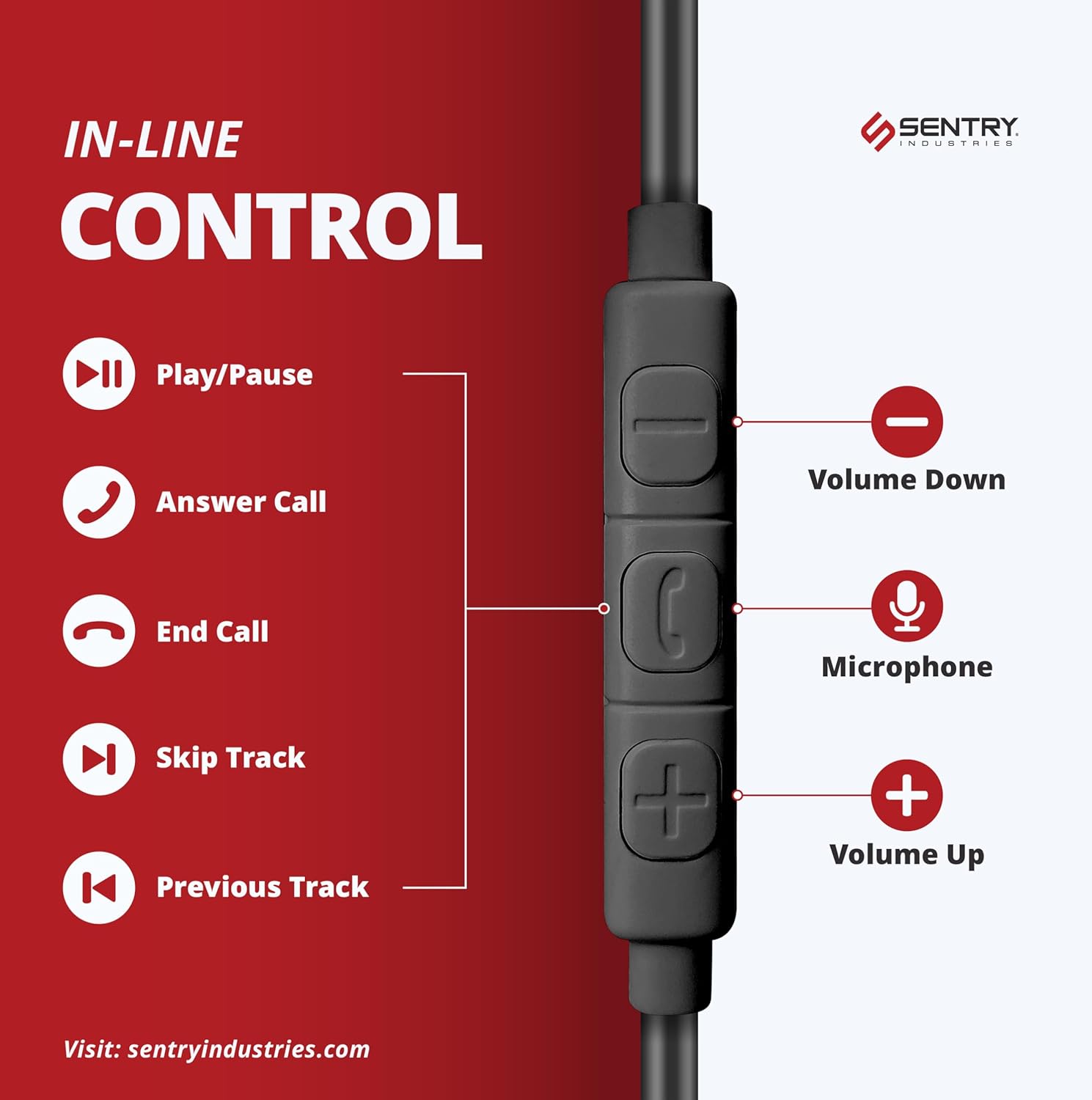
Figure 4: SENTRY OSH140 headphones neatly stored inside their deluxe hard case.
Disetél
- Ngabongkar: Carefully remove the headphones and the deluxe hard case from the packaging.
- Beberesih: Gently unfold the earcups from their collapsed position until the headband is fully extended.
- Nyambung: Insert the USB-C connector of the headphone cable directly into the USB-C port of your compatible device (e.g., cellphone, desktop, Mac, iPad, Switch, MP3 player). No additional drivers or software are typically required for basic audio functionality.
- Saluyukeun: Place the headphones over your ears, ensuring the soft earpads fully cover them. Adjust the headband for a comfortable and secure fit.
Parentah Operasi
The SENTRY OSH140 headphones feature an inline remote with a built-in microphone for convenient control of your audio and calls.

Figure 5: Diagram illustrating the functions of the inline control buttons.
Kontrol Audio:
- Puter / Reureuh: Pencét tombol tengah sakali.
- Lagu salajengna: Pencét tombol tengah dua kali gancang.
- Lagu Sateuacanna: Pencét tombol tengah tilu kali gancang.
- Volume Up: Pencét tombol '+'.
- Volume Turun: Pencét tombol '-'.
Kontrol Telepon:
- Ngajawab / mungkas Telepon: Press the center button once during an incoming call or to end an active call.
- Nolak Telepon: Pencet jeung tahan tombol tengah salila kurang leuwih 2 detik dina mangsa telepon asup.
- Mikropon: The built-in microphone is automatically active during calls.
Pangropéa
- beberesih: Anggo lawon anu lemes sareng garing pikeun ngabersihkeun headphone. Entong nganggo pembersih cair atanapi semprotan.
- Panyimpenan: When not in use, fold the headphones and store them in the provided deluxe hard case to protect them from dust, scratches, and damage.
- Perawatan kabel: Ulah nepi ka tikungan seukeut atawa narik kabel USB-C kaleuleuwihi pikeun nyegah karusakan internal.
- Tahan cai: These headphones are not water resistant. Avoid exposure to moisture or liquids.
Pamérésan masalah
| Masalah | Solusi |
|---|---|
| Taya sora tina headphone. |
|
| Mikropon teu jalan. |
|
| Kualitas sora henteu saé. |
|
spésifikasi
| Fitur | Rincian |
|---|---|
| Ngaran modél | OSH140 |
| Téhnologi konektipitas | USB-C kabel |
| Headphone Jack | USB-C |
| Tipe Supir Audio | Supir dinamis |
| Ukuran supir | 40 mm |
| Impedansi | 32 ohm |
| Réspon Frékuénsi | 20 KHz (Note: The provided data states 20 KHz, which is typically the upper limit of human hearing. A full range would be 20Hz-20kHz) |
| Sensitipitas | 110 dB |
| Kontrol bising | Sound Isolation (via Studio Grade Earpads) |
| Mikropon | Inline Mic |
| Tipe Kontrol | Media Control (Inline Remote) |
| Wangun Earpiece | Leuwih-Ceuli |
| Bahan | Plastic (Headphones), Nylon (Carrying Case) |
| Warna | Hideung |
| Dimensi produk | 3.75 x 0.75 x 6.75 inci |
| Item Beurat | 1.5 ons |
| Tingkat Résistansi Cai | Henteu Tahan Cai |
| Alat nu cocog | Cellphones, Desktop, Mac, iPad, Switch, MP3 |
Garansi sareng Rojongan
Sentry Industries provides an extensive 90-day warranty on all products, offering free replacements within this period. For any product inquiries, technical support, or warranty claims, please contact Sentry Industries customer service through their official websitus atanapi pangecér dimana produkna dibeuli.
For additional information, please visit the SENTRY Store on Amazon.
Produk Leuwihview Video
Video 1: Hiji produk resmi leuwihview of the Sentry OSH140 Over-Ear USB-C Headphones, provided by Amazon Videos (Seller).