1. Bubuka
Thank you for choosing the BOGASING M6 Portable Bluetooth Speaker. This manual provides essential information for setting up, operating, and maintaining your speaker. Please read it carefully before use and retain it for future reference.
The BOGASING M6 is designed to deliver powerful sound with deep bass, featuring IPX6 waterproofing, Bluetooth 5.3 connectivity, and multiple sound effects for an enhanced listening experience. Its portable design makes it ideal for various environments, from outdoor adventures to home use.
2. Eusi Paket
Mangga cék kotak pikeun item di handap ieu:
- 1 x BOGASING M6 Bluetooth Speaker
- 1 x USB Type-C Charging Cable (Adapter Not Included)
- 1 x 3.5mm Kabel Audio
- 1 x Lanyard
- 1 x Manual Pamaké (Dokumén Ieu)
3. Produk Langkungview jeung Kontrol
Familiarize yourself with the buttons and ports on your BOGASING M6 speaker:
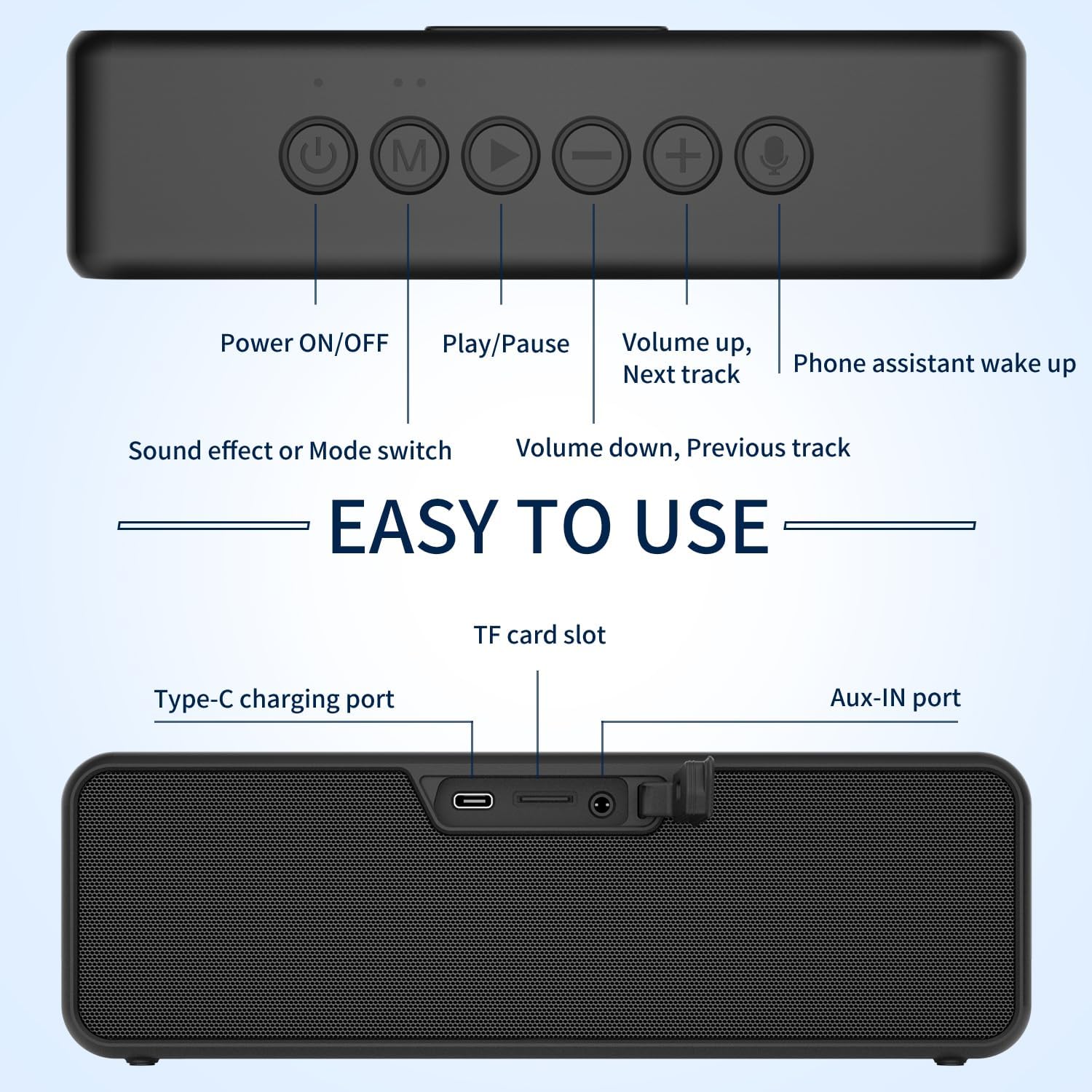
Gambar: Luhur sareng tukang view of the BOGASING M6 speaker, highlighting the function of each button and port.
Kontrol Panel Top:
- Tombol DIRI / OFF: Pencét terus tahan pikeun ngahurungkeun atawa mareuman speaker.
- Tombol 'M' (Modeu): Short press to switch between Bluetooth, TF Card, and AUX modes.
- Tombol Puter/Reureuh: Short press to play or pause music. In Bluetooth mode, press and hold to disconnect the current device.
- '-' (Volume Down / Previous Track) Button: Pencét pondok pikeun ngirangan volume. Pencét lila pikeun muka lagu saméméhna.
- '+' (Volume Up / Next Track) Button: Pencét pondok pikeun ningkatkeun volume. Pencét lila pikeun muka lagu salajengna.
- Tombol mikropon: Short press to activate your device's voice assistant (e.g., Siri, Google Assistant).
Port Panel Belakang:
- Port Ngecas Tipe-C: Pikeun ngecas batré internal speaker.
- Slot Kartu TF: Lebetkeun kartu TF (MicroSD) kanggo muterkeun musik langsung.
- Port AUX-IN: Sambungkeun alat audio éksternal nganggo kabel audio 3.5mm anu kalebet.
4. Setup jeung Operasi
4.1 Ngecas Speaker
- Sambungkeun kabel ngecas USB Tipe-C anu disayogikeun kana port Tipe-C speaker.
- Connect the other end of the cable to a USB power adapter (5V/2A recommended, not included) or a computer's USB port.
- Indikator LED bakal nunjukkeun status ngecas. Bakal pareum atanapi robih warna nalika dicas pinuh.
4.2 Nyapasangkeun Bluetooth
- Power on the BOGASING M6 speaker by pressing and holding the Power ON/OFF button. The speaker will enter Bluetooth pairing mode, indicated by a flashing blue LED.
- Dina alat sélulér anjeun (smartphone, tablet, jsb.), aktipkeun Bluetooth sareng milarian alat anu sayogi.
- Select "BOGASING M6" from the list of devices.
- Saatos nyambung, indikator LED bakal robah jadi biru polos, sareng anjeun bakal ngadangu sora konfirmasi.
4.3 Leres Wireless Stereo (TWS) papasangan
The TWS function allows you to pair two BOGASING M6 speakers for a stereo sound experience.

Image: Two BOGASING M6 speakers connected wirelessly to a smartphone, illustrating the True Wireless Stereo feature.
- Ensure both BOGASING M6 speakers are powered on and not connected to any Bluetooth device.
- On one speaker (this will be the primary speaker), press and hold the Play/Pause button for 2-3 seconds until you hear a prompt indicating TWS pairing mode.
- The two speakers will automatically search for and connect to each other. Once connected, you will hear a confirmation sound, and the LED indicators on both speakers will change.
- Ayeuna, sambungkeun alat sélulér Anjeun ka spiker primér liwat Bluetooth sakumaha dijelaskeun dina bagian 4.2.
4.4 Modeu Sora (EQ)
The BOGASING M6 offers three distinct sound effect modes:

Image: Visual representation of the three sound effect modes: Enhanced Bass, 3D Stereo, and Vocals.
- Bass ditingkatkeun: For music genres that benefit from deeper low frequencies.
- Stereo 3D: Creates a wider, more immersive soundstage.
- Vokal: Optimizes clarity for spoken word or vocal-heavy music.
To switch between these modes, short press the 'M' (Mode) button.
4.5 TF Card & AUX Input
- Kartu TF: Insert a TF (MicroSD) card with MP3/WAV/FLAC audio files kana slot kartu TF. Speaker bakal otomatis pindah ka modeu kartu TF tur mimitian playback.
- Input AUX: Connect an external audio device (e.g., MP3 player, computer) to the AUX-IN port using the 3.5mm audio cable. The speaker will automatically switch to AUX mode.
5. Fitur konci
5.1 Powerful Sound with Deep Bass

Gambar: Hiji ngabeledug view of the BOGASING M6 speaker, illustrating its dual high-performance drivers and passive radiators for powerful sound and deep bass.
The BOGASING M6 is equipped with high-performance drivers and passive radiators, combined with an advanced DSP chip, to deliver 30W of impressive sound and deep, punchy bass.
5.2 Rating Tahan Cai IPX6

Image: The BOGASING M6 speaker submerged in water, showcasinkamampuan tahan cai IPX6 na.
With an IPX6 waterproof rating, the M6 speaker is protected against powerful water jets, making it suitable for use in various outdoor conditions, including poolside, beach, or camping, without fear of heavy rain or splashes.
Video: Demonstration of the BOGASING M6 speaker's IPX6 waterproof feature in various outdoor settings, including being splashed by water and submerged in shallow water.
5.3 Advanced Bluetooth 5.3 Technology
The latest Bluetooth 5.3 technology ensures optimized transmission, faster connection speeds, and stable connectivity with a wide range of devices, including smartphones, MP3 players, TVs, and PCs.
6. Pangropéa
- beberesih: Ngusap spéker ku hipu, damp lawon. Ulah make bahan kimia kasar atawa cleaners abrasive.
- Panyimpenan: Simpen speaker di tempat anu tiis, garing, sareng jauh tina suhu anu ekstrim sareng sinar panonpoé langsung.
- Perawatan batré: Pikeun manjangkeun umur batré, eusian pinuh ku speaker sateuacan dianggo anu munggaran sareng sahenteuna sakali unggal tilu bulan upami henteu dianggo sacara rutin. Hindarkeun sering ngosongkeun batréna.
- Paparan cai: After exposure to water, ensure the charging port and other openings are dry before charging or connecting cables.
7. Cara ngungkulan
| Masalah | Mungkin Cukang lantaranana | Solusi |
|---|---|---|
| Speaker teu hurung. | batré lemah. | Ngecas spéker sahenteuna 30 menit. |
| Teu bisa masangkeun via Bluetooth. | Speaker teu aya dina mode papasangan atawa geus disambungkeun ka alat sejen. | Ensure the speaker is in pairing mode (flashing blue LED). Disconnect from other devices by long pressing the Play/Pause button. Restart both speaker and device. |
| Taya sora atawa volume low. | Volume too low on speaker or connected device. Incorrect input mode. | Increase volume on both speaker and device. Press 'M' button to cycle through input modes (Bluetooth, TF, AUX). |
| Papasangan TWS gagal. | Spikerna jauh teuing atanapi parantos nyambung ka alat sanés. | Ensure both speakers are within 10 meters of each other and not connected to any other Bluetooth devices. Repeat TWS pairing steps. |
8. Spésifikasi
| Fitur | Spésifikasi |
|---|---|
| Ngaran modél | M6 |
| Tipe Speaker | Subwoofer |
| Daya Kaluaran | 30W (Single Speaker), 60W (TWS) |
| Vérsi Bluetooth | 5.3 |
| Peunteun waterproof | IPX6 |
| Téhnologi konektipitas | Bluetooth, Aux-in, TF-Card |
| Mode Kaluaran Audio | Stereo |
| Sumber Daya | Batré Powered (1 batré Litium Ion kaasup) |
| Dimensi produk | 27D x 5.3W x 7.3H Sentimeter |
| Item Beurat | 0.9 gram |
9. Garansi jeung Rojongan
BOGASING products come with a standard manufacturer's warranty. For detailed warranty information, product support, or technical assistance, please refer to the warranty card included in your package or visit the official BOGASING website. You may also contact our customer service team through the retailer where you purchased the product.
Please keep your purchase receipt as proof of purchase for warranty claims.


