
Cuifati Cuifatig8c3hmvd9n
FS01 Digital Camera User Manual
Brand: Cuifati | Model: Cuifatig8c3hmvd9n
Bubuka
Hatur nuhun pikeun meuliasing the Cuifati FS01 Digital Camera. This camera is designed for photography enthusiasts, offering 4K video resolution and 64MP image resolution. It features dual LCD screens (2.8-inch rear and 2-inch front), 16x digital zoom, and anti-shake capabilities, making it suitable for various photography needs. This manual provides detailed instructions on how to set up, operate, and maintain your camera to ensure optimal performance and longevity.

Perhatosan penting: Please read the product instructions carefully before use to ensure correct and safe operation.
Eusi pakét
Mangga parios eusi pakét pikeun mastikeun yén sadaya barang aya:
- 1 x Cuifati FS01 Digital Camera
- 1 x Kabel USB
- 1 x BL-5B Lithium Ion Battery (1200mAh, built-in)
- 1 x Manual Pamaké
- 1 x Tali Portabel
Produk Leuwihview
Biasakeun diri sareng komponén sareng kadali kaméra.

Gambar: Hareup jeung pungkur view of the Cuifati FS01 Digital Camera, showcasing the dual screens and main controls.

Gambar: Hareupeun view of the camera, highlighting the lens, flash, and front display.

Gambar: Tukangeun view of the camera, showing the main LCD screen and control buttons (T/W for zoom, WiFi, Flash, Mode, Delete, Menu, Display).
Komponén konci:
- Lensa: Nangkep gambar sareng video.
- Front LCD Screen (2-inch): For convenient self-portraits and vlogging.
- Rear LCD Screen (2.8-inch): Main display for framing shots, reviewing media, and navigating menus.
- Tombol Daya: Ngahurungkeun / mareuman kaméra.
- Tombol jepret: Nyokot poto atawa ngamimitian/lirén ngarékam pidéo.
- Zoom Buttons (T/W): Adjusts the 16x digital zoom.
- Tombol Menu: Aksés setélan sareng pilihan kaméra.
- Tombol DISP: Toggles mintonkeun inpormasi dina layar.
- Tombol Mode (M): Switches between different shooting modes.
- Tombol Flash: Ngontrol setélan lampu kilat.
- Tombol Pupus: Deletes selected photos or videos.
- Tombol WiFi: Activates Wi-Fi for connectivity.
- Mikropon: Built-in for audio recording with videos.
- Port USB: Pikeun ngecas sareng mindahkeun data.
- Slot Kartu SD Mikro: For external memory storage.
- Kompartemen batré: Houses the BL-5B battery.
Disetél
1. Ngecas Batré
The camera comes with a built-in 1200mAh BL-5B Lithium Ion Battery. Before first use, ensure the battery is fully charged.
- Connect the camera to a power source (e.g., computer USB port or USB wall adapter) using the provided USB cable.
- Lampu indikator ngecas bakal hurung. Bakal pareum atanapi robih warna saatos ngecas parantos réngsé.
2. Inserting a Micro Memory Card
A micro memory card (not included) is required to store photos and videos. The camera supports up to 256GB Class 10 micro memory cards.
- Panggihan slot kartu micro SD dina kaméra.
- Insert the micro SD card with the gold contacts facing down until it clicks into place.
- Pikeun nyabut, dorong kartu ka jero dugi ka kaluar.
3. Powering on / Pareum
Pencét terus tahan tombol Daya (biasana aya di luhur kaméra) salami sababaraha detik pikeun ngahurungkeun atanapi mareuman kaméra.
Parentah Operasi
1. Ngarekam Poto sareng Video Dasar
- Nyandak Poto: Turn on the camera. Frame your shot using the LCD screen. Press the Shutter button fully down to take a photo.
- Ngarekam Pidéo: Switch to video mode using the Mode button (M). Press the Shutter button to start recording. Press it again to stop recording.
- Zum: Use the T (Telephoto) button to zoom in and the W (Wide) button to zoom out. The camera supports 16x digital zoom.
2. Using Dual Screens for Selfies and Vlogging
The camera features a 2.8-inch rear screen and a 2-inch front screen, ideal for self-portraits and vlogging.
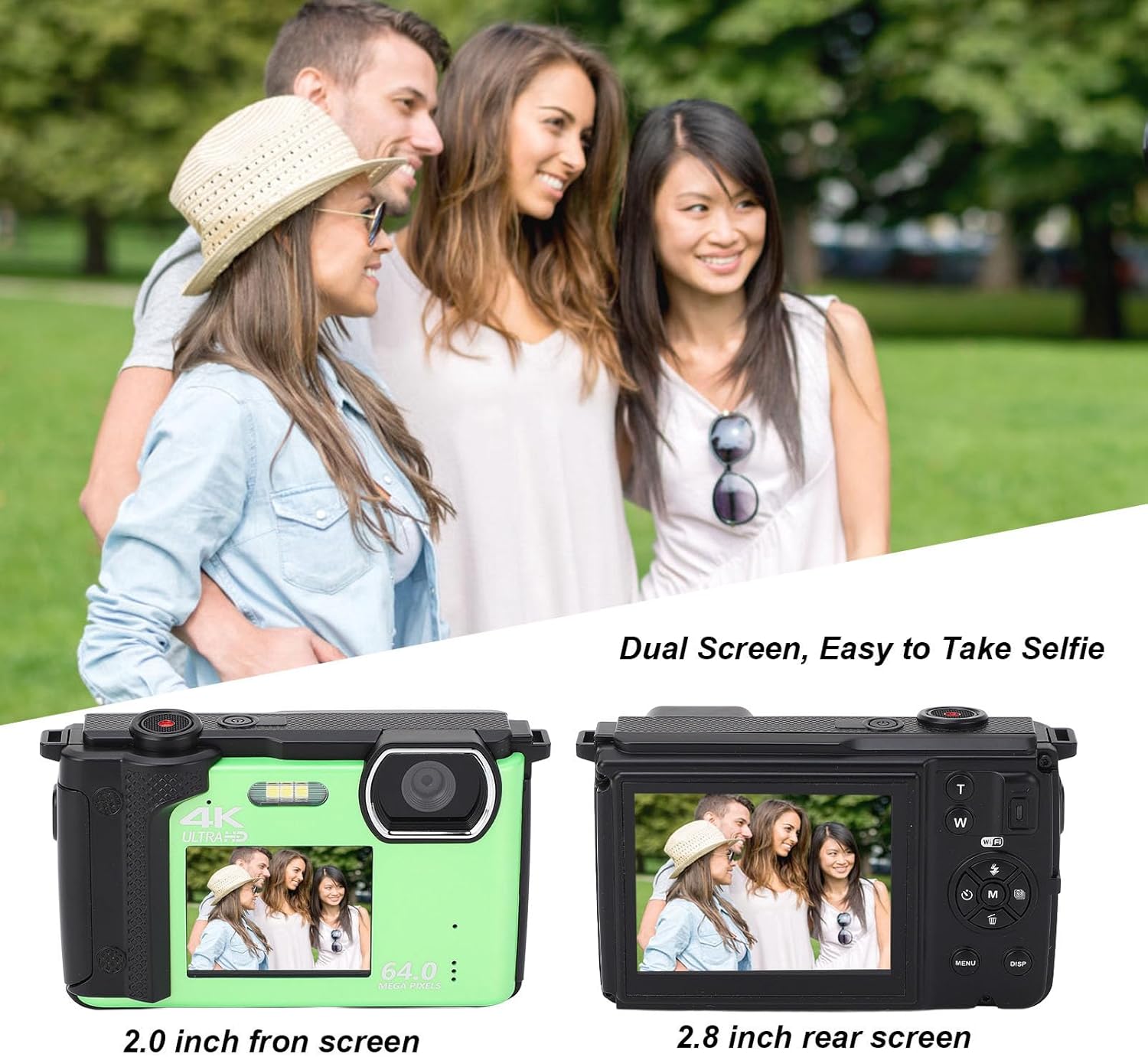
Gambar: Illustration of the dual screen functionality, showing how the front screen aids in taking selfies or group photos.
- To switch to the front screen, typically there is a dedicated button or a setting in the menu.
- Utilize the built-in 2s, 5s, and 10s selfie timer functions for timed shots.
- Continuous shooting mode allows you to capture a series of photos rapidly.
3. Konektipitas Wi-Fi sareng Pamakéan Aplikasi
The camera can connect to smart devices for remote control and sharing.

Gambar: Demonstrates the camera's Wi-Fi wireless sharing capability, allowing connection to a smartphone for photo and video transfer.
- Unduh Aplikasi: Milarian pikeun 'IDC' on Google Play (for Android) or the iOS App Store (for iOS) to download the companion application.
- Activate Camera Wi-Fi:
- Hurungkeun kaméra.
- Pencét éta MENU tombol pikeun ngasupkeun ménu.
- Use the left/right navigation keys to switch to Setélan Sistim.
- Use the up/down navigation keys to find the Hotspot submenu.
- Pencét éta M key to open Wi-Fi. The Wi-Fi ID and password will be displayed on the camera screen.
- Connect from Smartphone:
- Open your smartphone's settings and navigate to WLAN or Wifi.
- Select the network named 4K_xxxx (matching the camera's displayed ID).
- Enter the password displayed on the camera screen.
- Once connected, you can use your smartphone to control the camera for taking photos and recording videos.
4. Using as a Web Kaméra
The Cuifati FS01 can function as a web camera when connected to a computer.
- Sambungkeun kaméra ka komputer Anjeun nganggo kabel USB nu disadiakeun.
- Select the "PC Camera" or "Webcam" option on the camera's screen (if prompted).
- Komputer anjeun kedah mikawanoh kaméra salaku webcam, allowing you to use it for video calls or live streaming.
spésifikasi
| Fitur | Katerangan |
|---|---|
| Bahan Produk | palastik |
| Beurat | Kira-kira. 380g / 13.4 oz |
| Resolusi gambar | 64M, 56M, 48M, 30M, 24M, 20M, 12M, 8M, 5M |
| Resolusi Video | 4K 60fps/30fps, 2.7K 30fps, 1080P 60fps/30fps, 720P 120fps/60fps/30fps |
| Layar ganda | 2.8 Inch Rear Screen, 2 Inch Front Screen |
| Mikropon | Diwangun-Di |
| File Formatna | MP4, JPEG |
| Panyimpenan | Supports Up To 256G Class10 Micro Memory Cards (Not Included) |
| Camera Battery Capacity | 1200mAh Lithium Ion Battery x 1, BL-5B (Built-In) |
| Zum Digital | 16x |
| Laju shooting kontinyu | 30 fps |
| Kamampuh Ngarekam | 136 menit (sakitar) |
| Stabilisasi Gambar | No |
| Pokus otomatis | No |
Pamérésan masalah
Upami anjeun ngalaman masalah sareng kaméra anjeun, tingali léngkah-léngkah ngungkulan masalah umum ieu:
- Kaméra teu hurung:
- Pastikeun batréna dieusi pinuh.
- Pariksa naha batréna leres diselapkeun.
- Try connecting the camera to a power source via USB to see if it powers on.
- "Memory Card Error" or unable to save photos:
- Ensure a compatible micro SD card (Class 10, up to 256GB) is inserted correctly.
- Format the memory card through the camera's menu (this will erase all data on the card).
- Coba kartu mémori anu béda.
- Kualitas gambar/video goréng:
- Pastikeun lénsa beresih jeung bébas tina smudges.
- Check lighting conditions; use flash in low light if necessary.
- Verify that the selected image/video resolution settings are appropriate.
- Masalah sambungan Wi-Fi:
- Pastikeun Wi-Fi diaktipkeun dina kaméra sareng telepon pinter anjeun.
- Double-check the Wi-Fi ID and password.
- Balikan deui kaméra sareng smartphone anjeun.
- Ensure the 'IDC' app is installed and up to date on your smartphone.
- Camera freezes or becomes unresponsive:
- If possible, remove and reinsert the battery (if accessible, otherwise hold power button for 10 seconds).
- Perform a factory reset via the camera's menu (note: this will reset all settings).
Pangropéa
Perawatan sareng pangropéa anu leres bakal manjangkeun umur kaméra anjeun.
- Ngabersihan kaméra:
- Anggo lawon anu lemes sareng henteu lint pikeun ngabersihan awak kaméra.
- For the lens and screens, use a specialized lens cleaning cloth and solution. Avoid abrasive materials.
- Ulah nganggo deterjen atanapi pelarut anu kuat.
- Panyimpenan:
- Store the camera in a cool, dry place away from direct sunlight, dust, and moisture.
- Upami disimpen kanggo waktos anu lami, cabut batréna pikeun nyegah bocor.
- Perawatan batré:
- Ulah ngalaan batré ka suhu ekstrim.
- Ulah ngabongkar atawa tusukan batréna.
- Ngeusi batre rutin, sanajan teu dipake, pikeun ngajaga kaséhatan.
Garansi sareng Rojongan
For warranty information and technical support, please refer to the warranty card included with your product or visit the official Cuifati website. You can also visit the Cuifati store on Amazon for additional product information and support resources.
Cuifati Store Link: https://www.amazon.com/stores/Cuifati/page/092BE1D7-D029-428E-9855-7943182E7680
Ask a question about this manual
Ask about setup, troubleshooting, compatibility, parts, safety, or missing instructions. Manuals+ will review the question and use this page’s manual context to help answer it.