
Bubuka
The realme Buds Air 5 Pro are advanced truly wireless in-ear earbuds designed to deliver a high-quality audio experience. They feature 50dB Active Noise Cancellation (ANC), Realboost Dual Coaxial Drivers for rich sound, 360° Spatial Audio Effect, and support for LDAC HD Audio. This manual provides essential information for setting up, operating, maintaining, and troubleshooting your earbuds.
Eusi pakét:
- Earbud realme Buds Air 5 Pro (Kenca sareng Katuhu)
- Ngecas Case
- Kabel Ngecas USB
- Eartips (rupa-rupa ukuran)
- Manual pamaké

Image: realme Buds Air 5 Pro earbuds and charging case in Astral Black.
Disetél
1. Ngecas Awal
Before first use, fully charge the earbuds and charging case. Connect the provided USB charging cable to the charging port on the case and a power source. The indicator light on the case will show charging status.
2. Nyapasangkeun sareng Alat
- Pastikeun yén earbuds aya dina wadah ngecas sareng tutup wadahna dibuka.
- Press and hold the function button on the charging case for 3 seconds until the indicator light flashes white, indicating pairing mode.
- Dina alat anjeun (smartphone, tablet, laptop), aktipkeun Bluetooth sareng milarian alat anu sayogi.
- Select "realme Buds Air 5 Pro" from the list to connect.
- Once connected, the indicator light will turn solid white or off.
3. Ngagem Earbuds
Select the eartips that provide the best seal and comfort for your ears. Insert the earbuds gently into your ear canal and rotate them slightly to ensure a secure and comfortable fit. A proper fit is crucial for optimal sound quality and noise cancellation.
4. Aplikasi realme Link
Download the realme Link app from your device's app store. This app allows you to customize settings, update firmware, check battery status, and access advanced features like EQ presets, volume enhancements, and sound modes.

Image: realme Link app interface for customizing earbud settings.
Parentah Operasi
Toél Kontrol
The earbuds feature touch-sensitive areas for control. Default controls are:
- Ketok dua kali: Puter/Reureuh musik, Jawab/Tungtung telepon.
- Ketok tilu kali: Lagu salajengna.
- Touch and hold (one earbud): Switch between Noise Cancellation and Transparency modes.
- Touch and hold (both earbuds): Enter/Exit Gaming Mode (Low Latency).
Note: These controls can be customized via the realme Link app.
Aktif Noise pembatalan (ANC)
The realme Buds Air 5 Pro offer up to 50dB of active noise cancellation to reduce ambient sounds. Toggle ANC on/off or switch to Transparency mode using the touch controls or the realme Link app.

Image: Visual representation of 50dB Active Noise Cancellation.
Modeu Transparansi
Transparency mode allows you to hear your surroundings without removing the earbuds, enhancing awareness in various environments.
360° Spatial Audio Effect
Experience an immersive audio environment with the 360° Spatial Audio Effect. This feature can be enabled through the realme Link app for a theatre-like listening experience.

Image: A user enjoying the 360° Spatial Audio Effect.
Sambungan Alat Ganda
The earbuds support simultaneous connection to two devices. This allows for seamless switching between audio sources, such as a laptop and a smartphone, without manual re-pairing.

Image: Illustration of dual-device connection capability.
Mode Latency Low
For gaming, activate the 40ms Super Low Latency mode to minimize audio delay, providing a more synchronized gaming experience.

Image: Earbuds providing 40ms Super Low Latency for gaming.
Pangropéa
beberesih
Regularly clean the earbuds and charging case with a soft, dry, lint-free cloth. Remove eartips and clean any earwax or debris from the earbud nozzles using a small brush or cotton swab. Ensure the charging contacts on both the earbuds and case are clean and dry.
Panyimpenan
Nalika teu dianggo, simpen earbud dina wadah ngecasna pikeun ngajaga tina lebu sareng karusakan. Simpen wadahna di tempat anu tiis, garing, sareng jauh tina sinar panonpoé langsung sareng suhu anu ekstrim.
Tahan cai
The realme Buds Air 5 Pro are IPX5 water resistant, meaning they are protected against low-pressure water jets from any direction. This makes them suitable for workouts and light rain. Do not submerge the earbuds in water or expose them to heavy rain or strong water jets. The charging case is not water resistant.

Image: Earbuds demonstrating IPX5 water resistance.
Pamérésan masalah
Teu Aya Sora atanapi Pegatkeun Sambungan
- Pastikeun earbuds dieusi.
- Pariksa sambungan Bluetooth dina alat anjeun. Cobi mareuman teras hurungkeun deui Bluetooth.
- Pindah ngadeukeutan ka alat anjeun pikeun nyegah gangguan.
- Coba pasangkeun deui earbuds.
Earbuds Teu Ngecas
- Pastikeun kabel ngecas disambungkeun aman ka duanana wadah jeung sumber kakuatan.
- Pariksa kontak nu ngecas dina earbuds jeung jero wadahna beresih jeung bébas tina lebu.
- Coba kabel ngecas atawa adaptor kakuatan béda.
Poor Sound Quality or ANC Performance
- Ensure the earbuds are properly seated in your ears with a good seal. Try different eartip sizes.
- Clean the earbud nozzles and eartips.
- Check for firmware updates via the realme Link app.
Reset pabrik
If issues persist, perform a factory reset:
- Tempatkeun duanana earbuds kana kotak ngeusian.
- Press and hold the function button on the charging case for 10 seconds until the indicator light flashes red and then white.
- The earbuds will reset and enter pairing mode. You will need to re-pair them with your device.
spésifikasi
| Fitur | Rincian |
|---|---|
| merek | realme |
| Nomer modél | RMA2120 |
| Warna | Hideung |
| Panempatan Ceuli | Dina Ceuli |
| Faktor Bentuk | Dina Ceuli |
| Impedansi | 32 ohm |
| Kontrol bising | Pembatalan Sora Aktif (50dB) |
| Tipe Supir Audio | Realboost Dual Coaxial Drivers (11mm Bass Driver, 6mm Tweeter) |
| Rentang Frékuénsi | 20-40KHz |
| Kahirupan Batré (Earbuds + Case) | Nepi ka 40 Jam |
| Métode kontrol | Toél |
| Vérsi Bluetooth | 5.3 |
| Rentang Bluetooth | 10 Méter |
| Tingkat Résistansi Cai | IPX5 (Earbuds wungkul) |
| Latency Lemah | 40ms Super Low Latency |
| Beurat | 48 Gram (Total) |

Image: Realboost Dual Coaxial Drivers diagram.
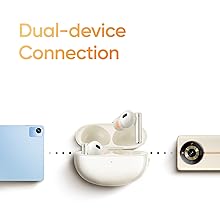
Image: 6-Mic Call Noise Cancellation diagram.

Image: Battery life information for the earbuds and charging case.
Émbaran jaminan
The realme Buds Air 5 Pro comes with a 1-taun jaminan produsén ti tanggal beuli. Garansi ieu nyertakeun cacad manufaktur dina panggunaan normal. Punten tahan bukti pameseran anjeun pikeun klaim garansi.
The warranty does not cover damage caused by misuse, accidents, unauthorized repairs, or normal wear and tear. For detailed warranty terms and conditions, please refer to the official realme websitus atanapi ngahubungan rojongan customer.
Rojongan Palanggan
For further assistance, technical support, or warranty claims, please contact realme customer service through their official website or the realme Link app. Ensure you have your product model number (RMA2120) and proof of purchase ready.
Sumberdaya Online:
- Visit the official realme website for FAQs and support articles.
- Utilize the realme Link app for firmware updates and personalized settings.