1. Parentah Kasalametan
Mangga baca sadaya pitunjuk kaamanan kalayan saksama sateuacan ngoperasikeun alat ieu. Upami henteu nuturkeun pitunjuk ieu tiasa nyababkeun sengatan listrik, kahuruan, atanapi cilaka.
- Pastikeun catu daya cocog sareng voltage dieusian dina labél rating.
- Ulah ngajalankeun unit ku kabel kakuatan ruksak atawa colokan.
- Keep the unit at least 50 cm away from walls or other objects to ensure proper ventilation.
- Ulah selapkeun objék kana inlet hawa atawa outlet.
- Ulah dianggo dina lingkungan baseuh sapertos kamar mandi atanapi rohangan cuci baju.
- Cabut colokan unit sateuacan ngabersihkeun atanapi ngalakukeun perawatan naon waé.
- Alat ieu henteu dimaksudkeun pikeun dianggo ku jalma (kalebet murangkalih) anu ngirangan kamampuan fisik, indrawi atanapi mental, atanapi kirang pangalaman sareng pangaweruh, kecuali aranjeunna dipasihan pangawasan atanapi petunjuk ngeunaan panggunaan alat ku jalma anu tanggung jawab kana kasalametanana.
2. Eusi Paket
Verify that all items listed below are present in the packaging.
- Unit Air Conditioner portabel
- Kadali jauh
- Selang knalpot
- Window Sealing Kit (Adjustable window slider, exhaust hose adapter, window exhaust adapter)
- Selang solokan
- Manual pamaké

Image: Included accessories for the Mistral MPAC1600R, showing the exhaust hose, window panel kit, and hose adapters.
3. Produk Langkungview
Hareupeun View

Gambar: Hareupeun view of the Mistral MPAC1600R portable air conditioner, featuring its sleek black design and top control panel.
Samping View

Gambar: Sisi view of the Mistral MPAC1600R portable air conditioner, highlighting its compact profile and side vents.
Tukangeun View
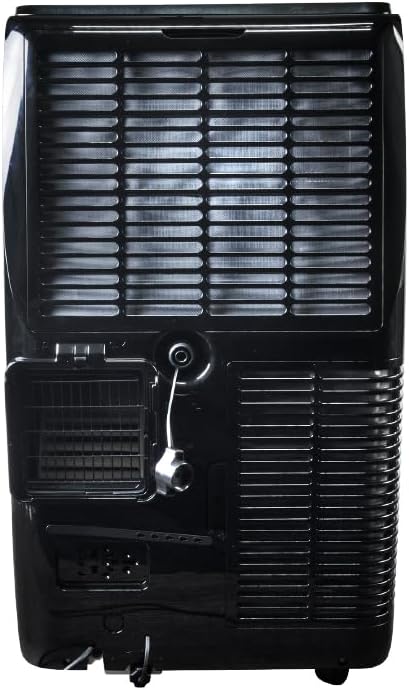
Gambar: Tukangeun view of the Mistral MPAC1600R portable air conditioner, detailing the exhaust port, drainage outlet, and power connection.
Diménsi

Image: Diagram illustrating the dimensions of the Mistral MPAC1600R: 45 cm (width), 39.6 cm (depth), and 74.5 cm (height).
4. Setup jeung Instalasi
4.1 Ngabongkar bungkusan
Cabut AC sareng sadaya asesoris tina bungkusna kalayan ati-ati. Simpen bungkusna kanggo disimpen atanapi diangkut engké.
4.2 Pamasangan selang knalpot
- Screw adaptor selang knalpot kana hiji tungtung selang knalpot.
- Attach the window exhaust adapter to the other end of the exhaust hose.
- Insert the exhaust hose adapter into the exhaust outlet on the rear of the air conditioner unit.
4.3 Instalasi Kit Jandéla
- Adjust the window slider kit to fit your window opening.
- Pasangkeun pakakas panggeser jandela dina pigura jandela.
- Insert the window exhaust adapter (attached to the exhaust hose) into the opening of the window slider kit.
- Ensure the window is sealed around the kit to prevent air leakage.
4.4 Pertimbangan panempatan
- Tempatkeun unit dina permukaan anu rata sareng stabil.
- Ensure there is at least 50 cm of clear space around the unit for proper airflow.
- Posisikeun unit caket jandela supados gampang dipasang selang knalpot.
- Hindarkeun nempatkeun unit dina sinar panonpoé langsung atanapi caket sumber panas.
5. Parentah Operasi
5.1 Control Panel jeung Remote Control
The unit can be operated via the control panel on top of the unit or the included remote control. The remote control offers full functionality.
- Tombol Daya: Hurungkeun unit ON atawa OFF.
- Tombol Mode: Ngaliwatan modeu Tiis, Garing, sareng Kipas.
- Tombol Laju Kipas: Saluyukeun laju kipas (High, Medium, Low).
- Tombol Kaluhur/Turun Suhu: Adjusts the desired temperature (18 to 32 °C).
- Tombol Timer: Nyetél pangatur waktu ON/OFF 24 jam.
- Tombol Mode Saré: Activates or deactivates Sleep Mode.
- Smart Mode Button: Activates or deactivates Smart Mode.
- Tombol Mode Turbo: Activates or deactivates Turbo Mode.
- Tombol Konci Budak: Ngonci panel kontrol pikeun nyegah parobahan teu kahaja.
5.2 Modeu Operasi
- Mode tiis: Nyadiakeun cooling. Setel suhu sareng laju kipas anu dipikahoyong.
- Mode garing: Dehumidifies the room. Fan speed is fixed to low.
- Modeu kipas: Ngiderkeun hawa tanpa niiskeun. Pilih kecepatan kipas anu dipikahoyong.
- Smart Mode: Automatically selects the optimal operating mode (Cool, Dry, or Fan) based on the room temperature.
- Modeu Turbo: Operates at maximum cooling power and fan speed for rapid cooling.
- Modeu Bobo: Gradually increases the set temperature by 1°C per hour for the first two hours, then maintains it, providing quieter operation for comfortable sleep.
5.3 Wi-Fi Connectivity and Smart Home Integration
The MPAC1600R features Wi-Fi connectivity, allowing control via a smartphone app and integration with smart home systems like Alexa and Google Home. Refer to the separate Wi-Fi setup guide for detailed instructions on connecting your device.
5.4 Fungsi Konci Anak
To activate the Child Lock, press and hold the Child Lock button on the control panel or remote control for 3 seconds. This will disable all other buttons. To deactivate, repeat the process.
6. Pangropéa
Pangropéa rutin ngajamin kinerja optimal sareng manjangkeun umur AC anjeun.
6.1 Ngabersihan Saringan Udara
Saringan hawa kedah dibersihkeun unggal dua minggu atanapi langkung sering gumantung kana panggunaan sareng kualitas hawa.
- Pareuman jeung cabut colokan unit.
- Locate the air filter panel (usually on the rear or side).
- Cabut saringan.
- Bersihkeun saringan nganggo vacuum cleaner atanapi kumbah nganggo cai sabun haneut.
- Rinse thoroughly and allow it to air dry completely before reinstalling.
6.2 Draining Cai
The unit collects condensation during operation. When the internal water tank is full, the unit will stop and display an error code. Drain the water as follows:
- Pareuman jeung cabut colokan unit.
- Place a shallow pan or container under the drain port at the bottom rear of the unit.
- Cabut colokan solokan.
- Ngidinan sakabéh cai pikeun solokan kaluar.
- Ngaganti colokan solokan aman.
6.3 Panyimpenan
Upami nyimpen unit kanggo waktos anu panjang:
- Drain all water completely.
- Ngabersihan saringan hawa.
- Jalankeun unit dina modeu Kipas salami sababaraha jam pikeun ngagaringkeun komponén internal.
- Cabut colokan kabel listrik jeung coil eta rapih.
- Simpen unit dina tempat anu garing sareng tiis, langkung saé dina bungkusan aslina.
7. Guide ngungkulan
Sateuacan ngahubungi layanan palanggan, tingali tabel di handap ieu pikeun masalah umum sareng solusina.
| Masalah | Mungkin Cukang lantaranana | Solusi |
|---|---|---|
| Unit teu hurung | Taya catu daya Kabel listrik teu dicolokkeun Internal water tank full | Pariksa stop kontak listrik Pastikeun kabel listrik dicolokkeun sacara aman Solokan bak cai |
| Taya cooling atawa cooling cukup | Saringan hawa mampet Selang knalpot teu dipasang kalawan bener Window not sealed Kamar ageung teuing Setélan suhu luhur teuing | Ngabersihan saringan hawa Check exhaust hose connection and ensure it's not bent Seal window gaps Ensure unit is appropriate for room size Turunkeun suhu anu disetel |
| Unit ribut | Unit henteu dina permukaan datar Saringan hawa mampet Halangan dina kipas | Pasang unit dina permukaan anu rata Ngabersihan saringan hawa Pariksa jeung cabut sagala halangan |
| Leak cai | colokan solokan leupas Unit didengdekkeun Selang solokan diblokir | Pastikeun sumbat solokan aman Pasang unit dina permukaan anu rata Check and clear any blockages in the drain hose |
8. Spésifikasi Téknis
| Fitur | Spésifikasi |
|---|---|
| Modél | MPAC1600R |
| Kamampuh cooling | 16,000 BTU |
| Voltage | 220 volt |
| Wattage | 1560 watt |
| Tingkat Noise | 51 desibel |
| Cooling Range Suhu | 18 nepi ka 32 °C |
| Modeu | Cool, Dry, Fan, Smart, Turbo, Sleep |
| Laju kipas | Luhur, Sedeng, Murah |
| Timer | 24 Jam |
| Fitur husus | UV Sterilisation, Wi-Fi (Alexa & Google Home compatible), Child Lock |
| Ukuran produk (L x W x H) | 45 x 39.6 x 74.5 cm |
| Beurat | 33.3 kg |
| Faktor Bentuk | Portabel |
9. Garansi sarta Rojongan Palanggan
This Mistral Portable Air Conditioner is covered by a manufacturer's warranty. Please refer to the warranty card included in your package for specific terms and conditions, including the warranty period and coverage details.
For technical assistance, troubleshooting beyond this guide, or warranty claims, please contact Mistral customer support. Contact information can typically be found on the manufacturer's official websitus atanapi dina resi pameseran Anjeun.
When contacting support, please have your model number (MPAC1600R) and proof of purchase readily available.