
1. Bubuka
Thank you for choosing the Docreate LCD 99 Gear Adjustable Handheld Spot Welder. This portable device is designed for efficient and precise spot welding of nickel-plated sheets, ideal for 18650 lithium battery assembly, cell phone repair, and electric car repair. Featuring an intuitive LCD display and both automatic and manual operating modes, it offers versatility and ease of use for both professional and amateur users.
2. Parentah Kasalametan
Please read and understand all safety instructions before operating the spot welder to prevent injury or damage to the device.
- Always wear appropriate personal protective equipment, including safety glasses, to protect your eyes from sparks.
- Pastikeun ventilasi anu cekap di rohangan damel anjeun pikeun nyebarkeun haseup naon waé.
- Do not operate the device in wet conditions or near flammable materials.
- Jauhkeun alat tina jangkauan barudak sareng piaraan.
- Handle batteries with care. Do not short-circuit batteries or attempt to weld damaged batteries.
- Disconnect the device from power when not in use or during maintenance.
3. Eusi Paket
Pastikeun yén sadaya item aya dina pakét anjeun:
- 1 x Docreate Handheld Spot Welder
- 1 x 2-meter Nickel Roll
- 1 x Amplas
- 1 x Kabel Ngecas Tipe-C
- 1 x Pen Cap
- 2 x Copper Pins (Welding Needles)

4. Produk Langkungview
The Docreate Spot Welder is a compact and powerful tool designed for precision welding tasks.
4.1. Fitur konci
- Desain portabel: Lightweight and compact, ideal for both indoor and outdoor use.
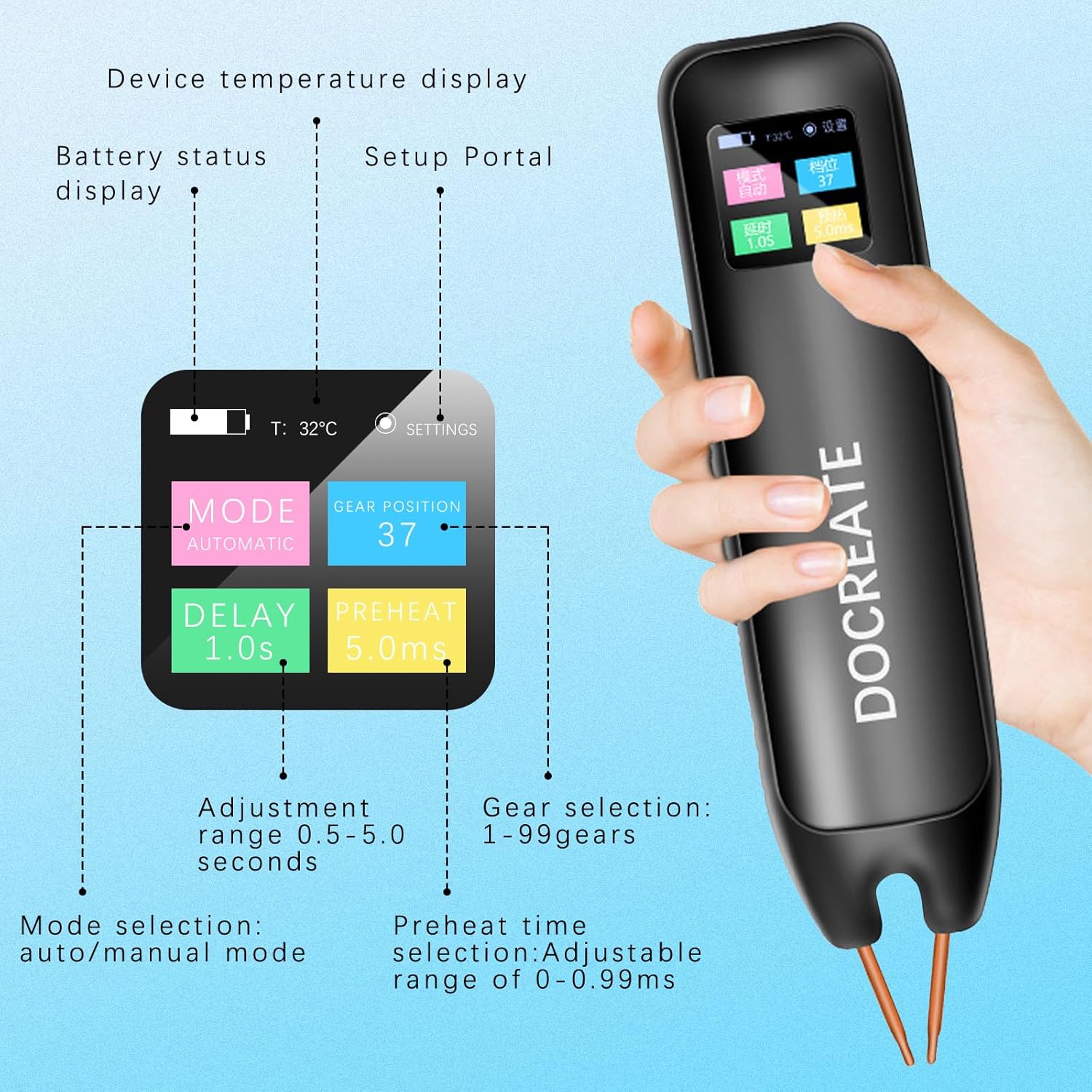
- Layar LCD: Provides real-time information including temperature, mode, preheat time, trigger time, power level, and battery status.
- 99 Adjustable Gears: Allows for precise control over welding parameters to suit various materials and thicknesses.
- Dual Pulse Technology: Ensures strong and reliable welds.
- Auto/Manual Modes: Offers flexibility in operation.

5. Setélan
5.1. Ngecas Alat
Before first use, fully charge the spot welder using the provided Type-C charging cable. Connect the cable to the device's Type-C port and a compatible USB power adapter (not included).

5.2. Daya Hurung / Pareum
Press and hold the power button on the side of the device to turn it on or off. The LCD screen will illuminate upon power-on.
6. Parentah Operasi
The spot welder offers both automatic and manual modes for different welding preferences.
6.1. Pilihan Modeu
The device allows switching between Automatic and Manual modes. Use the controls on the device to navigate the LCD menu and select your desired mode.
6.2. Modeu otomatis
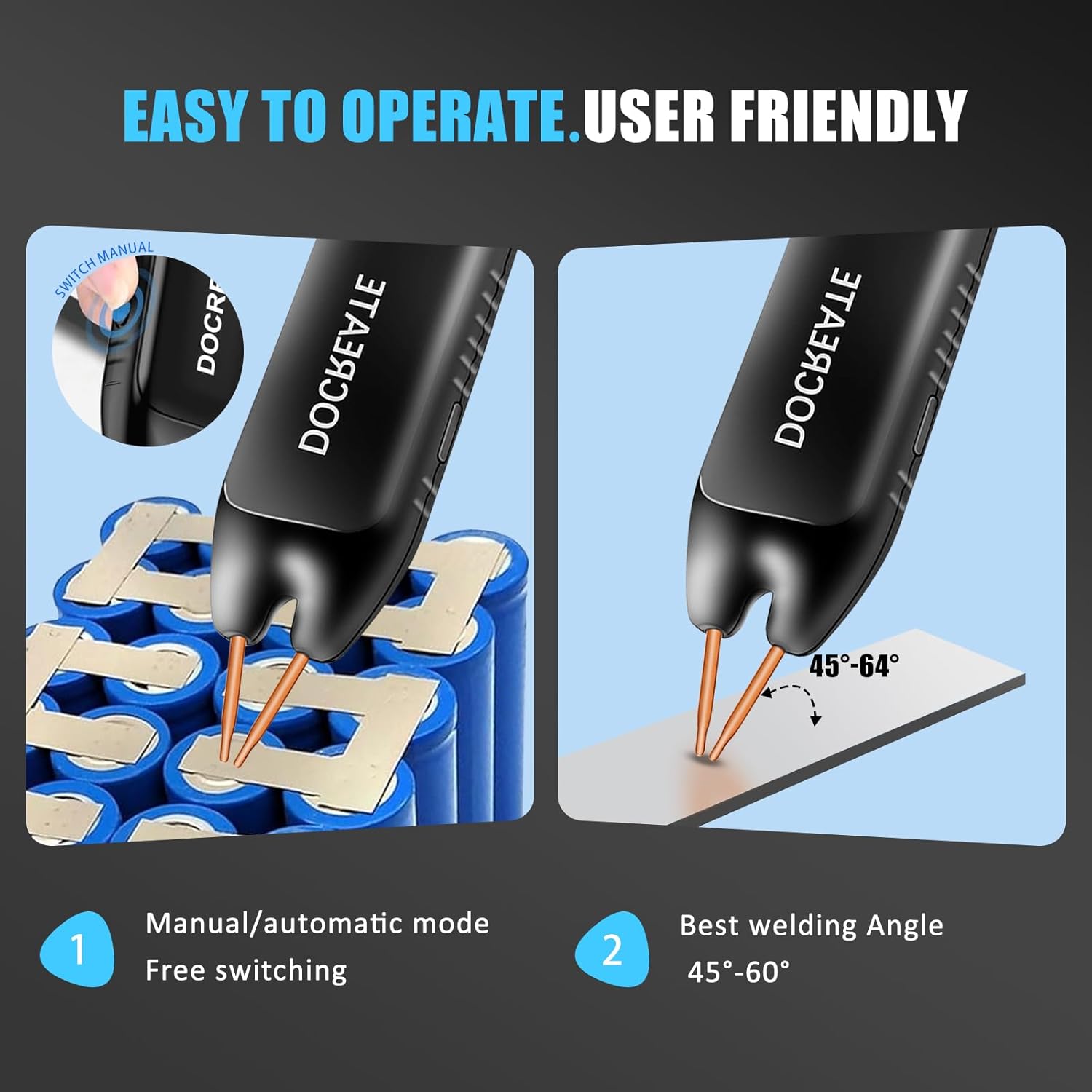
In Automatic Mode, simply place both welding pins firmly on the desired welding position. The device will automatically detect contact and initiate the weld after a set delay time. Ensure the welding pins are inclined at an angle of 45°-60° to the welding surface for optimal results.
6.3. Modeu Manual
In Manual Mode, you have direct control over the welding trigger. Adjust parameters via the LCD display. Place both welding pins firmly on the desired welding position, ensuring a 45°-60° inclination. Then, press the welding button on the side of the device to initiate the weld.
6.4. Adjusting Welding Gears (Power Level)
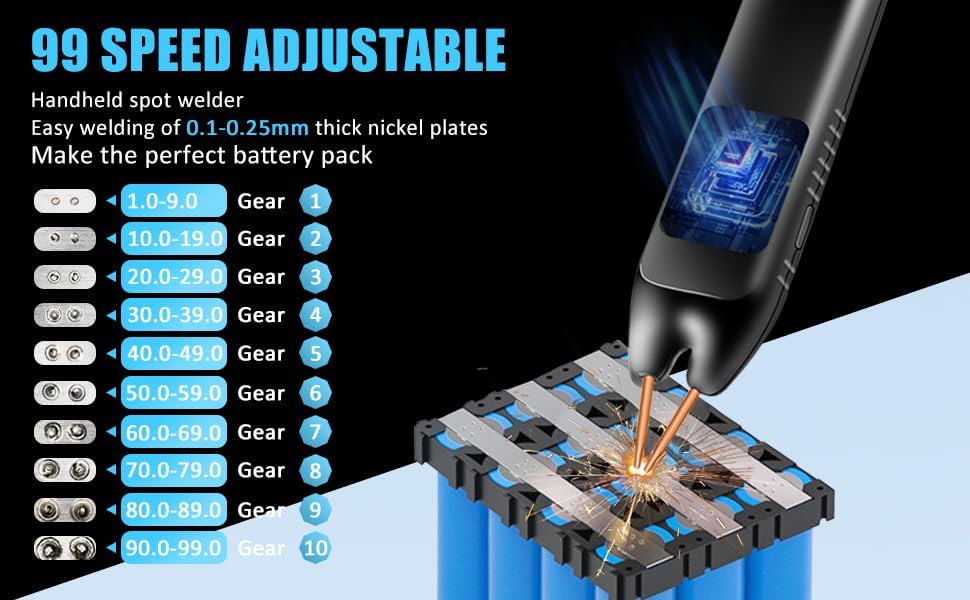
The spot welder features 99 adjustable gears to control the welding power. Higher gear numbers correspond to higher power. Adjust the gear setting via the LCD display to match the thickness of the nickel-plated sheets you are welding (0.1mm to 0.25mm).
7. Pangropéa
Pangropéa anu leres mastikeun umur panjang sareng kinerja anu optimal tina mesin las titik anjeun.
- beberesih: Lap alat sacara rutin nganggo lawon anu garing sareng lemes. Entong nganggo pembersih atanapi pangleyur anu abrasif.
- Perawatan éléktroda: The copper pins (electrodes) are replaceable. If they become worn or oxidized, gently sand them with the provided sandpaper or replace them to ensure good electrical contact.
- Panyimpenan: Store the spot welder in a cool, dry place away from direct sunlight and moisture.
- Batré: For long-term storage, ensure the battery is partially charged (around 50%) to preserve its lifespan.
8. Cara ngungkulan
If you encounter issues with your spot welder, refer to the following common problems and solutions:
- Alat teu hurung: Pastikeun batréna tos dicas. Sambungkeun kabel ngecas Tipe-C teras antepkeun ngecas sababaraha lami sateuacan dicobian dihurungkeun deui.
- Weak or inconsistent welds:
- Check the battery level; a low battery can affect welding power.
- Increase the gear (power) setting.
- Ensure the welding pins are clean and have good contact with the nickel sheet and battery terminal. Sand the tips if necessary.
- Verify the welding angle (45°-60°) and apply firm, even pressure.
- Overheating: The device has an intelligent internal temperature detection system. If it overheats, it may temporarily shut down. Allow it to cool down before resuming operation.
- Masalah tampilan LCD: If the display is not functioning correctly, try restarting the device. If the problem persists, contact customer support.
9. Spésifikasi
| Fitur | Spésifikasi |
|---|---|
| merek | Docreate |
| Nomer modél | Docreate-757 |
| Item Beurat | 9.9 ons |
| Dimensi produk | 7.72 x 1.62 x 1.62 inci |
| Warna | Spot Welder, 99 Gears |
| Sumber Daya | Batré Powered |
| Wattage | 4.2 Milliwatts |
| Ketebalan las | 0.1-0.25mm (nickel-plated sheets) |
| Gears adjustable | 99 |
10. Garansi jeung Rojongan
Docreate products are manufactured to the highest quality standards. For warranty information, technical support, or any inquiries regarding your spot welder, please contact Docreate customer service through the retailer's platform or the official Docreate website. Please have your model number (Docreate-757) and purchase details ready when contacting support.