1. Bubuka
The Waveshare UGV02 is a versatile 6-wheel drive (6x4WD) mobile robot chassis designed for off-road applications. It features robust construction, excellent shock absorption, and an open-source architecture for extensive secondary development. This manual provides essential information for setting up, operating, and maintaining your UGV02 chassis.

Image: The Waveshare UGV02 6x4 Off-Road Mobile Robot Chassis, showcasing its robust design and wheels.
2. Eusi Paket
Pariksa heula sadaya barang anu didaptarkeun di handap ieu aya dina pakét anjeun. Upami aya komponén anu leungit atanapi ruksak, mangga ngahubungi dukungan palanggan.

Gambar: Leuwihview of the UGV02 package contents, including the assembled UGV02 kit, accessories pack, power supply, USB cable, Picatinny rail, mounting plate, and camera holder.
- UGV02 Kit (assembled chassis)
- Pakét asesoris
- 12.6V 2A catu daya
- kabel USB
- Rel Picatinny
- Plat pamasangan
- Panyekel kaméra
- Extension rails and ESP32 slave computer (as part of the kit)
3. Fitur konci
- 6 Wheels x 4WD Design: Provides strong power and increased ground contact for stability and load capacity.
- Kamampuhan Off-Road: Flexible rubber tires and shock absorption system for complex terrains.
- High-Strength Aluminum Body: Constructed from 2mm thick 5052 Aluminum Alloy for durability and protection.
- Multiple Host Computer Support: Compatible with Raspberry Pi, Jetson Nano, Jetson Orin Nano, etc., communicating via serial port with the ESP32 slave computer.
- ESP32 Slave Computer: Built-in multi-functional robot driver board with Wi-Fi and Bluetooth, supporting serial bus servos, PWM signal output, and TF card expansion.
- 3S UPS Power Supply Module: Supports 3 x 18650 Li batteries (not included) for uninterruptible power, charging, and simultaneous power output.
- Extension Rails: Includes 2 x 10²⁰ European standard profile rails for installing additional peripherals.
- Open-Source Demos & Web Aplikasi: Facilitates secondary development and remote control.
- Multi-functional Mounting Plate: Allows installation of various peripherals like LIDAR, cameras, and other modules.

Image: Visual representation of the UGV02's key features, including full metal body, extension rails, 6 wheels x 4WD, ESP32 slave computer, 0.91" OLED, UART/I2C communication, open source, web app, 9-axis IMU, shock-absorbing tires, multi-host support, and multi-functional driver board.
4. Setup Guide
4.1 Pamasangan catu daya
The UGV02 requires three 18650 Li-ion batteries (not included) for operation. These batteries are installed in the 3S UPS power supply module.
- Ensure the UGV02 is powered off.
- Panggihan kompartemen batré dina chassis.
- Insert three 18650 Li-ion batteries into the 3S UPS power supply module, ensuring correct polarity.
- Amankeun panutup kompartemen batré.
- Connect the power supply module to the UGV02's charging port.

Image: Illustration of the 3S Lithium battery UPS power supply module, showing where three 18650 batteries (not included) are inserted. This module provides uninterruptible power and supports charging.
4.2 Host Computer Connection (Optional)
The UGV02 supports various host computers like Raspberry Pi, Jetson Nano, or Jetson Orin Nano. The host computer communicates with the onboard ESP32 slave computer via a serial port.
- Choose your desired host computer.
- Mount the host computer onto the UGV02 chassis using the provided mounting plate or extension rails.
- Connect the host computer to the ESP32 slave computer via the serial communication interface. Refer to the host computer's documentation for specific serial port configuration.
- If using Wi-Fi, connect the Wi-Fi antenna to the reserved interface on the UGV02.

Image: Depicts the UGV02 chassis with a multi-functional mounting plate, showing how various host computers like Jetson Orin Nano, Raspberry Pi 4B, and Raspberry Pi Zero can be connected. It also illustrates the mounting plate's design for peripherals like LIDAR and cameras.
4.3 Peripheral Installation (Optional)
The UGV02 comes with extension rails and a multi-functional mounting plate for adding peripherals.
- Extension Rails: Use the 1020 European standard profile rails to install additional modules. Boat nuts and M4 screws are included for secure attachment.
- Lempeng Pamasangan: The multi-functional mounting plate allows for the installation of LIDAR (e.g., LD19, STL 27L), cameras, or other custom modules. Open-source DXF drawings and 3D models are available for secondary development.
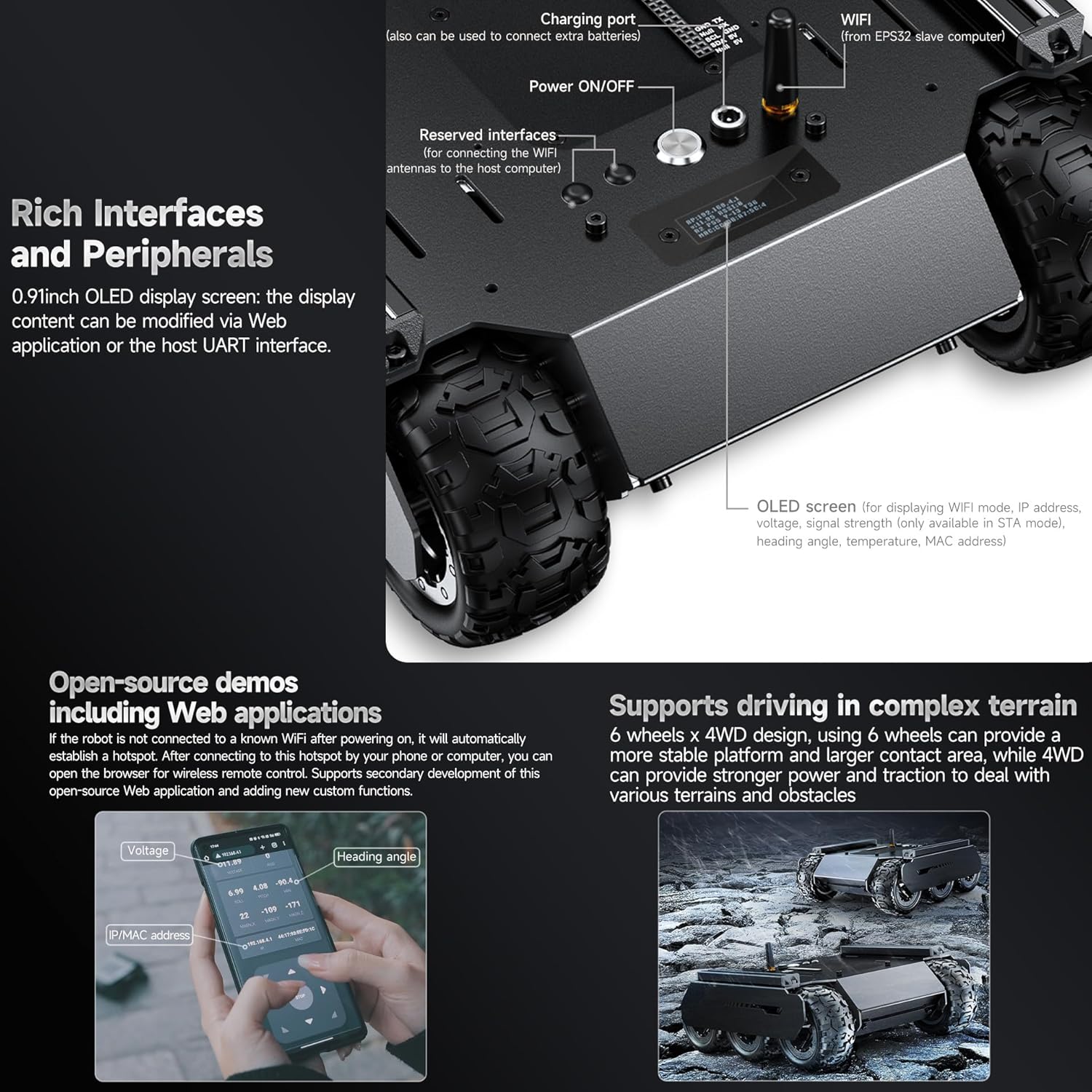
Image: Shows the aluminum extension rails on the UGV02 and how additional peripherals can be mounted using boat nuts. It also highlights the Picatinny rail and M4 screws for accessory attachment.
5. Parentah Operasi
5.1 Powering on / Pareum
Locate the Power ON/OFF switch on the UGV02 chassis. Press the switch to power on or power off the robot.
5.2 Basic Control via Web Aplikasi
The UGV02 features an open-source web application for remote control and monitoring.
- Power on the UGV02. If it is not connected to a known Wi-Fi network, it will automatically establish a hotspot.
- Connect your smartphone or computer to the UGV02's Wi-Fi hotspot.
- Buka a web browser and navigate to the IP address provided by the UGV02 (usually displayed on the 0.91-inch OLED screen or found in the hotspot details).
- The web application interface will allow you to control the robot's movement, monitor voltage, heading angle, and other parameters.

Image: A smartphone screen displaying the UGV02's web application interface, showing controls for voltage, heading angle, and IP/MAC address. This interface allows for remote control and monitoring of the robot.
5.3 Advanced Control and Secondary Development
For advanced users, the UGV02's open-source nature allows for extensive customization and development.
- UART Communication: Send JSON commands via the web application or UART communication to control peripherals, configure serial bus servos, obtain servo feedback, and IMU information.
- PWM Signal Output: Control the angle of PWM servos.
- Tampilan OLED: Modify the content displayed on the 0.91-inch OLED screen.
- Multi-functional Driver Board: The ESP32-based driver board can be used as a sub-controller, handling low-level computations, PID control for wheel speed, inverse kinematics for robotic arm linkages, and position interpolation. It also reads sensor data (9-axis IMU, INA219 battery voltage detection) and can independently stabilize camera vertical movement.

Image: Illustrates the UGV02 with a robotic arm and pan-tilt camera attached, demonstrating the use of serial bus servos and PWM servos. It also shows the slave computer driver board, highlighting its role in controlling various peripherals.
6. Pangropéa
- beberesih: Regularly clean the chassis and wheels to remove dirt, dust, and debris, especially after off-road use. Use a soft, dry cloth. Avoid using harsh chemicals or excessive moisture.
- Perawatan batré:
- Ensure 18650 batteries are charged using the provided power supply.
- Ulah ngecas batré kaleuleuwihi atanapi ngosongkeun batréna nepi ka jero.
- Store the UGV02 with partially charged batteries if not in use for extended periods.
- Inspeksi ban: Periodically check the flexible rubber tires for wear, tears, or damage. Replace if necessary to maintain optimal traction and shock absorption.
- Pariksa komponén: Inspect all connections, screws, and mounted peripherals regularly to ensure they are secure.
- Apdet parangkat lunak: Check the Waveshare official website or community forums for any available firmware or software updates for the ESP32 slave computer or host computer.
7. Cara ngungkulan
| Masalah | Mungkin Cukang lantaranana | Solusi |
|---|---|---|
| UGV does not power on. |
|
|
| Cannot connect to UGV via Wi-Fi. |
|
|
| Gerakan robot teu teratur atanapi teu responsif. |
|
|
8. Spésifikasi
| Fitur | Rincian |
|---|---|
| Modél | UGV02 |
| Outline Dimensi | 252 x 230 x 94 mm |
| Jangkungna Chassis | 25 mm |
| Lebar Tirus | 42 mm |
| Diaméter Tirus | 80 mm |
| Jumlah Roda | 6 |
| Beurat | 2 kg (chassis only) |
| Driving Payload | 4 kg |
| Rojongan batré | 3 x 18650 Lithium batteries (in series, NOT included) |
| Waktu Ngecas | 1.5 jam |
| Daya Motor | 5W x 4 |
| Upper Surface Area | 37864 mm² |
| Bahan Tirus | Nylon wheel hub, rubber tire |
| Rail Center Distance | 203 mm |
| Laju ngajalankeun | 0.05 - 1.3 m/s |
| Number of Driving Wheels | 4 |
| Bahan Awak | 2mm (thickness) 5052 Aluminum Alloy |
| Vertical Obstacle Ability | 40 mm |
| Kamampuhan Panjat Pinang | 22° |
| Minimal Ngéngingkeun Radius | 0 m (in-situ Rotation) |
| Kahirupan batré | 45 min (full power continuous output) |
| Fungsi Remote Control | WIFI AP/STA |
| Antarbeungeut Komunikasi | UART / serial bus servo interface / I2C |

Image: Technical drawing showing the dimensions of the UGV02 chassis in millimeters, including top, side, and front views kalawan ukuran konci.
9. Garansi jeung Rojongan
For warranty information and technical support, please refer to the official Waveshare website or contact their customer service directly. Details regarding specific warranty periods and support channels are typically provided with your purchase documentation or on the manufacturer's websitus.
Pabrikan: Waveshare
Jumlah modél: UGV02
ASIN: B0C9QQQTDP
Pikeun pitulung salajengna, anjeun tiasa nganjang ka Waveshare Store on Amazon.


