1. Bubuka
This manual provides essential information for the Espressif ESP32-S3-LCD-EV-Board, a versatile development board designed for RGB interface LCD applications. It is built around the ESP32-S3 module, featuring 16MB Flash and 8MB PSRAM, and integrates a capacitive touch screen and dual array microphones for advanced human-machine interaction.
For comprehensive technical details and programming guides, please refer to the official Espressif user guide: Espressif ESP32-S3-LCD-EV-Board User Guide.
2. Produk Langkungview
The ESP32-S3-LCD-EV-Board is engineered for prototyping smart central control screens, switch panels, home appliance control panels, electric vehicle dashboards, and visual doorbells. It comes in two main variants, distinguished by their display sizes and resolutions:
- Varian 1: 3.95-inch display with 480 x 480 resolution.
- Varian 2: 4.3-inch display with 800 x 480 resolution.
Key integrated components include:
- LCD Screen with capacitive touch functionality.
- Dual array microphones for offline voice wake-up and recognition.
- Spiker terintegrasi pikeun kaluaran audio.
- indikator LED.
- Tombol anu tiasa diprogram ku pangguna.
- ESP32-S3-WROOM-1 module for Wi-Fi and Bluetooth connectivity.
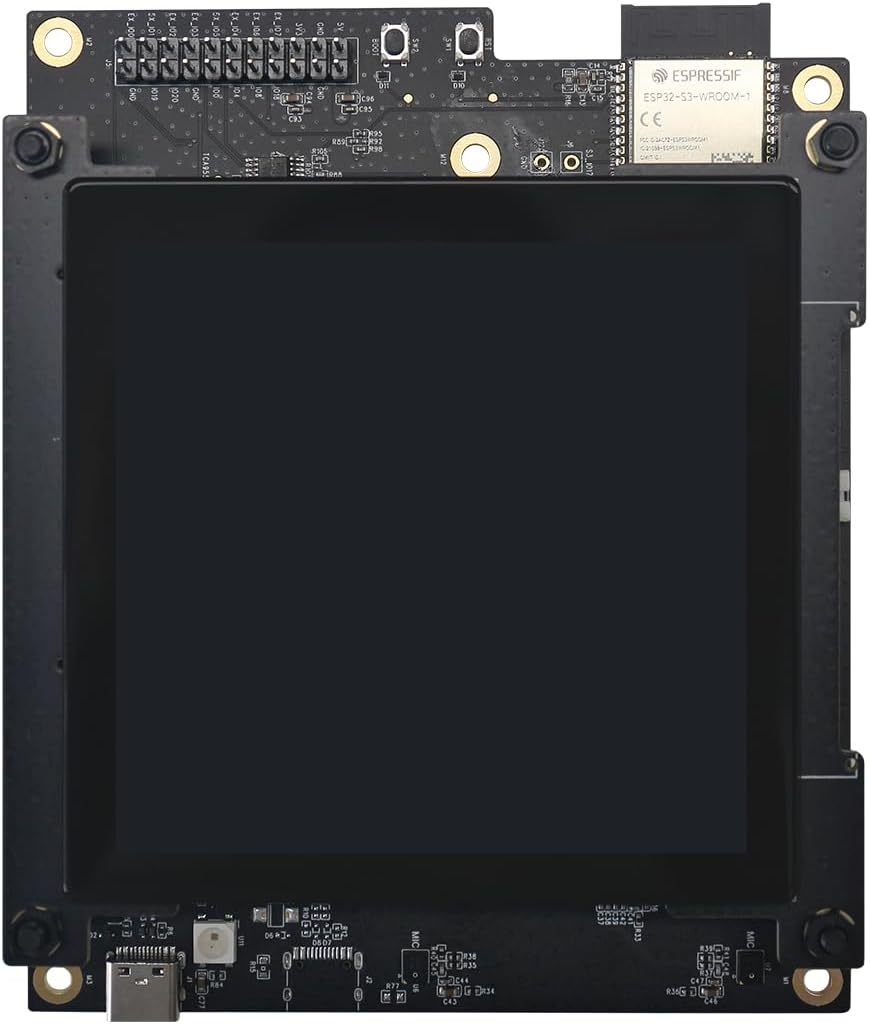
Gambar 1: Ti luhur ka handap view of the Espressif ESP32-S3-LCD-EV-Board. The image displays the development board with its integrated LCD screen, the ESP32-S3-WROOM-1 module, various connectors, and control buttons. Key components visible include the ESPRESSIF module, pin headers for GPIO, and microphone inputs (MIC).
3. Parentah Setup
To begin using your ESP32-S3-LCD-EV-Board, follow these general steps. Detailed instructions, including software environment setup and initial programming, are available in the official user guide.
- Sambungan Daya: Connect the board to a suitable power source using the USB-C port. Ensure the power supply meets the board's voltage jeung sarat ayeuna.
- Pamasangan supir: Install any necessary USB-to-serial drivers on your computer if the board is not automatically recognized.
- Setelan Lingkungan Pangwangunan: Set up your preferred ESP-IDF (Espressif IoT Development Framework) or Arduino IDE environment.
- Firmware Upload: Follow the instructions in the official user guide to compile and upload your first application to the board.
For detailed setup procedures, including specific software configurations and example projects, please consult the Espressif ESP32-S3-LCD-EV-Board User Guide.
4. Parentah Operasi
The ESP32-S3-LCD-EV-Board is designed for flexible operation, supporting various applications from embedded systems to IoT devices. Operation typically involves programming the ESP32-S3 module to interact with the integrated peripherals and external components.
- Interaksi tampilan: Utilize the capacitive touch screen for user input and display visual information.
- Kontrol sora: Implement voice commands and recognition using the dual array microphones.
- Konektipitas: Leverage Wi-Fi (802.11bgn) and Bluetooth for network communication and device pairing.
- Pamakéan GPIO: Connect external sensors, actuators, and other modules via the available General Purpose Input/Output (GPIO) pins.
- Manajemén kakuatan: Optimize power consumption for battery-powered applications, if applicable.
Refer to the Espressif documentation for detailed API references and programming examples specific to the ESP32-S3 and its peripherals.
5. Spésifikasi Téknis
| Fitur | Rincian |
|---|---|
| merek | Ésprésif |
| Ngaran modél | ESP32-S3-LCD-Ev-Board |
| Prosesor | Espressif ESP32-S3 (1 Processor) |
| Mémori Flash | 16 MB |
| Ram | 8 MB PSRAM |
| Konéktipitas Wireless | Wi-Fi (802.11bgn), Bluetooth |
| Sistem operasi | FreeRTOS (supported) |
| Pilihan Témbongkeun | 3.95'' 480x480 or 4.3'' 800x480 Capacitive Touch Screen |
| Fitur Audio | Dual Array Microphones, Speaker |
| Dimensi (Pakét) | 6.5 x 6.5 x 6.5 inci |
| Item Beurat | 1 pon |
6. Pangropéa
Proper maintenance ensures the longevity and reliable operation of your ESP32-S3-LCD-EV-Board.
- beberesih: Keep the board clean and free from dust and debris. Use a soft, dry cloth for cleaning. Avoid liquid cleaners directly on components.
- Lingkungan: Operate the board within recommended temperature and humidity ranges. Avoid exposure to extreme temperatures, moisture, or corrosive substances.
- Penanganan: Handle the board by its edges to prevent damage to components and electrostatic discharge.
- Panyimpenan: When not in use, store the board in an anti-static bag in a cool, dry place.
7. Cara ngungkulan
If you encounter issues with your ESP32-S3-LCD-EV-Board, consider the following troubleshooting steps:
- Henteu aya kakuatan: Ensure the USB-C cable is securely connected and the power source is functional. Try a different cable or power adapter.
- Masalah sambungan: Verify all connections to external peripherals are correct and secure. For USB communication, check device manager for proper driver installation.
- Gagalna Unggah Firmware: Confirm your development environment is correctly configured and the board is in programming mode (if required). Check for correct COM port selection.
- Tampilan Teu Gawé: Check power to the board and ensure the display cable is properly seated. Review your code for display initialization errors.
- Voice/Audio Problems: Ensure microphones and speakers are correctly enabled in your firmware and that audio levels are appropriately set.
For more in-depth troubleshooting and common issues, refer to the official Espressif ESP32-S3-LCD-EV-Board User Guide and community forums.
8. Rojongan sarta Émbaran Garansi
For technical questions, business inquiries, or further assistance with your Espressif ESP32-S3-LCD-EV-Board, please contact Espressif Systems directly:
- Email Rojongan Téknis: sales@espressif.com
- Pituduh Pamaké Resmi: Espressif ESP32-S3-LCD-EV-Board User Guide
Warranty information is typically provided at the point of purchase or within the product packaging. Please consult your vendor or Espressif's official websitus pikeun istilah jeung kaayaan jaminan husus.


