1. Bubuka
This manual provides essential instructions for the safe and effective use of your FLYLINKTECH 4000A Portable Car Battery Jump Starter. Please read this manual thoroughly before operation and retain it for future reference. This device is designed to jump-start vehicles with dead or low-voltage batteries and can also function as a portable power bank and LED flashlight.
2. Naon dina Box
Pastikeun yén sadaya barang aya nalika muka bungkusan:
- FLYLINKTECH CF900 Jump Starter Unit
- Kabel Jumper pinter
- Kabel Ngecas USB-C
- Tas EVA portabel
- Manual pangguna (dokumén ieu)

Image: Contents of the FLYLINKTECH CF900 package. This includes the jump starter unit, smart jumper cables, a USB-C charging cable, a portable EVA carrying case, and the user manual.
3. Fitur Produk
- High-Power Jump Starter: Delivers 4000A peak current, suitable for vehicles with up to 9.0L gas or 8.0L diesel engines. Capable of up to 30 jump starts on a single charge.
- Bank Daya Serbaguna: Features an 18,000mAh battery capacity and dual USB ports, including Quick Charge 3.0, for charging various electronic devices. Maintains charge for up to 24 months when not in use.
- Multi-functional LED Flashlight: Equipped with a bright 600-lumen LED light offering standard, SOS, and strobe modes for emergencies. Provides up to 48 hours of continuous illumination.
- Fitur Kasalametan ditingkatkeun: Integrated smart protection system provides 10 layers of safety, including reverse polarity, over-current, and over-voltage protection. Ensures safe operation in extreme temperatures (-4°F to 140°F) and prevents sparks or incorrect connections.
- Desain awét sareng portabel: Compact and lightweight (820g) with a rugged ABS exterior for protection against impacts and scratches.

Gambar: Detil view of the FLYLINKTECH CF900 jump starter, highlighting the LED display, power button, LED flashlight, USB output ports (USB1 5V/2.4A, USB2 Quick Charge 3.0), jump start socket, and 5V/2A USB-C input port.
4. Setup jeung Ngecas
Before first use, fully charge the jump starter. It is recommended to recharge the unit every 3-6 months to maintain optimal battery health.
- Locate the USB-C input port on the jump starter.
- Connect the provided USB-C charging cable to the jump starter's input port.
- Connect the other end of the USB-C cable to a 5V/2A USB wall adapter (not included) or a compatible USB charging port.
- The LCD display will show the charging progress. Charge until the display indicates 100%.

Image: The FLYLINKTECH jump starter functioning as a portable power bank, charging a smartphone and a tablet via its USB output ports. The image highlights the 18000mAh capacity and Quick Charge 3.0 feature.
5. Parentah Operasi
5.1. Ngahurungkeun Kandaraan sacara Langsung
Pastikeun jump starter geus dieusi sahenteuna 50% sateuacan nyobian jump starter kendaraan.
- Connect Smart Jumper Cables: Insert the blue plug of the smart jumper cables completely into the jump start socket on the jump starter unit. Ensure a secure connection. The indicator light on the smart clamp will flash green and red.
- Nyambung ka Batré Mobil: Gantelkeun cl beureumamp ka positif (+) terminal batré mobil jeung cl hideungamp ka terminal négatip (-).
- Pariksa Lampu Indikator:
- Héjo padet: Connection is correct and safe. Proceed to start the vehicle.
- Beureum Polos jeung Bip: Polaritas tibalik kadeteksi. Pegatkeun sambungan clamps sareng pasangkeun deui kalayan leres.
- Héjo kedip-kedip: Batré voltage is too low. Press the "BOOST" button on the smart clamp for 3 seconds until the light turns solid green. Start the vehicle within 30 seconds.
- No Light/No Beep: Check connections or if the car battery is severely damaged.
- Mimitian Kendaraan: Once the indicator light is solid green, start your vehicle's engine.
- Leupaskeun Clamps: As soon as the engine starts, remove the smart jumper cables from the car battery terminals first, then disconnect the blue plug from the jump starter unit.

Image: Easy operation guide for jump starting a car. Step 1: Insert the jump clamp into the booster. Step 2: Connect the clamps to the car battery. Step 3: Start your car. Step 4: Remove the clamps.
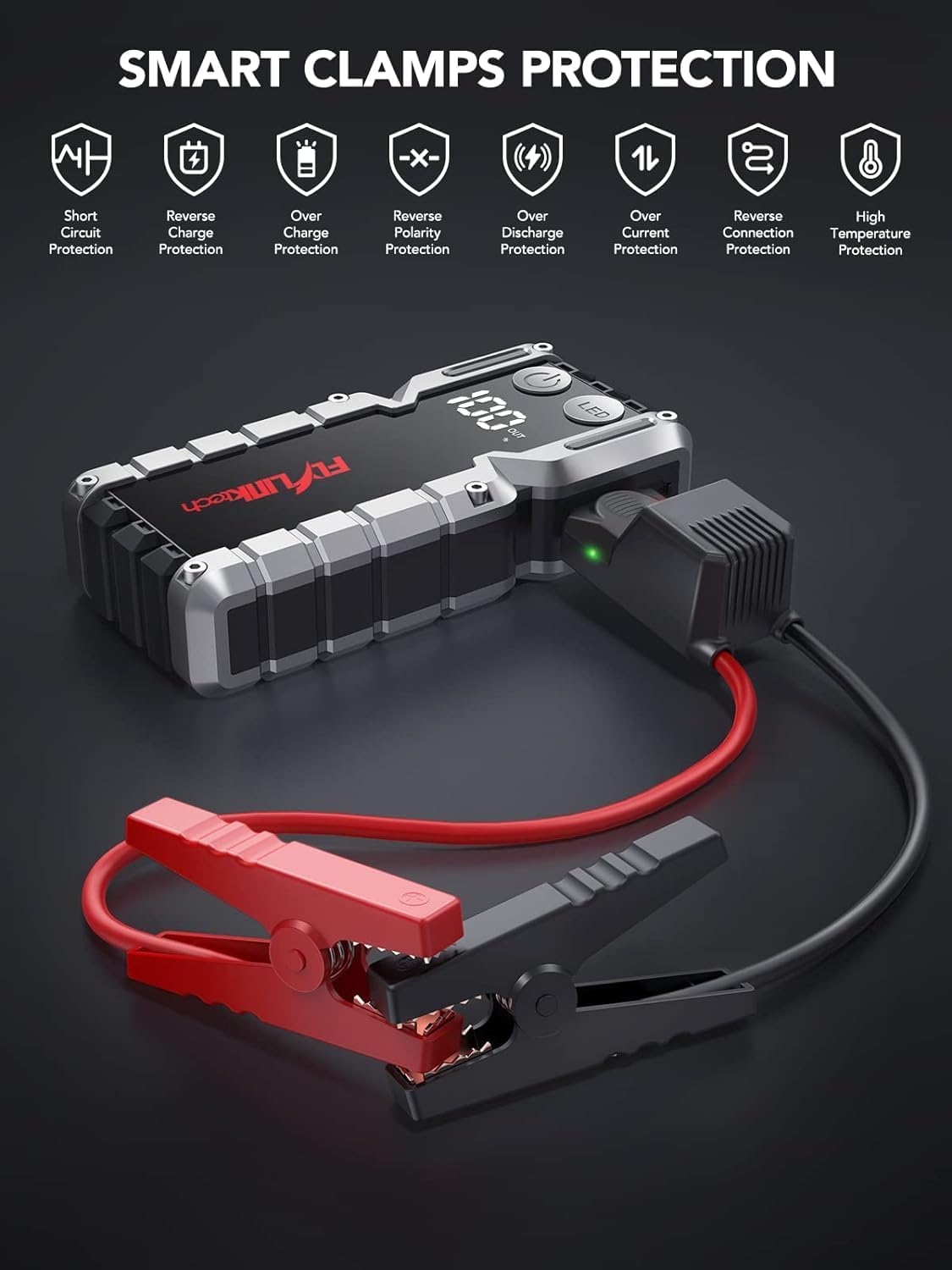
Image: Smart Clamps Protection. Icons represent various safety features including short circuit protection, reverse charge protection, over charge protection, reverse polarity protection, over discharge protection, over current protection, and high temperature protection.
5.2. Ngagunakeun salaku Power Bank
The jump starter can charge various USB-powered devices.
- Connect your device's USB charging cable to one of the USB output ports (USB1 or USB2 QC3.0) on the jump starter.
- Jump starter bakal otomatis mimiti ngecas alat anjeun.
- The LCD display will show the remaining battery percentage tina starter luncat.
5.3. Ngagunakeun Senter LED
The built-in LED flashlight has three modes: standard, SOS, and strobe.
- Press and hold the "LED" button for 3 seconds to turn on the standard flashlight mode.
- Press the "LED" button again to cycle through the modes: Standard > SOS > Strobe.
- Press and hold the "LED" button for 3 seconds to turn off the flashlight.

Image: The built-in LED flashlight of the FLYLINKTECH jump starter, demonstrating its three modes: standard flashlight, SOS signal, and strobe light.
6. Pangropéa
- Store the jump starter in its portable EVA carrying case when not in use to protect it from dust and damage.
- Recharge the unit every 3-6 months, even if not used, to maintain battery health and extend its lifespan.
- Bersihkeun bagian luar ku kaén anu lembut sareng garing. Ulah make bahan kimia kasar atawa cleaners abrasive.
- Keep the jump starter away from direct sunlight, heat sources, and moisture.
- Do not disassemble the unit. Servicing should only be performed by qualified personnel.
7. Cara ngungkulan
| Masalah | Mungkin Cukang lantaranana | Solusi |
|---|---|---|
| Jump starter teu hurung. | Batré discharged lengkep. | Charge the jump starter fully using the provided USB-C cable. |
| Kandaraan henteu ngamimitian saatos nyambungkeun. | Lepat clamp sambungan (polaritas tibalik). Batré jump starter lemah teuing. Vehicle battery severely damaged. Cl pinteramp indicator not solid green. | Pastikeun clamps disambungkeun kalawan bener (beureum ka +, hideung ka -). Ngecas starter luncat. Konsultasi ka montir profésional. Follow indicator light instructions in Section 5.1. If flashing green, use BOOST function. |
| Cl pinteramp indicator is solid red and beeping. | Sambungan polaritasna sabalikna. | Geura pegatkeun sambungan clamps and re-attach correctly (red to +, black to -). |
| Flashlight does not work. | Batré lemah teuing. LED button not pressed correctly. | Ngecas starter luncat. Press and hold the "LED" button for 3 seconds to activate. |
| Alat henteu ngecas via port USB. | Batré jump starter lemah teuing. Masalah sambungan kabel. | Ngecas starter luncat. Ensure USB cables are securely connected to both the jump starter and the device. Try a different cable. |
8. Spésifikasi
| Fitur | Rincian |
|---|---|
| Modél | CF900 |
| Kapasitas batré | 18000 mah (66.6Wh) |
| Puncak Arus | 4000A |
| Luncat Mimitian Kaluaran | 12V |
| Kaluaran USB1 | 5V / 2.4A |
| USB2 Output (QC3.0) | 5V/2.4A, 9V/2A, 12V/1.5A |
| Input Tipe-C | 5V / 2A |
| Suhu Operasi | -20°C nepi ka 60°C (-4°F nepi ka 140°F) |
| Dimensi produk | 19 cm x 9 cm x 4 cm (kira-kira) |
| Item Beurat | 820 g |
| Kasaluyuan engine | Up to 9.0L Gas or 8.0L Diesel |
9. Garansi jeung Rojongan
FLYLINKTECH provides the following support for this product:
- Garansi Gratis 3 Taun: Ngawengku cacad manufaktur sareng gangguan fungsi dina panggunaan normal.
- Rojongan Téknis Hirupna: Bantosan dina panggunaan produk, ngungkulan masalah, sareng patarosan umum.
- Layanan Pelanggan 7/24: Available around the clock for any questions or concerns.
For support, please refer to the contact information provided in your product packaging or visit the official Flylinktech websitus.