Bubuka
Welcome to the user manual for your new LIGE Smart Watch. This device is designed to enhance your daily life with advanced features such as ECG+PPG health monitoring, Bluetooth calling, message notifications, and comprehensive sport activity tracking. It is compatible with both iOS and Android devices and comes with two interchangeable bands (steel and silicon) for versatile styling. Please read this manual carefully to ensure proper use and maintenance of your smartwatch.
1. Setélan
1.1 Unboxing jeung komponén
Saatos muka bungkusan, pastikeun sadaya komponén aya:
- LIGE Smart Watch unit
- Steel Watch Band
- Silicon Watch Band
- Kabel Ngecas
- Manual pangguna (dokumén ieu)

Figure 1.1: LIGE Smart Watch with both steel and silicon bands.
This image displays the LIGE Smart Watch featuring a black steel band, with an additional black silicon band shown separately. The watch face displays various metrics including time, date, temperature, and activity data.
1.2 Ngecas Smart Watch
Sateuacan dianggo anu munggaran, cas heula jam tangan pinter anjeun sapinuhna.
- Sambungkeun kabel ngecas magnét kana titik ngecas di tukang jam tangan.
- Plug the USB end of the cable into a standard USB power adapter (5V/1A recommended) or a computer USB port.
- The watch screen will display a charging indicator. A full charge typically takes 2-3 hours.
1.3 Pamasangan Aplikasi sareng Papasangan
Pikeun muka konci fungsi lengkep LIGE Smart Watch anjeun, anjeun kedah masang aplikasi pendamping dina smartphone anjeun.
- Unduh Aplikasi: Scan the QR code provided in the watch's initial setup screen or search for the official LIGE Smart Watch app in the Apple App Store (for iOS) or Google Play Store (for Android).
- Ngadaptar / Asup: Buka aplikasi tur turutan parentah dina layar pikeun nyieun hiji akun atawa asup.
- Aktipkeun Bluetooth: Pastikeun Bluetooth diaktipkeun dina smartphone Anjeun.
- Pasangkeun Alat: In the app, navigate to the "Device" or "Add Device" section. Select your LIGE Smart Watch from the list of available devices. Confirm the pairing request on both your watch and smartphone.
- Pasihan Idin: Idinan idin anu diperyogikeun (contona, bewara, lokasi, kontak) supados aplikasi tiasa fungsina leres.
2. Ngoperasikeun Smart Watch Anjeun
2.1 Napigasi Dasar
The LIGE Smart Watch features a 1.28-inch IPS full touch screen with a resolution of 240x240 pixels for clear and vivid display.

Gambar 2.1: Detil view of the smartwatch display.
This image highlights the 1.28-inch IPS display of the LIGE Smart Watch, emphasizing its 240x240px resolution and clear visual experience with vibrant colors.
- Layar cabak: Gesek ka kenca/katuhu pikeun nganapigasi antara pungsi utama, gesek ka luhur/handap pikeun setelan gancang atawa bewara. Ketok pikeun milih.
- Side Button(s): Typically, one button serves as a power on/off, back, or home button. Refer to the watch's specific button layout for exact functions.
2.2 Bewara Telepon sareng Pesen Bluetooth
Once paired with your smartphone, your LIGE Smart Watch can handle calls and display notifications.
- Telepon Bluetooth: Answer, reject, or make calls directly from your watch. Ensure your watch is connected to your phone's Bluetooth for this feature.
- Panginget Pesen: Receive notifications for incoming calls, SMS, and app messages (e.g., WhatsApp, Facebook) directly on your watch. Configure app notifications in the companion app.
2.3 Pangimeutan Kaséhatan
Jam tangan ieu dilengkepan ku sénsor canggih pikeun ngalacak kaséhatan anu komprehensif.

Gambar 2.2: Tukangeun view of the smartwatch with heart rate sensor.
This image shows the back of the LIGE Smart Watch, highlighting the optical heart rate sensor (green light) and charging contacts. The text "SMART WATCH" and "WITH HEART RATE" are visible.
- Ngawaskeun Laju haté: The watch uses an AI heart rate algorithm for 24-hour intelligent monitoring. Wear the watch snugly on your wrist for accurate readings.
- EKG+PPG: Advanced electrocardiogram and photoplethysmography sensors provide detailed heart health data. Follow in-app instructions for performing ECG measurements.
- Monitoring tekanan darah: Provides estimated blood pressure readings. Note that this is for reference only and not a substitute for medical equipment.
- Monitor Saré: Ngalacak pola bobo anjeun sacara otomatis, kalebet sare jero, sare hampang, sareng waktos hudang. View laporan lengkep dina aplikasi.
2.4 Sport Activity Tracking
The watch supports multiple exercise modes to help you track your fitness goals.
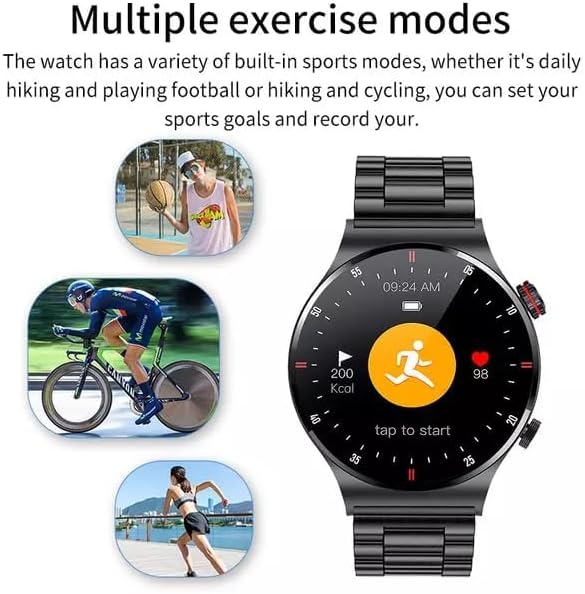
Figure 2.3: Smartwatch interface showing various sport modes.
This image illustrates the LIGE Smart Watch's capability to track multiple exercise modes, with icons representing activities like running, cycling, and basketball. The watch screen shows activity metrics such as calories burned and heart rate.
Select your desired sport mode from the watch menu (e.g., running, cycling, hiking) to record duration, distance, calories burned, and heart rate during your workout.
2.5 NFC Function (Note)
The product description indicates NFC functionality. Please refer to the companion app or the latest product specifications for details on how to utilize NFC features, such as access control or payment. Note that NFC functionality can vary by region and specific watch firmware.
2.6 Fitur séjén
- Puteran MP3: The watch supports MP3 playback. You may need to transfer music files to the watch's internal storage via the companion app or a direct connection, if supported.
- Setélan basa: The watch supports 25 languages. You can change the language setting through the watch's settings menu or the companion app.
3. Pangropéa
3.1 Ngabersihan Smart Watch Anjeun
Beberesih rutin ngabantosan ngajaga penampilan sareng fungsi jam tangan.
- Ngusap layar sareng awak nganggo lawon anu lemes sareng teu aya serat.
- Pikeun smudges nekad, rada dampen lawon jeung cai. Ulah make bahan kimia kasar atawa bahan abrasive.
- Ngabersihan kontak ngecas périodik pikeun mastikeun sambungan alus.
3.2 Tahan Cai (IP68)
Your LIGE Smart Watch is IP68 waterproof, meaning it is resistant to dust and can withstand immersion in water up to 1.5 meters for 30 minutes.
- It is suitable for daily use, hand washing, and light rain.
- Avoid hot water, steam, or prolonged immersion in water (e.g., swimming, diving) as this can compromise the seal.
- Ulah beroperasi tombol di jero cai.
- Tegalan arloji sacara saksama saatos kakeunaan cai.
3.3 Perawatan Batré
Pikeun manjangkeun umur batre:
- Hindarkeun suhu anu ekstrim.
- Ngeusi batre arloji saméméh batréna béak sagemblengna.
- If storing the watch for an extended period, charge it to about 50% and recharge every few months.
4. Cara ngungkulan
| Masalah | Mungkin Cukang lantaranana | Solusi |
|---|---|---|
| Arloji teu hurung | batré lemah | Ngecas arloji sahenteuna sahenteuna 30 menit. |
| Teu tiasa dipasangkeun sareng telepon | Bluetooth pareum, masalah aplikasi, jam tangan teu tiasa dipanggihan | Ensure phone Bluetooth is on. Restart watch and phone. Reinstall app. Check app for pairing instructions. |
| Taya béja | App permissions, notification settings | Check app notification permissions on your phone. Ensure notifications are enabled in the watch app. |
| Data kaséhatan teu akurat | Pas pas, halangan sensor | Ensure watch is worn snugly on the wrist. Clean the sensor area on the back of the watch. |
| Masalah ngecas | Dirty contacts, faulty cable/adapter | Clean charging contacts. Try a different USB port or power adapter. Ensure cable is securely connected. |
5. Spésifikasi
| Fitur | Rincian |
|---|---|
| Nomer modél | BW0382 |
| Dimensi produk | 20 x 15 x 5 cm; 180 g |
| Produsén | LIGE |
| Sistem operasi | Android Wear (compatible with iOS and Android) |
| Fitur husus | Sleep Monitor, Notifications, Heart Rate Monitor, ECG, Blood Pressure Monitoring, MP3 Playback |
| Téhnologi konektipitas | Bluetooth |
| Standar Komunikasi Nirkabel | Bluetooth |
| Komposisi sél batré | Litium Polimér |
| Tahan cai | IP68 |
| Resolusi layar | 240 x 240 piksel |
| Ukuran layar | 1.28 inci |
6. Garansi jeung Rojongan
For warranty information and customer support, please refer to the warranty card included with your product or contact LIGE customer service directly.
Produsén: LIGE
Kanggo bantosan salajengna, mangga buka LIGE resmi websitus atawa ngahubungan saluran rojongan maranéhanana.


