1. Produk Langkungview
The Qidoe Aluminum 12V USB Laptop Charger Socket is designed to provide efficient and versatile charging for a wide range of electronic devices in various vehicle types, including cars, RVs, marine vessels, boats, and motorcycles. It integrates advanced charging technologies and a digital voltmeter for optimal performance and user convenience.

Figure 1.1: Qidoe 12V USB Laptop Charger Socket
2. Fitur konci
- Officially Certified 83W Output: Features an intelligent boosting chip for a maximum output of 83W (65W PD + 18W QC3.0).
- Upgraded PD 65W Smart Boost Charger: The 12V USB-C PD Port automatically adjusts voltage (12V to 15V and 20V) to provide up to 65W for laptops, 30W for tablets, and 20W for phones.
- Intuitive LED Digital Voltmeter: Némbongkeun batré voltage when idle or using USB-A, and output voltage/current when using the PD port.
- Sturdy Aluminum Alloy Shell: Durable, shock-resistant, and includes a removable waterproof cap for dust and splash protection.
- Skin-friendly Anti-slip Button Switch: Provides a strong tactile feel and defaults to 'on' upon power connection for convenience.

Figure 2.1: Simultaneous Charging Capability

Figure 2.2: 65W PD Smart Boost Charging
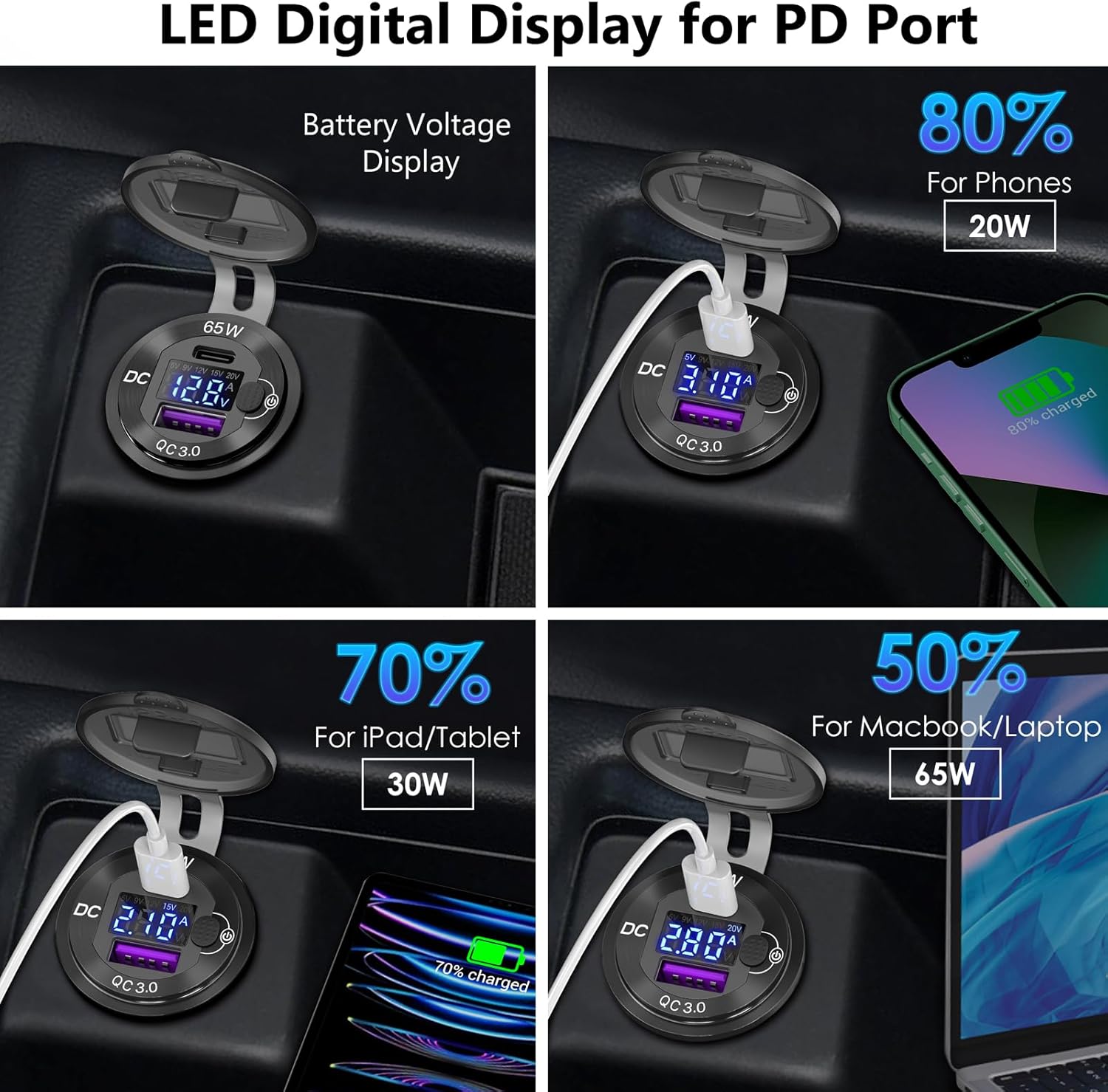
Figure 2.3: LED Digital Display Functionality

Figure 2.4: All Aluminum Metal Body Construction
3. Naon dina Box
- 1 x Qidoe 12V USB Outlet
- 1 x 23.6-inch Wire with a 10A Fuse
- 2 x Replacement Fuses
4. Pitunjuk Instalasi
The Qidoe charger is designed for easy installation, either as a replacement for an existing cigarette lighter socket or as a new DIY installation.
Léngkah-léngkah pamasangan:
- Nyiapkeun liang: If installing in a new location, drill a 1.18-inch (3 cm) diameter hole using a hole opener. If replacing an existing socket, remove the old one.
- Selapkeun sareng Amankeun: Insert the charger into the prepared hole and tighten the retaining ring securely.
- Sambungkeun Wiring: Connect the red wire to the positive (+) terminal and the black wire to the negative (-) terminal of your vehicle's 12V-24V power supply. Ensure correct polarity to prevent damage.
- Pariksa Pamasangan: Once connected, the digital display should illuminate, indicating successful installation.

Figure 4.1: Installation Process
5. Parentah Operasi
Hurungkeun/Pareuman:
The charger features a skin-friendly anti-slip button switch. The switch defaults to the 'on' position once power is connected, meaning it will automatically power on when your vehicle's ignition is turned on. To manually turn it off or on, press the button.

Figure 5.1: Power Button Operation
Alat Ngecas:
Sambungkeun alat anjeun ka palabuhan anu cocog:
- Port USB-C PD (65W): For fast charging laptops (e.g., MacBook, Dell, Samsung, Lenovo, Acer, HP), tablets, and compatible smartphones. This port can boost voltage to 15V or 20V as needed.
- USB-A QC3.0 Port (18W): For fast charging compatible smartphones and other USB-A powered devices.
The charger supports simultaneous charging of two devices.

Figure 5.2: Charging Two Devices Simultaneously
Digital Voltmeter Display:
Layar LED anu terintegrasi nyayogikeun inpormasi sacara real-time:
- When the charger is idle or only the USB-A port is in use, it displays the vehicle's battery voltage.
- When a device is plugged into the USB-C PD port, it will display the output voltage and current of the PD port, allowing you to monitor the charging speed.
Video 5.1: Demonstration of Qidoe 83W 12V USB Power Outlet features, including waterproofing, laptop charging, and voltmeter display. This video shows the product's robust design and high-power output capabilities.
Video 5.2: Leuwihview of the Qidoe Laptop Charger Socket for Car, RV, Marine, Boat, and Moto. This video highlights the product's versatility and suitability for various vehicle types.
6. Perawatan sareng Pangropéa
- beberesih: Wipe the surface with a soft, dry cloth. Avoid using abrasive cleaners or solvents.
- Topi Tahan Cai: Ensure the waterproof cap is securely closed when the charger is not in use, especially in wet or dusty environments, to protect the ports.
- Ngagantian sekering: If the charger stops functioning, check the 10A fuse in the wiring. Replace it with one of the provided spare fuses if blown.
- Panyimpenan: If storing the vehicle for an extended period, ensure the charger is disconnected from the power source.
7. Cara ngungkulan
If you encounter issues with your Qidoe charger, please check the following:
- Taya Daya/Tampilan:
- Is the product switch turned on? (Press the button to toggle).
- Are the positive and negative wires connected correctly? (Red to +, Black to -).
- Is the fuse in the wiring blown? Replace if necessary.
- Is the vehicle's power supply low on electricity or disconnected?
- Ngecas Lambat:
- Ensure you are using a compatible charging cable that supports fast charging (PD or QC3.0).
- Verify your device supports PD 3.0 or QC 3.0 for optimal charging speeds.
- Check the digital display for the output voltage and current to confirm expected power delivery.
- Alat Teu Dipikawanoh:
- Coba kabel ngecas béda.
- Ensure the device is properly connected to the port.
- Restart the device you are trying to charge.
8. Spésifikasi
| Fitur | Spésifikasi |
|---|---|
| merek | Qidoe |
| Nomer modél | 05-1 |
| Masukan Voltage | 12 Volt (DC) |
| Daya Kaluaran | Max 83W (65W PD + 18W QC3.0) |
| USB-C PD Kaluaran | 65W (supports 12V to 15V/20V boost) |
| USB-A Kaluaran QC3.0 | 18W |
| Ampumur | 6 Amps |
| Téhnologi konektipitas | USB, USB Type C, USB Type A |
| Bahan | Aluminium Alloy |
| Fitur husus | Fast Charging, Waterproof, Digital Voltmeter |
| Tipe Pamasangan | Perforated Mount |
| Item Beurat | 2.39 ons |
| Produsén | Shenzhen GSG Technology Co.Ltd |
| Negara asal | Cina |
9. Rojongan
For any questions, technical assistance, or support regarding your Qidoe product, please refer to the contact information provided with your purchase or visit the official Qidoe store on Amazon: Qidoe Store.