
Bubuka
Hatur nuhun pikeun meuliasing the Kisonli SC-21 Wireless Solar Bluetooth Speaker. This portable speaker offers versatile audio playback options including Bluetooth, USB, TF card, and FM radio, along with the convenience of solar charging. Please read this manual carefully before use to ensure proper operation and to maximize your listening experience.

Image: The Kisonli SC-21 Wireless Solar Bluetooth Speaker, showcasing its design with solar panels and the Kisonli brand logo.
Parentah Kasalametan
- Do not expose the speaker to extreme temperatures or direct sunlight for prolonged periods, especially when not charging.
- Hindarkeun lungsur atanapi nahan panyatur kana tabrakan anu kuat.
- Keep the speaker away from water and liquids. Although it is water-resistant, it is not fully waterproof.
- Ulah nyobian ngabongkar atanapi ngalereskeun speaker nyalira. Hubungi petugas servis anu mumpuni pikeun kéngingkeun bantosan.
- Use only the specified charging cables and adapters.
- Jauhkeun tina jangkauan barudak.
Eusi pakét
Mangga parios pakét kanggo barang-barang ieu:
- Kisonli SC-21 Wireless Solar Bluetooth Speaker
- Kabel Ngecas USB
- Portable Shoulder Strap
- Manual pangguna (dokumén ieu)
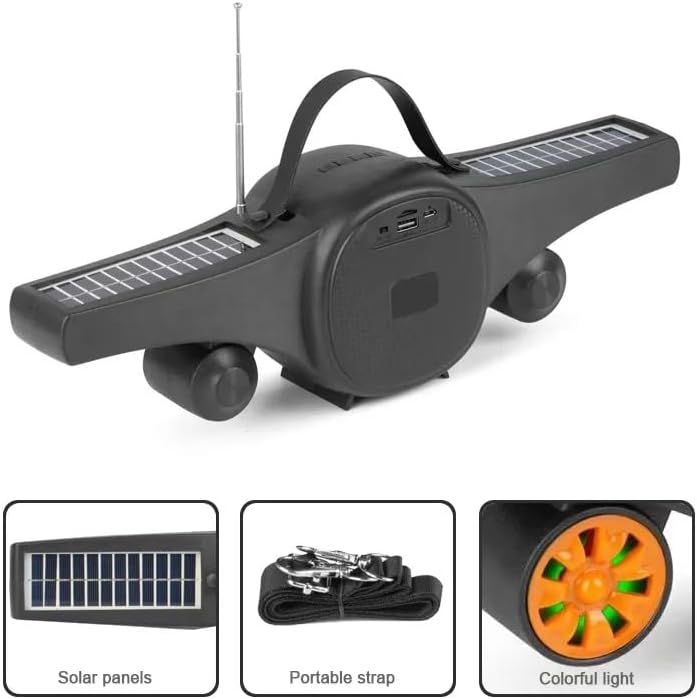
Image: The Kisonli SC-21 speaker showing its solar panels, antenna, USB port, and the included portable strap.
Produk Leuwihview
Familiarize yourself with the various parts and controls of your Kisonli SC-21 speaker.
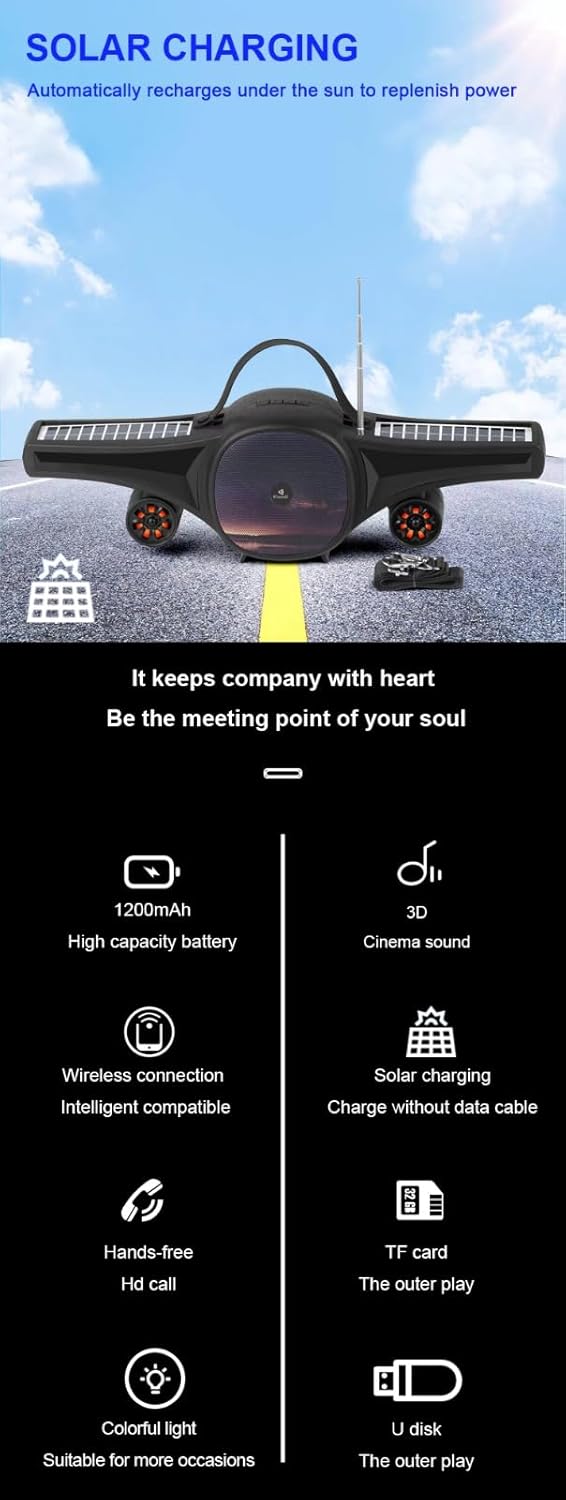
Image: A detailed display of the speaker's features, including the carrying handle, portable strap, control buttons, multiple playback ports (USB, TF card), colorful LED lights, and solar panels.
Kontrol sareng palabuhan:
- Saklar kakuatan: Tombol ON/OFF.
- Tombol Mode (M): Switches between Bluetooth, FM Radio, USB, and TF card modes.
- Play/Pause Button (►/−): Plays or pauses audio. In FM mode, long press to auto-scan stations.
- Previous Track/Volume Down (-): Pencét sakeudeung pikeun lagu/stasion samemehna, pencét lila pikeun ngurangan volume.
- Next Track/Volume Up (+): Pencét sakeudeung pikeun lagu/stasion salajengna, pencét lila pikeun ningkatkeun volume.
- LED Light Button (☀): Toggles the colorful LED lights.
- Port USB: Pikeun playback USB flash drive.
- Slot Kartu TF: Pikeun playback kartu TF (MicroSD).
- Port ngecas DC 5V: For charging the speaker using the provided USB cable.
- Panel panonpoe: Located on the wings for solar charging.
- anteneu: Extendable antenna for improved FM radio reception.
Disetél
1. Ngecas Speaker
Before first use, fully charge the speaker. The speaker can be charged via USB or solar power.
- Ngecas USB: Connect the provided USB charging cable to the DC 5V port on the speaker and to a USB power adapter (not included) or a computer's USB port. The charging indicator light will illuminate. Charging time is approximately 2-3 hours.
- Ngecas Surya: Place the speaker in direct sunlight. Ensure the solar panels are facing upwards and are not obstructed. The speaker will automatically recharge. Solar charging is slower than USB charging and is ideal for maintaining charge or for use in outdoor environments.

Image: The Kisonli SC-21 speaker positioned to demonstrate its solar charging capability under sunlight.
2. Powering on / Pareum
To power on the speaker, slide the Power Switch to the "ON" position. To power off, slide it to the "OFF" position.
Parentah Operasi
1. Mode Bluetooth
- Hurungkeun spiker. Spiker ieu bakal otomatis asup kana modeu pasangan Bluetooth, anu dituduhkeun ku lampu LED anu kedip-kedip.
- Dina alat anjeun (smartphone, tablet, laptop), aktipkeun Bluetooth sareng milarian alat anu sayogi.
- Select "SC-21" from the list of devices.
- Once paired, the speaker will emit a confirmation sound, and the LED light will stop flashing. You can now play audio from your device through the speaker.
2. Putereun Kartu USB/TF
- Insert a USB flash drive or a TF (MicroSD) card containing MP3/MAV audio files kana port masing-masing.
- The speaker will automatically switch to USB or TF card mode and begin playing audio. If it doesn't, press the "M" (Mode) button to cycle through modes until you reach the correct playback mode.
- Use the Previous/Next Track buttons to navigate through your music.
3. Modeu Radio FM
- Extend the antenna for better reception.
- Press the "M" (Mode) button until you hear the FM radio.
- Long press the Play/Pause button (►/−) to initiate an automatic scan for available radio stations. The speaker will save the stations it finds.
- Short press the Previous/Next Track buttons to switch between saved radio stations.
4. Volume Control
Long press the "+" button to increase the volume. Long press the "-" button to decrease the volume.
5. Lampu LED Control
Press the LED Light button (☀) to turn the colorful LED lights on or off.
Pangropéa
- beberesih: Anggo kaén anu garing sareng lemes pikeun ngabersihan permukaan spéker. Ulah make cleaners abrasive atawa pangleyur.
- Panyimpenan: Simpen spéker di tempat anu tiis sareng garing jauh tina sinar panonpoé langsung sareng suhu anu ekstrim upami henteu dianggo kanggo waktos anu lami.
- Perawatan batré: Pikeun manjangkeun umur batre, ulah miceun batre pinuh. Ngeusi batre spéker rutin, sanajan teu dipake.
Pamérésan masalah
| Masalah | Mungkin Cukang lantaranana | Solusi |
|---|---|---|
| Speaker teu hurung. | Batré lemah atawa béak. | Charge the speaker using the USB cable or place it in direct sunlight. |
| Teu aya sora ti panyatur. | Volume is too low; device not paired; incorrect mode selected. | Increase volume; ensure Bluetooth device is paired; press "M" button to select correct mode (Bluetooth, USB, TF, FM). |
| Papasangan Bluetooth gagal. | Spiker teu dina modeu pairing; alatna jauh teuing; gangguan. | Ensure speaker is in Bluetooth mode (flashing LED); move device closer; turn off other Bluetooth devices. |
| panarimaan radio FM goréng. | Antena teu dipanjangkeun; sinyal lemah. | Extend the antenna fully; try moving the speaker to a different location. |
| USB / kartu TF teu maén. | Lepat file format; kartu / drive teu diselapkeun leres; speaker teu dina modeu bener. | Mastikeun files are MP3/MAV format; reinsert card/drive; press "M" button to select USB/TF mode. |
spésifikasi
Detailed technical specifications for the Kisonli SC-21 speaker.

Image: A table displaying the product parameters for the Kisonli SC-21 speaker.
| Fitur | Rincian |
|---|---|
| Modél | SC-21 |
| Vérsi Bluetooth | BT 5.0 |
| Daya Kaluaran | 5W x 1 |
| Waktu Ngecas | 2-3 jam |
| Maén Time | 3-5 jam |
| Kapasitas batré | 1200 mah |
| Ukuran produk (L x W x H) | 400 x 92 x 116 mm |
| Beurat produk | 100 grams (device only) / 800 grams (package weight) |
| Modeu Playback | Bluetooth, TF Card, USB Disk, FM Radio |
| Format Musik anu Dirojong | MP3, MAV |
| Sumber Daya | Solar Powered, DC 5V USB |
| Fitur husus | LED Light, Portable, Water Resistant |
| Alat nu cocog | Smartphone, Tablet, Laptop |
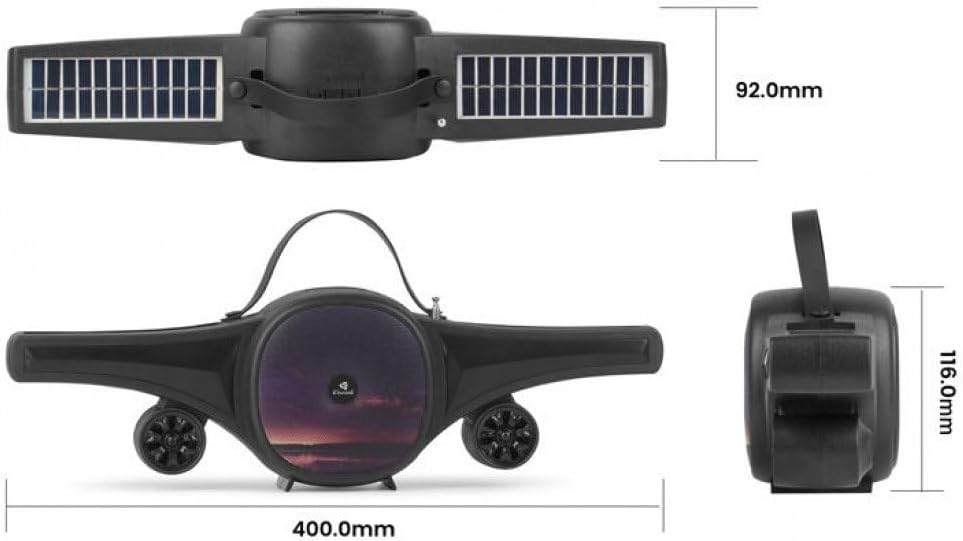
Image: Technical drawing of the Kisonli SC-21 speaker showing its dimensions (400mm length, 92mm width, 116mm height).
Garansi sareng Rojongan
Kisonli products are designed for reliability and performance. For warranty information or technical support, please refer to the retailer where you purchased the product or visit the official Kisonli websitus. Punten tahan bukti pameseran anjeun pikeun klaim garansi.


