1. Bubuka
This manual provides essential information for the installation, operation, and maintenance of your Philips Hue Wall Tap Dial Light Switch and Philips Hue Smart Dimmer Switch. These devices are designed to enhance your Philips Hue smart lighting system, offering convenient control over your lights. A Philips Hue Bridge (sold separately) is required for full functionality.
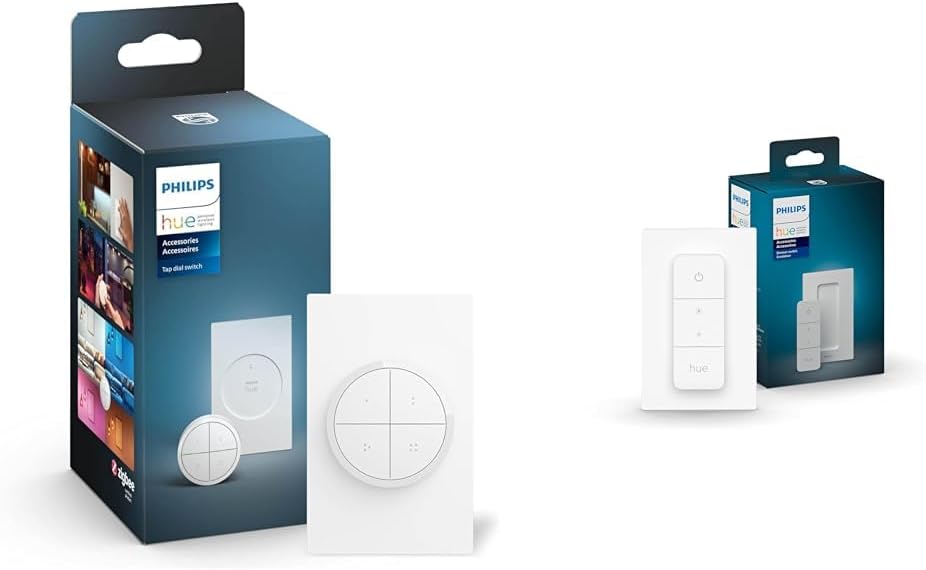
Image 1.1: Philips Hue Wall Tap Dial Light Switch and Smart Dimmer Switch in their retail packaging.
2. Émbaran Kasalametan
Mangga baca sareng ngartos sadaya parentah kaamanan sateuacan nganggo produk ieu. Gagalna nuturkeun paréntah ieu tiasa nyababkeun shock listrik, seuneu, atanapi bahaya anu sanés.
- Do not attempt to open or modify the devices.
- Keep devices away from water and moisture.
- Use only with Philips Hue compatible lighting products and the Philips Hue Bridge.
- Ensure proper ventilation around the devices.
- Buang batré nurutkeun peraturan lokal.
3. Eusi Paket
Paket anjeun kedah ngandung barang-barang ieu:
- 1x Philips Hue Wall Tap Dial Light Switch (includes dial and wall plate)
- 1x Philips Hue Smart Dimmer Switch (includes remote and wall plate)
- Instruksi Manual

Image 3.1: Components of the Philips Hue Tap Dial Switch.

Image 3.2: Components of the Philips Hue Smart Dimmer Switch.
4. Setélan
Both the Wall Tap Dial Switch and the Smart Dimmer Switch require a Philips Hue Bridge for full functionality and integration with your smart home system. Ensure your Hue Bridge is set up and connected to your network before proceeding.
4.1 Léngkah-léngkah Persiapan Awal
- Install your Philips Hue Lighting: Ensure your Philips Hue lights are installed and functioning within your home.
- Connect the Philips Hue Bridge: If not already done, connect your Hue Bridge to your router and power it on.
- Download the Philips Hue App: Download and install the Philips Hue app on your smartphone or tablet. Follow the in-app instructions to set up your Hue Bridge and discover your lights.

Image 4.1: Visual guide for installing Philips Hue lighting.

Image 4.2: Visual guide for connecting the Philips Hue Bridge.

Image 4.3: Visual guide for downloading the Philips Hue app.
4.2 Mounting and Pairing the Wall Tap Dial Switch
- Pamasangan: The Wall Tap Dial Switch can be mounted to a wall using the included adhesive or screws, or it can be used as a portable remote. The dial itself is magnetic and attaches to the wall plate.
- papasangan: Open the Philips Hue app, navigate to 'Settings' > 'Accessories setup' > 'Add accessory'. Select the Wall Tap Dial Switch and follow the on-screen instructions to pair it with your Hue Bridge and assign it to rooms or zones.

Image 4.4: The Philips Hue Tap Dial Switch mounted on a wall.
4.3 Mounting and Pairing the Smart Dimmer Switch
- Pamasangan: The Smart Dimmer Switch remote can be attached magnetically to its wall plate or any metal surface. The wall plate can be mounted using adhesive strips or screws.
- papasangan: In the Philips Hue app, go to 'Settings' > 'Accessories setup' > 'Add accessory'. Select the Smart Dimmer Switch and follow the app's guidance to connect it to your Hue Bridge and configure its control over your lights.

Image 4.5: The Philips Hue Smart Dimmer Switch being used to control lights.
5. Parentah Operasi
5.1 Philips Hue Wall Tap Dial Switch
- Tombol: The four buttons can be customized via the Hue app to activate specific lighting scenes, turn lights on/off, or control individual lights or groups.
- Telepon: Rotate the dial clockwise to brighten lights and counter-clockwise to dim lights. The dial's function can also be customized in the app.
- Portability: The magnetic dial can be removed from its wall plate for use as a portable remote.
5.2 Philips Hue Smart Dimmer Switch
- Tombol Hurung/Pareum: Press the 'On' button to turn lights on. Press the 'Off' button to turn lights off.
- Tombol Caang: Use the '+' button to brighten lights and the '-' button to dim lights.
- Hue Button: Press the 'Hue' button to cycle through four preset scenes or to get the right light based on the time of day. These scenes are configurable in the Philips Hue app.

Image 5.1: The Philips Hue app interface for assigning routines to accessories.

Image 5.2: Demonstrating the intuitive design of the Philips Hue Smart Dimmer Switch.
5.3 Pidéo Dilanjutkeunview of Philips Hue System
Video 5.3: Hiji leuwihview of the Philips Hue smart lighting system, demonstrating its versatility and control options.
6. Pangropéa
6.1 beberesih
Clean the devices with a soft, dry cloth. Do not use abrasive cleaners or solvents, as these may damage the surface.
6.2 Ngagantian batré
Both switches are battery-powered. When the battery is low, you may notice a decrease in responsiveness or an indicator in the Philips Hue app. Refer to the specific product's packaging or the Philips Hue app for instructions on how to replace the battery. Typically, these devices use standard coin cell batteries.
7. Cara ngungkulan
- Alat teu ngabales: Check the battery. Ensure the device is within range of the Philips Hue Bridge. Verify the device is paired correctly in the Philips Hue app.
- Lampu teu ngaréspon: Ensure the Philips Hue Bridge is powered on and connected to your network. Check the status of your Philips Hue lights in the app.
- Kasesahan pasangan: Ensure the device is in pairing mode (refer to specific product instructions for details). Move the device closer to the Hue Bridge during pairing. Restart the Hue app and the Hue Bridge.
- Sambungan intermiten: Ensure there are no major obstructions (e.g., thick walls, large metal objects) between the switch and the Hue Bridge. Other ZigBee devices can act as repeaters to extend the network range.
8. Spésifikasi
| Fitur | Rincian |
|---|---|
| merek | Philips Hue |
| Modél | Tap Dial + Dimmer Switch |
| Protokol konektipitas | ZigBee |
| Métode kontrol | Toél |
| Modeu Operasi | Manual |
| Alat nu cocog | Philips Hue lights, Philips Hue bridge |
| Warna | Bodas |
| Bahan | Metal (Contact Material) |
9. Garansi jeung Rojongan
For warranty information and customer support, please refer to the official Philips Hue website or contact Philips Hue customer service directly. Keep your proof of purchase for warranty claims.


