Produk Leuwihview
The Voice Duo True Wireless Stereo Earbuds offer a seamless audio experience with advanced features designed for convenience and clarity. These earbuds come with a translucent charging case featuring an LCD screen for real-time battery status, ensuring you're always aware of your power levels. With Bluetooth connectivity, auto-pairing, and a built-in microphone, they are ideal for music, calls, and on-the-go use.

Image: The Voice Duo True Wireless Stereo Earbuds, showing both earbuds and the open charging case with an LCD display.
Video: An official product video demonstrating the key features and usage of The Voice Duo True Wireless Earbuds, including their design, connectivity, and charging capabilities.
Naon Kaasup
Your Voice Duo True Wireless Stereo Earbuds package includes the following components:
- The Voice Duo True Wireless Stereo Earbuds (Left and Right)
- Translucent Charging Case with LCD Screen
- Kabel Ngecas USB
- Manual pamaké

Image: The product packaging for The Voice Duo True Wireless Stereo Earbuds, indicating the contents.
Disetél
Ngecas Earbuds sareng Case
Before first use, ensure both the earbuds and the charging case are fully charged. The translucent charging case features an LCD screen that displays the current battery percentage of the case.
- Place the earbuds into their respective slots in the charging case. The magnetic design will ensure they are correctly seated for charging.
- Connect the provided USB charging cable to the charging port on the case and plug the other end into a compatible USB power source (e.g., computer USB port, wall adapter).
- The LCD screen on the case will illuminate to show the charging status. When fully charged, the display will indicate 100%.
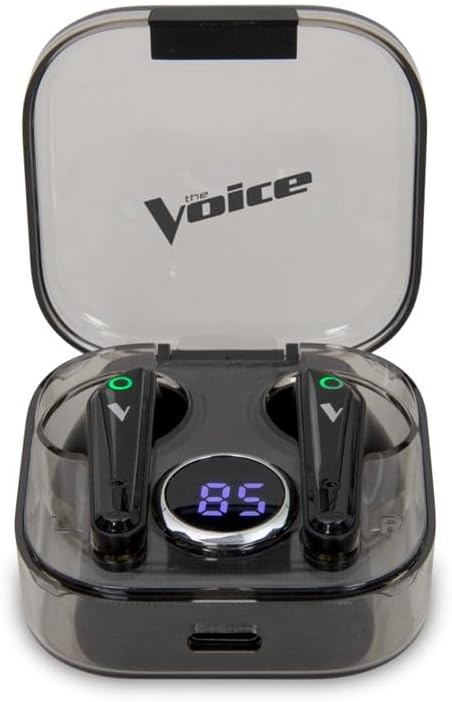
Image: The Voice Duo Earbuds securely placed within their charging case, displaying the battery percentage dina layar LCD.
Masangkeun sareng Alat Anjeun
The Voice Duo Earbuds feature auto-pairing for quick and easy connection.
- Ensure Bluetooth is enabled on your smartphone, tablet, or other compatible device.
- Buka wadah pangisi daya teras cabut dua earbud. Éta bakal otomatis hurung teras lebet kana modeu pairing.
- On your device, search for Bluetooth devices and select "The Voice Duo" from the list.
- Sakali disambungkeun, anjeun bakal ngadangu konfirmasi karungu, sareng earbuds bakal siap dianggo.
Parentah Operasi
Daya Otomatis Hurung / Pareum
The earbuds automatically power on when removed from the charging case and power off when placed back into the case and the lid is closed. This feature helps conserve battery life.
Leungeun-Free Telepon
The built-in microphone allows for clear, hands-free calls. When a call comes in, you can answer or end it using the touch controls on the earbuds (refer to the full user manual for specific touch commands).
Asisten sora Integrasi
The Voice Duo Earbuds are optimized for use with Siri (iOS) and Google Assistant (Android). Simply tap the earbud (refer to the full user manual for specific touch commands) to activate your device's voice assistant and issue commands for navigation, music control, calls, and more.

Image: A person wearing one of The Voice Duo Earbuds, demonstrating its comfortable fit for daily use.
Pangropéa
To ensure the longevity and optimal performance of your Voice Duo Earbuds, follow these maintenance guidelines:
- beberesih: Rutin usap earbuds sareng wadah ngecas ku lawon anu lemes, garing, teu aya serat. Hindarkeun ngagunakeun bahan abrasive atanapi bahan kimia anu kasar.
- Panyimpenan: Lamun teu dipake, nyimpen earbuds dina wadah ngecas maranéhanana pikeun ngajaga eta tina lebu jeung karuksakan.
- Suhu: Avoid exposing the earbuds and case to extreme temperatures (hot or cold) or high humidity.
- Paparan cai: These earbuds are not waterproof. Avoid direct contact with water or excessive moisture.
Pamérésan masalah
If you encounter issues with your Voice Duo Earbuds, try the following solutions:
- Henteu aya Masalah Sora/Koneksi:
- Pastikeun earbuds dieusi.
- Verify Bluetooth is enabled on your device and
Dokumén Patali - VDUO-6/2067

The Voice DUO TWS Earbuds User Manual and Specifications
Comprehensive user manual for The Voice DUO TWS Earbuds, covering setup, controls, troubleshooting, product specifications, and warranty information. Learn how to pair, use, and care for your wireless earbuds.
The Voice CB-TE072 True Wireless Earbuds Manual
User manual for The Voice CB-TE072 True Wireless Earbuds, covering package contents, safety instructions, FCC compliance, controls, usage instructions, troubleshooting, and warranty information.
MIXX StreamBuds Micro True Wireless Earbuds: How-To Guide and Specifications
Comprehensive guide for MIXX StreamBuds Micro True Wireless Earbuds, covering setup, pairing, usage, charging, technical specifications, safety, and recycling.
Pituduh Mimitian Gancang Earbud Peredam Bising JBL LIVE PRO 2 TWS True Wireless
Pituduh lengkep pikeun nyetél sareng nganggo earbud peredam bising nirkabel JBL LIVE PRO 2 TWS anjeun. Diajar ngeunaan pasangan, kontrol, fitur aplikasi, ngecas, sareng spésifikasi téknis.
boAt Airdopes 281: Patarosan sareng Fitur anu Sering Ditaroskeun
Frequently asked questions and technical details for the boAt Airdopes 281 wireless earbuds, covering features like touch controls, call handling, IPX5 water resistance, battery life, Bluetooth 5.0 connectivity, and voice assistant compatibility.