Bubuka
Thank you for choosing The Voice Hollywood Wireless Headphones. These headphones are designed to provide a superior audio experience with the convenience of wireless connectivity. Featuring HD Ultra Max Sound, a comfortable adjustable headband, and a tri-fold design for portability, they are optimized for seamless integration with Siri and Google Assistant. This manual provides detailed instructions for setup, operation, maintenance, and troubleshooting to ensure optimal performance and longevity of your device.
Émbaran Kasalametan
- Ulah ngalaan headphone ka suhu ekstrim, kalembaban, atawa zat korosif.
- Hindarkeun dengekeun dina tingkat polumeu luhur pikeun période anu panjang pikeun nyegah karusakan dédéngéan.
- Ulah nganggo headphone nalika nyetir, ngagowes, atanapi dina kaayaan dimana teu tiasa ngadangu sora sekitar tiasa bahaya.
- Jauhkeun headphone tina jangkauan barudak sareng piaraan.
- Ngan nganggo kabel ngecas sareng asesoris anu disayogikeun.
- Entong nyobian ngabongkar atanapi ngarobih headphone. Ieu bakal ngabatalkeun jaminan.
Eusi pakét
Punten parios yén sadaya barang aya dina pakét anjeun:
- The Voice Hollywood Wireless Headphones
- Kabel Ngecas USB Tipe-C
- Kabel Audio 3.5mm (AUX)

Figure 1: Included components and key features of the headphones.
Produk Leuwihview
The Hollywood Wireless Headphones feature an ergonomic design for extended comfort and intuitive controls for ease of use. The over-ear cups provide a comfortable fit, and the adjustable headband ensures a secure fit for various head sizes. The tri-fold design allows for compact storage and portability.

Gambar 2: Hareupeun view tina headphone.

Figure 3: Headphones in folded position for portability.
Kontrol jeung palabuhan
Refer to Figure 1 for a visual guide to the controls and ports. The main controls are located on the ear cups and include:
- Tombol Daya: Dianggo pikeun ngahurungkeun/mareuman sareng ngamimitian pasangan Bluetooth.
- Volume Kaluhur/Tombol Lagu Salajengna: Pencét pondok pikeun polumeu ka luhur, pencét panjang kanggo lagu salajengna.
- Volume Turun/Tombol Lagu Saméméhna: Pencét pondok pikeun volume handap, pencét lila pikeun lagu saméméhna.
- Tombol Multi-fungsi (MFB): Maénkeun/pareumkeun, ngajawab/ngaréngsékeun telepon, aktipkeun asisten sora.
- Port USB Tipe-C: Pikeun ngecas headphone.
- 3.5mm Audio Jack: Pikeun sambungan kabel nganggo kabel AUX.
- Mikropon internal: Pikeun nelepon tanpa nganggo leungeun sareng paréntah asistén sora.
Disetél
Ngecas Headphone
Before first use, fully charge your headphones. A full charge typically takes approximately 2-3 hours.
- Connect the small end of the USB Type-C charging cable to the charging port on the headphone ear cup.
- Sambungkeun tungtung kabel USB anu langkung ageung ka adaptor kakuatan USB (teu kalebet) atanapi port USB komputer.
- The LED indicator light will illuminate during charging and turn off or change color once fully charged.
Papasangan Bluetooth
Pair your headphones with your Bluetooth-enabled device (e.g., smartphone, tablet, computer).
- Pastikeun headphone dipareuman.
- Press and hold the Power button for approximately 5-7 seconds until the LED indicator light flashes blue and red alternately, indicating pairing mode.
- Dina alat anjeun, aktipkeun Bluetooth sareng milarian alat anyar.
- Select "Hollywood" from the list of available devices.
- Once successfully paired, the LED indicator will flash blue slowly or turn solid blue.
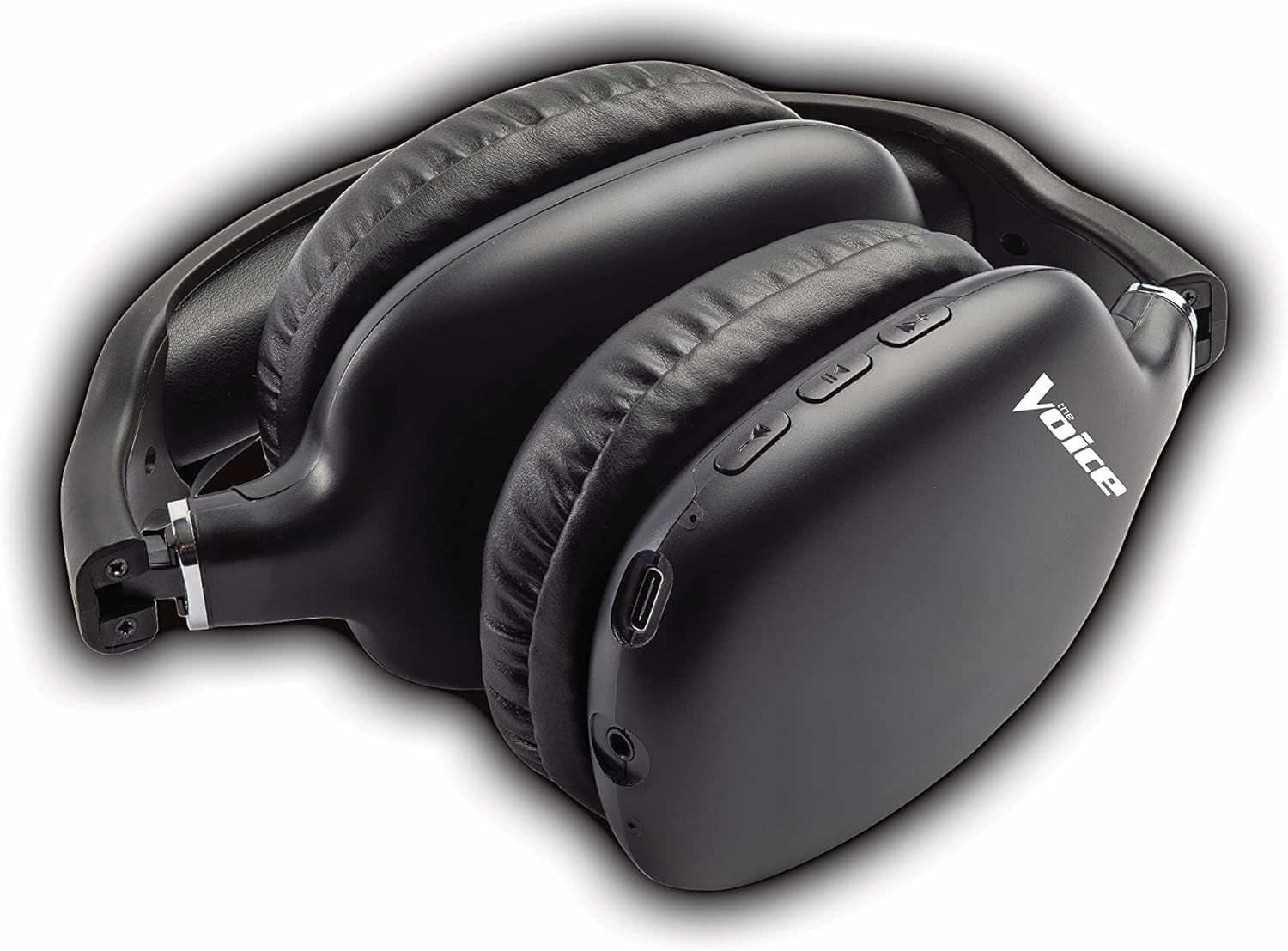
Figure 4: Headphones paired with a smartphone.
Sambungan Kabel (Modeu AUX)
You can use the headphones with non-Bluetooth devices or when the battery is depleted using the included 3.5mm audio cable.
- Plug one end of the 3.5mm audio cable into the audio jack on the headphone ear cup.
- Colokkeun tungtung anu hiji deui kana colokan kaluaran audio 3.5mm alat anjeun.
- Headphone bakal otomatis pindah ka mode kabel.
Parentah Operasi
Daya Hurung/Pareuman
- Daya Hurung: Press and hold the Power button for approximately 3 seconds until the LED indicator flashes blue.
- Pareum listrik: Pencét jeung tahan tombol Daya salila kurang leuwih 3 detik nepi ka indikator LED pareum.
Puterkeun Musik
- Puter / Reureuh: Pencét sakeudeung Tombol Multi-fungsi (MFB).
- Lagu salajengna: Pencét lila tombol Volume Up.
- Lagu Sateuacanna: Pencét lila tombol Jilid Turun.
- Volume Up: Pencét pondok tombol Volume Up.
- Volume Turun: Pencét pondok tombol Volume Turun.
Manajemén Telepon
- Ngajawab / mungkas Telepon: Pencét sakeudeung Tombol Multi-fungsi (MFB).
- Nolak Telepon: Pencét lila Tombol Multi-fungsi (MFB).
- Telepon deui Nomer Panungtungan: Double-press the Multi-function Button (MFB).
Aktivasina Asistén Sora
- Aktipkeun Siri/Asisten Google: Triple-press the Multi-function Button (MFB).
Video 1: Demonstrates the adjustable and padded comfort, built-in mic, and connectivity to Google or Siri for The Voice Hollywood Wireless Headphones.

Figure 5: User enjoying audio with the headphones, highlighting comfort and usability.
Pangropéa
beberesih
Regular cleaning helps maintain the headphones' appearance and functionality.
- Wipe the ear cups and headband with a soft, dry, lint-free cloth.
- Keur kokotor bandel, rada dampbilas lawon ku cai sareng sabun hampang, teras langsung usap dugi ka garing.
- Ulah make cleaners abrasive, alkohol, atawa pangleyur kimiawi.
Panyimpenan
When not in use, store your headphones in a cool, dry place, away from direct sunlight and extreme temperatures. Utilize the tri-fold feature for compact storage.
Pamérésan masalah
If you encounter issues with your headphones, refer to the table below for common problems and solutions.
| Masalah | Mungkin Cukang lantaranana | Solusi |
|---|---|---|
| Headphone teu hurung | batré lemah | Ngecas headphone pinuh. |
| Teu tiasa dipasangkeun sareng alat | Headphone teu dina modeu pairing; Bluetooth alat pareum; Jauh teuing ti alat | Ensure headphones are in pairing mode (flashing red/blue). Turn device Bluetooth on/off. Move headphones closer to device (within 10 meters). |
| Taya sora | Volume too low; Not connected; Incorrect audio source | Increase volume on headphones and device. Ensure headphones are properly paired/connected. Check audio output settings on your device. |
| Distorsi sora | Interference; Device volume too high | Move away from other wireless devices. Lower the volume on your device. |
| Mikropon teu jalan | Not connected; Device settings | Ensure headphones are properly paired. Check microphone input settings on your device. |
spésifikasi
| Fitur | Rincian |
|---|---|
| Ngaran modél | Hollywood |
| Téhnologi konektipitas | Wireless, Wired (Bluetooth) |
| Panempatan Ceuli | Leuwih Ceuli |
| Faktor Bentuk | Leuwih Ceuli |
| Tipe Kontrol | Voice Control, Built-in buttons and microphone |
| Rentang Frékuénsi | 20Hz - 20kHz |
| Item Beurat | 13.4 ons |
| Dimensi (Pakét) | 9.65 x 8.35 x 3.58 inci |
| Nomer modél | VHOL-6/2069 |
| UPC | 841133120698 |
Garansi sareng Rojongan
The Voice Hollywood Wireless Headphones come with a standard manufacturer's warranty. For detailed warranty information, technical support, or service inquiries, please refer to the warranty card included in your product packaging or visit the official The Voice Electronics website. Do not attempt to repair the product yourself.


