Bubuka
Hatur nuhun pikeun meuliasing The Voice Legend Wireless Bluetooth Speaker. This portable speaker is designed to deliver clear audio with a vibrant LED light show, making it perfect for various settings. It features Bluetooth connectivity for seamless music streaming, FM radio, hands-free calling, and support for USB and Micro SD playback. Its durable and lightweight design ensures portability and ease of use.
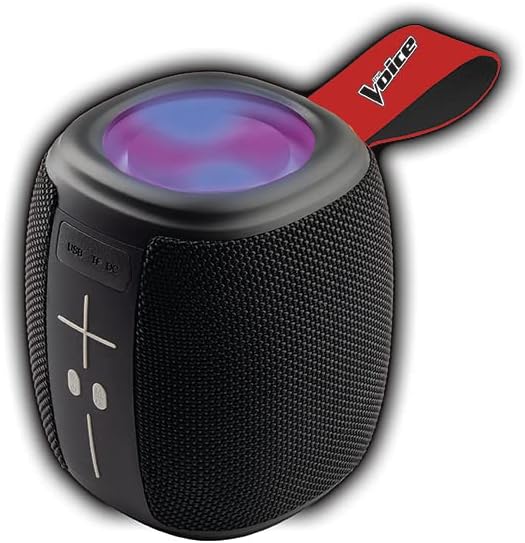
Image: The Voice Legend Wireless Bluetooth Speaker, showcasing its compact design and top-mounted LED light panel.
Naon dina Box
Mangga parios eusi pakét anjeun pikeun mastikeun yén sadaya barang aya:
- 1x The Voice Legend Bluetooth Speaker
- 1x Kabel Ngecas USB-C
- 1 x Manual Instruksi

Image: A visual representation of the package contents, including the speaker, USB-C charging cable, and the user manual.
Fitur produk
- Konektipitas Bluetooth Nirkabel: Easily connect to your smartphone, tablet, or laptop from up to 30 feet away.
- Tembongkeun Lampu LED Vibrant: Features multiple color modes for a dynamic visual experience, suitable for parties or ambient lighting.
- Portable & Lightweight Design: Compact dimensions (4.49 x 4.49 x 5.16 inches) and light weight (1.4 pounds) with a handy carrying strap for easy transport.
- Radio FM: Ngepaskeun kana stasiun radio karesep anjeun.
- Telepon Hand-Free: Built-in microphone allows for clear speakerphone calls.
- Sababaraha Pilihan Playback: Supports music playback via USB and Micro SD card slots.
- Batré anu tiasa dicas deui: Nyayogikeun waktos maén dugi ka 4 jam kalayan sakali ngecas.
- Oversize Controls: Easy-to-use large buttons for volume and playback control.
- Fungsi True Wireless Stereo (TWS): Connect two The Voice Legend speakers for an enhanced stereo sound experience.
- Tahan cai: Dirancang pikeun tahan cipratan sareng hujan ringan.
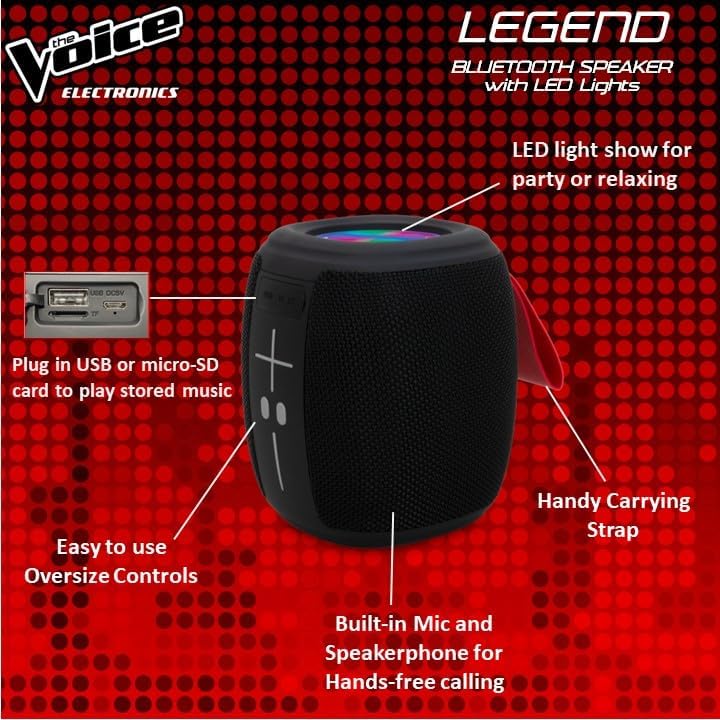
Gambar: Detil view of the speaker's side, pointing out the oversized controls, USB and Micro-SD card slots, built-in microphone for hands-free calling, and the handy carrying strap.
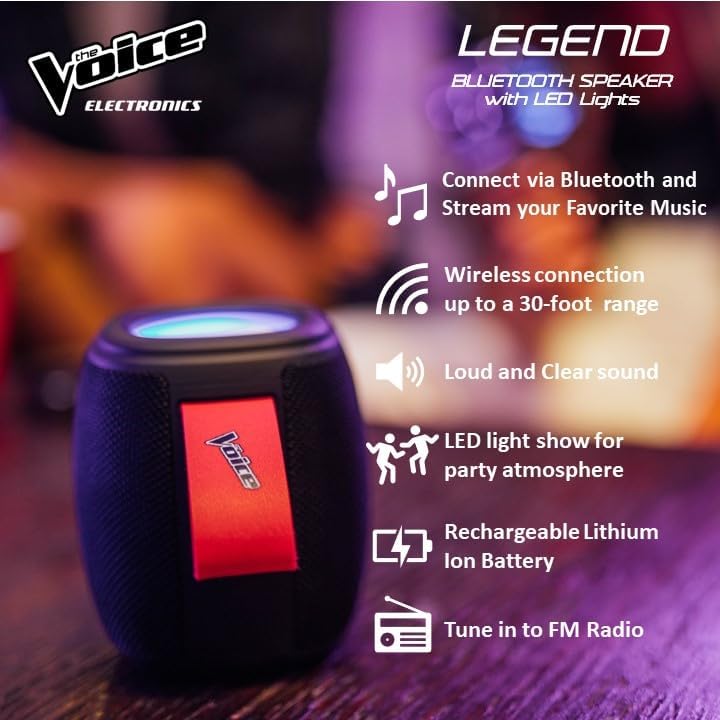
Gambar: Témbongkeun infografiscasing key features like Bluetooth connectivity, 30-foot wireless range, loud and clear sound, LED light show, rechargeable lithium-ion battery, and FM radio tuning.

Image: Demonstrating the speaker's lightweight and durable nature, and how to activate the LED light show for different ambiances.
Disetél
1. Ngecas Speaker
Before first use, fully charge the speaker. Connect the provided USB-C charging cable to the speaker's DC 5V port and the other end to a USB power adapter (not included) or a computer USB port. The charging indicator light will show charging status and turn off when fully charged. A full charge provides approximately 4 hours of playtime.
2. Powering on / Pareum
Press and hold the power button (usually marked with a circle or power symbol) for a few seconds to turn the speaker ON or OFF. A sound prompt will indicate the power status.
3. Papasangan Bluetooth
- Ensure the speaker is powered ON and in Bluetooth pairing mode. A blue LED light will flash rapidly, indicating it's ready to pair.
- Dina alat Anjeun (smartphone, tablet, jsb), buka setélan Bluetooth.
- Milarian pikeun "The Voice Legend" in the list of available devices.
- Select "The Voice Legend" to connect. Once connected, the blue LED light will stop flashing and remain solid, and you will hear a confirmation sound.
Video: An official product video demonstrating the features and ease of use of The Voice Legend Bluetooth Speaker, including its LED light show and portability.
Parentah Operasi
1. Music Playback (Bluetooth Mode)
- Once paired, open your music app on your device and start playing.
- Ngagunakeun éta + jeung - buttons on the speaker to adjust volume. Press and hold for volume control.
- Pencét pondok + tombol pikeun skip ka lagu salajengna.
- Pencét pondok - tombol pikeun pindah ka lagu saméméhna.
- Press the Play/Pause button (often marked with a play/pause symbol) to pause or resume playback.
2. Modeu Radio FM
- Press the Mode button (often marked "M") to switch to FM Radio mode.
- Spiker bakal otomatis nyeken sareng nyimpen stasiun radio anu sayogi.
- Ngagunakeun éta + jeung - tombol pikeun nganapigasi antara stasiun disimpen.
- For better reception, try repositioning the speaker.
3. Putereun USB / Micro SD
- Insert a USB drive or Micro SD card (with pre-loaded MP3 audio files) kana slot anu saluyu.
- The speaker will automatically detect the media and begin playback.
- Use the playback controls (volume, next/previous track, play/pause) as in Bluetooth mode.
4. Nelepon Hands-Free
- Nalika telepon asup nalika disambungkeun via Bluetooth, musik bakal ngareureuhkeun.
- Pencét tombol Puter/Pause pikeun ngajawab telepon asup.
- Pencét deui tombol Puter / Reureuh pikeun ngeureunkeun telepon.
- Pencét jeung tahan tombol Puter/Reureuh pikeun nolak telepon asup.
5. Lampu LED Control
The speaker features a dynamic LED light show. Press the dedicated light button (if available, or refer to specific button functions in the included manual) to cycle through different light modes or turn the lights off. There are typically 4 different color modes.
6. Leres Wireless Stereo (TWS) papasangan
To achieve a true stereo sound experience, you can pair two The Voice Legend speakers together:
- Ensure both speakers are powered ON and not connected to any Bluetooth device.
- On one speaker (this will be your primary speaker), press and hold the TWS pairing button (refer to the included manual for exact button location, often a dedicated button or a long press on a multi-function button).
- Spéker primér bakal milarian spéker sékundér. Sakali disambungkeun, anjeun bakal ngadéngé sora konfirmasi.
- Ayeuna, sambungkeun alat anjeun ka spiker utama via Bluetooth sapertos anu dijelaskeun dina bagian "Papasangan Bluetooth". Audio bakal diputer dina stereo ngalangkungan kadua spiker.

Image: Two The Voice Legend speakers shown side-by-side, illustrating their True Wireless Functionality (TWS) for connecting and streaming stereo audio.
Pangropéa
- beberesih: Ngusap spéker nganggo lawon anu lemes sareng garing. Ulah make cleaners abrasive atawa pangleyur.
- Panyimpenan: Simpen spéker dina tempat anu tiis sareng garing jauh tina sinar panonpoé langsung sareng suhu anu ekstrim.
- Perawatan batré: Pikeun manjangkeun umur batre, ulah miceun batre pinuh. Ngeusi batre spéker rutin, sanajan teu dipaké pikeun période nambahan.
- Tahan cai: While waterproof, avoid submerging the speaker in water for prolonged periods. Ensure charging ports are dry before charging.
Pamérésan masalah
| Masalah | Mungkin Cukang lantaranana | Solusi |
|---|---|---|
| Speaker does not turn ON. | batré lemah. | Ngecas spéker pinuh. |
| Teu tiasa dipasangkeun sareng alat Bluetooth. | Speaker henteu dina mode papasangan; alat Bluetooth pareum; jauh teuing ti speaker. | Ensure speaker is flashing blue LED. Turn device Bluetooth off/on. Move device closer (within 30 ft). |
| Teu aya sora atanapi sora distorsi. | Volume teuing leutik; spiker teu nyambung; masalah sumber audio. | Naékkeun volume spiker sareng alat. Pasangkeun deui Bluetooth. Pariksa sumber audio. |
| Radio FM statis/panarimaan goréng. | Sinyal lemah. | Reposition the speaker to find a stronger signal. |
| Cannot play from USB/Micro SD. | Lepat file format; kartu/drive teu dipasang kalawan bener. | Mastikeun files are MP3. Reinsert card/drive. |
spésifikasi
- Ngaran modél: The Voice Legend
- Tipe Speaker: Spéker nirkabel portabel
- Téknologi konektipitas: Bluetooth
- Téknologi Komunikasi Nirkabel: Bluetooth
- Kisaran Bluetooth: Nepi ka 30 suku (9.14 méter)
- Mode Kaluaran Audio: Stereo (kalayan TWS)
- Daya Kaluaran Maksimum Speaker: 3 Watt
- Kahirupan batré: Nepi ka 4 Jam
- Sumber Daya: Batré Powered
- Komponén Kaasup: Rechargeable battery, Built-in microphone
- Tahan cai: Sumuhun
- Métode kontrol: Kontrol sora
- Ukuran produk: 4.49 x 4.49 x 5.16 inci
- Beurat barang: 1.4 pon
- UPC: 841133120667
- Pabrikan: The Voice
Garansi sareng Rojongan
The Voice Legend Wireless Bluetooth Speaker comes with a Garansi kawates. Please refer to the warranty card included in your package for specific terms and conditions, including coverage period and details on how to obtain service.
For technical support, troubleshooting assistance, or warranty claims, please contact The Voice customer service. Contact information can typically be found on the product packaging or on the official The Voice Electronics websitus.
Punten mertahankeun bukti pameseran anjeun pikeun tujuan garansi.


