
1. Bubuka
This manual provides detailed instructions for the installation, operation, and maintenance of your FOSCAM V8EP 4K IP PoE Security Camera. The V8EP is an 8-megapixel outdoor camera designed for home and business surveillance, featuring 4K Ultra HD resolution, AI human and vehicle detection, color night vision, two-way audio, and Power over Ethernet (PoE) for simplified setup.

Image 1.1: FOSCAM V8EP Camera and App Interface
2. Produk Langkungview
2.1 Eusi pakét
- 1x FOSCAM V8EP 8MP Outdoor IP Camera
- 1x Guide Setup Gancang
- Kabel Ethernet 1x
- 1x Tanda Panjagaan
- 1x Tutup Anti Cai
2.2 Fitur konci
- 4K 8MP Ultra HD Resolution: Captures video at 3840x2160p with 6X digital zoom for clear details.
- Deteksi Manusa & Kandaraan AI: Advanced algorithms identify humans and vehicles, reducing false alarms.
- Warna Night Vision: Provides full-color video in low-light conditions up to 66 feet using built-in spotlights.
- Siren Alert & Spotlights: Deters intruders with an audible siren and bright spotlights upon detection.
- Audio Dua Arah: Diwangun-di mikropon jeung spiker ngamungkinkeun pikeun komunikasi real-time.
- Kakuatan kana Ethernet (Poe): Ngagampangkeun pamasangan ku cara nganteurkeun daya sareng data ngalangkungan hiji kabel Ethernet.
- IP66 Tahan Cuaca: Dirancang pikeun tahan rupa-rupa kaayaan cuaca luar.

Image 2.1: 4K Ultra HD Clarity Comparison
3. Setélan
3.1 PoE Installation
The FOSCAM V8EP camera utilizes Power over Ethernet (PoE) technology, requiring only one Ethernet cable for both power supply and data transmission. This simplifies wiring and installation.
- Pasang kaméra: Securely mount the camera to a wall or desired surface using the provided mounting hardware. Ensure the camera is positioned to cover the desired surveillance area.
- Sambungkeun kabel Ethernet: Connect one end of the Ethernet cable to the camera's PoE port.
- Connect to PoE Switch/NVR: Connect the other end of the Ethernet cable to a PoE switch, PoE injector, or a Foscam NVR. Ensure the PoE device is powered on.
- Sambungan jaringan: Connect your PoE switch or NVR to your router for network access.

Image 3.1: PoE Installation Diagram
3.2 App Setup and Initial Connection
To access and manage your camera, download the Foscam app on your smartphone.
- Download Foscam App: Milarian pikeun "Foscam" in your device's app store (iOS or Android) and install the application.
- Ngadamel akun: Open the app and follow the prompts to create a new Foscam account or log in if you already have one.
- Tambahkeun kaméra: In the app, select the option to add a new camera. Follow the on-screen instructions, which typically involve scanning a QR code on the camera or manually entering its details.
- Konpigurasikeun Setélan: Once connected, you can configure various camera settings, including network preferences, recording schedules, and alert notifications.
4. Operasi
4.1 AI Detection
The FOSCAM V8EP camera features intelligent AI detection capabilities to distinguish between different types of motion.
- Deteksi Manusa: Identifies human figures, reducing alerts from non-human movements.
- Deteksi Kandaraan: Recognizes vehicles, useful for monitoring driveways or parking areas.
- Custom Motion Zones: Anjeun tiasa nangtukeun daérah khusus dina widang kaméra view where motion detection should be active, ignoring irrelevant areas to minimize false alarms.
- Sensitipitas adjustable: Sensitivity levels for detection can be adjusted via the Foscam app to suit your environment.

Image 4.1: AI Human and Vehicle Detection
4.2 Visi Peuting
The camera provides advanced night vision options for clear surveillance in low-light conditions.
- Color Starlight Night Vision: Utilizes a high-quality sensor and F/1.6 aperture to capture color video in very low ambient light, extending up to 66 feet.
- Integrated Spotlights: Built-in spotlights (4500K) can be activated manually or automatically upon motion detection to illuminate the area and enable full-color night vision.
- Infrabeureum (IR) Night Vision: When spotlights are off, the camera automatically switches to infrared mode for black and white video in complete darkness.
- Schedule Spotlights: You can set schedules for when the spotlights should be active.

Image 4.2: Color Night Vision with Spotlights
4.3 Audio Dua Arah
Communicate directly through the camera using its integrated microphone and speaker.
- Komunikasi langsung: Speak to visitors or deter unwanted individuals from your smartphone via the Foscam app.
- Ngawaskeun Audio: Listen to audio from the camera's location.
Image 4.3: Two-Way Audio Functionality
4.4 Sistim alarem
When abnormal activity is detected, the camera can trigger an alarm to deter intruders and notify you.
- Aktipkeun Sirine: An audible siren can be triggered automatically or manually.
- Aktivasina Sorotan: Spotlights can flash to draw attention and illuminate the scene.
- Tanda instan: Receive push notifications, emails, or alerts on your device, allowing you to respond promptly.
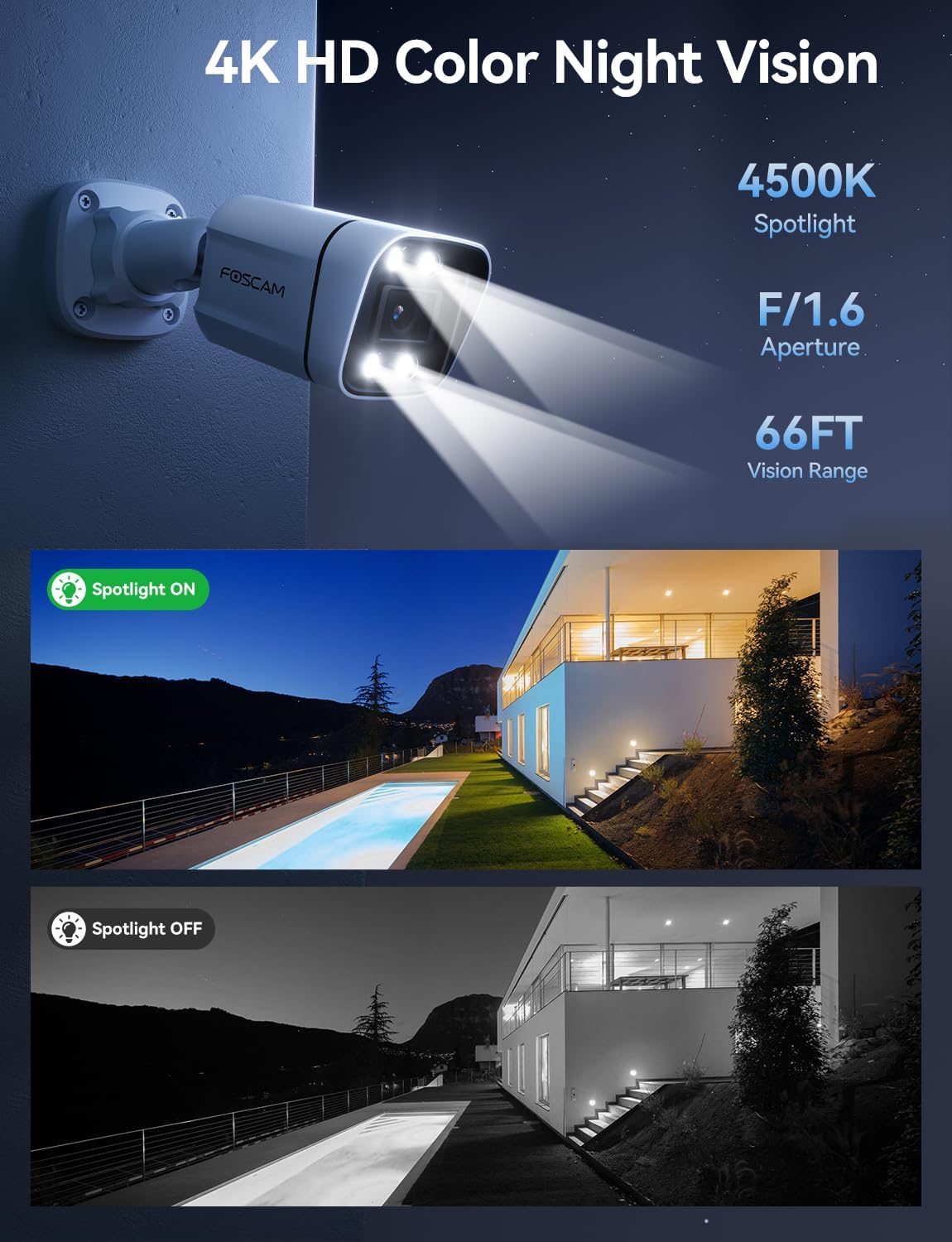
Image 4.4: Sound and Light Alarm System
4.5 Remote Access and Compatibility
Monitor your property from anywhere at any time.
- Foscam App/VMS: Aksés langsung view, recordings, and settings through the Foscam mobile app or Foscam VMS software on a computer.
- Integrasi Smart Home: Compatible with Alexa and Google Assistant for voice control and integration into smart home ecosystems.
- NVR/NAS Compatibility: Supports Blue Iris, Homey, Synology NAS, Qnap NAS, and ONVIF-enabled NVRs for local storage and advanced management.

Image 4.5: Remote Access Across Devices
5. Pangropéa
5.1 Résistansi Cuaca
The FOSCAM V8EP camera features an IP66 weatherproof housing, ensuring reliable operation in various outdoor conditions, including rain, snow, and dust.

Image 5.1: IP66 Weatherproof Design
5.2 Perawatan Umum
- beberesih: Périodik ngabersihan lénsa kaméra jeung perumahan ku lemes, damp cloth to remove dirt and debris that may affect image quality. Do not use harsh chemicals.
- Pamariksaan kabel: Regularly inspect the Ethernet cable and connections for any signs of wear or damage.
- Pembaruan firmware: Keep the camera's firmware updated through the Foscam app to ensure optimal performance and access to new features.
6. Cara ngungkulan
- Teu Aya Daya/Konéktipitas: Ensure the Ethernet cable is securely connected to both the camera and a powered PoE device (switch/injector/NVR). Verify the PoE device is functioning correctly and connected to your network.
- Teu Bisa Nyambung ka Aplikasi: Ensure your smartphone is connected to the same network as the camera during initial setup. Restart the camera and your router. Verify the Foscam app is updated to the latest version.
- Alarm Palsu anu Sering: Adjust the AI detection sensitivity settings in the Foscam app. Utilize custom motion zones to exclude areas with irrelevant movement (e.g., swaying trees, busy roads).
- Panglihatan Peuting Anu Goréng: Ensure the camera lens is clean. Check if the spotlights are enabled and functioning. Verify there are no obstructions blocking the camera's view.
- No Web panganteur: Note that this camera model primarily uses the Foscam app for configuration and live viewing. A direct web interface may not be available for all settings.
7. Spésifikasi
| Fitur | Spésifikasi |
|---|---|
| Ngaran modél | V8EP |
| Resolusi Capture Video | 4K (3840x2160p) |
| Resolusi Masih Éféktif | 8 MP |
| Laju pigura | 20 fps |
| Widang Of View | 110 darajat |
| Digital Zoom Ratio | 20X |
| Téhnologi konektipitas | Kabel (PoE) |
| Protokol konektipitas | Ethernet |
| Sumber Daya | Listrik Kabel (via PoE) |
| Pamakéan jero rohangan / outdoor | Jero rohangan, Luar |
| Peunteun Protection Internasional | IP66 |
| Wengi Sawangan Sawangan | 66 Feet (Color Starlight) |
| Flash Mémori Dirojong Ukuran Maximum | 256 GB (Micro SD) |
| Ukuran barang (L x W x H) | 4.3 x 3.94 x 7.6 inci |
| Item Beurat | 1.34 pon |
| Tipe Controller | Alexa, Google Assistant, Blue Iris, Homey, Synology NAS, Qnap NAS, NVR |
8. Garansi jeung Rojongan
FOSCAM is committed to providing reliable products and customer service.
- Bantosan Téknis: FOSCAM offers 24/7 fast reply and lifetime technical support for its products.
- Jaminan kualitas: The product comes with a 180-day quality guarantee.
- Wangsul: Ngarasakeun pengembalian barang gratis salami 30 dinten.
- ngagantian: Free replacement and fast delivery are provided for eligible issues.
For further assistance, please visit the official FOSCAM websitus atanapi ngahubungan rojongan customer maranéhanana.