Bubuka
This manual provides instructions for the ALLIMITY SN-14-AL Replacement Remote Control. This remote is designed to be compatible with various Sony television models, offering a direct replacement for your original remote without requiring complex programming.
Produk Leuwihview
The ALLIMITY SN-14-AL remote control is a functional replacement unit. It features a standard layout for easy navigation and control of compatible Sony televisions.

Gambar 1: Hareupeun view of the ALLIMITY SN-14-AL Replacement Remote Control, showing all buttons and their labels.
Fitur konci:
- No programming required; ready to use after battery installation.
- Direct replacement for original Sony remote models.
- Desain ergonomis pikeun penanganan nyaman.
Compatible Sony TV Models:
- KDL37XBR6
- KDL40V4100, KDL40V4150, KDL40W4100
- KDL42V4100
- KDL46V4100, KDL46W4100, KDL46W4150
- KDL52W4100, KDL52V4100
- KDL32XBR6, KDL46S4100, KDL52S4100
Replaces Original Remote Models:
- RM-YD021, RM-YD024, RM-YD025, RM-YD026, RM-YD027
- RM-YD065, RM-YD092, RM-YD102, RM-YD103
- RM-Y156, RM-YD005, RM-YD014, RM-YD018, RM-YD028, RM-YD040, RM-YD063
Disetél
The ALLIMITY SN-14-AL remote control does not require any programming. Simply insert batteries, and it will be ready for use with your compatible Sony television.
Pamasangan batré:
- Teangan tempat panutup kompartemen batré dina tonggong kadali jauh.
- Geser panutup ka handap atawa pencét kancing jeung angkat pikeun muka kompartemen.
- Insert two (2) AAA alkaline batteries, ensuring the positive (+) and negative (-) terminals align correctly with the markings inside the compartment.
- Ganti panutup kompartemen batré ku cara ngageser deui kana tempatna nepi ka klik aman.
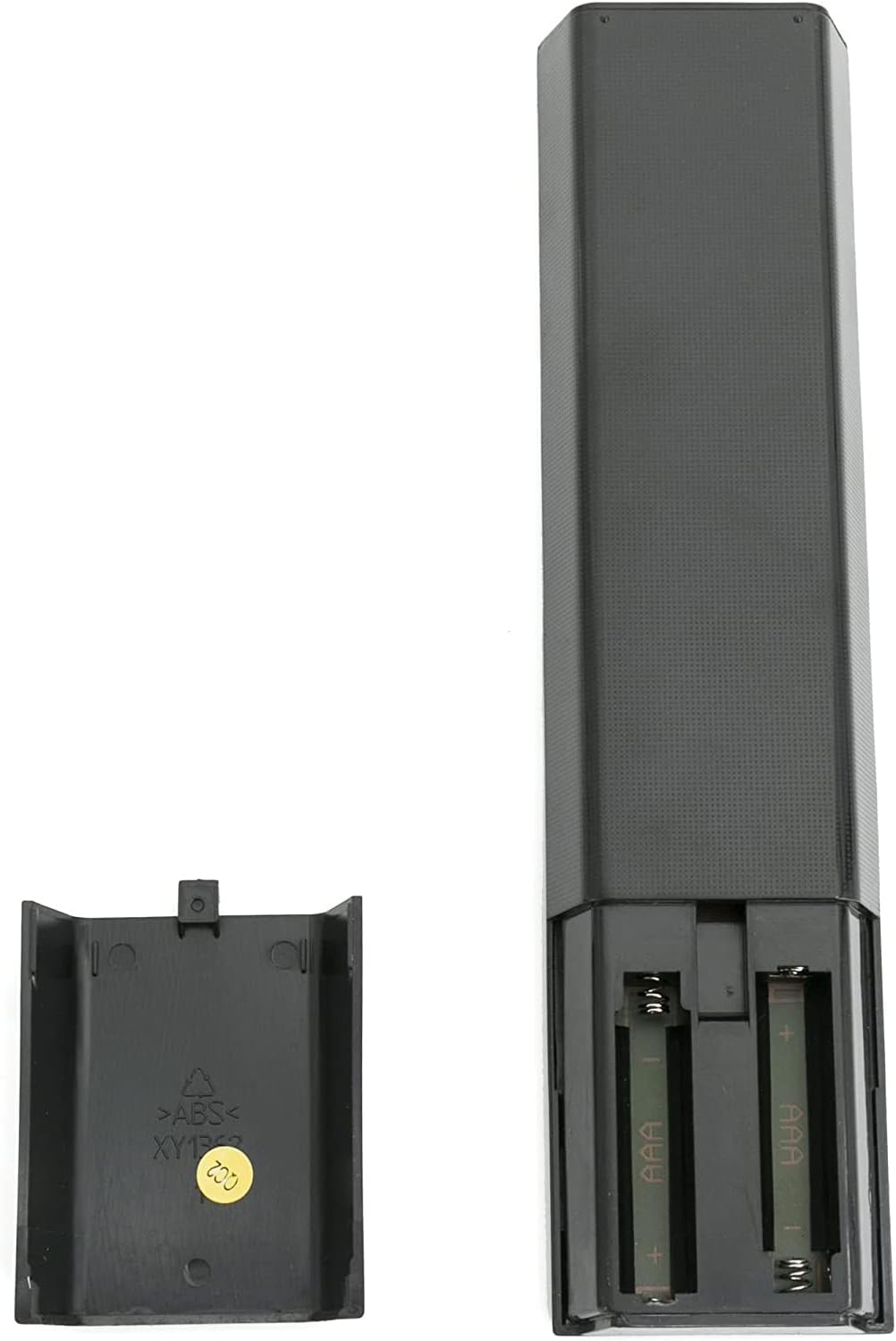
Gambar 2: View tina remot kontrol kalayan kompartemen batréna dibuka, nunjukkeun dimana nyelapkeun batré AAA.
Catetan:
- Ulah campur accu heubeul jeung anyar.
- Ulah gaul batré basa, standar (karbon-séng), atawa rechargeable (nikel-kadmium).
- Cabut batré upami kadali jauh henteu dianggo kanggo waktos anu panjang.
Parentah Operasi
Point the remote control directly at the infrared receiver on your Sony television. Ensure there are no obstructions between the remote and the TV.

Gambar 3: A hand holding the remote control, pointing it towards a television screen.
Fungsi dasar:
- kakuatan: Ngahurungkeun atawa mareuman televisi.
- input: Selects the input source (e.g., HDMI 1, AV, Component).
- VOL +/-: Saluyukeun tingkat polumeu.
- CH +/-: Ngaganti saluran televisi.
- Bisu: Ngajempékeun atanapi nganonaktipkeun audio televisi.
- Tombol Jumlah (0-9): Directly selects channels.
- BANDUNG: Accesses the TV's main menu or smart features.
- Pad Navigasi (Kaluhur/Turun/Kénca/Katuhu/Asupkeun): Navigates ngaliwatan ménu jeung confirms selections.
- PULIH: Balik deui ka layar atawa menu saméméhna.
- MAÉN/JEUNGKEUN/EUREUN/SATEUACANNA/SALAJENGNA: Ngadalikeun putereun média.
Refer to your Sony television's original user manual for specific functions of advanced buttons if needed, as this remote replicates the original functionality.
Pangropéa
- Keep the remote control dry. Moisture can damage the internal circuitry.
- Avoid exposing the remote to extreme temperatures.
- Bersihkeun remot nganggo lawon anu lemes sareng garing. Entong nganggo pembersih atanapi pelarut anu abrasif.
- Ulah leupaskeun atawa tundukkeun jauh kana tabrakan kuat.
Pamérésan masalah
Remote Control Teu Gawé:
- Pariksa batré: Ensure batteries are inserted correctly with the correct polarity (+/-). Replace old batteries with new AAA alkaline batteries.
- Garis Panempoan: Make sure there are no objects blocking the path between the remote control and the TV's infrared sensor.
- Jauh Sensor: Confirm the TV's remote sensor is not obstructed or dirty.
- Daya TV: Ensure the television is powered on and not in standby mode.
- Test with Camera: Use a smartphone camera to check if the remote is emitting an IR signal. Point the remote's front end at the camera lens and press any button. If you see a light flashing on the camera screen, the remote is likely transmitting a signal. (Note: Some smartphone cameras filter out IR light).
If the issue persists after performing these checks, contact customer support for further assistance.
spésifikasi
| Fitur | Rincian |
|---|---|
| Nomer modél | SN-14-AL |
| merek | KAKATAAN |
| Sumber Daya | 2 x Batré Alkali AAA (teu kalebet) |
| Diménsi | Kira-kira 6 x 2 x 0.6 inci |
| Beurat | Kira-kira 2 ons (tanpa batré) |
| Kasaluyuan | Sony KDL series TVs (specific models listed in Product Overview) |
| Fitur husus | Desain ergonomis |
Garansi sareng Rojongan
For warranty information or technical support, please refer to the documentation provided with your purchase or contact the seller directly. Keep your purchase receipt for any warranty claims.
For further assistance, you may also visit the ALLIMITY official websitus atanapi ngahubungan departemén layanan palanggan maranéhna.


