1. Bubuka
This manual provides detailed instructions for the installation, operation, and maintenance of your YuanLey 8 Port 2.5G Unmanaged Desktop Ethernet Switch with 10G SFP. Please read this manual thoroughly before using the device to ensure proper functionality and to prevent damage.
2. Eusi Paket
Pariksa yén pakét anjeun ngandung barang-barang ieu:
- 1 x YuanLey 8 Port 2.5G Ethernet Switch
- 1 x Kabel Listrik
- 1 x Manual Pamaké
3. Fitur Produk
- 9 Port Configuration: Includes 8 x 2.5 Gigabit Ethernet ports and 1 x 10G SFP+ Port.
- Performance-Speed luhur: Delivers 2.5 times faster network performance than traditional Gigabit switches, with a switching capacity of up to 60Gbps.
- Nyolok sareng Puter: Unmanaged design requires no configuration for immediate use.
- Durable and Quiet: Features a metal case with 6KV lightning protection and a fanless design for silent operation.
- Suhu Operasi Lebar: Functions reliably in temperatures ranging from -10°C to 50°C.
- Penempatan serbaguna: Supports both wall mount and desktop placement.
4. Produk Langkungview

Figure 4.1: YuanLey 8 Port 2.5G Unmanaged Desktop Ethernet Switch

Gambar 4.2: Panel hareup Leuwihview with Ports and Indicators
The switch features 8 RJ45 ports supporting 10/100/1000Mbps/2.5G adaptive speeds and 1 SFP+ port for 1G/2.5G/10G fiber connections. LED indicators provide status for power and link activity.
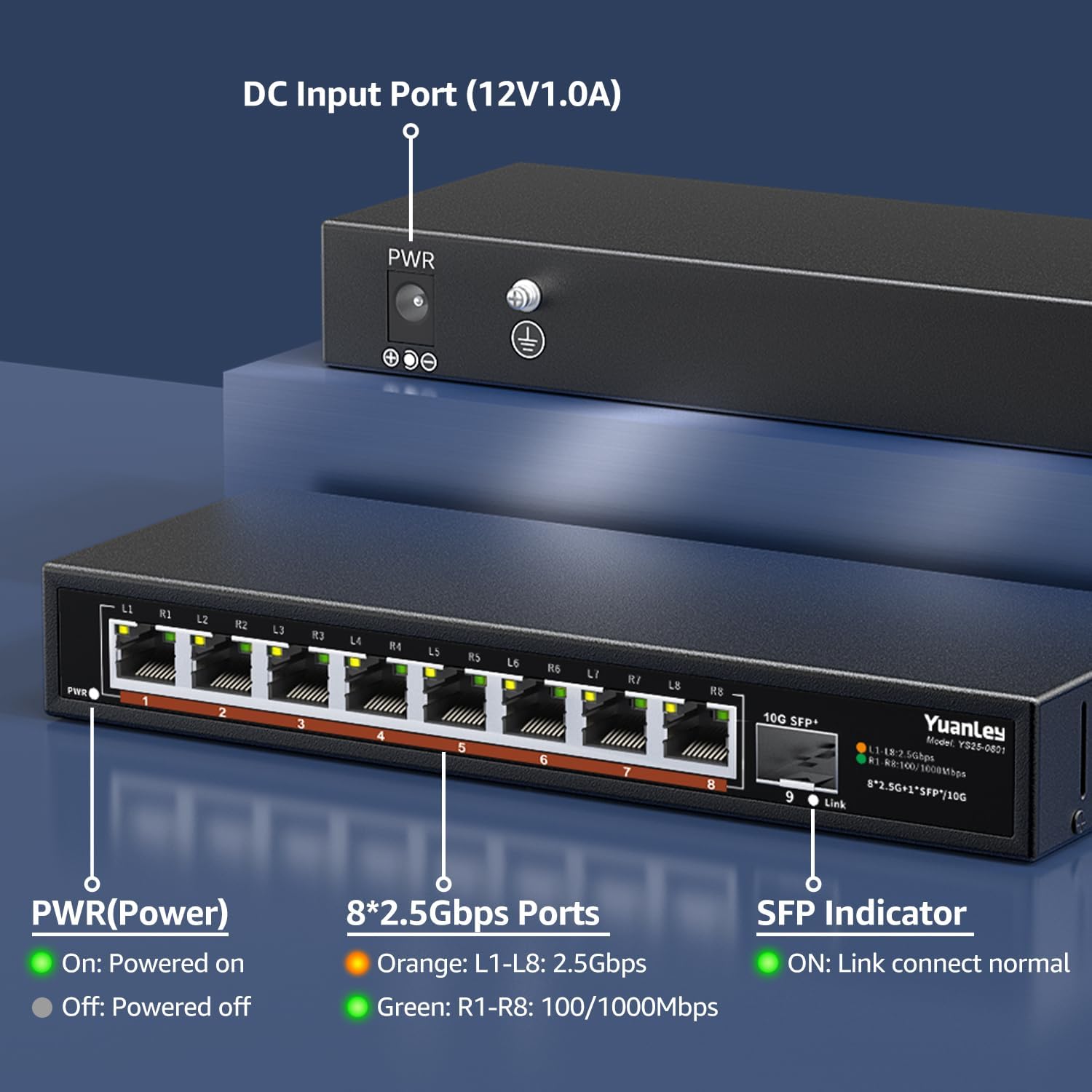
Gambar 4.3: Panel Tukang di Luhurview kalayan Input Daya

Gambar 4.4: Detil View of Ports and Indicators
The rear panel includes the DC 12V/1.0A power input port and a grounding screw for electrical safety. The front panel LEDs indicate power status, 2.5Gbps link speed (orange), and 100/1000Mbps link speed (green) for RJ45 ports, and link status for the SFP+ port.
5. Setélan
Follow these steps to set up your YuanLey Ethernet Switch:
- Sambungkeun Kakuatan: Plug the provided power adapter into the DC 12V/1.0A input port on the rear of the switch, then plug the adapter into a power outlet. The PWR LED on the front panel will illuminate green.
- Sambungkeun Alat Ethernet: Connect your network devices (e.g., computers, NAS, WiFi 6 APs, gaming PCs) to the 2.5G Base-T ports (1-8) using standard Ethernet cables (Cat5e or higher recommended for 2.5G speeds). The corresponding port LEDs will light up to indicate a successful connection and speed.
- Connect SFP+ Module (Optional): If using the 10G SFP+ port, insert a compatible 1G/2.5G/10G SFP/SFP+ module (not included) into the SFP+ slot. Then, connect a fiber optic cable or DAC cable to the module. The SFP indicator LED will light up when a link is established.

Figure 5.1: Typical Network Setup with the YuanLey Switch
Setup Video Guide
Video 5.1: An official YuanLey video demonstrating the setup and features of the 8 Port 2.5Gbps Switch.
6. Ngoperasikeun Switch
The YuanLey 2.5G Unmanaged Ethernet Switch is designed for simple plug-and-play operation. Once powered on and connected to your network devices, it will automatically detect the link speed and establish connections without any further configuration.
- Indikator LED: Observe the PWR, L1-L8, and SFP+ Link LEDs to monitor the switch's status and network activity.
- MDI/MDIX Otomatis: The switch supports Auto MDI/MDIX, eliminating the need for crossover cables.
- Adaptive Speed: RJ45 ports automatically adapt to 10/100/1000Mbps or 2.5Gbps.
7. Pangropéa
To ensure optimal performance and longevity of your switch, consider the following maintenance guidelines:
- panempatan: Place the switch in a well-ventilated area, away from direct sunlight, heat sources, and excessive moisture. The fanless design relies on natural convection for cooling.
- beberesih: Periodically clean the exterior of the switch with a soft, dry cloth. Avoid using liquid or aerosol cleaners.
- Manajemén Kabel: Pastikeun kabel jaringan disusun rapih sareng henteu bengkok atanapi tegang teuing.
- Sasayogian tanaga: Use only the original power adapter provided with the switch.

Figure 7.1: Fanless Design and Environmental Considerations
8. Cara ngungkulan
Upami anjeun ngalaman masalah sareng saklar anjeun, tingali masalah sareng solusi umum ieu:
- Henteu aya kakuatan:
- Pastikeun adaptor kakuatan disambungkeun sacara aman ka saklar sareng stop kontak listrik anu tiasa dianggo.
- Check if the PWR LED is illuminated. If not, try a different power outlet.
- Teu Aya Tautan/Kagiatan di Palabuhan:
- Pariksa yén kabel Ethernet parantos nyambung kalayan pageuh kana port switch sareng alat jaringan.
- Coba kabel Ethernet béda.
- Pastikeun alat nu disambungkeun dihurungkeun tur fungsina bener.
- Check the LED indicator for the specific port. If it's off, there might be no link.
- Lambat Jaringan:
- Ensure all devices in the network path (NICs, cables, routers) support 2.5G speeds to achieve maximum performance.
- Use Cat5e or higher-rated Ethernet cables for 2.5G connections.
- Check the color of the port LED: Orange indicates 2.5Gbps, Green indicates 100/1000Mbps.
- SFP+ Port Issues:
- Ensure the SFP/SFP+ module is correctly inserted and compatible with the switch.
- Verify the fiber optic or DAC cable is properly connected and undamaged.
- Check the SFP indicator LED for link status.
9. Spésifikasi
| Fitur | Spésifikasi |
|---|---|
| Nomer modél | 9 Port | 8x2500Mbps+1x10G SFP |
| Dimensi produk | 7.76 "L x 2.87" W x 1.14 "H (19.7cm x 7.3cm x 2.9cm) |
| Item Beurat | 1.36 pon (0.62 Kilogram) |
| Jumlah Palabuhan | 8 x 2.5G Base-T, 1 x 10G SFP+ |
| Laju Mindahkeun Data | 60 Gigabit Per Detik (Kapasitas Switching) |
| Voltage | 230 Volts (AC) input to adapter, 12V DC output |
| Bahan Kasus | logam |
| Suhu Operasi | -10°C nepi ka 50°C |
| Panangtayungan kilat | 6KV |
| UPC | 790885573743 |
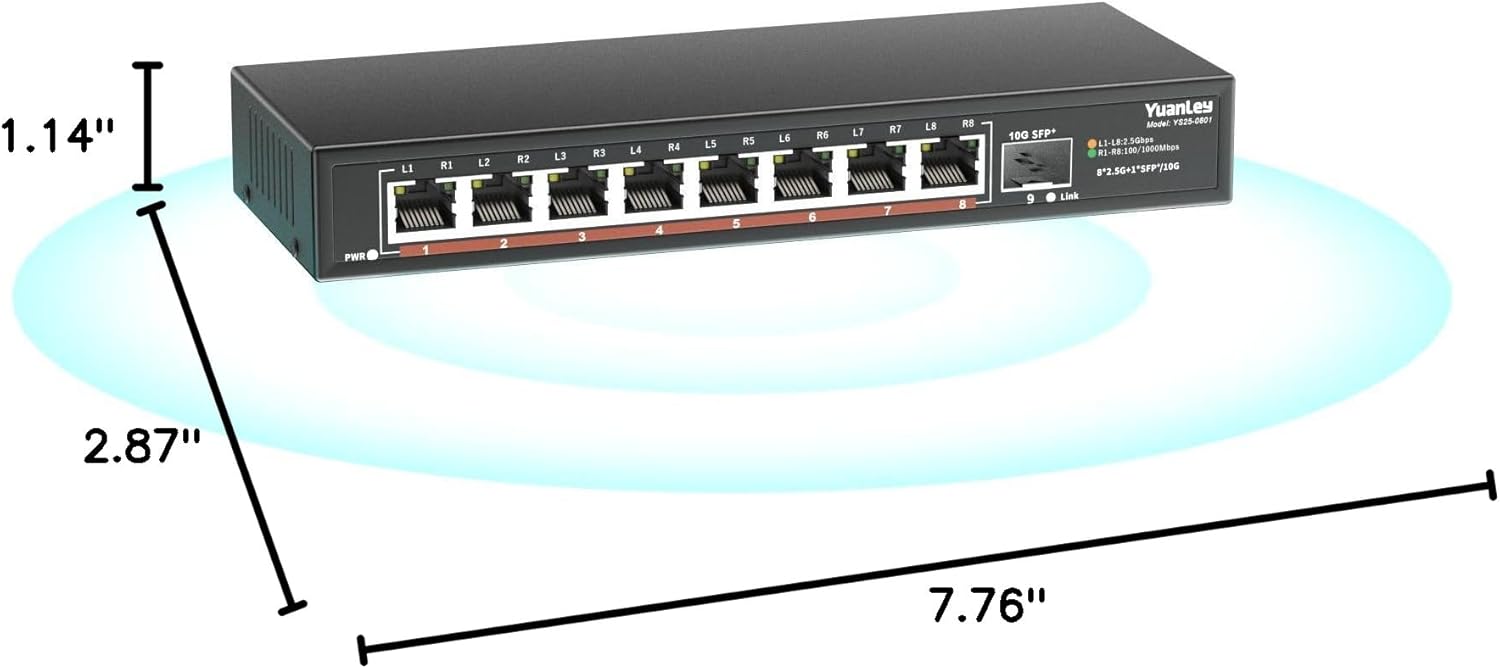
Gambar 9.1: Dimensi Produk
10. Garansi jeung Rojongan
YuanLey products are designed for reliability and performance. For warranty information and technical support, please refer to the official YuanLey websitus atanapi ngahubungan layanan palanggan maranéhanana langsung. Simpen resi pameseran anjeun pikeun klaim jaminan.
Pikeun pitulung salajengna, anjeun tiasa nganjang ka YuanLey Store on Amazon.


