Bubuka
This manual provides detailed instructions for the TELE System 27-inch Full HD LED TV, model palco hevc s2. Please read this manual carefully before using the product to ensure proper operation, maximize its lifespan, and understand its features. Keep this manual for future reference.
1. Setélan
1.1 Ngabongkar bungkusan
Cabut TV sareng sadaya asesoris tina bungkusna kalayan ati-ati. Pastikeun sadaya komponén aya:
- TELE System 27-inch Full HD LED TV
- Kadali jauh
- Kabel Daya
- Manual pangguna (dokumén ieu)
- Komponén Stand TV (upami aya)
1.2 Ngalampirkeun Stand atawa Pamasangan Tembok
Pikeun Pamasangan Stand:
- Teundeun layar TV ka handap dina permukaan anu lemes sareng bersih pikeun nyegah goresan.
- Sejajarkeun komponén stand jeung liang pamasangan di handapeun TV.
- Ngamankeun stand ngagunakeun screws disadiakeun. Ulah overighten.
Pikeun Wall Mounting:
This TV supports wall mounting. Refer to the specific instructions provided with your wall mount kit for proper installation. Ensure the wall mount is compatible with the TV's VESA mounting pattern and weight.
1.3 Nyambungkeun Daya
Connect the power cable to the TV's power input, then plug the other end into a suitable electrical outlet. The TV will enter standby mode.
1.4 Nyambungkeun Alat éksternal
Use the available ports on the TV to connect your external devices:
- HDMI: Pikeun pidéo sareng audio definisi luhur tina alat sapertos pamaén Blu-ray, konsol kaulinan, atanapi kotak set-top.
- USB: Pikeun nyambungkeun alat panyimpenan USB pikeun muterkeun media files.
- Antena/Kabel: Connect your DVB-T2 antenna for digital terrestrial television reception.
1.5 Mimiti-Time Setup
Upon first power-on, the TV will guide you through an initial setup process. This typically includes:
- Pilihan basa.
- Pilihan nagara / Wewengkon.
- Automatic channel scanning for DVB-T2 broadcasts.
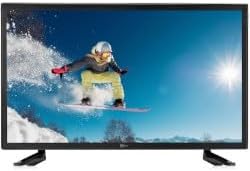
gambar ieu nembongkeun hareup view of the TELE System 27-inch Full HD LED TV, model palco hevc s2, with its stand attached. The screen displays a vibrant image of a snowboarder in action, highlighting the display quality.
2. Parentah Operasi
2.1 Kadali Dasar
Use the remote control to operate your TV. Key functions include:
- Tombol Daya: Ngahurungkeun atanapi mareuman TV (mode sayaga).
- Volume Kaluhur/Turun: Nyaluyukeun tingkat sora.
- Saluran luhur/handap: Robah saluran TV.
- Tombol Jumlah (0-9): Pilihan saluran langsung.
- Jempé: Ngajempékeun sora TV.
2.2 Pamilihan Input
Pencét éta SUMBER or INPUT button on your remote control to cycle through available input sources (e.g., HDMI1, HDMI2, USB, DVB-T2). Select the desired input for your connected device.
2.3 Navigasi Menu
Pencét éta MENU button to access the TV's main menu. Use the arrow buttons (Up, Down, Left, Right) to navigate through options and the OK or Asupkeun button to confirm selections. The menu allows you to adjust picture settings, sound settings, channel settings, and more.
2.4 DVB-T2 Tuner Usage
After completing the channel scan during initial setup, you can access digital terrestrial channels. Use the Channel Up/Down buttons or direct number input to switch channels. The TV supports DVB-T2 for high-quality digital broadcast reception.
2.5 USB Media Playback
Insert a USB storage device into the TV's USB port. The TV should automatically detect the device and prompt you to open the media browser. You can then navigate and play supported video, audio, and image files disimpen dina alat USB.
3. Pangropéa
3.1 Cleaning the Screen and Casing
- layar: Lembut usap layar nganggo lawon anu lemes sareng teu aya serat. Pikeun tanda nekad, rada dampen lawon jeung cai atawa cleaner layar husus. Ulah menyemprot cairan langsung kana layar.
- Casing: Anggo kaen anu lemes sareng garing pikeun ngusap TV casing. Avoid using abrasive cleaners, waxes, or solvents as they can damage the finish.
penting: Salawasna cabut TV tina stop kontak sateuacan beberesih.
3.2 Apdet parangkat lunak
The TV's software may receive updates to improve performance or add new features. Check the TV's menu for a 'Software Update' or 'System Update' option. Follow the on-screen instructions carefully if an update is available. (Note: Software update guarantee information is not available for this model.)
3.3 Pancegahan Kasalametan
- Entong meungpeung lawang angin.
- Ulah ngalaan TV ka hujan atawa beueus.
- Hindarkeun nempatkeun TV dina sinar panonpoé langsung atanapi caket sumber panas.
- Ulah muka TV casing; ngarujuk sadaya jasa ka tanaga anu mumpuni.
4. Cara ngungkulan
Sateuacan ngahubungi dukungan, cobian solusi ieu pikeun masalah umum:
| Masalah | Solusi anu mungkin |
|---|---|
| Taya Daya | Ensure the power cable is securely plugged into both the TV and the wall outlet. Check if the outlet is working by plugging in another device. |
| Taya Gambar, tapi Sora Aya Hadir | Pariksa sumber input. Pencét éta SUMBER button on the remote to ensure the correct input (e.g., HDMI1) is selected. |
| Taya Sora, tapi Gambar Aya | Check the volume level and ensure the TV is not muted. If using external audio, ensure it is correctly connected and powered on. |
| Remote Control Teu Gawé | Ganti batré dina kadali jauh. Pastikeun teu aya halangan antara jauh sareng sénsor IR TV. |
| Poor DVB-T2 Signal/No Channels | Check your antenna connection. Try repositioning the antenna or performing a new channel scan in the TV's menu. |
| Média USB Teu Bisa Diputer | Ensure the USB device is formatted correctly (e.g., FAT32) and the media files are in a supported format. Try another USB device. |
5. Spésifikasi
The following are the technical specifications for the TELE System 27-inch Full HD LED TV (Model: palco hevc s2):
- Ngaran modél: palco hevc s2
- Ukuran layar: 27 inci
- Téknologi tampilan: LED
- Resolusi: 1080p (HD lengkep)
- Laju Refresh: 120 hz
- Téknologi Tuner: DVB-T2
- Antarmuka Hardware: HDMI
- Total palabuhan USB: 1
- Rasio Aspék: 16:9
- Mode Kaluaran Audio: Stereo
- Surround Configuration: 2.0
- Tipe Pamasangan: Tembok Gunung
- Fitur husus: Layar datar
- Model Taun: 2010
Specifications are subject to change without notice. For the most up-to-date information, please refer to the product packaging or manufacturer's websitus.
6. Émbaran jaminan
This TELE System TV comes with a manufacturer's warranty. The specific terms and duration of the warranty may vary by region and retailer. Please retain your proof of purchase for warranty claims. For detailed warranty information, refer to the warranty card included with your product or visit the official TELE System websitus.
7. Rojongan Palanggan
If you encounter issues that cannot be resolved using the troubleshooting guide, or if you require further assistance, please contact TELE System customer support. Contact details can typically be found on the official TELE System websitus atanapi dina bungkusan produk.
Dukungan Online: Visit the official TELE System websitus pikeun FAQs, artikel rojongan, sarta formulir kontak.
Rojongan Telepon: Check the TELE System websitus pikeun nomer kontak régional.


