1. Bubuka
The IFYOO GTP01 Wired USB Gaming Touchpad combines keyboard and mouse functionalities into a compact gamepad form factor. Designed for precision and comfort, it is compatible with PC (Windows 11, 10, 8, 7), Xbox One, Xbox Series S/X, PS4, and PS5. This device is intended for games that support keyboard and mouse input.
This manual provides detailed instructions for setup, operation, maintenance, and troubleshooting to ensure optimal performance and user experience.
2. Eusi Paket
- 1x IFYOO GTP01 Wired USB Gaming Touchpad
- 1x Manual Pamaké (dokumén ieu)
3. Produk Langkungview
The GTP01 features a large precision trackpad, a left joystick, and up to 24 buttons and triggers equipped with mouse micro switches for tactile feedback. It includes a scroll wheel and back buttons for enhanced control.

angka 3.1: luhur jeung handap view of the IFYOO GTP01 Gaming Touchpad.
3.1 Fitur konci
- Mouse-Level Precision Trackpad: Large trackpad (8.4cm x 6.3cm) for accurate aiming, precise tracking, and fast turning.
- Micro Switch Buttons: Up to 13 buttons feature mouse micro switches for crisp, tactile feedback and a 5 million click lifespan.
- Alps Joystick: Short concave joystick for enhanced movement control.
- Desain ergonomis: Anti-slip textured back grip and carefully placed buttons for comfortable use.
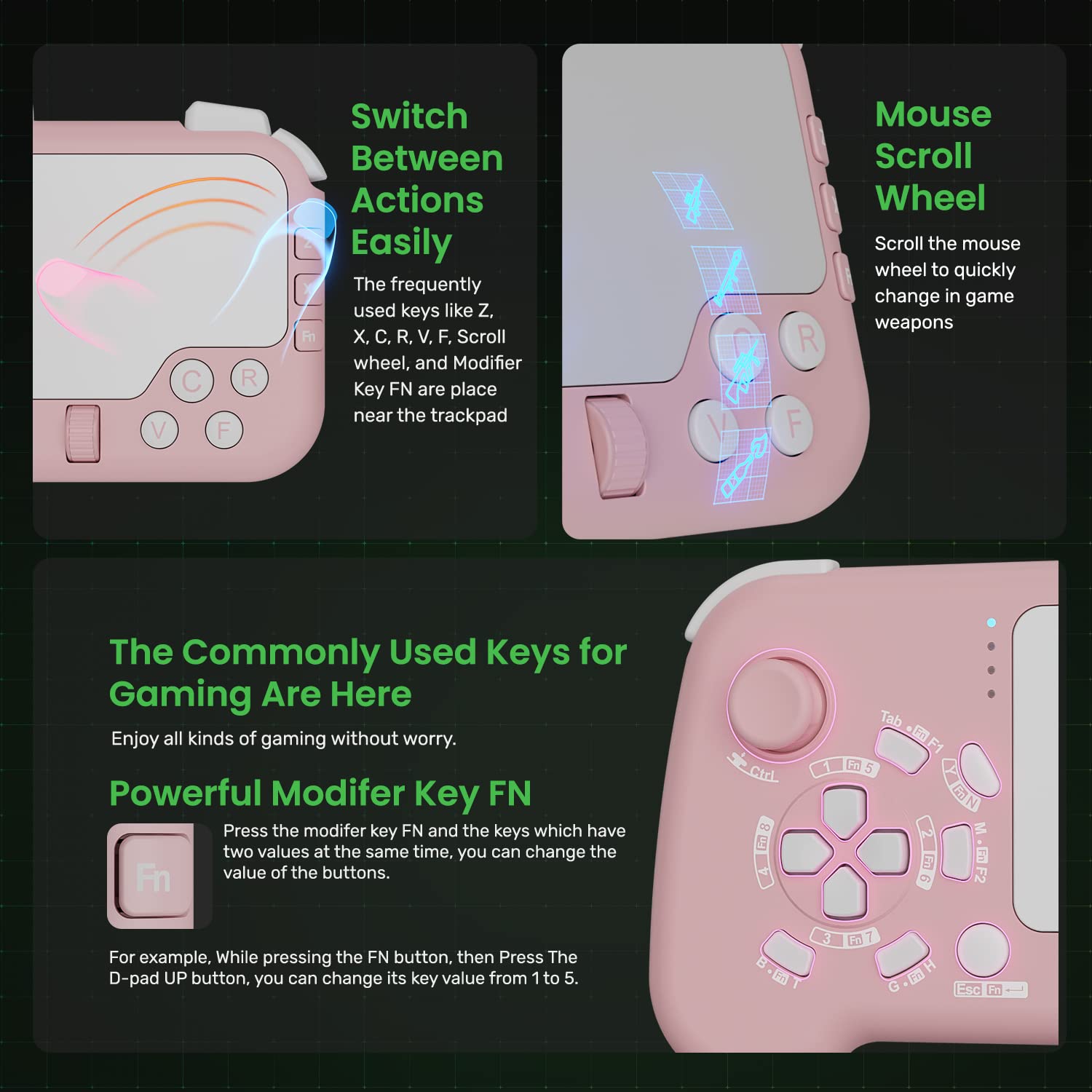
- Modifier Key (FN): Allows changing key mappings for D-pad and other buttons to suit various game requirements.
- Back Buttons & Scroll Wheel: Three programmable back buttons and a mouse scroll wheel for quick in-game actions.
- Plug & Play: Taya supir diperlukeun.

Figure 3.2: Detailed key layout of the IFYOO GTP01, showing primary and FN-modified functions.
4. Setélan
4.1 Sarat Sistim
- PC: Windows 11, Windows 10, Windows 8, Windows 7
- Konsol Kaulinan: Xbox One, Xbox Series S/X, PS4, PS5
- Note: Console games must support keyboard and mouse input for compatibility.
4.2 Nyambungkeun Alat
- Locate an available USB port on your PC or game console.
- Plug the USB cable of the IFYOO GTP01 into the USB port.
- The device is Plug & Play and does not require additional drivers. Your system should automatically recognize the device.
- For console use, ensure the game you intend to play supports keyboard and mouse input.

Figure 4.1: The GTP01 connected via its 10-foot USB cable to a gaming console.
5. Parentah Operasi
5.1 Recommended Holding Posture
For optimal control and comfort, fit the right side of the device to the joints of your fingers and palm. Use your thumb tip to slide on the touchpad for precise control. This allows for a larger slide range and easier access to the right-side buttons.

Figure 5.1: Illustration of the recommended ergonomic grip for the GTP01.
Video 5.1: Demonstration of recommended and non-recommended holding gestures for the GTP01. This video highlights how to properly grip the device for optimal thumb movement on the touchpad and easy access to side buttons, contrasting it with incorrect grips that limit control.
5.2 Touchpad Operation
- Gerakan: Slide your finger across the touchpad to move the mouse pointer or control in-game camera/view.
- Backward Key: Press the touchpad down to activate the Backward Key function.
Video 5.2: Demonstration of touchpad functionality, including mouse pointer movement and activating the backward key by pressing the touchpad. This video also shows in-game view movement using the touchpad.
5.3 Operasi Joystick
The left joystick controls movement. The up, down, left, and right directions correspond to W, S, A, and D key values respectively. Pressing the joystick down outputs the Ctrl key value.
Video 5.3: Demonstration of joystick operation, showing how directional inputs map to W, S, A, D keys and how pressing the joystick down activates the Ctrl key.
5.4 FN Modifier Key
The FN modifier key allows you to access secondary functions for certain buttons. To use a secondary function, hold down the FN key and then press the desired button. For example, holding FN and pressing the D-pad Up button will output key value 5 instead of 1.
Video 5.4: Demonstration of the FN key functionality, illustrating how to activate secondary key values for buttons like the D-pad.
5.5 Mouse Buttons and Scroll Wheel
- Klik Kénca: Located on the left shoulder button (Q).
- Klik katuhu: Located on the right shoulder button (E).
- Gulung kabayang: Functions identically to a standard mouse scroll wheel for scrolling. Pressing the scroll wheel down activates its middle mouse button function.
Video 5.5: Demonstration of mouse button and scroll wheel operations, including left click, right click, scrolling, and pressing the scroll wheel for its middle button function.
5.6 Back Buttons
The GTP01 includes three back buttons (Space, Left Shift, Left Alt) for additional customizable controls, allowing for quick access to frequently used actions.
Gambar 5.2: View of the back buttons and the anti-slip textured grip.
6. Pangropéa
- Jaga alat tetep bersih ku cara ngusap ku kaén anu lembut sareng garing.
- Hindarkeun alat ka suhu ekstrim, kalembaban, atanapi sinar panonpoé langsung.
- Do not attempt to disassemble the device, as this may void the warranty.
- Simpen alat dina tempat anu aman nalika henteu dianggo pikeun nyegah karusakan.
7. Cara ngungkulan
7.1 Alat Teu Kawanoh
- Ensure the USB cable is securely plugged into both the device and the computer/console.
- Cobi colokkeun alatna ka port USB anu béda.
- Pareuman terus hurungkeun deui komputer atanapi konsol anjeun.
- For PC, check Device Manager to see if the device is listed and if there are any driver issues (though no specific drivers are typically needed).
7.2 Input Lag or Unresponsive Controls
- Pastikeun kabel USB teu ruksak.
- Verify that the game you are playing supports keyboard and mouse input.
- Reduce other USB device connections to free up bandwidth if experiencing issues on PC.
7.3 Touchpad Precision Issues
- Ensure your thumb is clean and dry when using the touchpad.
- Adjust in-game mouse sensitivity settings to find your preferred precision level.
- Practice the recommended holding posture (refer to Section 5.1) for better control.
8. Spésifikasi
| Nomer modél | GTP01 |
| merek | IFYOO |
| Konektipitas | USB kabel |
| Panjang kabel | 10 suku (kira-kira 3 méter) |
| Kasaluyuan | PC (Windows 11/10/8/7), Xbox One, Xbox Series S/X, PS4, PS5 (games must support KBM) |
| Diménsi | 6.77 x 4.25 x 1.65 inci |
| Beurat | 10.6 ons |
| Trackpad Size | 8.4cm x 6.3cm (approximate) |
| Kahirupan Tombol | 5 Million Clicks (Micro Switches) |
9. Garansi jeung Rojongan
For warranty information and technical support, please refer to the official IFYOO websitus atanapi ngahubungan layanan palanggan maranéhanana langsung. Simpen resi pameseran anjeun salaku bukti pameseran pikeun klaim garansi.
IFYOO Official Websitus: Visit IFYOO Store on Amazon


