
1. Bubuka
This manual provides detailed instructions for the installation, operation, and programming of your DieseRC 433Mhz RF Wireless Remote Control Switch. This 2-channel AC relay receiver is designed to control various electrical devices and motors remotely, offering convenience and flexibility. Please read this manual thoroughly before installation and use to ensure proper functionality and safety.
2. Eusi Paket
Bungkusan kedah ngandung barang-barang di handap ieu:
- 1x DieseRC 433Mhz RF Relay Receiver Module
- 1x Protective Casing for Receiver Module
- 2x 2-Button Remote Controls

Gambar 1: Components of the DieseRC RF Wireless Remote Control Switch kit.
3. Spésifikasi
| Fitur | Spésifikasi |
|---|---|
| merek | DieseRC |
| Nomer modél | 2 Bouton |
| Sambungan | Nirkabel |
| Tipe Terminal | Clamp |
| Alat nu cocog | AC |
| Tipe Batré Jauh | Litium Mangan Dioksida (CR2032) |
| Modeu Operasi | Momentary, Toggle, Latched |
| Daya Max | 2500 Watt |
| Gawé Voltage | AC 85V-250V |
| Kaluaran Voltage | 1V-250V |
| Peunteun ayeuna | 10A |
| Bahan Kontak | Tambaga |
| Tipe Kontak | Biasana Buka (NO) |
| Tipe Pamasangan | Tembok Gunung |
| Frékuénsi | 433 MHz |
| Tipe Kodeu | 1527 Learning Code or 2262 Fixed Code |
4. Parentah Kasalametan
- Bahaya listrik: Always disconnect power before installing or servicing the device. Improper wiring can lead to electric shock or fire.
- Personil anu mumpuni: Pamasangan kedah dilakukeun ku tukang listrik anu mumpuni atanapi jalmi anu berpengalaman.
- Voltage kasaluyuan: Pastikeun vol operasitage of your device matches the specifications of this receiver (AC 85V-250V).
- Kapasitas beban: Do not exceed the maximum current rating of 10A or power rating of 2500W.
- Lingkungan: Install the receiver in a dry, well-ventilated area, away from direct sunlight, high temperatures, and corrosive environments.
- Barudak: Keep remote controls and the receiver out of reach of children.
5. Instalasi jeung Wiring
The receiver module features input terminals (N, L) for power supply and output terminals (NO, COM, NC) for connecting your device. Refer to the wiring diagrams below for common applications.
5.1 Terminal Definitions
- N: Input kawat nétral
- L: Input kawat langsung
- NO: Normally Open contact (connects to COM when activated)
- COM: Kontak umum
- NC: Normally Closed contact (connects to COM when deactivated)
5.2 Diagram Wiring
Below are typical wiring configurations for various devices. Always ensure power is disconnected before making any connections.

Gambar 2: Four common wiring modes for the receiver module.
- AC Device: Connect the live wire from the power source to the 'L' input. Connect the neutral wire from the power source to the 'N' input. For the device, connect one wire to 'COM' and the other to 'NO'.
- DC Device: Connect the AC power source to 'L' and 'N' inputs. Connect the DC power supply output to the 'COM' and 'NO' terminals, ensuring correct polarity for your DC device.
- AC Motor (e.g., for rolling shutters): Connect the AC power source to 'L' and 'N' inputs. Connect the motor's 'Up' wire to one 'NO' terminal and 'Down' wire to the other 'NO' terminal. Connect the motor's common wire to the corresponding 'COM' terminals. Ensure proper grounding.
- Motor DC: Connect the AC power source to 'L' and 'N' inputs. Connect the DC power supply output to the 'COM' terminals. Connect the motor's positive and negative wires to the 'NO' terminals.
5.3 Larapna Examples

Gambar 3: Remote control for garage doors.
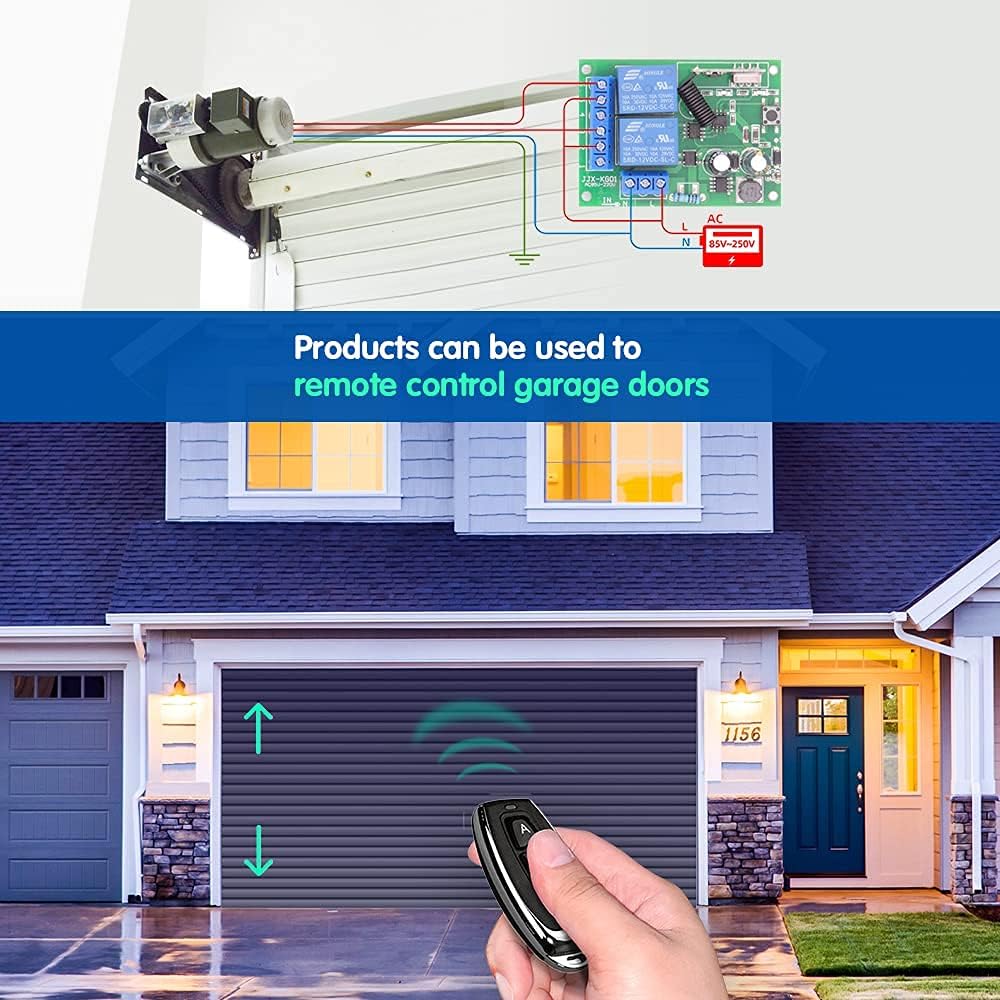
Gambar 4: Remote control for lighting systems.
6. Modeu Operasi
The receiver supports three operating modes: Momentary, Toggle, and Latched. Each mode offers different control behavior for your connected devices.

Gambar 5: Visual representation of operating modes.
6.1 Momentary Mode
In Momentary mode, the relay is activated only while the remote control button is pressed and held. Releasing the button deactivates the relay. This mode is suitable for applications like electric door locks or temporary power supply.
6.2 Modeu Toggle
In Toggle mode, pressing the remote control button once activates the relay, and it remains active. Pressing the same button again deactivates the relay. This mode is ideal for controlling lights or other devices that require a persistent ON/OFF state.
6.3 Latched Mode
In Latched mode, pressing button 'A' on the remote activates Relay 1. Pressing button 'B' on the remote activates Relay 2 and simultaneously deactivates Relay 1. This mode is useful for applications where only one of two relays should be active at any given time, such as controlling the up/down movement of a motor where both directions should not be active simultaneously.
7. Ngatur Program Jauh Jauh
To pair your remote control with the receiver and set the desired operating mode, follow these steps:

Gambar 6: Remote control programming steps.
- Pilih Mode: Press the learning button on the receiver module a specific number of times according to the desired mode:
- Pikeun Mode sakedapan: Press the learning button 1 waktos.
- Pikeun Modeu Togél: Press the learning button 2 kali.
- Pikeun Mode Dipasang: Press the learning button 3 kali.
- pasangan Jauh: Within approximately 3 seconds after the indicator light flashes, press the 'A' button on your remote control. The indicator light will flash again to confirm successful pairing for the first relay.
- Pair Second Button (if applicable): If you are using a 2-channel setup (e.g., for Latched mode), press the 'B' button on your remote control. The indicator light will flash again to confirm successful pairing for the second relay.
- Tes: Test the remote control to ensure the desired operating mode is correctly set.
8. Resetting the Receiver
To clear all programmed remote controls from the receiver, follow these steps:

Gambar 7: Resetting the receiver module.
- Press the learning button on the receiver module 8 kali berturut-turut.
- The indicator light will flash rapidly and then turn off, indicating that all stored remote control codes have been cleared.
After a reset, you will need to reprogram your remote controls following the steps in Section 7.
9. Remote Control Details
The remote control features two buttons (A and B) and is powered by a CR2032 lithium cell battery.

Gambar 8: Components of the 2-button remote control.
9.1 Ngagantian batré
If the remote control's range decreases or it stops responding, the battery may need replacement. To replace the battery:
- Buka remot kontrol kalayan ati-atiasing.
- Leupaskeun batré CR2032 heubeul.
- Selapkeun batré CR2032 anyar kalayan sisi positif (+) nyanghareup ka luhur.
- Close the remote control casing aman.
10. Cara ngungkulan
- Alat teu ngabales:
- Pariksa sadaya sambungan kabel pikeun kaamanan sareng kaleresan.
- Pastikeun panarima diaktipkeun.
- Verify the remote control battery is not depleted.
- Reprogram the remote control to the receiver (see Section 7).
- rentang operasi pondok:
- Ganti batré kadali jauh.
- Ensure there are no significant obstructions (e.g., thick walls, metal objects) between the remote and the receiver.
- Avoid installing the receiver near large metal structures or other RF interference sources.
- Relay clicks but device does not activate:
- Check the wiring between the receiver's output terminals (NO, COM, NC) and your device.
- Ensure the device itself is functioning correctly when directly powered.
11. Pangropéa
The DieseRC RF Wireless Remote Control Switch requires minimal maintenance. Keep the receiver module and remote controls clean and dry. Avoid exposing them to extreme temperatures, humidity, or corrosive substances. Do not attempt to repair the internal components yourself; contact qualified personnel if service is required.
12. Garansi jeung Rojongan
For warranty information or technical support, please refer to the product packaging or contact DieseRC customer service through your retailer. Keep your purchase receipt as proof of purchase.