1. Bubuka
The Keychron Q5 Pro is a highly customizable 96% layout wireless mechanical keyboard designed for a premium typing experience. It features QMK/VIA support for key remapping, a full aluminum body, double-gasket design, hot-swappable switches, and KSA Double-Shot PBT keycaps. This manual provides detailed instructions for setting up, operating, and maintaining your Keychron Q5 Pro keyboard.

2. Eusi Paket
Verify that all items are present in your Keychron Q5 Pro package:
- 1x Fully Assembled Keyboard (including Aluminum Case, PCB, PC Plate, Sound Absorbing Foam, Case Foam, Battery, Silicone Gaskets, Bottom Case)
- 1x Tipe-C ka Tipe-C Cable
- 1x Tipe-A kana Tipe-C Adaptor
- 1x Pindah Puller
- 1x Keycap Puller
- 1 x Obeng
- 1 x Konci Hex
- 14x Gaskets (10 Dipasang sareng 4 dina Kotak)
- 7 susunan x Stabiliser
- 1 set x Keycaps (Double-Shot KSA PBT)
- 1 set x Saklar

3. Setélan
3.1 Ngecas Awal
Before first use, connect the keyboard to a power source using the provided USB Type-C cable to fully charge the internal 4000mAh battery. The charging indicator will show the charging status.

3.2 Connecting Wirelessly (Bluetooth)
- Locate the mode switch on the back of the keyboard. Slide it to the 'BT' position for Bluetooth mode.
- Dina alat anjeun (komputer, tablet, smartphone), aktipkeun Bluetooth teras milarian alat anu sayogi.
- Select 'Keychron Q5 Pro' from the list of devices to pair.
- The keyboard can connect to up to 3 devices. Use Fn + 1, Fn + 2, or Fn + 3 to switch between paired devices.
3.3 Connecting Wired (USB)
- Locate the mode switch on the back of the keyboard. Slide it to the 'Cable' position for wired mode.
- Connect the provided USB Type-C cable from the keyboard to your computer's USB port.
- Kibor bakal otomatis dikenal ku sistem operasi anjeun.
3.4 Operating System Compatibility Switch
The Keychron Q5 Pro includes a switch to toggle between Windows and macOS layouts. Ensure this switch is set to your operating system for correct key functionality.

4. Parentah Operasi
4.1 Pemetaan Ulang Konci QMK/VIA
The Keychron Q5 Pro supports QMK/VIA, an open-source software that allows you to remap keys and program macros. This includes customizing the rotary knob functions.
- Unduh parangkat lunak VIA tina Keychron resmi websitus.
- Connect the keyboard in wired mode to your computer. Key remapping can only be performed in wired mode.
- Launch the VIA software and follow the on-screen instructions to customize key assignments and macros.
- Once programmed, the custom keymap will function in both wired and wireless modes.
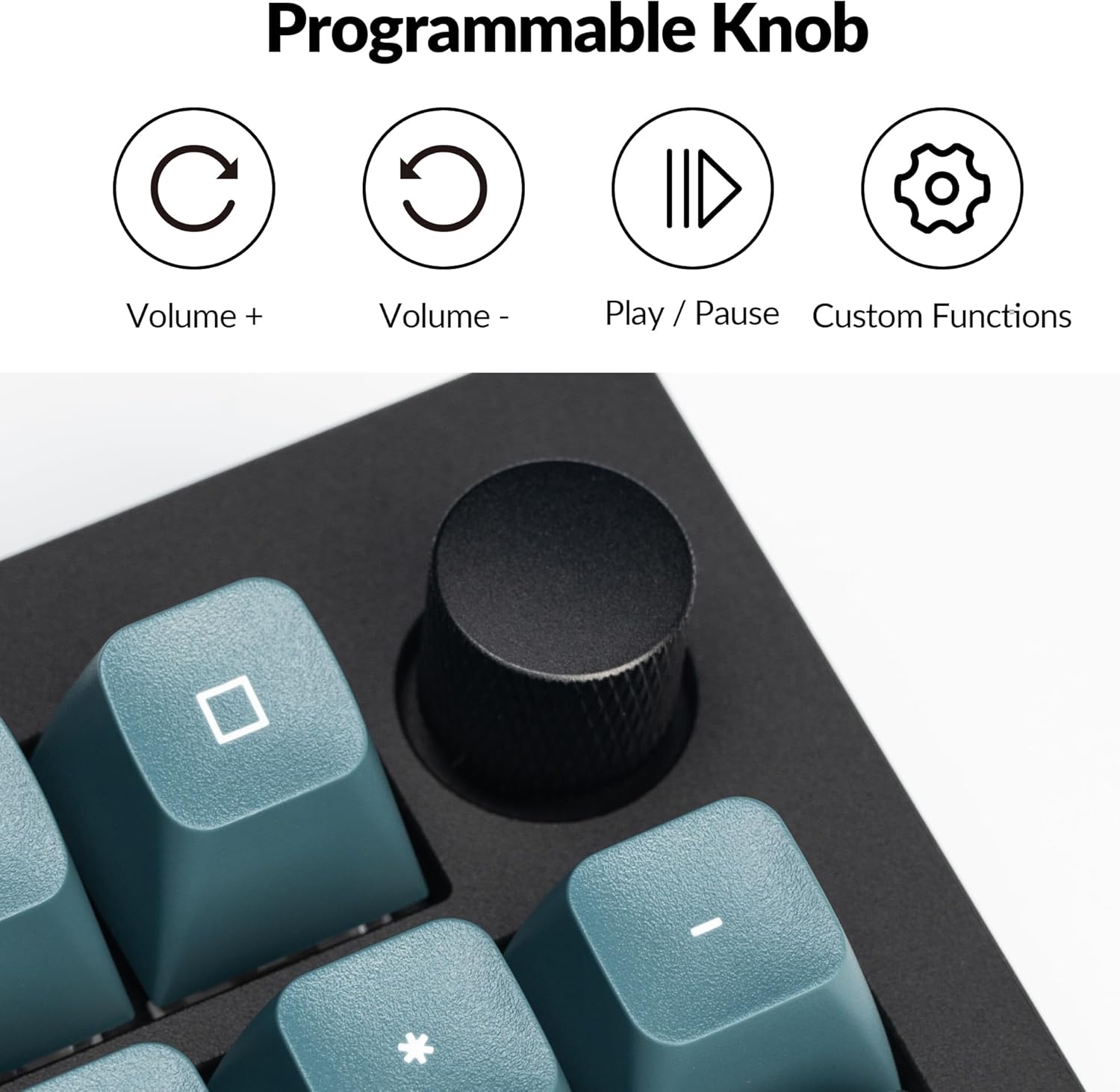
4.2 Programmable Rotary Knob
The rotary knob on the Keychron Q5 Pro offers versatile control. By default, it controls volume (rotate) and play/pause (press). Its functions can be customized using the VIA software.
- Puteran saarah jarum jam: Ningkatkeun Jilid
- Puterkeun ngalawan arah jarum jam: Ngurangan Volume
- Pencét: Puter / Reureuh Media
- Custom functions can be assigned via VIA software.

4.3 Panas-Swappable switch
The Q5 Pro features hot-swappable sockets, allowing you to change mechanical switches without soldering. This supports most 3-pin and 5-pin MX-style mechanical switches.
- Pareuman kibor atanapi pegatkeun sambungan tina komputer anjeun.
- Anggo penarik keycap anu disayogikeun pikeun nyabut keycap anu dipikahoyong sacara ati-ati.
- Use the provided switch puller to gently grip and pull the switch vertically out of its socket.
- Sejajarkeun pin saklar anyar jeung liang dina PCB. Pastikeun pinna lempeng.
- Press the new switch firmly into the socket until it clicks into place.
- Pasang deui tutup konci na.


4.4 Keycaps and Backlighting
The Q5 Pro comes with KSA profile double-shot PBT keycaps, known for their durability and oil resistance. The keyboard features south-facing RGB backlighting, which is optimized for non-shine-through keycaps.

5. Pangropéa
5.1 beberesih
- beberesih umum: Anggo lawon anu lemes sareng garing pikeun ngusap permukaan kibor. Pikeun kokotor anu bandel, radaampen lawon ku cai atawa solusi beberesih hampang.
- Ngabersihan Keycap: Keycaps can be removed using the provided keycap puller and cleaned with mild soap and water. Ensure they are completely dry before reattaching.
- Ngaleungitkeun lebu: Anggo hawa anu dikomprés pikeun ngaleungitkeun lebu sareng lebu tina antara keycaps sareng saklar.
5.2 Stabiliser
The Q5 Pro utilizes screw-in stabilizers for enhanced key stability. If a large key (e.g., Spacebar, Shift, Enter) feels wobbly or rattles, the stabilizers may need lubrication or adjustment. Refer to online resources or Keychron support for detailed stabilizer maintenance guides.

6. Cara ngungkulan
- Keyboard teu ngabales: Ensure the keyboard is charged. Check the mode switch (BT/Cable) and ensure it's set correctly. If in Bluetooth mode, re-pair the device. If in wired mode, try a different USB port or cable.
- Konci henteu ngadaptar: If a specific key is not working, try hot-swapping the switch with a known working one to determine if the issue is with the switch or the PCB socket. Ensure switches are fully seated.
- Masalah konektipitas Bluetooth: Ensure the keyboard is within range of your device. Remove and re-pair the keyboard in your device's Bluetooth settings. Ensure no other devices are interfering with the connection.
- Parangkat lunak QMK/VIA henteu ngadeteksi kibor: Ensure the keyboard is connected in wired mode. Download the latest VIA software and firmware from the official Keychron websitus.
- Lampu tukang teu jalan: Check the keyboard's backlight settings. Ensure the brightness is turned up. If specific LEDs are not working, it may indicate a hardware issue.
7. Spésifikasi
| Fitur | Rincian |
|---|---|
| Nomer modél | Q5P-M3 |
| Tata perenah | 96% |
| Konektipitas | Bluetooth 5.1 (Wireless), USB Type-C (Wired) |
| Laju Polling | 1000 Hz (Kabel), 90 Hz (Nirkabel) |
| Saklar | Hot-swappable K Pro Brown Switch (3-pin & 5-pin MX style compatible) |
| Kancing konci | KSA Profile PBT Tembakan Ganda |
| Bahan Awak | Full Aluminum |
| Gasket Design | Double-Gasket |
| Batré | 4000mAh Litium Polimér |
| Kasaluyuan System Operasi | macOS, Windows, Linux |
| Lampu tukang | RGB anu nyanghareup ka kidul |
| Dimensi produk | 16.06 x 5.71 x 1.41 inci |
| Item Beurat | 4.76 pon |
7.1 Keychron K Pro Switch Features

7.2 Ngabeledug View ngeunaan Komponén

8. Garansi jeung Rojongan
For warranty information, technical support, or further assistance, please visit the official Keychron websitus atanapi ngahubungan layanan palanggan maranéhna. Simpen bukti pameseran anjeun pikeun klaim garansi.
- Resmi Websitus: www.keychron.com
- Email dukungan: Rujuk ka pejabat website for current support contact information.


