
Bubuka
Thank you for choosing the Kisonli KS-1981 Wireless Stereo Speaker. This manual provides essential information for the safe and efficient operation of your device. Please read it carefully before use and retain it for future reference.
Produk Leuwihview
The Kisonli KS-1981 is a portable wireless stereo music speaker designed for versatile audio playback. It features Bluetooth connectivity, FM radio, and support for USB, AUX, and TF card inputs. Its compact design and clear sound make it suitable for various uses.

Gambar 1: Hareupeun view of the Kisonli KS-1981 Wireless Stereo Speaker.
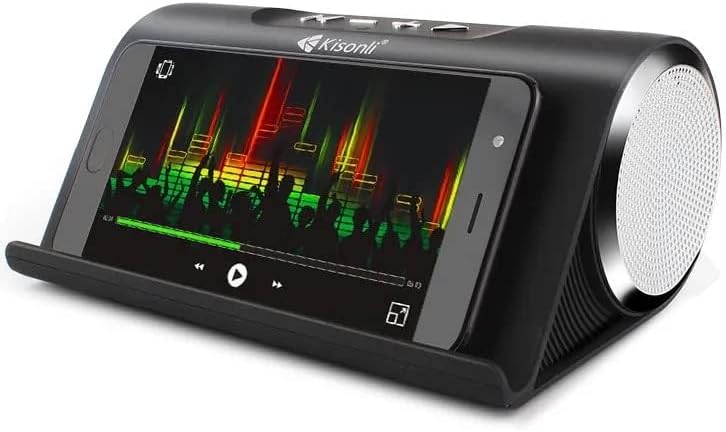
Figure 2: Kisonli KS-1981 speaker with a smartphone in its integrated stand, demonstrating media playback.
Disetél
1. Ngecas Speaker
Sateuacan dianggo anu munggaran, cas heula speakerna pinuh. Sambungkeun kabel ngecas USB anu disayogikeun kana port ngecas speaker sareng tungtung anu sanésna kana adaptor daya USB (henteu kalebet) atanapi port USB komputer. Lampu indikator ngecas bakal hurung nalika ngecas sareng pareum nalika dicas pinuh.
2. Powering on / Pareum
- To power on: Press and hold the Power button (usually marked with an 'M' or power symbol) for a few seconds until you hear an audible prompt or see an indicator light.
- Pikeun mareuman: Pencét jeung tahan deui tombol Daya pikeun sababaraha detik.
3. Papasangan Bluetooth
- Ensure the speaker is powered on and in Bluetooth mode (it usually defaults to this mode or can be switched using the 'M' button). The Bluetooth indicator light will flash, indicating it's ready for pairing.
- Aktipkeun Bluetooth dina smartphone Anjeun, tablet, atawa alat sejenna.
- Milarian pikeun available Bluetooth devices and select "KS-1981" from the list.
- Once paired, the speaker will emit a confirmation sound, and the Bluetooth indicator light will stop flashing.
4. Connecting via AUX/USB/TF Card
- Mode AUX: Connect one end of a 3.5mm audio cable (not included) to the speaker's AUX port and the other end to your audio device's headphone jack. Press the 'M' button to switch to AUX mode.
- Mode USB: Selapkeun USB flash drive nu ngandung audio MP3 filekana port USB. Spiker bakal otomatis pindah ka modeu USB sareng ngamimitian muterkeun.
- Mode Kartu TF: Selapkeun kartu TF (MicroSD) nu ngandung audio MP3 files kana slot kartu TF. Speaker bakal otomatis pindah ka modeu kartu TF tur mimitian playback.
Parentah Operasi
Fungsi Tombol
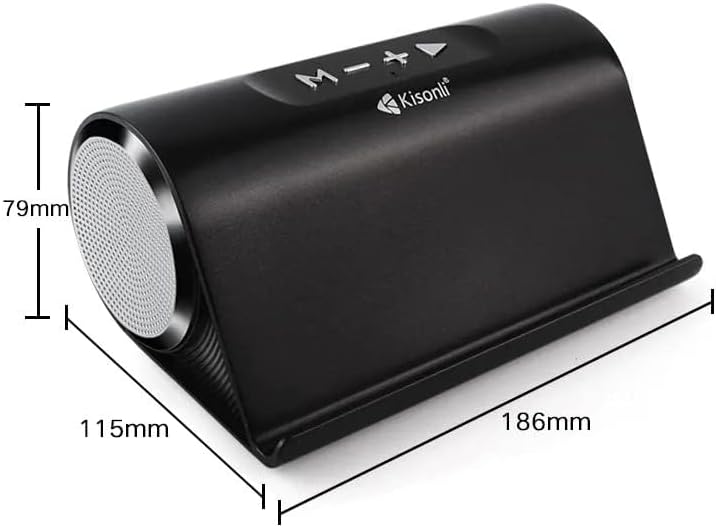
Gambar 3: Top view of the Kisonli KS-1981 speaker showing control buttons and dimensions.
- Tombol 'M' (Modeu/Kakuatan):
- Long press: Power On/Off.
- Short press: Switch between Bluetooth, FM Radio, AUX, USB, and TF card modes.
- '-' Button (Volume Down/Previous Track):
- Pencét sakeudeung: Leutikan volume.
- Long press: Go to the previous track/station.
- '+' Button (Volume Up/Next Track):
- Pencét sakeudeung: Naékkeun volume.
- Long press: Go to the next track/station.
- Play/Pause Button (►/−):
- Pencét pondok: Puter / Reureuh musik.
- In FM mode, long press to auto-scan and save FM stations.
Operasi Radio FM
- Pindah ka modeu FM nganggo tombol 'M'.
- Long press the Play/Pause button to automatically scan and save available FM radio stations.
- Use the '+' and '-' buttons (long press) to navigate between saved stations.
Pangropéa
- beberesih: Use a soft, dry cloth to clean the speaker's surface. Do not use abrasive cleaners, alcohol, or solvents.
- Panyimpenan: Simpen spéker dina tempat anu tiis sareng garing jauh tina sinar panonpoé langsung sareng suhu anu ekstrim.
- Perawatan batré: Pikeun manjangkeun umur batre, ulah miceun batre pinuh. Ngeusi batre spéker rutin, sanajan teu dipaké pikeun période nambahan.
- Tahan cai: The product is listed as water-resistant, but not waterproof. Avoid submerging it in water or exposing it to heavy rain.
Pamérésan masalah
| Masalah | Solusi |
|---|---|
| Speaker teu hurung. | Pastikeun batréna geus dieusian. Sambungkeun spéker ka sumber listrik teras cobian deui. |
| Taya sora. | Check the volume level on both the speaker and your connected device. Ensure the correct input mode is selected (Bluetooth, AUX, USB, TF). |
| Papasangan Bluetooth gagal. | Ensure the speaker is in Bluetooth pairing mode. Turn off and on Bluetooth on your device. Move the speaker closer to your device. Clear previous Bluetooth connections on your device. |
| panarimaan radio FM goréng. | Pindahkeun speaker ka tempat anu sinyalna langkung saé. Panjangkeun anteneu anu terintegrasi upami sayogi. |
| USB / kartu TF teu maén. | Pastikeun files are in a compatible format (e.g., MP3). Check if the card/drive is inserted correctly. Try a different USB/TF card. |
spésifikasi
| Fitur | Rincian |
|---|---|
| Ngaran Brand | Kisonli |
| Ngaran modél | KS-1981 |
| Maksimum Speaker Kaluaran Power | 16 Watt |
| Téhnologi konektipitas | USB, Bluetooth |
| Mode Kaluaran Audio | Stereo |
| Tipe Pamasangan | Stépar |
| Bahan | Thermoplastic Polyurethane |
| Tipe Speaker | Multimédia |
| Fitur husus | Bluetooth, Nirkabel |
| Dianjurkeun Mangpaat | For Televisions, For Computers, For Smartphones or Tablets, For Music Players |
| Diaméterna Woofer | 4 inci |
| Warna | Blue (Note: Product images show black, but specification lists blue) |
| Tahan cai | Sumuhun |
| Métode kontrol | Toél |
| Ukuran Speaker | 30 séntiméter |
| Tingkat Résistansi Cai | Not Water Resistant (Conflicting with 'Water Resistant: Yes' above, user should refer to product packaging for clarity) |
| Mangpaat husus | Musik |
| Ukuran produk (DxWxH) | 10 x 18 x 8 cm |
| Item Beurat | 1.32 pon |
| Alat nu cocog | Tablet, Laptop, Smartphone |
| Sumber Daya | Batré Powered |
| Komponén Kaasup | Ear Pads (Note: This seems incorrect for a speaker, likely a data entry error in source) |
| Produsén | Kisonli |
| Konfigurasi Saluran Sakuliling Sora | 2 |
| Téknologi Komunikasi Nirkabel | Bluetooth |
| Protokol Komunikasi | Bluetooth |
| Tipe Supir Audio | Supir dinamis |

Figure 4: Kisonli KS-1981 speaker with its retail packaging and charging/AUX cables.
Garansi sareng Rojongan
Émbaran jaminan
Produk ieu hadir kalawan a jaminan hiji taun from the date of purchase, covering manufacturing defects. Please retain your proof of purchase for warranty claims. The warranty does not cover damage caused by misuse, accidents, unauthorized modifications, or normal wear and tear.
Rojongan Palanggan
For technical assistance, warranty claims, or any questions regarding your Kisonli KS-1981 speaker, please contact your retailer or the manufacturer's customer service. Refer to the product packaging or the retailer's websitus pikeun detil kontak husus.