1. Bubuka
This manual provides essential information for the safe and effective operation of your SCULPFUN S30 Ultra 33000mW Laser Engraving Machine. This high-power laser engraver is designed for precision engraving and cutting of various materials, including wood, metal, and acrylic. Please read this manual thoroughly before initial use to ensure proper setup, operation, and maintenance.

Figure 1.1: SCULPFUN S30 Ultra 33000mW Laser Engraving Machine with example ukiran.
2. Pancegahan Kasalametan
WARNING: Laser radiation can cause eye and skin damage. Always follow safety guidelines.
- Due to the powerful laser, never operate the engraving machine unsupervised. Pause operation if you must leave the area.
- Always install the laser protective cover before operating the machine. If the cover is not installed, wear appropriate laser safety goggles.
- Do not touch the laser beam with your hands or any body part, as this can cause severe burns.
- Avoid strong impacts to the machine, which could damage components or misalign the laser.
- Children under the age of 14 are prohibited from using this product. Children over 14 require adult supervision during operation.
- Do not direct the laser beam at any specular (mirror-like) reflective objects, as this can cause injury to the operator or damage the laser.
- Ensure adequate ventilation in the work area to dissipate fumes and particles generated during engraving and cutting.
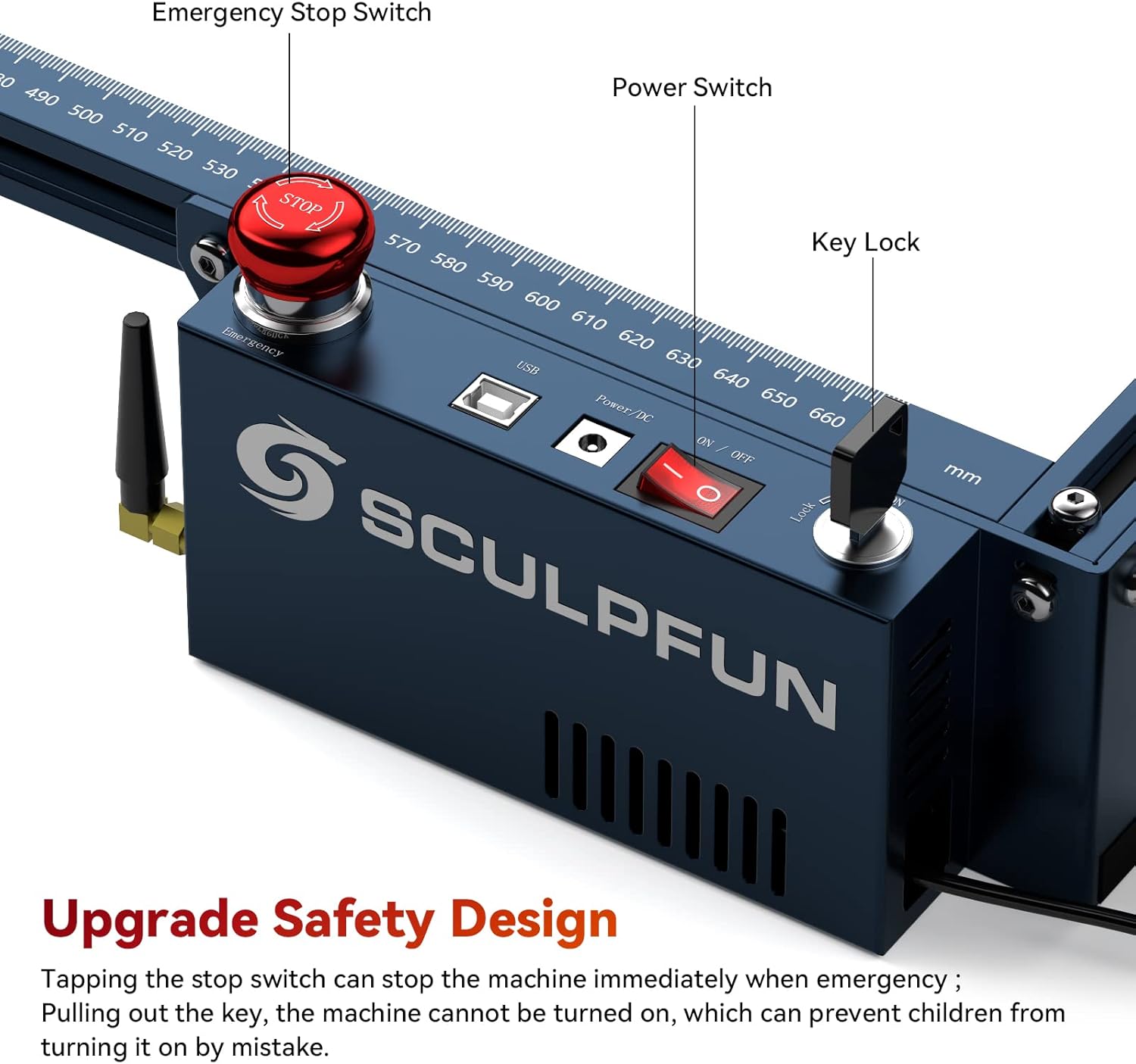
Figure 2.1: Safety features including Emergency Stop Switch and Key Lock for enhanced user protection.
3. Fitur Produk
- Powerful 33W Laser Output: Utilizes upgraded 6*6W diodes for superior cutting and engraving capabilities, capable of cutting 20mm lightweight wood, 15mm paulownia wood, or 0.05mm stainless steel in a single pass.
- Area Ukiran Ageung: Features a generous 600x600mm engraving area, accommodating large-scale projects.
- 32-bit Air-Assisted Motherboard: Equipped with an advanced motherboard supporting Bluetooth wireless connection and intelligent control of the air assist function via LightBurn's M8 button.
- Industrial-Grade Cutting Accuracy: Achieves 0.005mm high-precision engraving with an upgraded V2.0 X-axis linear slide rail, minimizing moiré patterns.
- Replaceable Protective Lens: Innovative design allows for easy replacement of the laser lens, significantly extending the laser's lifespan. A free lens is included.
- Enhanced 42-bit Stepping Motor: Provides robust power for high-speed movement, with a torque of 4.2 Kg·cm, ensuring stability even with heavier loads.
- Built-in High-Pressure Air-Assisted Nozzle: Generates powerful airflow to improve cutting efficiency by over 5 times and ensures clean cutting surfaces.
- Solid and Durable Frame: Constructed from high-strength aluminum alloy, capable of withstanding up to 50KG, ensuring long-term precision and durability.

Figure 3.1: Demonstrating the 33W laser power, cutting capabilities, and metal colorization feature.

Figure 3.2: Automatic Controlled Air Assist (M8) in action, improving cutting quality.
4. Setélan
Unpack all components carefully and verify against the packing list. Assemble the machine according to the detailed instructions provided in the separate assembly guide (not included in this manual). Ensure all connections are secure and the machine is placed on a stable, level surface in a well-ventilated area.
- Majelis pigura: Connect the aluminum alloy frame components securely.
- Pamasangan modul laser: Mount the laser module onto the X-axis carriage.
- Sambungan Bantuan Udara: Connect the air hose from the air pump to the laser module's nozzle.
- Sambungan listrik: Connect the power adapter to the machine and a suitable power outlet (100-240V AC, 50/60Hz).
- Pamasangan parangkat lunak: Install the recommended operating software (LightBurn or LaserGRBL) on your computer.
- Pangaluyuan Fokus Awal: Use the fixed-focus column to set the correct laser focus for your material.

Figure 4.1: The S30 Ultra series maintains a consistent structure for easy upgrades, requiring only laser head replacement for power upgrades.
5. Parentah Operasi
The SCULPFUN S30 Ultra supports various operating software, including LightBurn (with M8 air assist function) and LaserGRBL. It is compatible with both Windows and MAC systems. Supported file formats include NC, BMP, JPG, PNG, DXF, and other picture formats. Data transmission can be done via USB connection or Bluetooth wireless connection.
- peluncuran software: Open your preferred laser control software (e.g., LightBurn).
- Sambungkeun Mesin: Establish a connection between your computer and the engraver via USB or Bluetooth.
- Load Design: Import your desired design file (e.g., NC, JPG, PNG).
- Penempatan Bahan: Place the material to be engraved or cut on the working area. Ensure it is flat and secured.
- Setélan Parameter: Adjust laser power, speed, and passes according to the material type and desired outcome. Refer to the software's documentation for detailed parameter settings.
- Air Assist Control: If using LightBurn, utilize the M8 button to intelligently control the air assist for optimal cutting and to prevent material yellowing/blackening.
- Mimitian Operasi: Mimitian prosés ngukir atanapi motong tina parangkat lunak. Awasi mesin kalayan saksama salami operasi.
- Stopan Darurat: In case of any emergency, immediately press the red emergency stop switch on the machine.

Figure 5.1: The SCULPFUN S30 Ultra supports popular software like LightBurn and LaserGRBL for versatile operation.
6. Pangropéa
Pangropéa rutin ngajamin umur panjang sareng kinerja optimal tina engraver laser anjeun.
- Laser Lens Replacement: The S30 Ultra features a replaceable lens. If the lens becomes damaged or its performance degrades after long-term use, replace it with a new one to restore cutting power. One free lens is included with your purchase, and additional lenses can be obtained from SCULPFUN.
- Nozzle beberesih: Regularly clean the high-pressure air-assisted nozzle to prevent blockages and maintain efficient airflow. A nozzle cleaning tool is provided.
- Rel beberesih: Keep the linear slide rails clean and free of dust and debris to ensure smooth and precise movement of the laser module.
- beberesih umum: Periodically clean the entire machine, especially the working area, to remove any residue from engraving and cutting.

Figure 6.1: Essential maintenance tools for your SCULPFUN S30 Ultra.
7. Cara ngungkulan
This section provides general guidance for common issues. For detailed troubleshooting, refer to the comprehensive instruction manual or contact SCULPFUN support.
| Masalah | Mungkin Cukang lantaranana | Solusi |
|---|---|---|
| Laser teu firing atawa kaluaran lemah | Fokus salah, lénsa kotor, setélan daya lemah, sambunganna kendor. | Adjust focus, clean or replace lens, increase power setting in software, check all cables. |
| Mesin teu nyambung ka komputer | USB cable issue, Bluetooth not paired, driver not installed, software not recognizing port. | Try a different USB port/cable, re-pair Bluetooth, reinstall drivers, restart software/computer. |
| Kualitas ukiran/potonganna goréng | Incorrect speed/power, material issues, dirty lens, misaligned laser. | Adjust speed/power settings, ensure material is suitable and clean, clean lens, check for mechanical alignment issues. |
| Air assist not working | Air hose kinked/blocked, pump not powered, software setting incorrect. | Check air hose for obstructions, ensure air pump is connected and powered, verify M8 setting in LightBurn. |
8. Spésifikasi
- Modél produk: SCULPFUN S30 Ultra-33W
- Daya Kaluaran Laser: 33W (light energy)
- Fokus laser: 0.08 x 0.08 mm
- Panjang gelombang laser: 455 ± 5nm
- Métode fokus: Fixed focus column + sliding device
- Akurasi Ukiran: 0.005 mm
- Engraving Area Size: 600 x 600 mm
- Machine Electric Power: Kurang leuwih 156W
- Air Pump Type: Main board controlled, 24V, 30L/min flow rate
- Air Hose Inner Diameter: 7.5 mm
- motherboard: 32-bit air-assisted, supports Bluetooth wireless connection
- Parangkat Lunak Operasi: LightBurn (with M8 air assist), LaserGRBL, Benbox, GrblController, LiteFire
- Dirojong File Bentuk: NC, BMP, JPG, PNG, DXF, and other picture formats
- Pangiriman Data: USB connection or Bluetooth wireless connection
- Input kakuatan: 100-240V AC, 50/60Hz
- Kaluaran kakuatan: 24V 7A
- Ukuran produk: 34.06 x 9.72 x 9.25 inci
- Beurat pakét: 9.9 kg
- Sertifikasi: CE, FCC, RoHS, FDA, ICE

Figure 8.1: High-precision linear slide rail for superior engraving detail.

Figure 8.2: Expanded working area of the S30 Ultra compared to standard models.
9. Garansi jeung Rojongan
For warranty information, please refer to the documentation included with your product or contact SCULPFUN customer service directly. SCULPFUN provides support for product inquiries, technical assistance, and replacement parts such as laser lenses.
For further assistance, please visit the official SCULPFUN websitus atanapi ngahubungan saluran rojongan customer maranéhanana.
10. Video Produk Resmi
No official product videos from the seller were found that met the criteria for inclusion in this manual.


