Bubuka
This manual provides instructions for the Trust 25025 AZERTY Wireless Keyboard and Mouse Set. This comfortable wireless set features silent keys and buttons, and is constructed using 85% recycled materials. It is designed for ease of use and long-lasting performance.
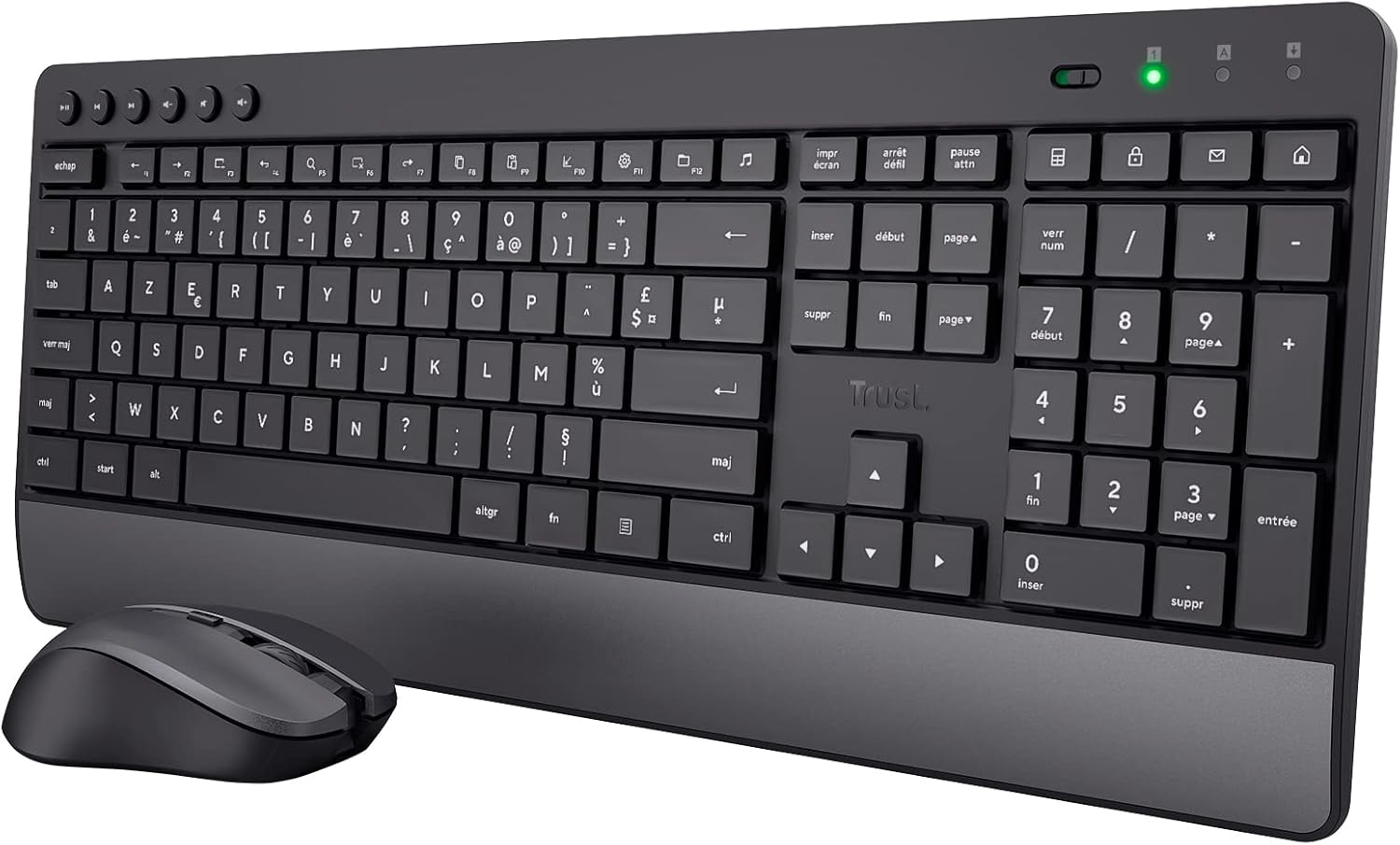
Image: The Trust 25025 AZERTY Wireless Keyboard and Mouse Set, featuring a full-size keyboard with a wrist rest and a compact mouse.
Eusi pakét
- Trust 25025 AZERTY Wireless Keyboard
- Amanah Mouse Wireless
- USB Micro panarima
- Batré 3 x AA (dipasang sateuacana atanapi kalebet nyalira)
- Manual pangguna (dokumén ieu)
Disetél
1. Pamasangan batré
The keyboard requires 2 AA batteries and the mouse requires 1 AA battery. These are typically included. If not, or if replacing, ensure correct polarity.
- Panggihan kompartemen batréna di handapeun kibor sareng beurit.
- Buka panutup batré.
- Insert the AA batteries, matching the + and - indicators.
- Tutup panutup batre sacara aman.
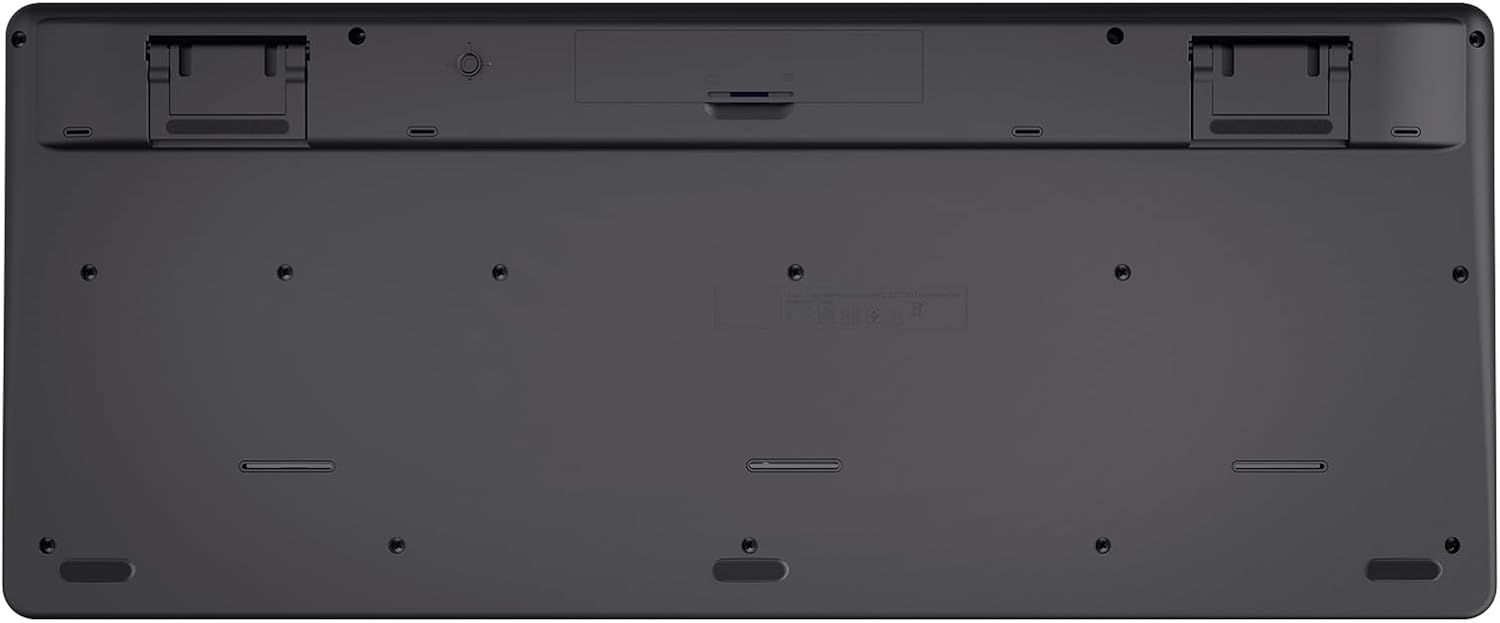
Image: The underside of the Trust 25025 keyboard, showing the battery compartment and the storage slot for the USB micro receiver.
2. Connecting the USB Micro Receiver
The keyboard and mouse connect wirelessly to your computer via a single USB micro receiver.
- Locate the USB micro receiver, usually stored in the mouse's battery compartment or a dedicated slot on the keyboard's underside.
- Plug the USB micro receiver into an available USB port on your computer (PC or Mac).
- Komputer anjeun kedahna sacara otomatis ngadeteksi sareng masang driver anu diperyogikeun. Ieu mangrupikeun alat plug-and-play, henteu meryogikeun pamasangan parangkat lunak tambahan.

Image: An icon representing 'Plug & Play' functionality, indicating easy setup without additional drivers.
3. Ngahurungkeun
Ensure the keyboard and mouse are switched on. The mouse typically has an on/off switch on its underside. The keyboard may have an indicator light to show it's active.
Parentah Operasi
Fitur kibor
- Tata Letak AZERTY: Standard French keyboard layout for comfortable typing.
- Tombol jempé: Dirancang pikeun operasi sepi, ngurangan noise ketikan.
- Sandaran Pigeulang Terpadu: Provides ergonomic support during extended use.
- Tombol Multimedia: Dedicated keys for quick access to media controls (play, pause, volume, etc.).
- Desain Tahan Tumpahan: Helps protect against accidental liquid spills.
- Hirup batré anu panjang: Up to 48 months of battery life under typical usage conditions.

Gambar: A luhur-handap view of the Trust 25025 keyboard and mouse, highlighting the AZERTY layout and multimedia keys.
Fitur Beurit
- Tombol-tombol Jempe: Reduces click noise for a quieter working environment.
- DPI adjustable: Cycle through 1000, 1400, and 1800 DPI settings for precise cursor control. Use the DPI button located near the scroll wheel to change sensitivity.
- Desain Ambidextrous: Suitable for both left-handed and right-handed users.
- Hirup batré anu panjang: Up to 12 months of battery life under typical usage conditions.

Gambar: A close-up view of the Trust wireless mouse, showing its ergonomic shape and the DPI adjustment button.
Pangropéa
beberesih
- Use a soft, dry cloth to clean the surfaces of the keyboard and mouse.
- Keur kokotor bandel, rada dampen lawon ku cai atawa solusi beberesih hampang. Hindarkeun bahan kimia anu kasar.
- Do not immerse the devices in water.
Ngagantian batré
When the battery indicator light (if present) illuminates or performance degrades, replace the batteries.
- Turn off the mouse using its power switch.
- Open the battery compartments on both devices.
- Remove old batteries and dispose of them according to local regulations.
- Pasangkeun batré AA anyar, pastikeun polaritasna bener.
- Close the battery covers.
Pamérésan masalah
Henteu aya réspon ti kibor atanapi beurit
- Pariksa batré: Pastikeun batréna leres dipasang sareng henteu béak. Ganti lamun perlu.
- Saklar kakuatan: Verify that the mouse (and keyboard, if applicable) is switched ON.
- Panarima USB: Ensure the USB micro receiver is securely plugged into a working USB port on your computer. Try a different USB port.
- Jarak: Make sure the keyboard and mouse are within the operational range of the USB receiver (typically up to 10 meters).
- gangguan: Move the devices away from other wireless devices or large metal objects that might cause interference.
Kursor Beurit Luncat atanapi Henteu Teratur
- Beungeut: Anggo beurit dina permukaan anu bersih sareng henteu ngamantulkeun cahaya. Disarankeun nganggo alas beurit.
- Setélan DPI: Adjust the DPI setting using the button on the mouse to find a comfortable sensitivity.
- Batré: Low battery power can affect mouse performance. Replace batteries if needed.
spésifikasi
| Fitur | Rincian |
|---|---|
| merek | Amanah |
| Nomer modél | 25025 |
| Runtuyan | Trezo |
| Warna | Hideung |
| Téhnologi konektipitas | Radio Frequency (Wireless) |
| Tata perenah kibor | AZERTI |
| Setélan DPI beurit | 1000, 1400, 1800 |
| Daya Tahan Batré Kibor | Nepi ka 48 bulan |
| Daya Tahan Batré Mouse | Nepi ka 12 bulan |
| Batré Diperlukeun | 3 x AA (kalebet) |
| Dimensi produk | 18.2 x 43.6 x 4.4 cm |
| Item Beurat | 752 g |
| Platform hardware | Mac, PC |
| Kasaluyuan System Operasi | Windows, Mac OS, Chrome OS |
| Fitur husus | 85% recycled plastic, long battery life, silent typing and clicks, wrist rest, single USB adapter for mouse and keyboard |
| Alat nu cocog | Laptop, PC |

Image: An icon indicating compatibility with multiple devices, including laptops and PCs.
Garansi sareng Rojongan
Kanggo inpormasi garansi sareng dukungan téknis, mangga tingal ka Yayasan resmi websitus atanapi ngahubungi layanan palangganna sacara langsung. Rincian ngeunaan periode garansi khusus sareng saluran dukungan biasana disayogikeun sareng bungkus produk atanapi dina pabrikan websitus.


