1. Bubuka
This user manual provides essential information for the safe and efficient operation of your HYCHIKA 3.6V Cordless Electric Rechargeable Screwdriver Drill Set. Please read this manual thoroughly before first use and keep it for future reference.
The HYCHIKA 3.6V Cordless Electric Screwdriver is designed for various screwing and light drilling tasks around the home. It features a maximum torque of 6 N-m, a 6.35 mm quick-change chuck, and a versatile design that allows for both pistol and straight grip configurations.
2. Parentah Kasalametan
Salawasna merhatikeun pancegahan kaamanan dasar nalika nganggo alat listrik pikeun ngirangan résiko seuneu, kejutan listrik, sareng tatu pribadi.
- Kasalametan Area Gawé: Jaga wewengkon gawé anjeun beresih jeung cahayana alus. Wewengkon nu pabalatak atawa poek ngondang kacilakaan. Ulah ngajalankeun parabot kakuatan dina atmosfir ngabeledug, kayaning ku ayana cair kaduruk, gas, atawa lebu.
- Kasalametan listrik: Hindarkeun kontak awak sareng permukaan anu dibumikeun atanapi dibumikeun sapertos pipa, radiator, kompor, sareng kulkas. Ulah ngantepkeun alat-alat listrik ka hujan atanapi kaayaan baseuh.
- Kasalametan Pribadi: Always wear eye protection. Use safety glasses, goggles, or a face shield. Wear hearing protection when operating noisy tools. Dress properly; avoid loose clothing or jewelry.
- Pamakéan sareng Perawatan Alat: Ulah maksakeun alat kakuatan. Anggo alat kakuatan anu leres pikeun aplikasi anjeun. Pegatkeun sambungan colokan tina sumber listrik jeung/atawa cabut batréna saméméh nyieun sagala pangaluyuan, ngaganti asesoris, atawa nyimpen parabot kakuatan.
- Paké Batré jeung Perawatan: Ngecas batré ngan ukur nganggo carjer anu ditangtukeun ku produsén. Ulah nganggo batré sareng alat-alat listrik anu sanés. Nalika batré teu dianggo, jauhkeun tina barang logam anu sanés.
3. Eusi Paket
Pastikeun yén sadaya item anu didaptarkeun di handap kalebet kana pakét anjeun. Lamun aya item nu leungit atawa ruksak, mangga ngahubungan rojongan customer.
- 1 x HYCHIKA 3.6V Cordless Screwdriver
- 19 x Screwdriver Bit
- 1 x Extension Bar
- 1 x Adaptor ngecas
- 1 x Manual Pamaké

Figure 3.1: Contents of the HYCHIKA 3.6V Cordless Screwdriver package, including the screwdriver, various bits, and charging adapter.
4. Fitur produk jeung komponén
Familiarize yourself with the different parts of your cordless screwdriver.

Figure 4.1: Key components of the screwdriver, including the magnetic chuck, PUSH button, front LED light, On/Off switch, LED charger indicator, 3.5mm charger port, and forward & reverse button.
- Magnetic Chuck: 1/4 inch (6.35mm) quick-change chuck for easy bit installation and removal.
- Lampu LED hareup: Illuminates the work area for improved visibility in dark environments.
- Saklar on/off: Activates and deactivates the screwdriver.
- Forward & Reverse Button: Controls the rotation direction for screwing and unscrewing.
- LED Charger Indicator: Provides status of battery charging.
- 3.5mm Charger Port: Connection point for the charging adapter.
- Tombol PUSH: Used to adjust the grip configuration from pistol to straight.
5. Setélan
5.1 Ngecas Batré
The screwdriver is powered by a 3.6V 2000 mAh Lithium-Ion battery. Before first use, fully charge the battery.
- Connect the charging adapter to the 3.5mm charger port on the screwdriver.
- Plug the charging adapter into a standard electrical outlet.
- The LED charger indicator will illuminate during charging. Once fully charged, the indicator may change color or turn off depending on the model.
- Cabut colokan carjer saatos ngeusi batre.

Figure 5.1: The screwdriver connected to its charging adapter, indicating a full charge.
The screwdriver is designed to maintain full power output even when the battery is low, ensuring consistent performance until the battery is depleted.
5.2 Installing Screwdriver Bits
The screwdriver features a 1/4 inch (6.35mm) magnetic quick-change chuck for easy bit installation.
- Pilih bit obeng luyu pikeun tugas anjeun.
- Insert the bit into the magnetic chuck until it is securely seated. The magnetic chuck will hold the bit firmly in place.
- To remove a bit, simply pull it out of the chuck. Bits with grooves are designed for easier removal.

Figure 5.2: Visual guide for inserting a bit into the magnetic chuck and removing it.
6. Parentah Operasi
6.1 Adjusting Grip Configuration
The screwdriver can be used in two grip configurations: pistol grip or straight grip, for enhanced versatility and comfort.
- To change the grip, press and hold the "PUSH" button located at the top of the screwdriver.
- While holding the button, rotate the handle ninety degrees to switch between pistol and straight configurations.
- Release the "PUSH" button once the desired configuration is achieved. The handle will lock into place.
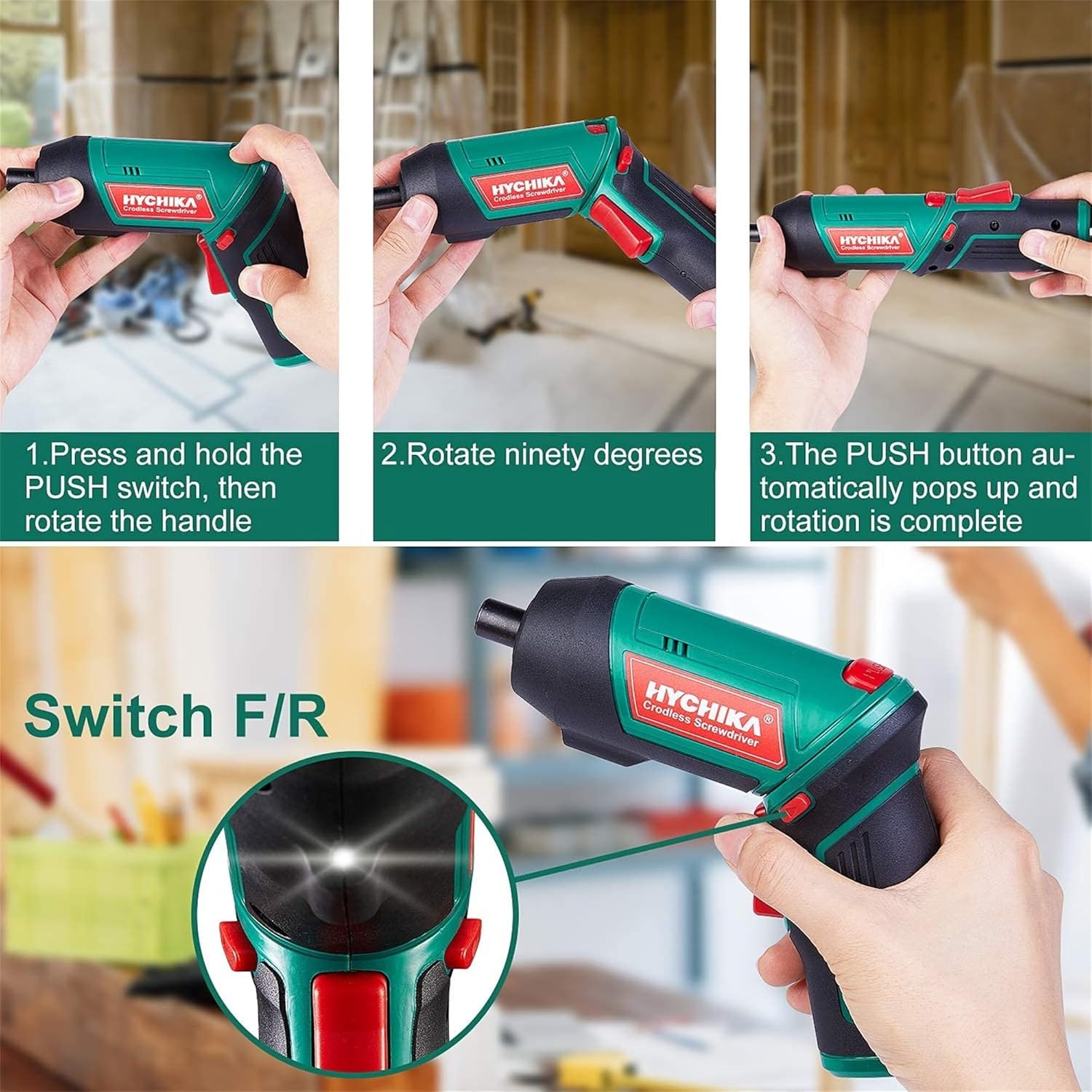
Figure 6.1: Demonstrates the process of transforming the screwdriver's grip by pressing the PUSH button and rotating the handle.
6.2 Forward and Reverse Operation
The forward/reverse button controls the direction of rotation for screwing and unscrewing.
- To drive screws (forward rotation), push the forward/reverse button to the left (when viewed ti tukangeun alat).
- To remove screws (reverse rotation), push the forward/reverse button to the right.
- When the button is in the center position, the tool is locked, preventing accidental activation.
6.3 Ngagunakeun Lampu Gawé LED
The built-in LED light automatically illuminates when the screwdriver is in operation, providing visibility in dimly lit areas.

Figure 6.2: The integrated LED light provides clear illumination for working in dark environments.
7. Pangropéa
Regular maintenance ensures the longevity and optimal performance of your screwdriver.
- beberesih: Jaga liang ventilasi tetep bersih sareng bébas tina lebu. Anggo lawon anu lemes sarengamp lawon pikeun ngabersihan pakakas casing. Ulah make bahan kimia kasar atawa cleaners abrasive.
- Perawatan Bit: Clean screwdriver bits after use. Store them in the provided case to prevent loss and damage.
- Panyimpenan batré: If storing the tool for an extended period, ensure the battery is partially charged (around 50%) and store it in a cool, dry place. Recharge the battery every 3-6 months to maintain its health.
- Inspeksi umum: Periodically check for any loose screws, damaged cords, or worn parts. Do not use the tool if any damage is observed.
8. Cara ngungkulan
This section addresses common issues you might encounter with your screwdriver.
| Masalah | Mungkin Cukang lantaranana | Solusi |
|---|---|---|
| Obeng teu hurung. | Batré béak. Forward/Reverse switch is in the center (locked) position. | Ngeusi batre sapinuhna. Nyorong saklar maju/mundur ka kenca atawa ka katuhu. |
| Screwdriver loses power quickly. | Batré teu dicas pinuh. Battery life degraded. | Pastikeun batréna tos dicas pinuh sateuacan dianggo. If battery life is significantly reduced, contact customer support for replacement options. |
| Bits are not held securely in the chuck. | Bit is not fully inserted. Chuck is dirty or damaged. | Push the bit firmly into the chuck until it clicks into place. Clean the chuck area. If damage is visible, contact customer support. |
Lamun masalah persists sanggeus nyobian solusi ieu, mangga ngahubungan rojongan customer.
9. Spésifikasi
| Fitur | Spésifikasi |
|---|---|
| merek | Overstock (HYCHIKA) |
| Nomer modél | c131a012-0da9-4306-aeab-b1d9ff5cd4b7 |
| Voltage | 3.6 volt |
| Sumber Daya | Batré Powered |
| Laju | 180 rpm |
| Item torsi | 6 Newton Meters (6 N-m) |
| Jenis Batré | Litium Ion |
| Kapasitas batré | 2000 mAh |
| Ukuran Amrik | 1/4 inci (6.35mm) |
| Bahan | Plastik, Karét |
| Warna | Héjo |
| UPC | 616859793583 |
10. Garansi jeung Rojongan
Overstock offers lifetime after-sales service for this product. For any questions, concerns, or technical assistance, please contact our customer support team.
Please have your model number (c131a012-0da9-4306-aeab-b1d9ff5cd4b7) and purchase information ready when contacting support.


