
1. Émbaran Kasalametan penting
Mangga baca sagala parentah taliti saméméh assembly sarta pamakéan. Simpen manual ieu pikeun rujukan ka hareup.
- Ulah nangtung dina korsi.
- Ulah dianggo korsi upami aya bagian anu ruksak atanapi leungit.
- Pastikeun sadaya baut sareng sekrup dikencangkeun sacara aman sateuacan dianggo. Périodik pariksa tur tighten deui sakumaha diperlukeun.
- Jauhkeun barudak sareng piaraan nalika dirakit. Bagian-bagian alit tiasa nyababkeun kaselek.
- Do not expose the chair to direct sunlight or extreme temperatures.
- The Bluetooth speakers contain a built-in battery. Do not use the speakers while charging.
- Maximum weight capacity: Information not explicitly provided, but general gaming chair limits are usually around 120-150kg. Users should refer to product packaging or official website for exact limits.
2. Eusi Paket
Pariksa yén sadaya komponén aya sateuacan ngamimitian assembly. Lamun aya bagian nu leungit atawa ruksak, kontak rojongan customer.
- Tukang tonggong
- Bantalan korsi
- Sandaran leungeun (Kénca & Katuhu)
- Legs/Base
- Perangkat Keras Perakitan (Sekrup, Ring, Kunci Allen)
- Power Adapter for Bluetooth Speakers
- Lumbar Support Cushion (with vibration function)
- Bantal Headrest
3. Setup jeung Majelis
Follow these steps to assemble your GTRACING Gaming Chair. It is recommended to have two people for assembly.
- Pasang Dasar: Secure the chair legs/base to the bottom of the seat cushion using the provided hardware.
- Pasang Armrests: Attach the armrests to the sides of the seat cushion.
- Sambungkeun Backrest: Align the backrest with the seat cushion and secure it using the bolts.
- Important Note for Lumbar Support: If your model includes integrated side speakers, ensure these are properly positioned and connected before fully securing the backrest, as this may affect the fit of the lumbar support cushion. Some users have reported difficulty fitting the lumbar support if the side speakers are not attached first.
- Attach Headrest and Lumbar Support: Place the headrest and lumbar support cushions as desired. The lumbar support cushion has a vibration function.
- Cék ahir: Pastikeun sadaya sambungan pageuh sareng korsi stabil sateuacan dianggo.
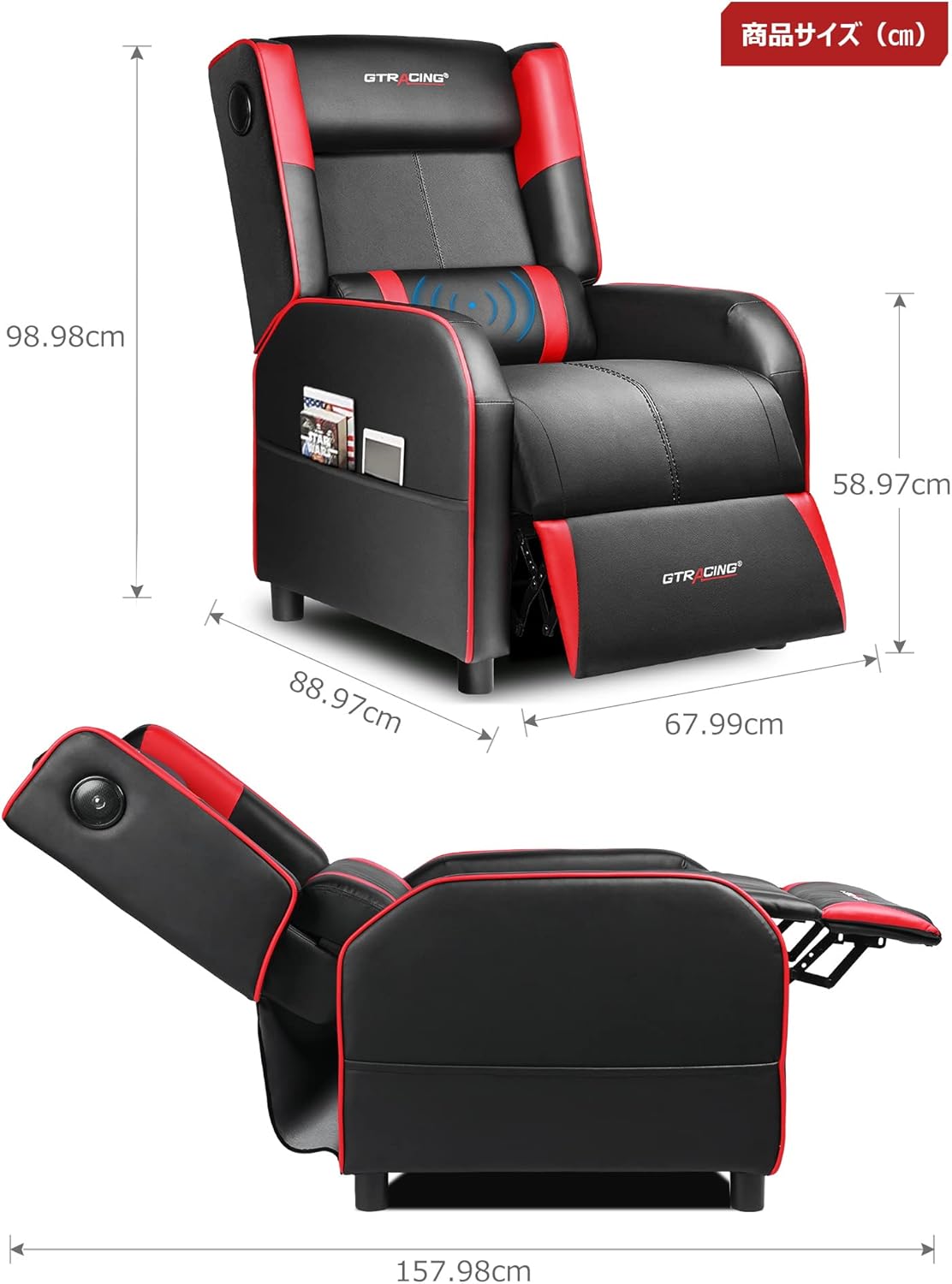
Image: Overall dimensions of the GTRACING Gaming Chair, showing height, width, and depth in both upright and reclined positions.
4. Parentah Operasi
4.1 Operasi Spiker Bluetooth
Your GTRACING Gaming Chair features integrated Bluetooth 5.1 speakers for an immersive audio experience.
- Hurungkeun/Pareuman: Locate the power button on the speaker control panel (usually on the side of the chair). Press and hold to power on or off.
- papasangan: Once powered on, the speakers will enter pairing mode. On your device (PC, smartphone, tablet), search for Bluetooth devices and select "GTRACING Speaker" (or similar name) to connect.
- Rentang sambungan: The speakers support a wireless connection range of approximately 15 meters (49 feet).
- Kahirupan batré: The built-in battery provides up to 15 hours of continuous playback on a full charge.
- Ngecas: Connect the provided power adapter to the charging port on the speaker control panel. Note: The speakers cannot be used while charging.
- Kompatibilitas Konsol: For PS4, PS5, XBOX, or SWITCH consoles, a dedicated USB adapter (sold separately) is required for low-latency connection (approx. 0.1 seconds delay).

Image: A user enjoying a game while seated in the GTRACING Gaming Chair, highlighting the integrated Bluetooth speakers located in the backrest for an immersive audio experience.
4.2 Fungsi Ngagoler
Adjust the backrest to your preferred angle for various activities.
- Rentang adjustment: The backrest can recline from 95° to 150°.
- Mékanisme Reclining: To recline, push the lever (usually on the right side of the chair) and lean back. Release the lever to lock the position.
- Integrated Ottoman: The ottoman extends and retracts in synchronization with the backrest, providing continuous leg support as you recline.
- Recommended Modes:
- 90° Game/Work Mode: Upright position for focused tasks.
- 115° Entertainment Mode: Slightly reclined for watching movies or casual browsing.
- 150° Nap Mode: Fully reclined for short rests or naps.
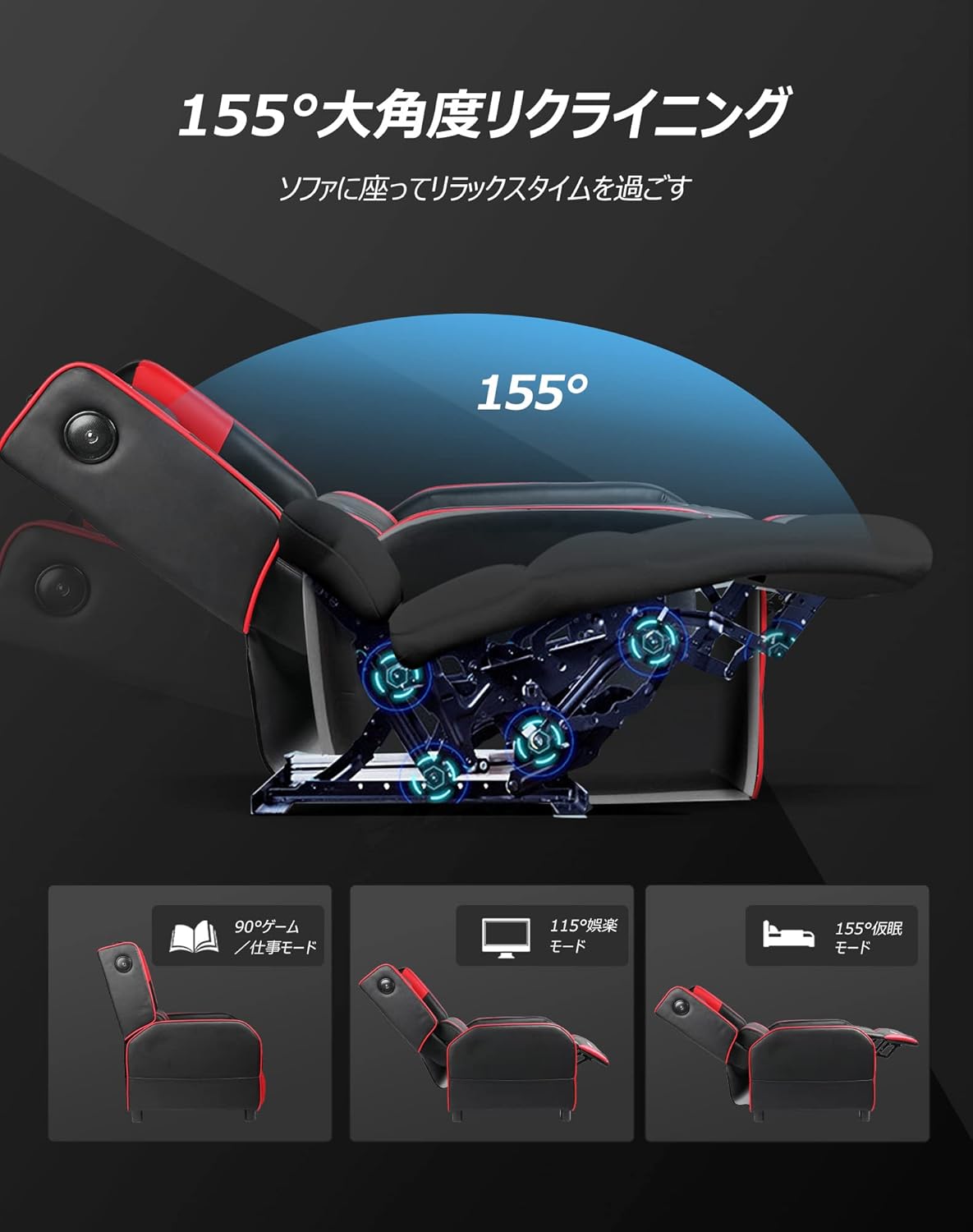
Image: Diagram illustrating the reclining function of the GTRACING Gaming Chair, showing the chair in upright (90°), entertainment (115°), and nap (155°) positions, with the ottoman extending accordingly.
4.3 Vibration Lumbar Support
The lumbar support cushion features a vibration function designed to alleviate lower back discomfort during prolonged sitting.
- Aktipkeun: Connect the lumbar support's USB cable to a power source (e.g., USB port on a computer, power bank, or wall adapter).
- Kauntungannana: The vibration helps to distribute pressure, reducing stress on the pelvis, lumbar spine, and sacrum.
4.4 Seat Comfort Features
The seat cushion is engineered for superior comfort and support.
- Integrated Urethane Cushion: The seat uses a highly elastic, integrated molded urethane cushion.
- Internal Spring System: Springs are incorporated within the urethane for enhanced elasticity and durability.
- Thick Backrest and Seat: The generous padding of both the backrest and seat cradles the body, providing a sofa-like seating experience.

Gambar: cross-section view of the GTRACING Gaming Chair's seat cushion, detailing the layers of high-quality PU leather, high-rebound urethane, high-density urethane, internal pocket coils, and integrated molded urethane for optimal comfort and support.
5. Pangropéa
Proper care will extend the life and appearance of your gaming chair.
- beberesih: Diusap ku hipu, damp lawon. Hindarkeun bahan kimia anu kasar atanapi pembersih abrasive.
- Tumpahan: Blot spills geuwat ku kaen beresih, garing.
- Paparan sinar panonpoé: Avoid prolonged exposure to direct sunlight to prevent fading and material degradation.
- Pariksa Hardware: périodik pariksa jeung tighten sadayana screws na bolts pikeun mastikeun stabilitas.
6. Cara ngungkulan
Upami anjeun ngalaman masalah, tingali solusi umum di handap ieu.
- Bluetooth Speakers Not Connecting:
- Ensure the speakers are powered on and in pairing mode.
- Pariksa yen Bluetooth diaktipkeun dina alat Anjeun.
- Move your device closer to the chair (within 15m).
- Poho alat tina setelan Bluetooth anjeun sareng cobian pasangkeun deui.
- Ensure the speakers are not currently charging.
- Lumbar Support Not Fitting During Assembly:
- As noted in the assembly section, ensure any integrated side speakers are attached before fully securing the backrest, as this can impact the fit of the lumbar support cushion.
- Reclining Mechanism Not Working Smoothly:
- Check for any obstructions around the reclining mechanism.
- Ensure the lever is fully engaged or disengaged.
- Verify that all assembly bolts related to the backrest are securely tightened.
7. Spésifikasi
| Nomer modél | GT208M |
| merek | GTRACING |
| Bahan | Faux Leather (PU Leather) |
| Warna | Beureum |
| Diménsi Produk (Tegak) | Approx. 80 cm (Depth) x 80 cm (Width) x 80 cm (Height) |
| Beurat produk | 30 kg |
| Ukuran Paket | 77 cm x 69 cm x 52 cm |
| Beurat pakét | 28 kg |
| Sudut Reclining | 95 ° nepi ka 150 ° |
| Vérsi Bluetooth | 5.1 |
| Speaker Battery Life | Nepi ka 15 jam (puteran kontinyu) |
| Speaker Ngecas | Not usable while charging |
| Parentah perawatan | Ngusap beresih |
8. Garansi jeung Rojongan
For warranty information or technical support, please refer to the official GTRACING websitus atanapi ngahubungan layanan palanggan maranéhanana langsung.
GTRACING offers after-sales support for their products. Please retain your proof of purchase for any warranty claims.
Anjeun sering tiasa mendakan detil kontak dukungan dina produsén websitus atawa ngaliwatan pangecér dimana anjeun dibeuli produk.