Produk Leuwihview
This ALLIMITY replacement remote control is designed to operate various JTC LED TV models, including DVB73207, DVB824010, DVX4, GENESIS 40GD, and GPRC15926. It provides all the essential functions of your original remote control without requiring any complex programming.
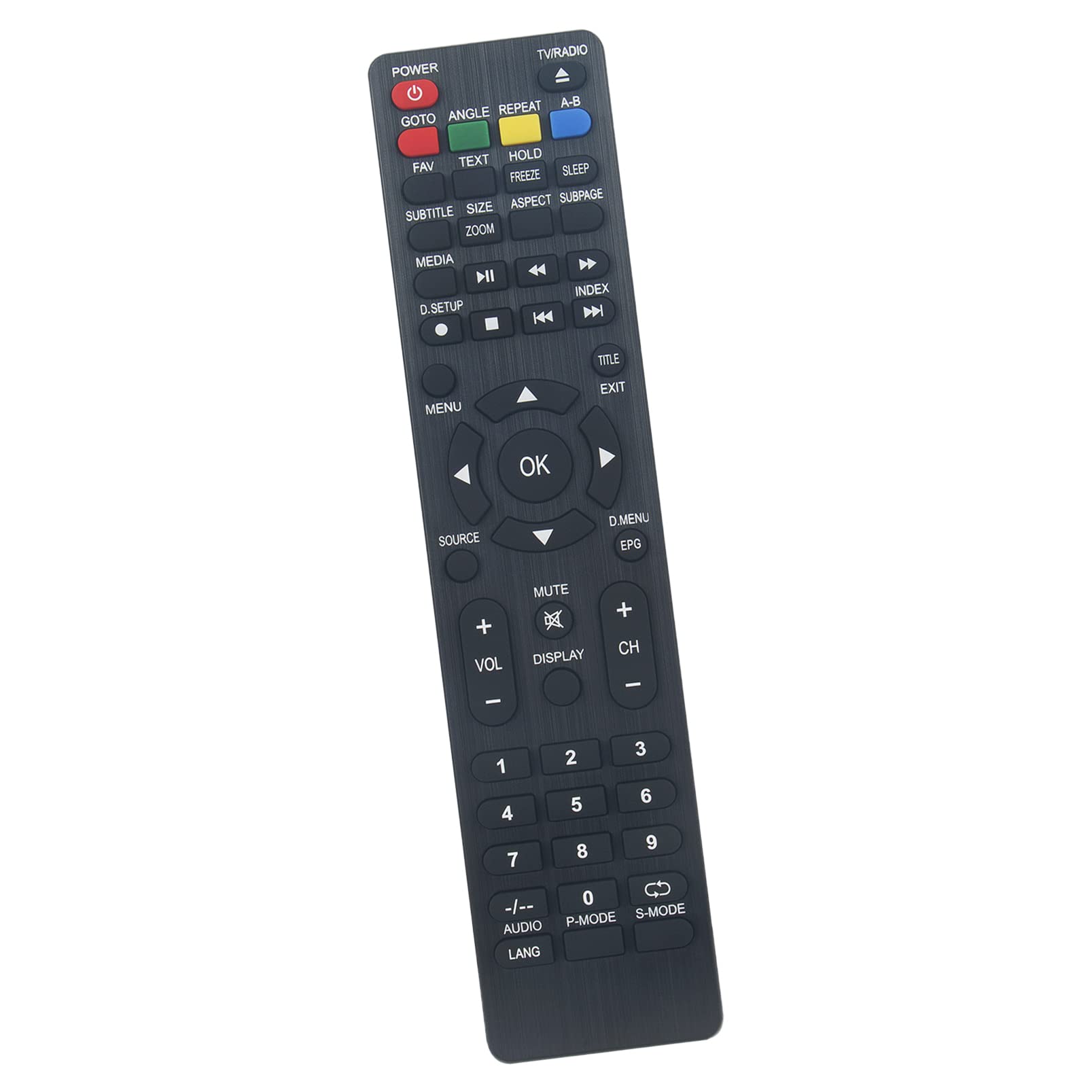
Gambar 1: Hareupeun view of the ALLIMITY replacement remote control, showing all buttons and their labels.
Disetél
1. Pamasangan batré
- Panggihan kompartemen batré dina tonggong kadali jauh.
- Geser panutup kompartemen batré ka handap atawa pencét kancing jeung angkat pikeun muka.
- Insert two new AAA alkaline batteries, ensuring the positive (+) and negative (-) terminals match the diagrams inside the compartment.
- Tutup panutup kompartemen batré aman.
No programming is required. The remote control is ready for use immediately after battery installation.

Gambar 2: Balik view tina kadali jauh, nyorot kompartemen batré.
Parentah Operasi
Point the remote control directly at your JTC LED TV. Ensure there are no obstructions between the remote and the TV's infrared receiver.
Fungsi konci:
- kakuatan: Ngahurungkeun atawa mareuman TV.
- TV / Radio: Switches between TV and Radio modes.
- GOTO: Jumps to a specific time in media playback.
- ANGGA: Changes the camera angle during DVD playback (if supported).
- ULANG: Repeats current track/chapter/title.
- AB: Repeats a specific section of media.
- FAV: Ngaksés saluran paporit.
- TEKS: Displays teletext.
- Tahan: Holds the current teletext page.
- SARE: Nyetél waktos bobo.
- SUBTITEL: Selects subtitle language.
- SIZE/ZOOM: Adjusts screen aspect ratio or zooms in/out.
- Aspék: Changes the aspect ratio of the display.
- SUBAGE: Navigates teletext subpages.
- SATENGAH: Accesses media player functions.
- Playback Controls (Play, Pause, Stop, Rewind, Fast Forward, Previous, Next): Ngadalikeun putereun média.
- D. SETUP: Accesses digital setup menu.
- Indéks: Displays index page.
- MENU: Muka ménu utama.
- JUDUL: Displays the title menu.
- KALUAR: Kaluar tina ménu atanapi pungsi ayeuna.
- Tombol Navigasi (Kaluhur, Turun, Kénca, Katuhu, OK): Navigates ménu jeung confirms selections.
- SUMBER: Milih sumber input (HDMI, AV, jsb.).
- D.MENU/EPG: Accesses digital menu or Electronic Program Guide.
- VOL +/-: Nyetél polumeu kaluhur atanapi kahandap.
- Bisu: Ngajempékeun atanapi nganonaktipkeun sora.
- TAMPILAN: Shows on-screen display information.
- CH +/-: Robah saluran kaluhur atanapi kahandap.
- Papan tombol angka (0-9): Direct channel selection or data entry.
- -/--: Toggles between single and double-digit channel entry.
- AUDIO/LANG: Selects audio track or language.
- P-MODE: Selects picture mode.
- S-MODE: Selects sound mode.
Pangropéa
Ngabersihan Remote Control:
- Ngusap kadali jauh ku lawon lemes, garing.
- Keur kokotor bandel, rada dampen the cloth with water or a mild cleaning solution. Do not use harsh chemicals or abrasive cleaners.
- Pastikeun teu aya cairan anu asup ka jero remot kontrol.
Ngagantian batré:
- Replace batteries when the remote control's response becomes sluggish or stops working.
- Salawasna gentos kadua batréna sakaligus ku batré alkali AAA anu énggal.
- Ulah campur batré heubeul jeung anyar, atawa tipena béda accu.
- Cabut batré upami kadali jauh henteu dianggo kanggo waktos anu panjang pikeun nyegah bocor.
Pamérésan masalah
- Jauh teu jalan:
- Pariksa naha batréna dipasang kalayan leres sareng polaritas anu leres (+/-).
- Ganti batréna ku nu anyar.
- Pastikeun teu aya halangan antara remot kontrol sareng sénsor infrabeureum TV.
- Pastikeun anjeun nunjuk remot langsung ka TV.
- rentang kawates:
- Pastikeun batréna seger.
- Pariksa sumber cahaya anu kuat (sapertos sinar panonpoé langsung atanapi lampu fluoresensi anu caang) anu tiasa ngaganggu sinyal infra red.
- Specific buttons not responding:
- This remote is a direct replacement and should replicate all original functions. If a specific button does not work, ensure your TV model supports that function.
- Clean the remote control, especially around the unresponsive button, to remove any debris.
spésifikasi
| merek | KAKATAAN |
| Nomer modél | QYSY-GARA-JC-QYSY |
| Téhnologi konektipitas | Infrabeureum (IR) |
| Alat nu cocog | JTC LED TV models: DVB73207, DVB824010, DVX4, GENESIS 40GD, GPRC15926 |
| Rentang maksimum | 10 Méter (kira-kira 33 kaki) |
| Batré Diperlukeun | 2 x Batré Alkali AAA (teu kalebet) |
Garansi sareng Rojongan
Information regarding specific warranty terms or direct support contact for this ALLIMITY replacement remote control is not provided in the product details. For any issues or inquiries, please refer to the retailer or platform where the product was purchased for their return and support policies.
This remote control is designed to function out-of-the-box without programming for the specified JTC TV models. If you encounter persistent issues, please verify compatibility with your TV model.


