Bubuka
This manual provides comprehensive instructions for the safe and efficient operation of your Max Power MPD1238 Portable Karaoke Speaker System. Please read this manual thoroughly before using the product and retain it for future reference. The MPD1238 is designed for powerful audio output, featuring a 15-inch woofer and a tweeter, built-in LED party lights, and versatile connectivity options including Bluetooth, USB, SD card, FM radio, and Aux input. It comes with a wired microphone and a DJ speaker stand, making it ideal for various events.
Naon dina Box
Saatos ngabongkar bungkusan, pastikeun sadaya barang anu didaptarkeun di handap aya sareng dina kaayaan anu saé. Upami aya barang anu leungit atanapi rusak, hubungi pangecér anjeun langsung.
- Max Power MPD1238 Karaoke Speaker
- Mikropon kabel
- Kadali jauh
- Aux Kabel
- Battery Auxiliary Cable
- DJ Speaker Stand

Image: The Max Power MPD1238 portable speaker, showcasing its 15-inch woofer, along with the wired microphone, remote control, and the included DJ stand.
Fitur
The Max Power MPD1238 is equipped with a range of features designed for a versatile audio experience:
- Kaluaran audio anu kuat: Features a 1 x 15” WOOFER and 1 x TWEETER for clear and robust sound.
- Diwangun-di Lampu Partéi LED: Flashing lights around the woofer add visual effects, with multiple modes and an option to turn off.
- Konektipitas Bluetooth Nirkabel: Easily connect your smartphone, tablet, or laptop for wireless audio streaming.
- Sababaraha Pilihan Playback: Supports USB drive, Micro SD card, FM Radio, and Aux cable input.
- Desain portabel: Equipped with a convenient trolley handle and wheels for easy transportation.
- Batré anu tiasa dicas deui: Provides long battery life for extended use, ensuring your party keeps going.
- Input mikropon: Includes 2 MIC inputs and 1 GUITAR input for karaoke and live performances.
- Kadali jauh: Full control over volume and playback settings from a distance.
- DJ Speaker Stand: Adjustable tripod stand for optimal sound projection.
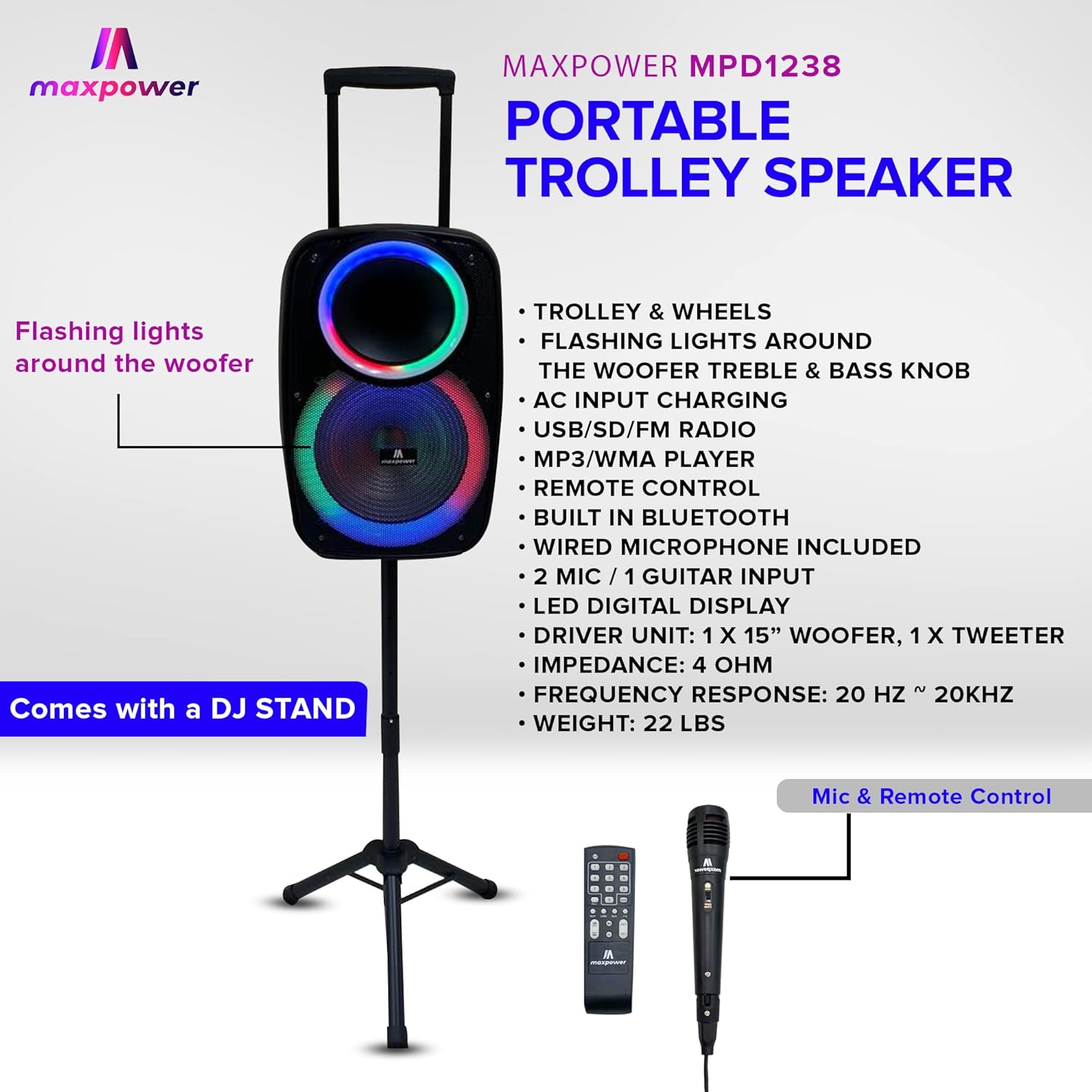
Image: The Max Power MPD1238 speaker positioned on its stand, illustrating its portability with a trolley handle and highlighting features such as flashing lights, AC input charging, USB/SD/FM radio, Bluetooth, wired microphone inclusion, LED digital display, and driver unit specifications.
Disetél
- Ngabongkar bungkusan: Sacara saksama miceun sadaya komponén tina bungkusan. Simpen bungkusan pikeun neundeun atanapi transportasi ka hareup.
- Ngeusi batre: Before first use, fully charge the speaker's internal battery using the provided AC power cable. Connect the cable to the speaker's AC input and then to a standard wall outlet. The charging indicator will show the status.
- Assembling the DJ Speaker Stand:
- Extend the tripod legs of the DJ stand to a stable position.
- Adjust the height of the stand using the locking pin and knob. Ensure the pin is fully engaged and the knob is tightened.
- Carefully place the Max Power MPD1238 speaker onto the pole of the DJ stand. Ensure it is securely seated.

Image: The Max Power MPD1238 speaker securely mounted on its adjustable DJ stand, demonstrating its elevated position for optimal sound projection.
- Nyambungkeun Mikropon: Insert the wired microphone's cable into one of the MIC input jacks on the speaker's control panel.
Parentah Operasi
Daya Hurung/Pareuman
Locate the power switch on the speaker's control panel. Toggle it to the "ON" position to power on the unit. Toggle to "OFF" to power off.
Mode Bluetooth
- Power on the speaker. The speaker will automatically enter Bluetooth pairing mode or you can select Bluetooth mode using the Mode button.
- Dina alat Bluetooth anjeun (smartphone, tablet, laptop), aktipkeun Bluetooth sareng milarian alat anu sayogi.
- Select "Max Power MPD1238" (or similar name) from the list of devices.
- Once paired, the speaker will emit a confirmation sound, and you can begin streaming audio wirelessly.
USB / SD Card Playback
- Insert a USB flash drive or SD card (pre-loaded with MP3/WMA audio files) kana port masing-masing dina panel kontrol speaker.
- The speaker will automatically detect the media and switch to USB or SD mode, beginning playback. If not, press the Mode button to select.
- Anggo kontrol puter balik (Puter/Jeda, Trek Salajengna/Sateuacanna) dina speaker atanapi remot kontrol pikeun ngatur musik anjeun.
Modeu Radio FM
- Press the Mode button until "FM" is displayed on the LED screen.
- Pencét tombol Puter/Pause pikeun ngamimitian scan otomatis pikeun stasiun FM anu sayogi. Spiker bakal nyimpen stasiun anu kadeteksi.
- Anggo tombol Lagu Salajengna/Sateuacanna pikeun napigasi antara stasiun FM anu disimpen.
Input Bantu (AUX)
- Connect one end of the provided Aux cable to the AUX input port on the speaker.
- Connect the other end of the Aux cable to the audio output jack of your external device (e.g., MP3 player, computer).
- Press the Mode button until "AUX" is displayed. Audio from your external device will now play through the speaker.
Mikropon sareng Input Gitar
- Plug your wired microphone into one of the "MIC IN" jacks.
- Plug your guitar into the "GUITAR IN" jack.
- Adjust the individual volume controls for the microphone and guitar on the speaker's control panel to achieve the desired mix with your music.
Lampu Partéi LED
The speaker features dynamic LED lights around the woofer. Use the dedicated light mode button on the control panel or remote to cycle through different light patterns or to turn the lights off.
Pangropéa
- beberesih: Anggo kaén anu garing sareng lemes pikeun ngabersihan bagian luar spéker. Ulah make cleaners cair atawa bahan abrasive.
- Panyimpenan: Lamun teu dipaké pikeun période nambahan, nyimpen speaker dina tiis, tempat garing, jauh ti sinar panonpoé langsung jeung hawa ekstrim.
- Perawatan batré: To prolong battery life, fully charge the speaker before long-term storage and recharge it every 3-6 months if not in use.
- Hindarkeun cai: This speaker is not waterproof. Keep it away from water and moisture to prevent damage.
Pamérésan masalah
| Masalah | Mungkin Cukang lantaranana | Solusi |
|---|---|---|
| Taya kakuatan | Batré béak; Pindah daya pareum. | Cas speaker; Pastikeun saklar daya dina posisi "ON". |
| Taya sora tina speaker | Volume is too low; Incorrect mode selected; Device not connected properly. | Increase master volume; Press Mode button to select correct input (Bluetooth, USB, AUX, FM); Reconnect device. |
| Bluetooth teu dipasangkeun | Speaker henteu dina mode papasangan; Alat jauh teuing; Bluetooth ditumpurkeun dina alat sumber. | Ensure speaker is in Bluetooth mode; Move device closer to speaker; Enable Bluetooth on your device and rescan. |
| Mikropon teu jalan | Mikropon teu dipasang kalawan bener; Volume mikropon teuing leutik; Mikropon rusak. | Ensure microphone is fully inserted into MIC IN jack; Increase microphone volume knob; Test with another microphone if available. |
| USB / kartu SD teu maén | Lepat file format; Kartu / drive teu diselapkeun leres; Korupsi files. | Mastikeun files are MP3/WMA format; Reinsert USB/SD card; Try a different USB/SD card. |
spésifikasi
| Fitur | Spésifikasi |
|---|---|
| Modél | MPD1238 |
| Unit Supir | 1 x 15” WOOFER, 1 x TWEETER |
| Impedansi | 4 ohm |
| Réspon Frékuénsi | 20 Hz ~ 20KHz |
| Téhnologi konektipitas | Bluetooth, USB, SD Card, Aux |
| Input | 2 x MIC, 1 x GUITAR, 1 x AUX |
| Sumber Daya | Battery Powered (Rechargeable) / AC Input |
| Alat nu cocog | Laptop, Tablet, Smartphone |
| Tipe Pamasangan | Pole Mount (DJ Stand included) |
| Ukuran (Kira-kira.) | 12" (W) x 12" (D) x 23.2" (H) |
| Beurat (Kira-kira.) | 22 pon |
| Batré (pikeun jauh) | 1 batré AAA diperlukeun (kaasup) |
| UPC | 647625216050 |

Image: A diagram illustrating the dimensions of a Max Power portable speaker, showing height, width, and depth. Note: The model number shown in this diagram (MPD3116) may differ from the product model (MPD1238), but the general dimensional representation is similar.
Garansi sareng Rojongan
For warranty information and technical support, please refer to the documentation provided with your purchase or visit the official Max Power websitus. Simpen resi pameseran anjeun salaku bukti pameseran pikeun klaim garansi.
For further assistance, you may contact Max Power customer service through their official channels.


