Adcraft Carel Control W/Sensors User Manual
Model: Carel Control W/Sensors
Bubuka
The Adcraft Carel Control W/Sensors is a genuine Original Equipment Manufacturer (OEM) part designed to ensure the safety, reliability, and optimal performance of your food service equipment. This manual provides comprehensive instructions for the proper installation, operation, and maintenance of your new control unit.
Adcraft is a leading manufacturer of high-quality equipment, utensils, and supplies for the food service industry, committed to delivering products that meet rigorous standards.
Eusi pakét
Please verify that all items listed below are present in your package. If any items are missing or damaged, please contact your supplier immediately.
- 1 x Adcraft Carel Control Unit
- 1 x Temperature Sensor with Blue Cable
- 1 x Mounting Bezel/Frame
- 2 x Yellow Mounting Clips
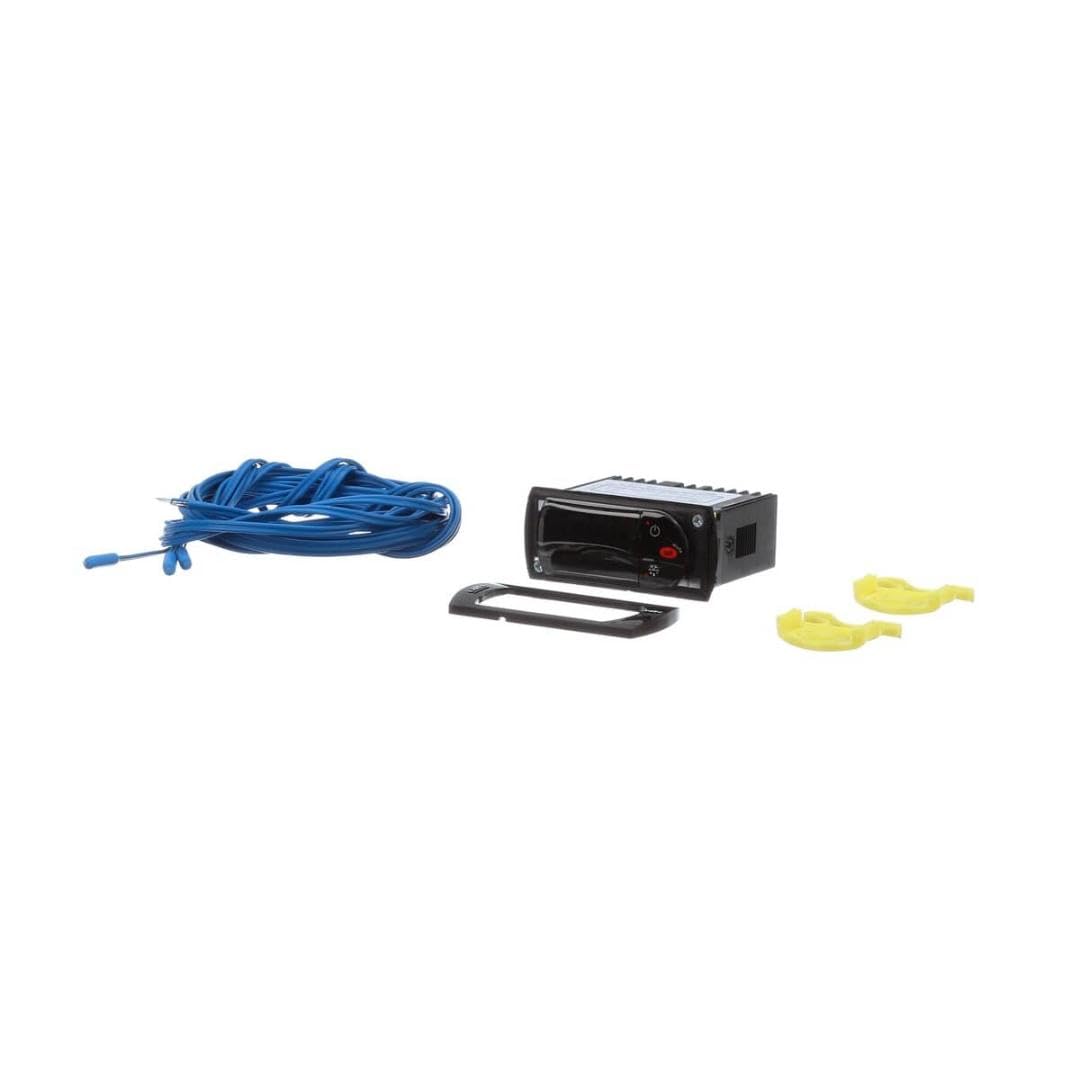
Gambar 1: Contents of the Adcraft Carel Control W/Sensors package. Shown are the black control unit, a coiled blue sensor cable with a probe, a black mounting bezel, and two yellow mounting clips.
Disetél
This section outlines the general steps for setting up your Adcraft Carel Control Unit. Specific wiring diagrams and detailed installation instructions should be referenced from the equipment's primary service manual or by a qualified technician.
- Kasalametan munggaran: Ensure that the power supply to the equipment is completely disconnected before beginning any installation work.
- Pasang Unit Kontrol:
- Cut an appropriate opening in the equipment panel according to the dimensions provided in the specifications.
- Insert the control unit from the front of the panel.
- Secure the control unit using the provided mounting bezel and yellow clips from the rear, ensuring a snug fit.
- Nyambungkeun sénsor: Connect the blue sensor cable to the designated sensor input terminals on the rear of the control unit. Ensure the sensor probe is placed in the area where temperature measurement is required.
- Sambungan listrik: Connect the power supply and load wires to the appropriate terminals on the control unit. Refer to the wiring diagram specific to your equipment and the control unit for correct connections. It is highly recommended that electrical connections are performed by a certified electrician.
- Power-Up mimiti: Once all connections are secure, restore power to the equipment. The control unit display should illuminate.
Ngoperasikeun
The Adcraft Carel Control Unit is designed for intuitive operation. While specific functions may vary based on the equipment it controls, the basic interface typically includes a digital display and several buttons for navigation and setting adjustments.
- tampilan: The digital display typically shows the current temperature reading from the connected sensor. It may also show various operational parameters or error codes.
- Tombol: Common buttons include:
- Tombol Daya/Siaga: To turn the unit on or off, or put it into standby mode.
- Tombol Setel: To enter programming mode or confirm a setting.
- Panah luhur/handap: To navigate menus or adjust numerical values.
- Function/Alarm Button: For specific functions or to acknowledge alarms.
- Setélan Parameter: To adjust temperature setpoints or other operational parameters, typically press the 'Set' button, use the arrow keys to navigate to the desired parameter, adjust the value, and press 'Set' again to confirm. Consult the equipment's specific operational guide for detailed parameter settings.
Pangropéa
Proper maintenance ensures the longevity and accurate performance of your Adcraft Carel Control Unit.
- beberesih: Regularly wipe the control unit's display and casing kalawan lemes, damp cloth. Do not use abrasive cleaners, solvents, or excessive moisture, as these can damage the unit.
- Inspeksi sénsor: Periodically inspect the sensor cable and probe for any signs of damage, such as cuts, kinks, or corrosion. A damaged sensor can lead to inaccurate readings.
- Sambungan: Ensure all electrical connections remain secure. Loose connections can cause intermittent operation or damage.
- Kaayaan Lingkungan: Ensure the control unit is operating within its specified environmental conditions (temperature, humidity) to prevent malfunction.
Pamérésan masalah
This section provides solutions to common issues you might encounter. For problems not listed here, or if solutions do not resolve the issue, contact a qualified service technician.
| Masalah | Mungkin Cukang lantaranana | Solusi |
|---|---|---|
| Display is blank / No power | No power supply; Loose wiring; Unit malfunction | Check power source and circuit breaker. Verify all electrical connections are secure. If problem persists, contact service. |
| Bacaan suhu teu akurat | Sensor faulty; Sensor improperly placed; Loose sensor connection | Check sensor placement. Ensure sensor cable is securely connected. Inspect sensor for damage; replace if necessary. |
| Unit teu ngabales pencét tombol | Unit frozen; Button malfunction | Try cycling power to the unit (turn off, wait 30 seconds, turn on). If issue continues, contact service. |
| Kodeu kasalahan dipintonkeun | Kasalahan sistem khusus | Refer to the equipment's primary service manual for specific error code definitions and troubleshooting steps. |
spésifikasi
- Jenis produk: Food Service Supply
- Tipe Bagian: Genuine OEM (Original Equipment Manufacturer) part
- ukuran: Approximately 2 x 2 x 2 inches (Control Unit)
- Item Ukuran Paket: 4.0L x 4.0W x 4.0H inci
- Item Beurat Paket: 0.475 pon
- ASIN: B0BYRPBDQ6
- Pabrikan: Adcraft
- Titimangsa munggaran sadia: 17 Maret 2023
Garansi sareng Rojongan
As a genuine OEM (Original Equipment Manufacturer) part, the Adcraft Carel Control W/Sensors is manufactured to high standards. For specific warranty information and technical support, please refer to the documentation provided with your primary equipment or contact Adcraft directly through their official website or customer service channels. Always use genuine OEM parts for optimal safety, reliability, and performance.
Pikeun pitulung salajengna, mangga buka di Adcraft Store on Amazon or consult your equipment's service manual.


