Bubuka
Thank you for choosing the Baseus Super Energy Pro 1600A Car Jump Starter. This device is designed to provide a reliable and powerful solution for starting vehicles with dead batteries, and also functions as a portable power bank. Please read this manual thoroughly before use to ensure safe and proper operation. Keep this manual for future reference.
Émbaran Kasalametan
- Always read the vehicle's owner's manual before attempting to jump start it.
- Ulah nyobian luncat ngamimitian batré beku.
- Pastikeun ventilasi anu leres nalika ngoperasikeun alat éta.
- Jauhkeun alat ti barudak jeung piaraan.
- Ulah ngantepkeun alat ieu ka hujan atawa suhu anu ekstrim.
- Avoid short-circuiting the jumper clamps. Do not connect the red and black clamps babarengan.
- If the device or cables are damaged, do not use them. Contact support.
- Always connect the clamps to the correct battery terminals (red to positive, black to negative).
- Remove the jump starter immediately after the vehicle starts.
Eusi pakét
Pastikeun yén sadaya item aya dina pakét anjeun:
- Baseus Super Energy Pro Car Jump Starter Unit
- Kabel Jumper Pinter nganggo Clamps
- Kabel Ngecas USB-C
- Manual pangguna (dokumén ieu)
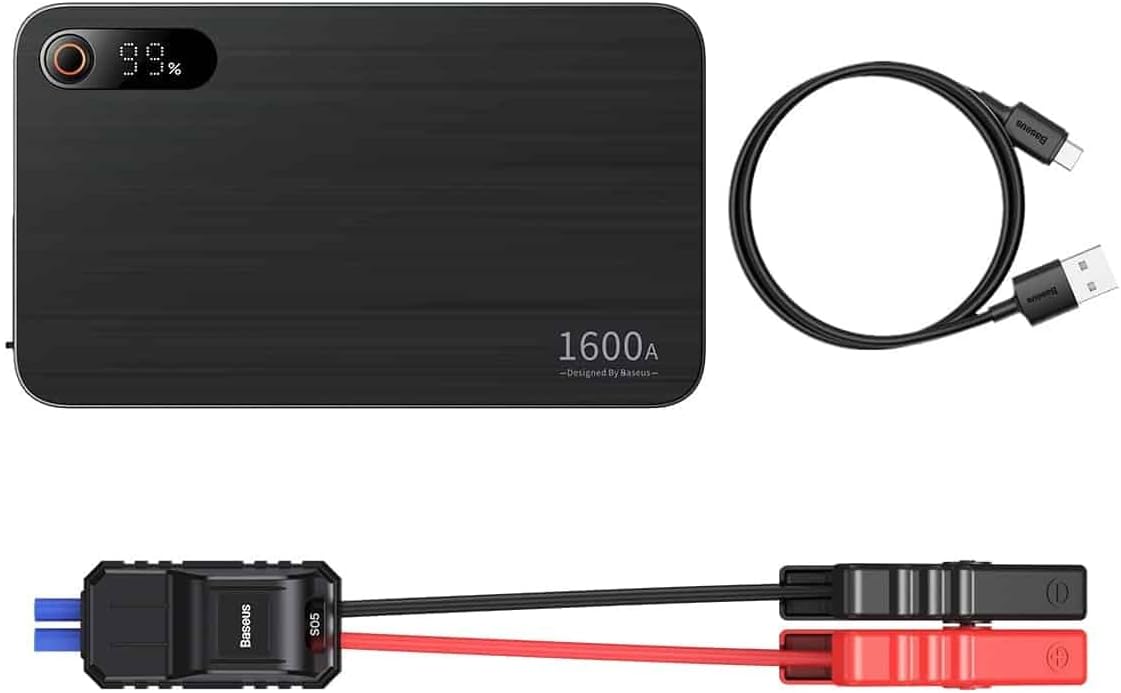
Image: Contents of the Baseus Super Energy Pro Car Jump Starter package, showing the main unit, smart jumper cables, and a USB-C charging cable.
Produk Leuwihview
Familiarize yourself with the components of your Baseus Super Energy Pro Car Jump Starter:
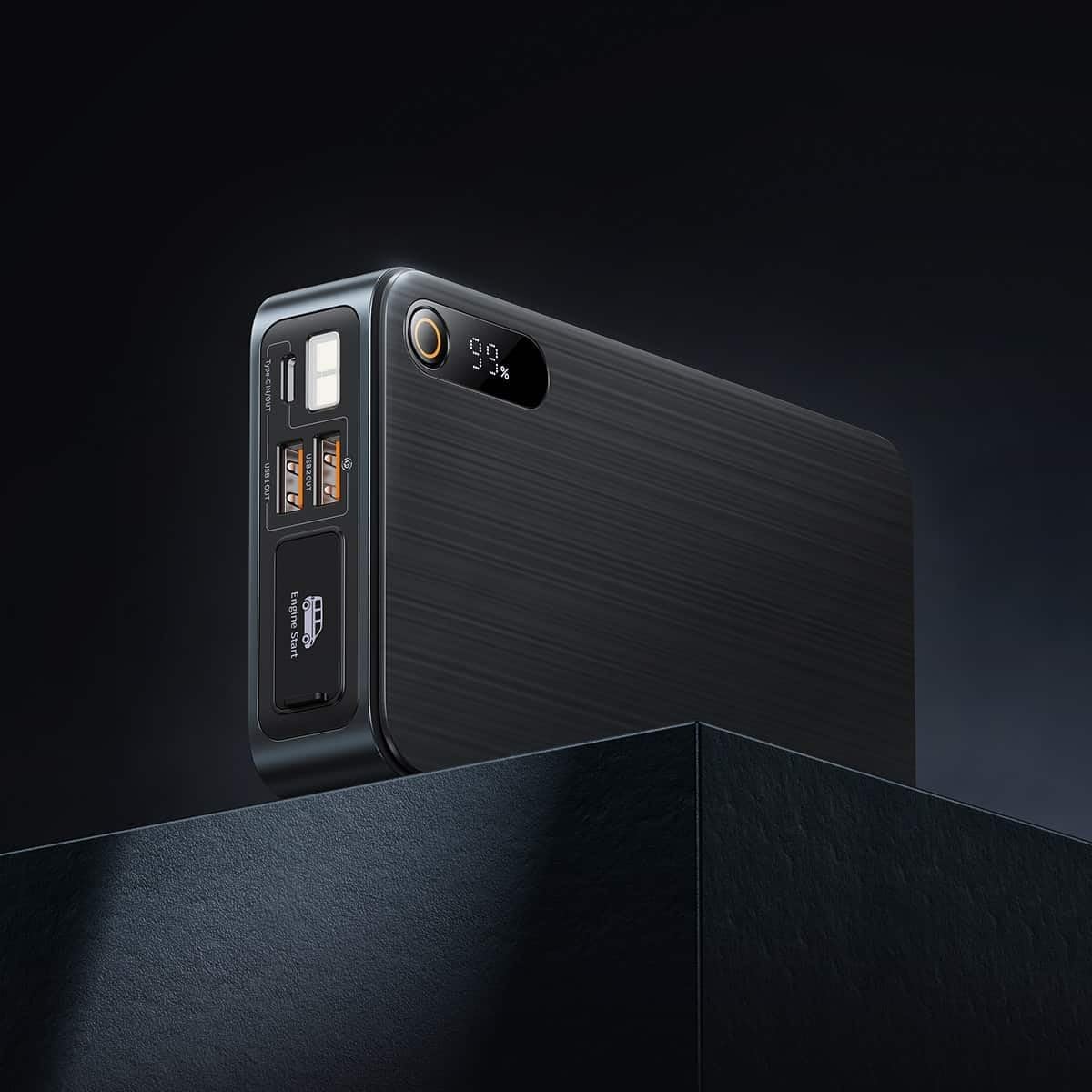
Image: Close-up of the jump starter's side panel, highlighting the various ports and the digital display.
- Digital tampilan: Nembongkeun persén batré sésanatage.
- Tombol Daya: Activates the device and turns on the LED light.
- Port Kaluaran USB-A: Pikeun ngecas alat éksternal sapertos smartphone atanapi tablet.
- Port Input/Kaluaran Tipe-C: Used for charging the jump starter itself or charging other devices.
- Engine Start Port: Dedicated port for connecting the smart jumper cables.
- Senter LED: Nyadiakeun katerangan dina lingkungan poék.

Image: The Baseus Super Energy Pro Car Jump Starter unit, displaying its digital battery indicator.
Ngecas Alat
Before first use, fully charge the Baseus Super Energy Pro Car Jump Starter. It is recommended to keep the device charged above 50% for optimal performance and longevity.
- Connect the provided USB-C charging cable to the Type-C port on the jump starter.
- Connect the other end of the USB-C cable to a suitable USB power adapter (not included).
- The digital display will show the charging progress. The device is fully charged when the display shows 100%.
Setup for Jump Starting
Ensure your vehicle is in Park (P) or Neutral (N) and the parking brake is engaged. Turn off all vehicle accessories (headlights, radio, air conditioning).
- Ensure the jump starter has sufficient charge (at least 50%).
- Connect the blue end of the smart jumper cables into the Engine Start port on the jump starter. Ensure it is firmly seated.
Operating Instructions (Jump Starting)
Turutan léngkah-léngkah ieu sacara saksama pikeun ngamimitian kendaraan anjeun:
- Sambungkeun Beureum Clamp: Gantelkeun beureum (+) clamp of the jumper cables to the positive (+) terminal of your vehicle's dead battery.
- Nyambung Hideung Clamp: Gantelkeun hideung (-) clamp of the jumper cables to the negative (-) terminal of your vehicle's dead battery.
- Indikator mariksa: Observe the indicator light on the smart jumper cable. A solid green light indicates a correct connection and that the device is ready to start. If it's red or flashing, check connections or refer to troubleshooting.
- Mimitian Kendaraan: Once the indicator is green, start your vehicle's engine.
- Cabut Kabel Jumper: As soon as the engine starts, immediately remove the blue plug of the jumper cables from the jump starter.
- Pegatkeun sambungan Clamps: Teras, pegatkeun sambungan kabel hideung (-)amp tina batré kandaraan, dituturkeun ku lampu beureum (+)amp.
Allow your vehicle's engine to run for at least 20-30 minutes to recharge its battery.
Pangropéa
- Panyimpenan: Store the jump starter in a cool, dry place, away from direct sunlight and moisture.
- Ngecas: For optimal battery life, recharge the device every 3-6 months, even if not in use.
- beberesih: Bersihkeun alat ku kaen anu lemes sareng garing. Ulah make bahan kimia kasar atawa bahan abrasive.
- Pamasangan batré: Do not dispose of the device in household waste. Follow local regulations for proper disposal of lithium-ion batteries.
Pamérésan masalah
| Masalah | Mungkin Cukang lantaranana | Solusi |
|---|---|---|
| Kandaraan teu ngamimitian | Batré jump starter lemah. Sambungan kabel salah. Vehicle battery is severely damaged. | Ngecas starter luncat. Pariksa clamp connections to battery terminals. Konsultasi ka montir profésional. |
| Jump starter teu ngecas | Ngecas kabel atawa adaptor faulty. Type-C port damaged. | Coba kabel USB-C sareng adaptor kakuatan anu béda. Kontak rojongan customer. |
| Smart cable indicator is red/flashing | Sambungan polaritasna sabalikna. Short circuit detected. Leuwih-ayeuna / leuwih-voltage. | Pegatkeun sambungan jeung sambungkeun deui clamps kalawan bener (beureum ka +, hideung ka -). Pastikeun clamps teu silih toél. Disconnect and try again after a few minutes. If problem persists, contact support. |
spésifikasi
| Fitur | Rincian |
|---|---|
| merek | Baseus |
| Nomer modél | CGNL070001 |
| Puncak Arus | 1600 A |
| Komposisi batré | Litium-ion |
| Jinis Layanan Kandaraan | mobil |
| Ukuran produk (L x W x H) | 10 x 5 x 1.27 cm |
| Item Beurat | 920 g |
| Input / Kaluaran | USB-A Output, Type-C Input/Output |
Garansi sareng Rojongan
For warranty information or technical support, please refer to the warranty card included with your product or contact the retailer where you purchased the device. You may also visit the official Baseus websitus kanggo bantosan sareng rincian kontak salajengna.