
Bubuka
The FIMEI Split Floor Lamp is a modern LED lighting solution designed for versatile use in various indoor environments. It features dual semicircular ring lights that rotate independently, offering a super-wide and uniform lighting range. This lamp provides stepless adjustment for both color temperature (from 3000K warm light to 6000K cool white light) and brightness (5% to 100%). Control is convenient via a touch-sensitive panel on the pole or a magnetic remote control, which also includes a smart memory function to recall your last settings.

Figure 1: FIMEI Split Floor Lamp mintonkeuncasing its rotatable dual light sources.
Eusi pakét
Punten parios yén sadaya komponén aya sateuacan ngamimitian assembly:
- Lamp Body (with integrated LED rings)
- Lamp Pole Sections (multiple screw-together segments)
- Dasar
- US Plug (Power Adapter)
- Kadali jauh
- Manual pamaké

Gambar 2: Leuwihview of all included components in the FIMEI Split Floor Lamp pakét.
Setup & Majelis
Assembly of the FIMEI Split Floor Lamp is tool-free and straightforward. Follow these steps for quick installation:
- Nyambung Lamp Bagian kutub: Taliti screw lamp pole sections together in sequence. Ensure each section is securely tightened to form a stable vertical pole. The internal wiring will guide the connection.
- Pasang Lamp Kepala: Screw lamp head assembly onto the top of the assembled lamp tihang.
- Secure to Base: Place the heavy-duty base on a flat, stable surface. Carefully screw the bottom of the assembled lamp pole into the threaded receiver on the base. Rotate clockwise until firmly secured.
- Sambungkeun Adaptor Daya: Nyambungkeun lamp's power cable to the provided US plug (power adapter).
- Colokkeun: Selapkeun adaptor kakuatan kana stop kontak listrik standar.
- Setup kadali jauh: Insert 2 AAA batteries (not included) into the remote control.
For a visual guide on the assembly process, please refer to the video below:
Video 1: Assembly and demonstration of the FIMEI Split Floor Lamp, including connecting pole sections, attaching the head, and initial power-up.
Parentah Operasi
1. Rotatable Dual Light Source
The FIMEI Split Floor Lamp features two independent semicircular LED rings. Each ring can be rotated up to 330 degrees horizontally and vertically. This allows you to precisely direct light to specific areas, creating a super-wide, uniform, and non-dazzling illumination.

Figure 3: Illustration of the separately rotatable semi-rings for wide-area illumination.
2. Stepless Color Temperature & Brightness Adjustment
Customize your lighting experience with stepless adjustments:
- Suhu warna: Adjust from a cozy 3000K warm light to a crisp 6000K cool white light.
- Caang: Smoothly dim or brighten the lamp ti 5% nepi ka 100%.
These adjustments can be made using either the touch-sensitive panel on the lamp pole or the remote control.

Figure 4: Visual representation of adjustable color temperature and stepless dimming.
3. Convenient Dual Control & Smart Memory Function
Anu lamp offers two methods of control:
- Touch-pad Control (on pole): Long-press to adjust brightness, tap to switch color temperature, and tap to turn On/Off.
- Kadali jauh: The magnetic remote control attaches to the lamp pole for easy storage. It provides full control over power, brightness, color temperature, and includes one-key switches for different light modes (e.g., Leisure, Reading, Working, Nursing, Night Light, Entertainment).
The intelligent memory function recalls your last lighting setting (brightness and color temperature) when the lamp is turned on, ensuring your preferred ambiance is ready instantly.
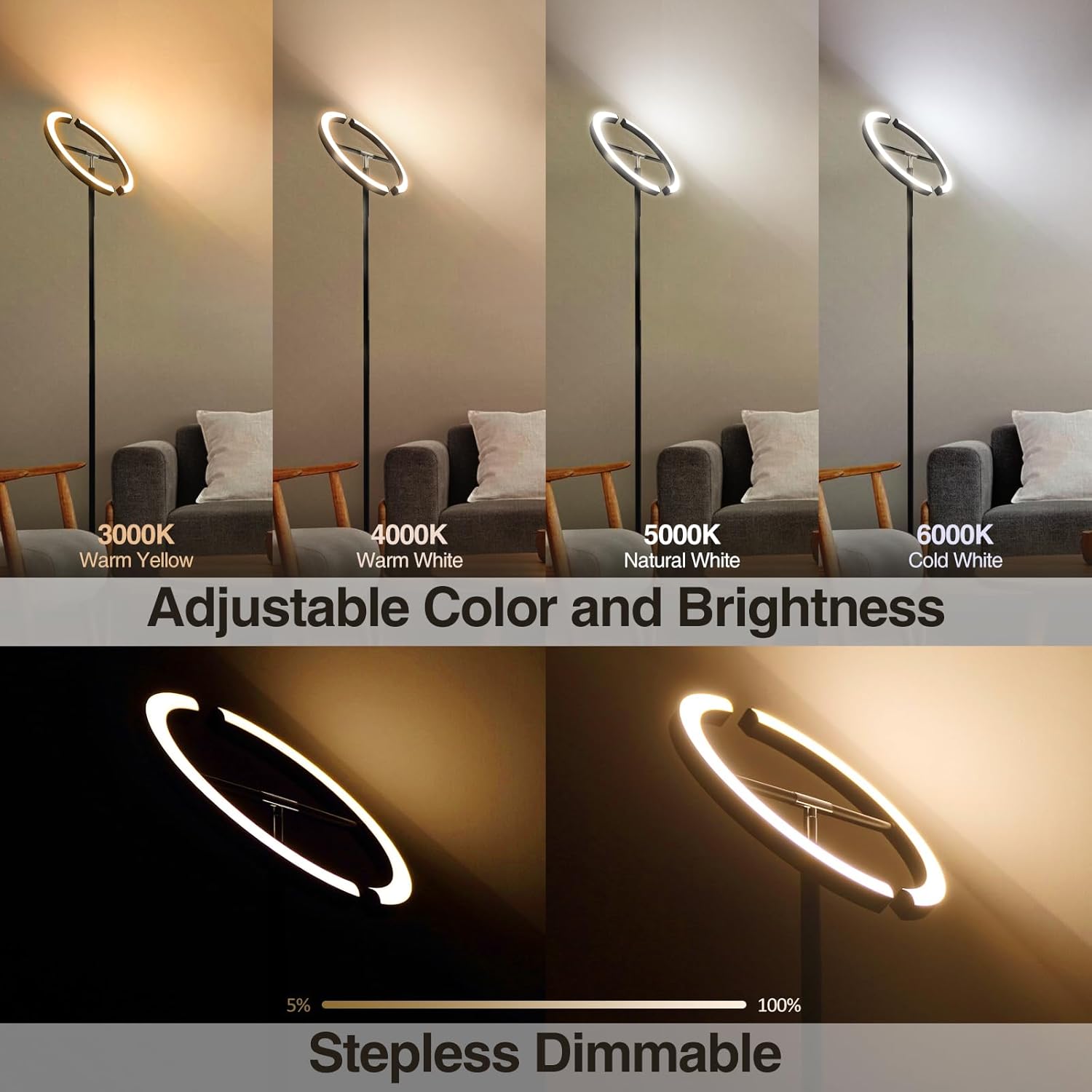
Figure 5: Dual control options: touch-pad on the pole and magnetic remote control.
Fitur & Kauntungan
- Panjagaan panon: Designed to provide bright yet non-dazzling illumination, reducing eye strain and offering gentle light for extended use.
- Modeu Lampu serbaguna: Pre-set modes on the remote control cater to various activities and moods, including Leisure, Night Light, Nursing, Working, Reading, and Entertainment modes.
- One-Hour Timer: The remote control includes a convenient 1-hour timer function, allowing the lamp to automatically switch off after a set period.

Gambar 6: The lamp's eye-caring feature provides gentle illumination.

Gambar 7: The lamp adapts to different activities with its versatile lighting modes.
Pangropéa
To ensure the longevity and optimal performance of your FIMEI Split Floor Lamp, turutan tungtunan pangropéa basajan ieu:
- beberesih: Pegatkeun sambungan lamp from the power outlet before cleaning. Use a soft, dry cloth to wipe down the lamp pole, base, and LED rings. Avoid using abrasive cleaners, solvents, or harsh chemicals, as these can damage the finish or electronic components.
- Ngaleungitkeun lebu: Rutin lebu lamp to prevent accumulation, which can affect light output and aesthetics.
- Pamariksaan: Periodically check the power cord and connections for any signs of damage. If any damage is found, discontinue use and contact customer support.
Pamérésan masalah
If you encounter any issues with your FIMEI Split Floor Lamp, mangga tingal léngkah-léngkah ngungkulan masalah umum ieu:
- Lamp Henteu Hurungkeun:
- Pastikeun adaptor kakuatan geus aman plugged kana duanana lamp sareng stop kontak listrik anu tiasa dianggo.
- Pariksa naha stop kontakna tiasa dianggo ku cara nyolokkeun alat anu sanés.
- Pastikeun yén lamp pole sections are tightly screwed together, ensuring proper electrical contact.
- Remote Control Teu Gawé:
- Pariksa jeung ngaganti accu AAA dina kadali jauh.
- Pastikeun teu aya halangan antara remote sareng lamppanarima.
- Try re-pairing the remote control with the lamp according to the instructions in the user manual (if applicable).
- Caang / Warna teu konsisten:
- Ensure you are using the stepless adjustment correctly by long-pressing the touch-pad or using the brightness/color buttons on the remote.
- If the issue persists, try unplugging the lamp pikeun sababaraha menit lajeng plugging deui ka reset.
If these steps do not resolve the issue, please contact FIMEI customer support for further assistance.
spésifikasi
| Spésifikasi | Nilai |
|---|---|
| merek | FIMEI |
| Nomer modél | 03662e1d-088f-48eb-9ff7-298832fa1e39 |
| Dimensi produk | 9.8 "D x 9.8" W x 69" H |
| Item Beurat | 9.75 pon (4.43 Kilogram) |
| Bahan | logam |
| Tipe rengse | Dilapis |
| Tipe Sumber Cahaya | LED |
| Wattage | 22 watt |
| Caang | 1400 Lumén |
| Suhu Warna | 3000K-6000K (Tiasa disaluyukeun) |
| Métode kontrol | Jauh, Toél |
| Fitur husus | Adjustable Color Temperature, Dimmable, Memory Function, Remote Control, Timer |
| Sumber Daya | Kabel Listrik |
| Pamakéan jero rohangan / outdoor | jero rohangan |
Garansi & Rojongan
FIMEI is committed to the quality of its products. The FIMEI Split Floor Lamp comes with a quality assurance policy that protects against any manufacturing defects in materials, workmanship, or electrical function. For any inquiries, technical support, or warranty claims, please contact FIMEI customer support. Your satisfaction is our priority.
For additional information or to explore other FIMEI products, please visit the FIMEI Store.