1. Bubuka
This manual provides detailed instructions for the proper use and maintenance of your Daikin BRC52B61 Remote Control with Wall Holder. Please read this manual thoroughly before using the product to ensure safe and efficient operation. Keep this manual for future reference.
2. Émbaran Kasalametan
- Ulah ngalaan kadali jauh ka sinar panonpoé langsung, suhu luhur, atawa kalembaban luhur.
- Hindarkeun leupaskeun kadali jauh atanapi tunduk kana tabrakan anu kuat.
- Entong nyobian ngabongkar atanapi ngarobih kadali jauh.
- Jauhkeun batré tina jangkauan barudak. Lamun ditelan, neangan perhatian médis langsung.
- Buang batré anu dipaké nurutkeun peraturan lokal.
3. Produk Langkungview
The Daikin BRC52B61 remote control is designed for convenient operation of your Daikin minisplit air conditioner. It features an intuitive button layout and a clear display for easy temperature and mode adjustments. The included wall holder provides a secure and accessible storage solution.

Figure 1: Daikin BRC52B61 Remote Control and Wall Holder. The image shows the white remote control on the left with its display and various buttons, and the matching white wall holder on the right.
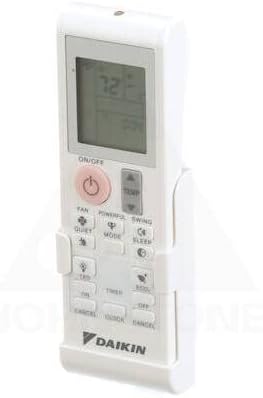
Figure 2: Daikin BRC52B61 Remote Control securely placed within its wall holder, viewed tina sudut pandang.
4. Setélan
4.1 Pamasangan batré
To power your remote control, you will need to install two AAA batteries (not included). Follow these steps:
- Geserkeun panutup batré tina bagian tukang remot kontrol.
- Insert two AAA batteries, ensuring the positive (+) and negative (-) terminals align correctly with the markings inside the battery compartment.
- Geser panutup batré deui kana tempatna nepi ka ngaklik aman.
Video 1: This video demonstrates the process of installing batteries into the remote control and subsequently changing the temperature display unit from Celsius to Fahrenheit. The remote is shown on a white surface, and hands are seen manipulating the battery cover and pressing buttons.
4.2 Wall Holder Installation
The included wall holder allows for convenient storage of your remote control. To install:
- Choose a suitable location on a wall, ensuring it is easily accessible and away from direct heat or moisture.
- Use screws (not included) to securely fasten the wall holder to the wall through the designated mounting holes.
- Once installed, simply slide the remote control into the holder for storage.
5. Parentah Operasi
Biasakeun diri sareng tombol dina kadali jauh anjeun:
- ON/OFF: Pencét pikeun ngaktipkeun atanapi mareuman unit AC.
- TEMP ▲/▼: Saluyukeun setelan suhu nu dipikahoyong.
- MODÉ: Ngaliwatan mode operasi (contona, Tiis, Panas, Kipas, Garing, Otomatis).
- kipas: Nyetél kagancangan kipas.
- KUAT: Ngaktipkeun operasi anu kuat pikeun niiskeun atanapi manaskeun gancang.
- Ayun: Ngatur arah ayunan louver.
- Tenang: Ngaktipkeun mode operasi anu sepi.
- SARE: Aktipkeun mode sare pikeun operasi peuting nyaman.
- LED: Turns the indoor unit's display LED on or off.
- TIMER ON/OFF: Sets the timer for automatic on/off operation.
- ÉKONOMI: Activates economy mode for energy-saving operation.
- KANYAMANAN: Ngaktipkeun mode aliran hawa anu nyaman.
- BATAL: Ngabolaykeun setélan timer.
5.1 Changing Temperature Units (Celsius/Fahrenheit)
To switch the temperature display between Celsius (°C) and Fahrenheit (°F):
- Pastikeun kadali jauh diaktipkeun.
- Pencét jeung tahan tombol Pareum tombol jeung TEMP ▲ (up arrow) button simultaneously for approximately 3 seconds.
- The display will switch between Celsius and Fahrenheit. Repeat the process to switch back.
Refer to Video 1 in the Battery Installation section for a visual demonstration of this process.
6. Pangropéa
6.1 Ngagantian batré
When the display on the remote control becomes dim or the remote control does not respond, replace both batteries with new AAA batteries. Always replace both batteries at the same time with the same type.
6.2 Ngabersihan Remote Control
Wipe the remote control with a soft, dry cloth. Do not use liquid cleaners or chemical sprays, as these may damage the remote control's surface or internal components.
7. Cara ngungkulan
- Kadali jauh teu ngabales: Check if the batteries are installed correctly and have sufficient charge. Replace batteries if necessary. Ensure there are no obstructions between the remote control and the air conditioner unit.
- Tampilan suhu anu salah: Refer to Section 5.1 to change the temperature unit between Celsius and Fahrenheit.
- rentang kawates: Ensure the remote control is pointed directly at the air conditioner unit's receiver. Obstacles can reduce the effective range.
8. Spésifikasi
| Nomer modél | BRC52B61 |
| merek | DAIKIN |
| Alat nu cocog | Air Conditioner (Minisplit) |
| Sumber Daya | 2 x Batré AAA (teu kalebet) |
| Warna | Bodas |
| Item Beurat | 7.8 ons |
| Ukuran Paket | 10.24 x 6.06 x 2.56 inci |
9. Garansi jeung Rojongan
For warranty information and technical support, please refer to the documentation provided with your Daikin air conditioner unit or visit the official Daikin websitus. Simpen resi pameseran anjeun salaku bukti pameseran.