Modél: 01991-001
This manual provides comprehensive instructions for the installation, operation, and maintenance of the Axis F9114 Main Unit. Please read this manual carefully before using the product to ensure proper functionality and safety.
The AXIS F9114 is a main unit designed for the F-Series surveillance system. It supports up to four F21 or F7 sensor units, providing a flexible and discreet surveillance solution. This unit acts as the central processing hub for connected camera sensors.

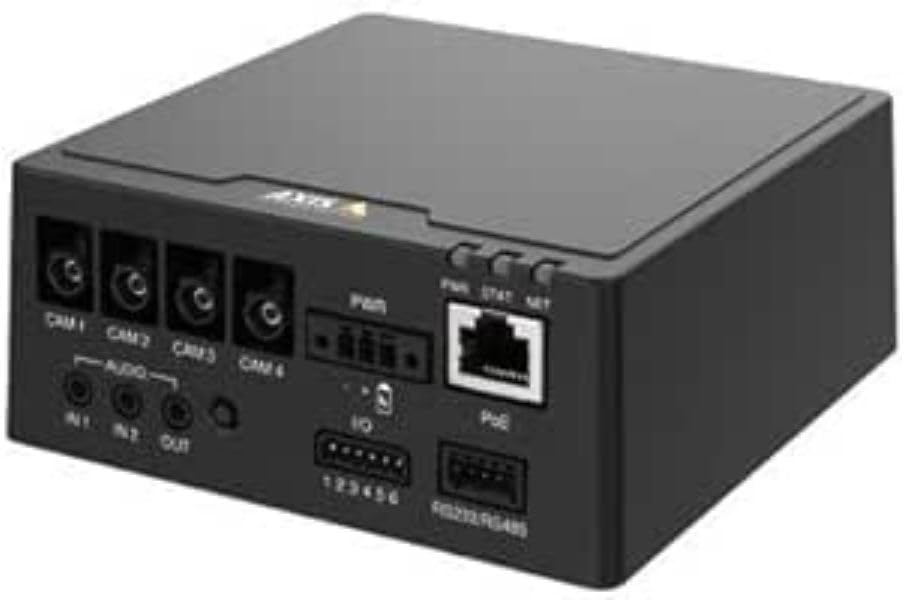
Gambar 1: Hareupeun view of the AXIS F9114 Main Unit, showing camera input ports (CAM 1-4), audio input/output, power input, I/O ports, and an Ethernet port with PoE support.
Connect an Ethernet cable from your network to the "PoE" port on the F9114. This provides network access for configuration and video streaming.
Once all connections are secure and power is supplied, the unit will begin its startup sequence. Observe the LED indicators for status.
The F9114 integrates with various video management software (VMS) solutions. Refer to your VMS documentation for adding and managing the device.
Refer to the Axis Communications support documentation for password reset procedures, which typically involve a factory reset button or specific software tools.
For more detailed troubleshooting, refer to the comprehensive support resources available on the Axis Communications websitus.
| Fitur | Rincian |
|---|---|
| merek | Komunikasi Axis |
| Nomer modél | 01991-001 |
| Item Beurat | 1.87 pon |
| Ukuran produk (L x W x H) | 19.69 x 19.69 x 11.02 inci |
| Produsén | AXIS - KAMERA |
| ASIN | B0BWNS49VS |
| Tanggal Kahiji Sadia | Pébruari 23, 2023 |
Note: Specifications are subject to change without notice. For the most current information, please refer to the official Axis Communications websitus.
For detailed warranty information, please refer to the warranty statement provided with your product or visit the official Axis Communications websitus. Simpen bukti pameseran anjeun pikeun klaim garansi.
If you encounter issues that cannot be resolved using this manual or the troubleshooting section, please contact Axis Communications technical support. Support resources, including FAQs, documentation, and contact information, are available on their official websitus.
Websitus: www.axis.com/support
![]() |
Tabél Perbandingan Produk AXIS Q3 2025: Video Jaringan, Audio, Kontrol Aksés, sareng Interkom Dokumén Q3 2025 ieu ti Axis Communications nyayogikeun tabel ngabandingkeun produk komprehensif pikeun rentang éksténsif ngeunaan video jaringan, audio, kontrol aksés, sareng solusi interkom. Éta rinci spésifikasi, fitur, sareng inpormasi modél dina sagala rupa lini produk, kalebet kaméra, perékam, parangkat lunak, sareng sistem interkom. |
![]() |
AXIS FA51 Main Unit Benutzerhandbuch | Installation und Konfiguration Das offizielle Benutzerhandbuch für die AXIS FA51 Main Unit von AXIS Communications. Enthält Anleitungen zur Installation, Konfiguration, Video-Streaming, Aufnahme und Systemverwaltung für Überwachungslösungen. |
![]() |
Axis Network Switch Konfigurasi Guide - Setup jeung Manajemén Pitunjuk komprehensif pikeun pangurus jaringan dina ngonpigurasikeun sareng ngatur saklar jaringan AXIS T85 sareng D8208-R. Nyertakeun setelan, fitur, kaamanan, sareng ngungkulan masalah. |
![]() |
AXIS M43 Panorama kaméra Series Guide Instalasi Pitunjuk pamasangan ieu nyayogikeun inpormasi penting pikeun nyetél AXIS M43 Panoramic Camera Series, kalebet modél AXIS M4327-P sareng AXIS M4328-P. Éta nyertakeun prosedur pamasangan, kaamanan, sareng patuh pangaturan. |
![]() |
AXIS High Poe Midspan na Splitters Guide Instalasi Pituduh instalasi pikeun AXIS T8123 High PoE Midspan jeung AXIS T8126 / T8128 High PoE Splitters, ngawengku setelan, spésifikasi, sarta ngungkulan pikeun Power over Ethernet solusi. |
![]() |
Pituduh Pamasangan Stasion Kaméra AXIS S20 Seri Alat Pituduh pamasangan ieu nyayogikeun pitunjuk penting pikeun nyetél sareng masang AXIS Camera Station S20 Appliance Series, kalebet modél S2008, S2016, sareng S2024. Ieu ngawengku perangkat keras di sakumnaview, cable connections, software setup, and network configuration for professional video surveillance systems. |