1. Bubuka
The LILYGO T-SIM7600G-H is a versatile development board integrating an ESP32-WROVER microcontroller with a SIM7600G wireless communication module. This board offers comprehensive connectivity options including Wi-Fi, Bluetooth, 4G LTE CAT4, and GPS. Designed for various application scenarios, it features an integrated 18650 battery holder and a solar charging interface for enhanced portability and power management.

Gambar 1.1: Hareupeun view of the LILYGO T-SIM7600G-H Development Board.
2. Produk Langkungview
2.1 Fitur konci
- Integrated Wireless Module: Features SIM7600G for 4G LTE CAT4, GPS, with Wi-Fi and Bluetooth via ESP32-WROVER.
- Manajemén kakuatan: Built-in 18650 battery holder and solar charging interface.
- Dual USB-C Interfaces: Two T-type-c interfaces for flexible connectivity and power.
- Konsumsi Daya Lemah: GPS power control allows for ultra-low power consumption, reaching approximately 300uA in sleep mode.
- Development Friendly: Based on ESP32, offering a robust platform for various IoT and communication projects.
2.2 Idéntifikasi komponén
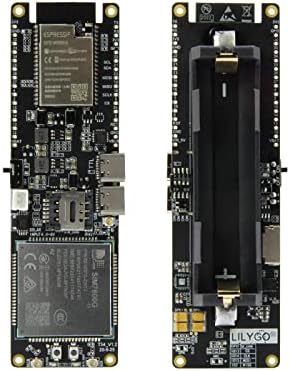
Figure 2.1: Labeled diagram of the T-SIM7600G-H board's front components.
Refer to Figure 2.1 for the location of key components:
- ESP32 Programming Download Port: USB-C port for programming the ESP32.
- Antarmuka USB: Additional USB-C port for general use or power.
- Tombol Reset: Ngareset dewan.
- SIM Module Power Button: Controls power to the SIM7600G module.
- Slot Nano SIM: For inserting a Nano SIM card for cellular connectivity.
- Solar Charging Cable Interface: Connector for solar panel input.
- Saklar kakuatan: Main power control for the board.
- Slot Kartu TF: For inserting a MicroSD (TF) card.
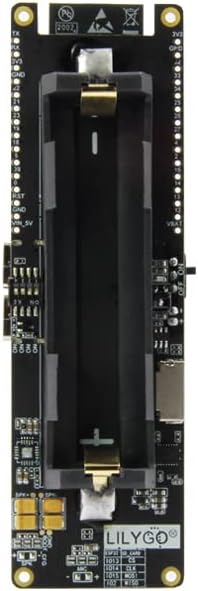
Gambar 2.2: Balik view of the T-SIM7600G-H board, showing the 18650 battery holder.
Figure 2.2 illustrates the back of the board, prominently featuring the 18650 battery holder. Ensure correct polarity when inserting the battery.
3. Setélan
Follow these steps to set up your LILYGO T-SIM7600G-H board:
- Insert 18650 Battery: Carefully insert a 3.7V 18650 Li-ion battery into the battery holder on the back of the board, observing the correct polarity (+/-).
- Lebetkeun Kartu Nano SIM: Locate the Nano SIM slot and gently insert your activated Nano SIM card. Ensure it clicks into place.
- Sambungkeun Antenna:
- Connect the provided GPS antenna to the designated U.FL connector (often labeled 'GPS').
- Connect the provided LTE antenna to its respective U.FL connector (often labeled 'SIM' or 'LTE').

Figure 3.1: Proper connection of GPS and SIM (LTE) antennas.
- Connect to Computer (Optional): For programming or initial power, connect the board to your computer using a USB-C cable via the ESP32 programming download port.
- Connect Solar Panel (Optional): If using solar charging, connect a compatible solar panel (4-6V input) to the solar charging cable interface. Ensure the solar panel is placed in direct sunlight for optimal charging.

Gambar 3.2: Kelample setup for solar charging the T-SIM7600G-H board.
4. Parentah Operasi
4.1 Powering on / Pareum
- To power on the board, slide the Pindah kakuatan kana posisi ON.
- Pikeun mareuman, geser tombol Pindah kakuatan kana posisi OFF.
- The SIM Module Power Button can be used to independently control the power to the SIM7600G module, allowing for power saving when cellular connectivity is not required.
4.2 Pamrograman sareng Pangwangunan
The LILYGO T-SIM7600G-H board is compatible with the Arduino IDE and ESP-IDF development frameworks. For detailed programming guides, example code, and firmware updates, please refer to the official LILYGO GitHub repository:
github.com/Xinyuan-LilyGO/T-SIM7600X
Ensure you have the necessary ESP32 board definitions and drivers installed in your development environment before attempting to upload code.
5. Pangropéa
- Penanganan: Handle the board with care to avoid damaging components or connections. Avoid static discharge.
- Lingkungan: Keep the board in a dry environment, away from moisture, extreme temperatures, and direct sunlight when not in use.
- beberesih: If necessary, gently clean the board with a soft, dry brush or compressed air. Do not use liquids or abrasive cleaners.
- Perawatan batré: If using the 18650 battery, ensure it is charged regularly and stored properly. Avoid over-discharging or over-charging the battery.
6. Cara ngungkulan
- Board does not power on:
- Check if the 18650 battery is inserted correctly and fully charged.
- Pastikeun Pindah Daya dina posisi ON.
- If powered via USB, ensure the USB cable is properly connected and the power source is active.
- Teu aya sambungan jaringan sélulér:
- Verify that the Nano SIM card is correctly inserted and activated with a cellular plan.
- Ensure the LTE antenna is securely connected.
- Check if the SIM Module Power Button is enabled.
- Confirm network coverage in your area.
- GPS henteu nampi sinyal:
- Ensure the GPS antenna is securely connected.
- Operate the board outdoors or near a window with a clear view ti langit.
- Verify that GPS power control is not disabling the module in your software.
- Kasalahan pamrograman:
- Install the correct USB drivers for the board.
- Select the correct board and COM port in your IDE.
- Refer to the LILYGO GitHub repository for specific programming instructions and common issues.
7. Spésifikasi
| Fitur | Rincian |
|---|---|
| Ngaran modél | T-SIM7600G-H |
| merek | LILYGO |
| Prosesor | ESP32-WROVER (ARM Processor) |
| Modul sélular | SIM7600G (4G LTE CAT4) |
| Téhnologi konektipitas | Wi-Fi, Bluetooth, 4G LTE, GPS |
| Kapasitas Panyimpenan Mémori | 4 MB |
| Panyekel batré | Integrated 18650 Battery Holder |
| Pangecas Interface | USB-C, Solar Charging (4-6V input) |
| Tipe Kartu SIM | Nano SIM |
| Kasaluyuan System Operasi | Mac OS (and other common development environments) |
8. Garansi jeung Rojongan
For warranty information, please refer to the terms and conditions provided by your point of purchase. For technical support, detailed documentation, and community forums, please visit the official LILYGO GitHub repository and community channels. LILYGO continuously updates its resources to assist developers and users.