
1. Bubuka
Hatur nuhun pikeun meuliasing the Andoer Digital Camera. This manual provides detailed instructions on how to set up, operate, and maintain your camera to ensure optimal performance and longevity. Please read this manual thoroughly before using the camera and keep it for future reference.
This compact and lightweight digital camera is designed to capture high-quality photos and videos, featuring 2.7K video resolution, 48MP picture resolution, 16X digital zoom, and a 2.88-inch IPS screen. It includes various functions such as anti-shake, face detection, smile capture, and a built-in LED fill light.
2. Émbaran Kasalametan
- Do not expose the camera to extreme temperatures, direct sunlight, or high humidity.
- Hindarkeun leupaskeun atanapi tundukkeun kaméra kana tabrakan anu kuat.
- Jauhkeun kaméra tina cai sareng cairan sanésna.
- Do not attempt to disassemble or modify the camera. Repairs should only be performed by qualified personnel.
- Use only the specified battery and charging cable provided with the camera.
- Jauhkeun batré tina jangkauan barudak.
- Clean the camera lens and screen with a soft, lint-free cloth.
3. Eusi Paket
Punten parios eusi bungkusan nalika unboxing pikeun mastikeun yén sadaya barang aya:
- 1 x Andoer Digital Camera
- 2 x Lithium Batteries (3.7V 700mAh)
- 1 x Kabel Ngecas USB
- 1 x Tali pigeulang
- 1 x Mawa Kantong
- 1 x Users' Manual (English)
4. Produk Langkungview
The Andoer Digital Camera is designed for ease of use, featuring a compact body and intuitive controls.

Gambar 4.1: Hareup jeung tukang view of the Andoer Digital Camera, showing the lens, screen, and control buttons. Two rechargeable batteries are also shown.

Gambar 4.2: The compact size of the Andoer Digital Camera, with dimensions of 9.4cm (length), 5.6cm (height), and 1.9cm (thickness) indicated.
The camera features a 2.88-inch IPS screen for clear viewing and playback, a powerful 16X digital zoom lens, and an integrated LED fill light for low-light conditions.
5. Setélan
5.1. Pamasangan batré
- Panggihan panutup kompartemen batréna di handapeun atanapi sisi kaméra.
- Geser panutupna muka.
- Insert the provided lithium battery (3.7V 700mAh) into the compartment, ensuring the correct polarity as indicated inside.
- Tutup panutup kompartemen batré aman.

Gambar 5.1: The camera with its battery compartment open, showing the removable 700mAh rechargeable lithium battery.
5.2. Ngecas Batré
The camera is powered by a rechargeable lithium battery. To charge:
- Connect the USB charge cable to the camera's USB port.
- Sambungkeun tungtung kabel USB anu sanés ka adaptor kakuatan USB (teu kalebet) atanapi port USB komputer.
- Lampu indikator ngecas bakal hurung. Bakal pareum atanapi robih warna saatos ngecas parantos réngsé.
5.3. Nyelapkeun Kartu Mémori
The camera requires an external memory card (not included) to store photos and videos. It supports Class-10 external memory cards up to 128GB.
- Teang slot kartu memori, biasana deukeut kompartemen batré.
- Lebetkeun kartu memori kalayan kontak logamna ngadep ka arah anu leres (tingali diagram caket slotna).
- Sorong kartu ka jero nepi ka ngaklik dina tempatna. Pikeun nyabutna, sorong deui ka jero nepi ka kaluar.
6. Parentah Operasi
6.1. Powering on / Pareum
- To power on: Press and hold the Power button (usually marked with a power symbol) until the screen illuminates.
- To power off: Press and hold the Power button again until the screen turns off.
- The camera also features an Auto Power Off function (1min/3min/5min) to conserve battery.
6.2. Ngarekam Poto sareng Video Dasar
After powering on, the camera typically defaults to photo mode.
- Nyandak Poto: Frame your shot using the IPS screen. Press the Shutter button (usually on top of the camera) halfway down to focus, then press fully to capture the image.
- Ngarekam Pidéo: Press the Mode button to switch to video recording mode. Press the Shutter button to start recording, and press it again to stop.

Gambar 6.1: The 2.88-inch IPS screen of the camera displaying a scene, highlighting its size and clarity for viewing.
6.3. Ngagunakeun Digital Zoom
The camera supports 16X digital zoom.
- Use the 'W' (Wide) and 'T' (Telephoto) buttons, typically located near the shutter button or on the directional pad, to zoom out and zoom in, respectively.

Gambar 6.2: A visual representation of the camera's 16X digital zoom, showing progressive magnification of a subject.
6.4. Nyambungkeun ka Komputer
You can connect the camera to a computer to transfer photos and videos.
- Sambungkeun kaméra ka komputer Anjeun nganggo kabel USB nu disadiakeun.
- The camera should appear as a removable disk drive.
- Supported Operating Systems: Windows XP/ Vista/ 7/ 8/ 10, Mac 10.2 and above.
7. Functions and Modes
The Andoer Digital Camera offers a variety of functions and shooting modes to enhance your photography experience.
7.1. Modeu shooting
The camera includes various scene modes to optimize settings for different environments:
- Otomatis: Standard mode for general shooting.
- Potrét: Optimizes for capturing people.
- Peuting: Pikeun kaayaan cahaya remen.
- bentang: Ideal for wide outdoor scenes.
- Lampu tukang: Adjusts for subjects with strong light behind them.
- Pihak: For indoor events with mixed lighting.
- Pantai: For bright, reflective environments.
- Olahraga: For capturing fast-moving subjects.
7.2. Fungsi Husus
- Anti goyang: Helps reduce blur caused by camera movement, especially in low light or with zoom.
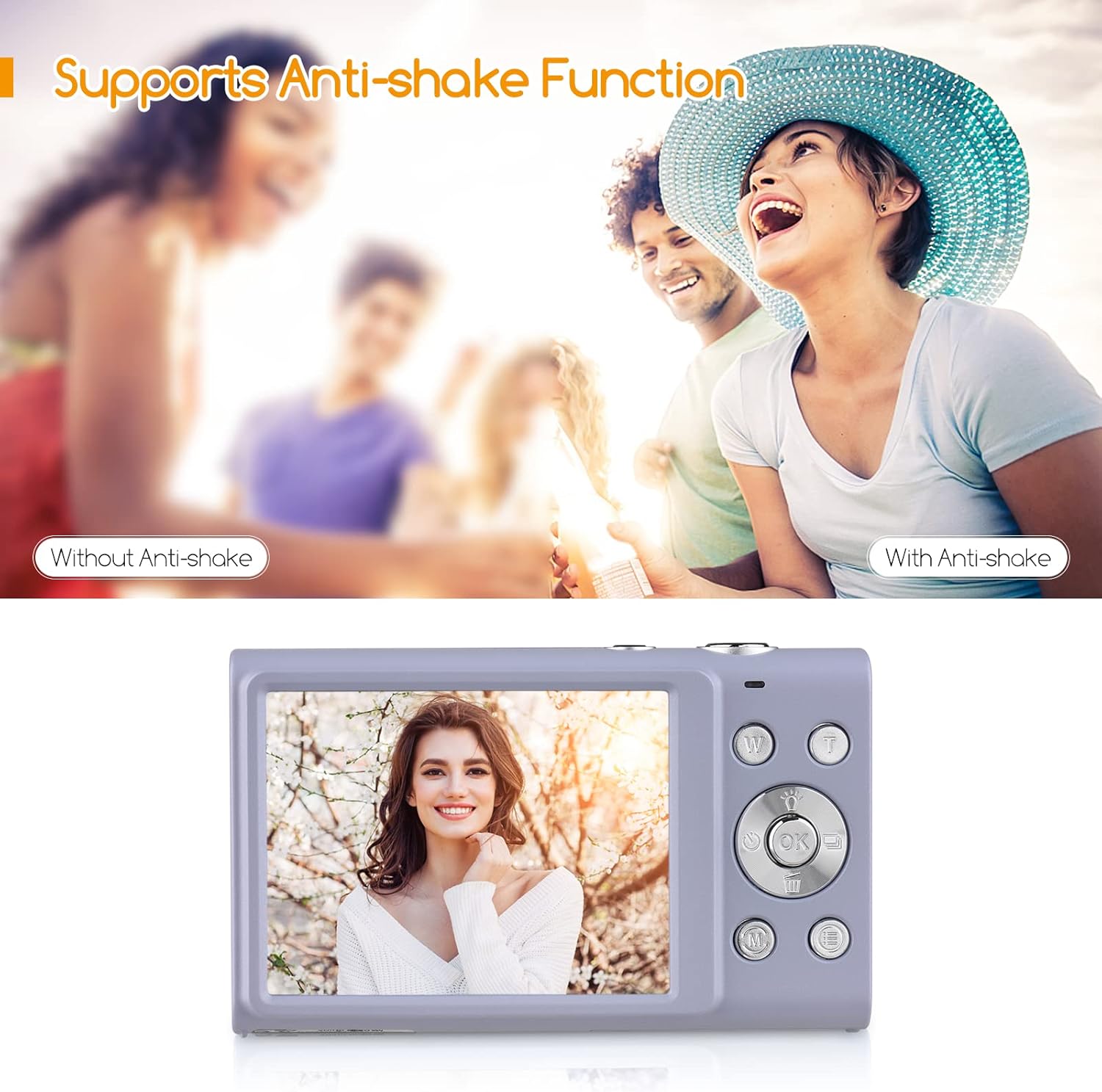
Gambar 7.1: A visual comparison demonstrating the effectiveness of the anti-shake function, showing a blurry image without it and a clear image with it enabled.
- Face Detect & Smile Capture: Automatically detects faces and can trigger the shutter when a smile is detected.
- Beauty Face: Enhances facial features for more flattering portraits.

Gambar 7.2: Icons representing key camera features: Face Detection, Smile Capture, Beauty Face, and Auto Focus, indicating their availability.
- Continuous Photography: Captures a series of photos in quick succession.
- Timer otomatis: Allows for a delay before the shutter fires (Off/ 2 sec/ 5 sec/ 10 sec).
- Built-in LED Fill Light: Provides additional illumination for photos in dark conditions.

Gambar 7.3: A collage illustrating various camera functions: Self-Timer options (2s, 5s, 10s), Continuous Shooting, the effect of the LED Fill Light in low light, and Face Detection & Smile Capture in action.
8. Pangropéa sarta perawatan
- beberesih: Use a soft, dry, lint-free cloth to clean the camera body. For the lens and screen, use a specialized lens cleaning cloth and solution if necessary. Avoid abrasive materials.
- Perawatan batré: Store batteries in a cool, dry place. If not using the camera for an extended period, remove the battery. Do not expose batteries to high temperatures or dispose of them in fire.
- Panyimpenan: When not in use, store the camera in its carry bag or a protective case to prevent dust and scratches. Avoid storing in areas with extreme temperature fluctuations or high humidity.
9. Cara ngungkulan
Upami anjeun mendakan masalah sareng kaméra anjeun, mangga tingal masalah sareng solusi umum ieu:
| Masalah | Mungkin Cukang lantaranana | Solusi |
|---|---|---|
| Kaméra teu hurung. | Batré lemah atanapi henteu leres diselapkeun. | Ngecas batré pinuh. Pastikeun batréna diselapkeun kalayan polaritasna anu leres. |
| Teu tiasa nyandak poto/video. | Kartu mémori pinuh, teu diselapkeun, atawa ruksak. | Lebetkeun kartu memori. Hapus anu teu perlu files or format the card (this will erase all data). Try a different memory card. |
| Gambar blur. | Camera shake, dirty lens, or out of focus. | Hold the camera steady. Clean the lens. Ensure the camera has focused before pressing the shutter fully. Use Anti-Shake function. |
| Layar kosong atawa beku. | Kasalahan sistem. | Cabut sareng pasang deui batréna pikeun ngareset kaméra. |
10. Spésifikasi
Detailed technical specifications for the Andoer Digital Camera:
| Fitur | Spésifikasi |
|---|---|
| Nomer modél | PKZ8856093261786YD |
| Pilihan Warna | Pink/ Black/ Purple/ Green (optional) |
| Sénsor Gambar | Sénsor CMOS |
| Panjang fokus | f=7.36 mm |
| aperture | F/3.2 |
| tampilan | 2.88 inci IPS layar |
| File Formatna | JPG (Picture) / AVI (Video) |
| Resolusi Gambar | 48MP/ 44MP/ 36MP/ 24MP/ 20MP/ 16MP/ 12MP/ 10MP, etc. |
| Resolusi Video | 2.7K (2688x1520), 1080P (1920x1080), 720P (1280x720), VGA (640x480) |
| Modeu shooting | Auto/ Portrait/ Night/ Landscape/ Backlight/ Party/ Beach/ Sports |
| Timer otomatis | Off/ 2 sec/ 5 sec/ 10 sec |
| Zum Digital | 16X zum digital |
| Otomatis Pareum | 1 mnt / 3 mnt / 5 mnt |
| Kakeunaan | EV-3 to EV+3 |
| Sarat Sistem Operasi | Windows XP/ Vista/ 7/ 8/ 10, Mac 10.2 |
| Sasayogian tanaga | 1 * Lithium battery (3.7V 700mAh) |
| Ukuran barang | 9.4 * 5.6 * 1.9cm / 3.7 * 2.2 * 0.7 inci |
| Item Beurat | 115g / 4.1oz (with battery) |
| Universal Gunung | 1/4" Screw Hole at the Bottom |

Gambar 10.1: The camera's bottom view, highlighting the universal 1/4" screw hole for tripod compatibility.
11. Garansi jeung Rojongan
Inpormasi Garansi: Specific warranty terms and conditions are typically provided with your purchase documentation. Please refer to the warranty card or contact your retailer for details regarding coverage and duration.
Rojongan Palanggan: For technical assistance, troubleshooting beyond this manual, or warranty claims, please contact Andoer customer support through the official websitus atanapi inpormasi kontak anu disayogikeun sareng bungkusan produk anjeun.