Bubuka
This manual provides comprehensive instructions for the safe installation, operation, and maintenance of your Sygonix SY-5224780 LED Strip Base Set. Please read this document thoroughly before using the product to ensure proper function and to prevent damage or injury. Retain this manual for future reference.
Parentah Kasalametan
- Pastikeun catu daya voltage (230V) matches the product's requirements before connecting.
- Do not cut the LED strip while it is connected to a power source. Always disconnect power before making any modifications.
- Avoid bending the LED strip sharply, as this can damage the internal circuitry.
- Keep the LED strip and all electrical components away from water, moisture, and high humidity environments. This product is for indoor use only.
- Do not cover the LED strip or power adapter with flammable materials during operation to prevent overheating.
- If any part of the product is damaged, discontinue use immediately and contact customer support.
- Produk ieu sanés cocooan. Jauhkeun tina jangkauan barudak.
Eusi pakét
Pastikeun yén sadaya item anu didaptarkeun di handap aya dina pakét anjeun:
- 1x Sygonix SY-5224780 RGB LED Strip (3 meters)
- 1x Kadali Jauh
- 1x adaptor kakuatan (230V)
- Various Connector Cables and Mounting Accessories
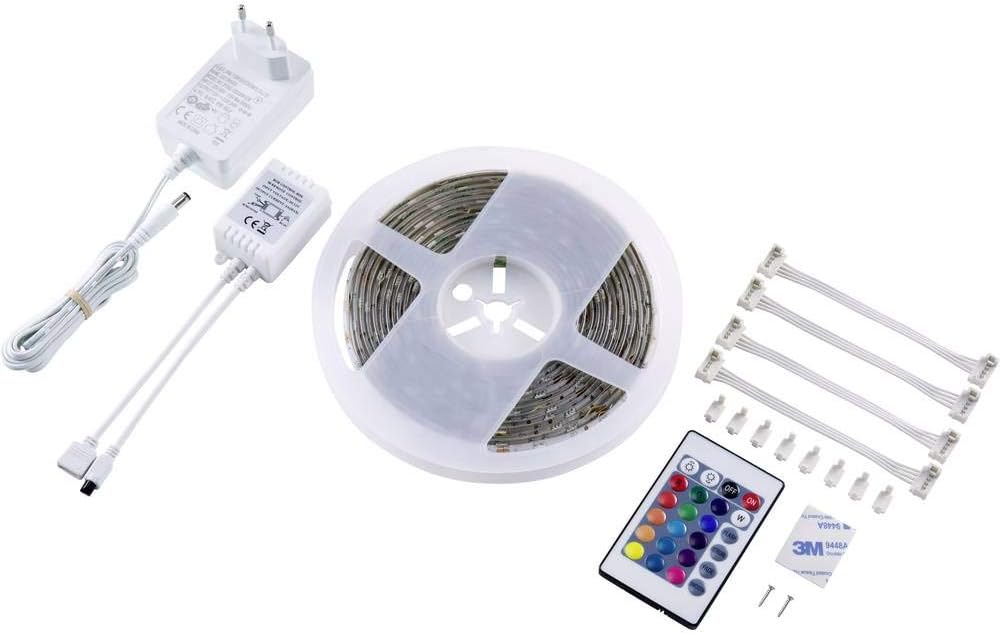
Gambar 1: Contents of the Sygonix SY-5224780 LED Strip Base Set. This image displays the complete package contents, including the coiled 3-meter RGB LED strip, a remote control unit, a power adapter, and several connector cables and mounting accessories.
Disetél
1. Persiapan
- Unpack all components and inspect them for any damage.
- Pastikeun permukaan pamasangan bersih, garing, sareng lemes pikeun perekatan anu optimal.
2. Pasang Strip LED
- The LED strip features an adhesive backing for easy installation. Carefully peel off the protective film from the back of the strip.
- Press the strip firmly onto the desired surface, ensuring even contact along its entire length.
- The LED strip can be shortened at designated cut marks (typically indicated by a scissor icon or copper pads) to fit specific lengths. Ensure the power is disconnected before cutting.
3. Nyambungkeun Power Supply
- Connect the LED strip to the included controller unit. Ensure the connectors are aligned correctly.
- Connect the controller unit to the power adapter.
- Finally, plug the power adapter into a standard 230V wall outlet.

Gambar 2: Example of the Sygonix LED strip installed in a room, demonstrating its application for ambient lighting. The image shows the strip outlining a triangular shape on a wall, providing indirect illumination.
Ngoperasikeun
The Sygonix LED Strip is controlled using the included remote control. Ensure the remote control has functional batteries and is pointed towards the receiver on the LED strip's controller unit.
Fungsi Remote Control:

Gambar 3: Sygonix LED strip on a reel alongside its remote control. The remote control features buttons for power, color selection (RGB and white), brightness adjustment, and various dynamic lighting modes.
- ON/OFF: Power button to turn the LED strip on or off.
- R, G, B, W Buttons: Select red, green, blue, or white light directly.
- Palet Warna: A grid of buttons allows selection of various pre-mixed colors.
- Penyesuaian Caang: Buttons to increase or decrease the light intensity.
- FLASH: Activates a rapid, alternating color change mode.
- STROBE: Activates a slower, flashing color change mode.
- luntur: Activates a smooth transition between different colors.
- HALUS: Activates a gradual, continuous color cycle.
Pangropéa
- beberesih: Disconnect the power before cleaning. Use a soft, dry cloth to gently wipe the LED strip and remote control. Do not use liquid cleaners, abrasive materials, or solvents.
- Sambungan: Periodically check all connections to ensure they remain secure and free from dust or debris.
- Panyimpenan: If storing the LED strip for an extended period, ensure it is clean, dry, and coiled loosely to prevent damage.
Pamérésan masalah
| Masalah | Mungkin Cukang lantaranana | Solusi |
|---|---|---|
| Strip LED teu hurung. | Taya catu daya. Batré kadali jauh maot. sambungan salah. | Check if the power adapter is plugged in and the outlet is functional. Ganti batré kadali jauh. Ensure all connectors are securely and correctly attached. |
| Warna nu salah atawa kedip-kedip. | Sambungan leupas. gangguan kadali jauh. | Check all connections between the strip, controller, and power adapter. Ensure there are no obstructions between the remote and the receiver. Try resetting the power. |
| Kadali jauh teu ngabales. | Batréna paéh atanapi dipasangna teu leres. Remote control is too far or not aimed at receiver. | Replace the battery and ensure correct polarity. Move closer to the LED strip's receiver and aim directly. |
spésifikasi
| Fitur | Rincian |
|---|---|
| merek | Sygonix |
| Nomer modél | SY-5224780 |
| Warna Cahaya | RGB |
| Panjangna | 3 méter |
| Voltage | 230 volt |
| Wattage | 18 watt |
| Fitur husus | Remote Controlled, Adhesive backing |
| Ukuran produk (L x W x H) | 300 x 0.3 x 1 cm |
| Item Beurat | 111 gram |
Émbaran jaminan
Warranty terms and conditions may vary depending on your region and retailer. Please refer to your purchase documentation, receipt, or contact the retailer where you purchased the Sygonix SY-5224780 LED Strip Base Set for detailed warranty information.
Ngarojong
For technical support, product inquiries, or further assistance, please contact Sygonix customer service or your authorized retailer. Contact information can typically be found on the product packaging or the brand's official websitus.


