
1. Émbaran Kasalametan
Please read this manual carefully before using the camera to ensure safe and proper operation. Keep this manual for future reference.
- Ulah ngalaan kaméra ka cai atawa beueus.
- Hindarkeun ngaragragkeun kaméra atanapi kéngingkeun dampak anu kuat.
- Do not attempt to disassemble or modify the camera. Repairs should only be performed by qualified personnel.
- Jauhkeun kaméra tina sinar panonpoé langsung sareng suhu anu luhur.
- Anggo ngan ukur jinis batré sareng kabel ngecas anu ditangtukeun.
- Buang batré anu leres nurutkeun peraturan lokal.
- Clean the camera lens and screen with a soft, dry cloth.
2. Eusi Paket
Pastikeun yén sadaya item anu didaptarkeun di handap kalebet kana pakét anjeun:
- Andoer Digital Camera Body
- Lithium Battery (3.7V 550mAh)
- Kabel Ngecas USB
- Kantong Bag
- Manual pangguna (dokumén ieu)

Image: Contents of the Andoer Digital Camera package, showing the camera, wrist strap, USB charging cable, carry bag, and user manual.
3. Produk Langkungview
3.1 Hareup View

Gambar: Hareupeun view of the Andoer Digital Camera, displaying the lens, built-in flash, and indicating 2.7" TFT screen and 18 Megapixels.
3.2 Tukangeun View (Display and Controls)
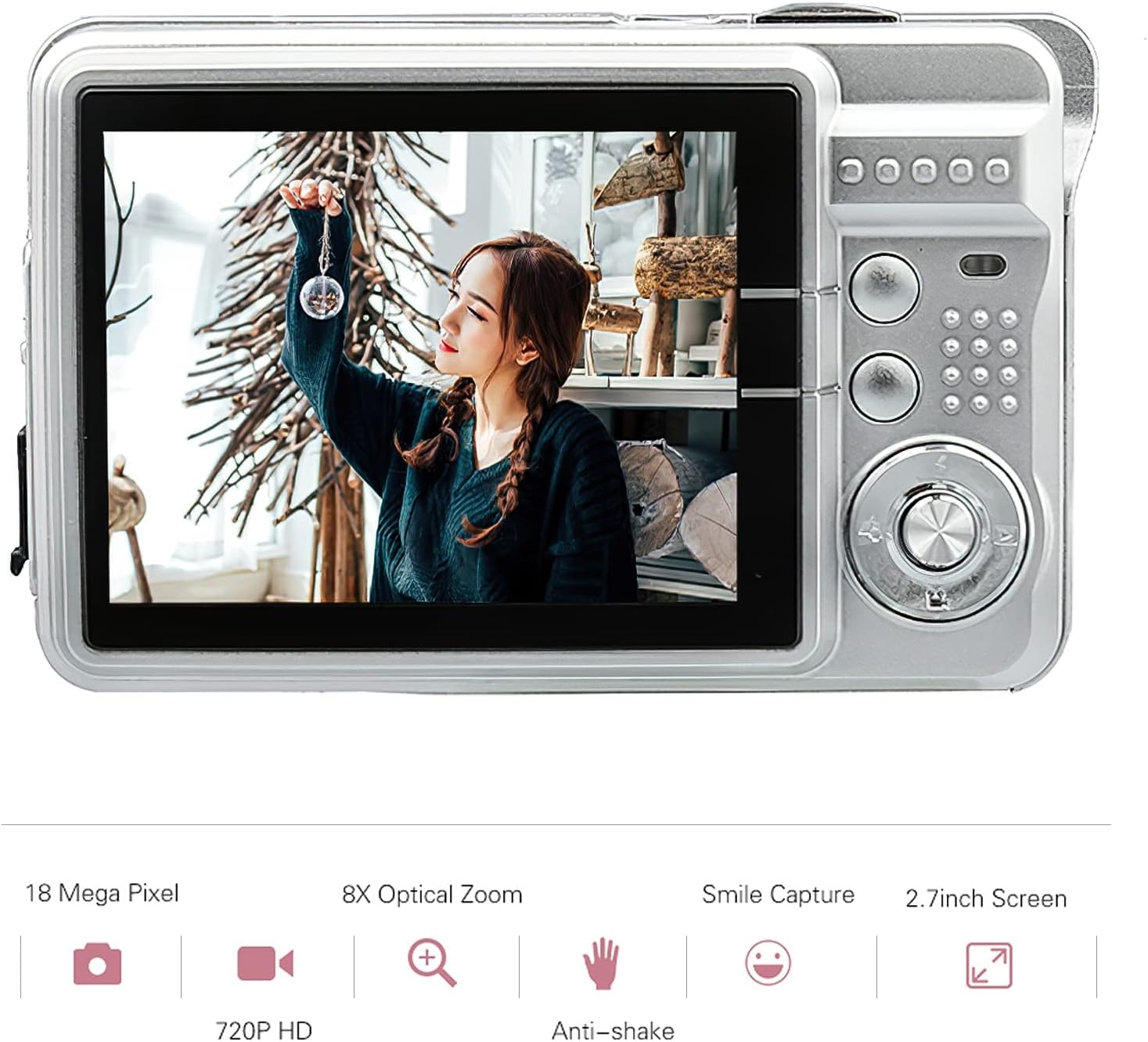
Gambar: Tukangeun view of the Andoer Digital Camera, featuring the 2.7-inch TFT display and various control buttons on the right side.
The camera features a 2.7-inch TFT display for viewing photos and videos, along with intuitive controls for navigation and settings adjustment.
4. Setélan
4.1 Ngecas Batré
- Open the battery compartment cover on the side of the camera.
- Insert the provided Lithium battery (3.7V 550mAh) into the compartment, ensuring correct polarity.
- Tutup panutup kompartemen batré aman.
- Connect the camera to a USB power source (e.g., computer, USB wall adapter) using the supplied USB charging cable.
- The charging indicator light will illuminate. Charging is complete when the light turns off or changes color (refer to camera display for battery status).
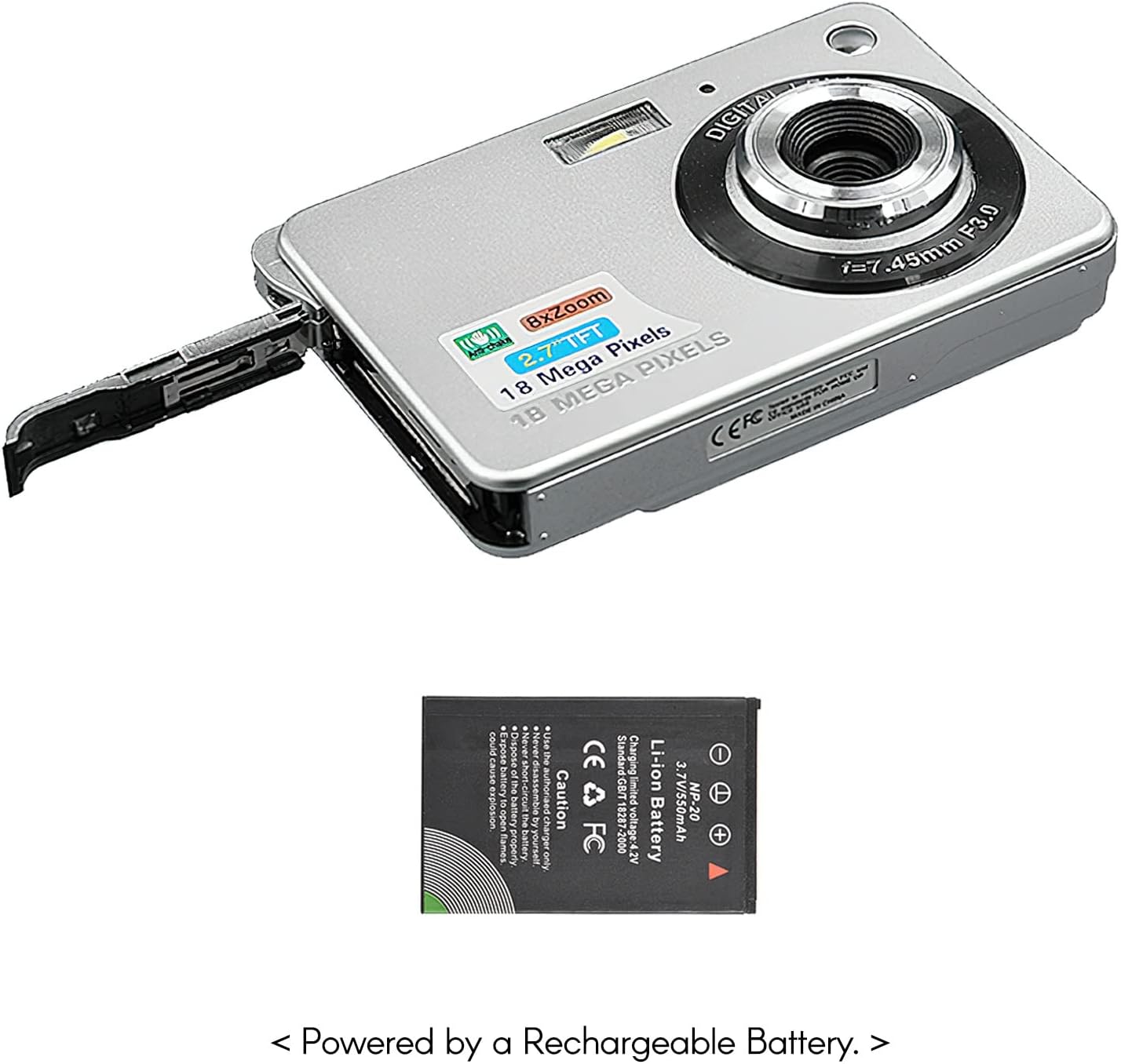
Gambar: Sisi view of the camera with the battery compartment open, illustrating how to insert the rechargeable lithium battery.
4.2 Inserting a Memory Card (Not Included)
This camera supports SD memory cards up to 32GB. A memory card is required to save photos and videos.
- Teang slot kartu memori, biasana deukeut kompartemen batré.
- Insert the SD card with the metal contacts facing down (or as indicated by the diagram near the slot) until it clicks into place.
- Pikeun nyabut, dorong kartu ka jero dugi ka kaluar.
5. Parentah Operasi
5.1 Powering on / Pareum
Press and hold the Power button (usually located on the top or side) to turn the camera on or off.
5.2 Nyokot Poto
- Hurungkeun kaméra.
- Frame your shot using the 2.7-inch TFT display.
- Press the Shutter button (typically on top) halfway down to focus, then press fully to capture the image.

Image: The camera's screen showing a captured image, demonstrating the 18 Megapixel photo capability.
5.3 Ngarékam Pidéo
- Hurungkeun kaméra.
- Switch to video recording mode (usually via a mode button or menu option).
- Press the Record button (often marked with a red dot) to start recording. Press again to stop.

Image: The camera's screen displaying a video playback, illustrating its 720P high-definition video recording function.
5.4 Digital ngazum
The camera features 8X digital zoom. Use the zoom buttons (often labeled 'W' for Wide and 'T' for Telephoto) to adjust the zoom level.

Image: A visual representation of the 8x digital zoom capability, showing a scene at 1x magnification and then zoomed in at 8x.
5.5 Navigasi Menu
Press the 'Menu' button to access camera settings. Use the directional buttons to navigate and the 'OK' or 'Set' button to confirm selections. Available settings include:
- Timer otomatis: Off/ 2 sec/ 5 sec/ 10 sec
- Kakeunaan: EV-3 to EV+3
- Kasaimbangan bodas: Auto/ Daylight/ Cloudy/ Incandescent/ Fluorescent
- Modeu Pamandangan: Auto/ Night Portrait/ Night Scenery/ Portrait/ Scenery/ Sport/ Party/ Beach/ High sensitivity
- Fitur séjén: Anti-Shake, Face Detect, Smile Capture
6. Pangropéa
6.1 Ngabersihan Kaméra
- Anggo lawon anu lemes sareng henteu lint pikeun ngabersihan awak kaméra.
- Pikeun lénsa sareng layar, anggo lawon beberesih lensa khusus sareng solusi upami diperyogikeun. Hindarkeun bahan abrasive.
- Do not use organic solvents to clean the camera.
6.2 Perawatan Batré
- Ngeusi batre sapinuhnya sateuacan dianggo heula.
- Upami kaméra henteu dianggo kanggo waktos anu panjang, cabut batréna.
- Simpen batré di tempat anu tiis sareng garing.
7. Cara ngungkulan
| Masalah | Mungkin Cukang lantaranana | Solusi |
|---|---|---|
| Kaméra teu hurung. | Batré béak atawa teu bener diselapkeun. | Ngecas batré. Pastikeun batréna diselapkeun kalayan polaritasna anu leres. |
| Teu tiasa nyandak poto/ngarékam pidéo. | Teu aya kartu memori anu dipasang atanapi kartu pinuh/rusak. | Lebetkeun kartu SD anu cocog. Hapus anu teu perlu fileatanapi format kartu (ieu bakal ngahapus sadaya data). |
| Gambar blur. | Lens is dirty, insufficient light, or camera shake. | Clean the lens. Use the flash in low light. Hold the camera steady or use anti-shake feature. |
| Kaméra freezes atawa jadi unresponsive. | glitch software samentara. | Cabut sareng pasang deui batréna pikeun ngareset kaméra. |
8. Spésifikasi
| Fitur | Rincian |
|---|---|
| Modél | IAT4319650447530BC |
| Sénsor Gambar | Sénsor CMOS |
| tampilan | 2.7 inci TFT LCD |
| Resolusi Poto | Nepi ka 18 Megapixels |
| Resolusi Video | 1280x720 (720P), 720x480, 640x480 (VGA), 320x240 (QVGA) |
| Zum Digital | 8X |
| Stabilisasi Gambar | Digital Anti Goyang |
| Kompensasi Paparan | EV-3 to EV+3 |
| Kasaimbangan Bodas | Auto/ Daylight/ Cloudy/ Incandescent/ Fluorescent |
| File Formatna | JPEG (Photo), AVI (Video) |
| Média Panyimpenan | Kartu SD (nepi ka 32GB, henteu kalebet) |
| Sasayogian tanaga | 1 * Lithium battery (3.7V 550mAh) |
| Sistim nu dirojong | Windows XP, VISTA, WIN7, MAC |
| Ukuran barang | 9 * 6 * 2cm / 3.5 * 2.4 * 0.8 inci |
| Item Beurat | 90g / 3.2oz |
9. Garansi jeung Rojongan
Andoer products are designed and manufactured to the highest quality standards. For warranty information and customer support, please refer to the documentation provided at the time of purchase or visit the official Andoer websitus.
If you encounter any issues not covered in this manual, please contact Andoer customer service for assistance.
Catetan: Spésifikasi tiasa robih tanpa aya bewara sateuacana.