Thank you for choosing the Xiaomi Electric Scooter 4. This manual provides essential information for the safe assembly, operation, and maintenance of your scooter. Please read this manual thoroughly before your first ride to ensure optimal performance and safety. Keep this manual for future reference.
2. Émbaran Kasalametan
2.1 Pedoman Kasalametan Umum
Salawasna nganggo helm sareng alat pelindung anu sanés (bantal dengkul, bantal siku) nalika numpak.
Pastikeun sadaya komponén parantos dipasang kalayan pageuh sareng dina kaayaan anu saé sateuacan unggal perjalanan.
Ulah numpak dina hujan badag, salju, atawa dina permukaan anu és.
Patuh kana hukum sareng peraturan lalu lintas lokal.
Jaga jarak anu aman tina kendaraan sareng pejalan kaki sanés.
Hindarkeun tunggang dina pangaruh alkohol atanapi narkoba.
The maximum load capacity is 110 kg. Do not exceed this limit.
2.2 System ngerem
The Xiaomi Electric Scooter 4 is equipped with a dual braking system for enhanced safety:
Rem Cakram Tukang: Nyayogikeun kakuatan eureun anu kuat sareng tiasa diandelkeun.
Front E-ABS System: An electronic anti-lock braking system on the front wheel helps prevent wheel lock-up during sudden braking, improving control.
Regularly check the brake levers and cables for proper function and adjustment.
3. Produk Langkungview
The Xiaomi Electric Scooter 4 features an optimized design for a comfortable and stable ride. Key components include a robust aluminum frame, 10-inch tubeless tires, and an intuitive handlebar display.
Gambar 3.1: Sisi view of the Xiaomi Electric Scooter 4, showcasing its sleek black design and red cable accents.
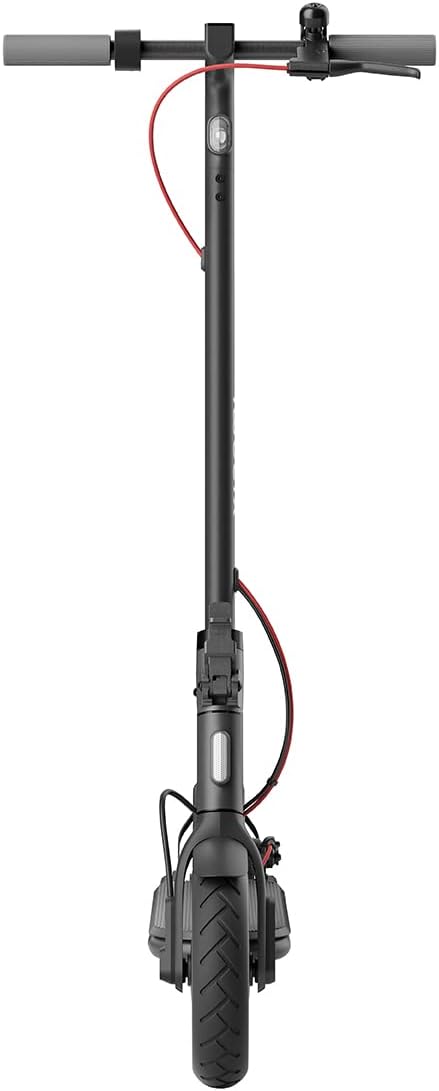
Gambar 3.2: Hareupeun view of the scooter, highlighting the front wheel and handlebar assembly.
Gambar 3.3: Top-handap view of the handlebars, showing the central display, bell, and brake levers.
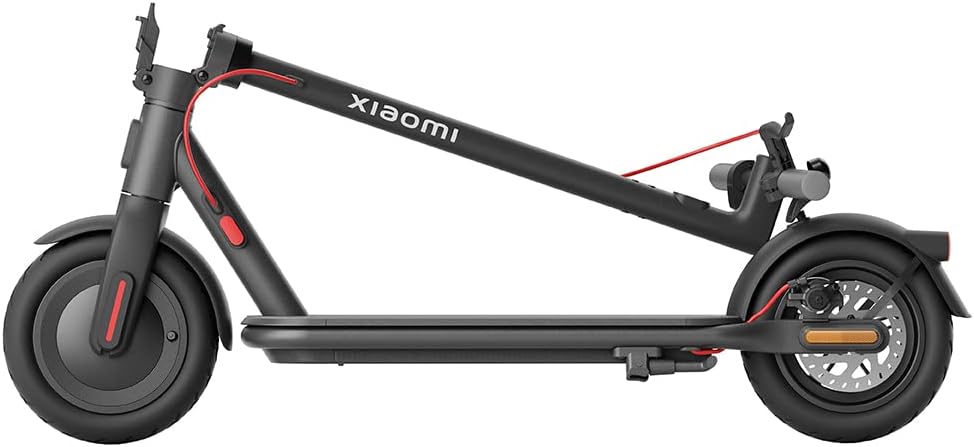
Figure 3.4: The scooter in its folded configuration, demonstrating its portability for storage or transport.
Figure 3.5: Size comparison illustrating the improved dimensions of the Xiaomi Electric Scooter 4 compared to the Electric Scooter 3, offering a more comfortable ride with increased length, height, handlebar width, and deck width.
Figure 3.6: Close-up of the 10-inch tubeless tires, designed for improved shock absorption, stability on uneven roads, and reduced puncture risk due to their deeper tread pattern.
Figure 3.7: Diagram illustrating the powerful 600W brushless Hall motor, enabling the scooter to reach speeds of up to 25 km/h and climb inclines of up to 16%.
Figure 3.8: Visual representation of the three adjustable speed levels: Pedestrian, Standard, and Sport, allowing riders to adapt to various riding conditions and preferences.
4. Setélan
4.1 Unfolding Scooter nu
Teundeun Scooter dina tempat nu datar.
Locate the new front hinge mechanism near the base of the handlebar stem.
Release the locking mechanism by pulling the lever.
Angkat gagang stang kalayan ati-ati dugi ka konci dina posisi nangtung. Pastikeun mékanisme konci parantos dipasang sapinuhna.
Video 4.1: This video demonstrates the quick and easy folding and unfolding process of the Xiaomi Electric Scooter 4, highlighting the front hinge mechanism for convenient transport and storage.
4.2 Muatan Awal
Sateuacan nganggo heula, ngeusi batre skuter sapinuhna.
Connect the charger to the charging port on the scooter and then to a power outlet.
Lampu indikator dina carjer bakal robah nalika ngecas parantos réngsé.
4.3 Tire Pressure Check
Although equipped with tubeless tires, it is recommended to check tire pressure regularly for optimal performance and safety. Refer to the tire sidewall for recommended pressure.
5. Parentah Operasi
5.1 Daya Hurung/Pareuman
To power on, press and hold the power button on the handlebar display until the screen illuminates.
Pikeun mareuman, pencét jeung tahan tombol daya nepi ka tampilan pareum.
5.2 Modeu numpak
The scooter offers three riding modes to suit different environments and preferences:
Modeu Pedestrian: Maximum speed of 6 km/h. Ideal for crowded areas or when walking alongside the scooter.
Modeu standar: Maximum speed of 20 km/h. Suitable for general urban commuting.
Modeu Olahraga: Maximum speed of 25 km/h. Provides maximum power and speed for experienced riders on open roads.
To switch between modes, short press the power button while the scooter is on.
5.3 Tunggang Scooter nu
Teundeun hiji suku dina dek jeung nyorong kaluar jeung suku séjén pikeun meunangkeun moméntum awal.
Sakali gerak, pencét gently uas akselerator pikeun ngahurungkeun motor.
Jaga kasaimbangan sareng setir ku cara ngadengdekkeun sareng muterkeun stang.
To brake, gently squeeze the brake levers. For emergency stops, apply both brakes firmly.
5.4 Xiaomi Home App Integration
Connect your scooter to the Xiaomi Home app on your smartphone for advanced features and control:
View real-time riding data (speed, battery level, mileage).
Lock/unlock the scooter.
Apdet firmware.
Adjust settings and preferences.
The app provides a comprehensive overview and control over your scooter's functions.
6. Pangropéa
6.1 beberesih
Ngusap scooter ku lemes, damp lawon. Ulah make jet cai tekanan luhur atawa agén beberesih kasar.
Pastikeun panutup port ngecas ditutup aman sateuacan beberesih.
6.2 Perawatan Batré
Cas batréna sacara rutin, sanajan skuter teu dianggo, pikeun manjangkeun umurna.
Hindarkeun batréna lengkep.
Simpen skuter dina tempat anu tiis sareng garing jauh tina sinar panonpoé langsung sareng suhu anu ekstrim.
6.3 Pangropéa ban
Regularly inspect tires for wear, cuts, or punctures.
Maintain recommended tire pressure for optimal ride quality and tire longevity.
7. Cara ngungkulan
If you encounter issues with your Xiaomi Electric Scooter 4, please refer to the following common troubleshooting tips:
Masalah
Mungkin Cukang lantaranana
Solusi
Scooter teu daya on
Batré lemah; sambunganna kendor
Ngecas batré; pariksa sagala sambungan kabel.
Ngurangan rentang atawa kakuatan
Ban kurang angin; batréna ruksak; sering naék tanjakan
Check and adjust tire pressure; ensure full charge; consider riding mode.
Rem karasa kendor atanapi teu efektif
Brake cable adjustment needed; worn brake pads
Adjust brake cable tension; inspect and replace brake pads if necessary.
Noise mahiwal salila operasi
Loose components; debris in wheels
Inspect the scooter for loose parts and tighten; clear any debris from wheels.
For more complex issues, consult the Xiaomi Home app or contact customer support.
The Xiaomi Electric Scooter 4 comes with a limited warranty. For detailed warranty terms and conditions, please refer to the warranty card included with your product or visit the official Xiaomi website. For technical support, spare parts, or service inquiries, please contact Xiaomi customer service or an authorized service center.
You can also find additional resources and FAQs on the Xiaomi Home app or the official Xiaomi support page: www.mi.com/global/support
Ask a question about this manual
Ask about setup, troubleshooting, compatibility, parts, safety, or missing instructions. Manuals+ will review the question and use this page’s manual context to help answer it.