1. Bubuka
Thank you for choosing the WOOX R4260 Smart Wireless Outdoor Camera. This manual provides comprehensive instructions for the installation, operation, and maintenance of your device. Please read this manual carefully before use to ensure proper functionality and safety. Keep this manual for future reference.
2. Produk Langkungview
2.1 Eusi pakét
- WOOX R4260 Smart Wireless Outdoor Camera
- Ningkatna Kurung
- Pemasangan Screws sareng Colokan Tembok
- Kabel Ngecas USB
- Manual pamaké
2.2 Komponén kaméra
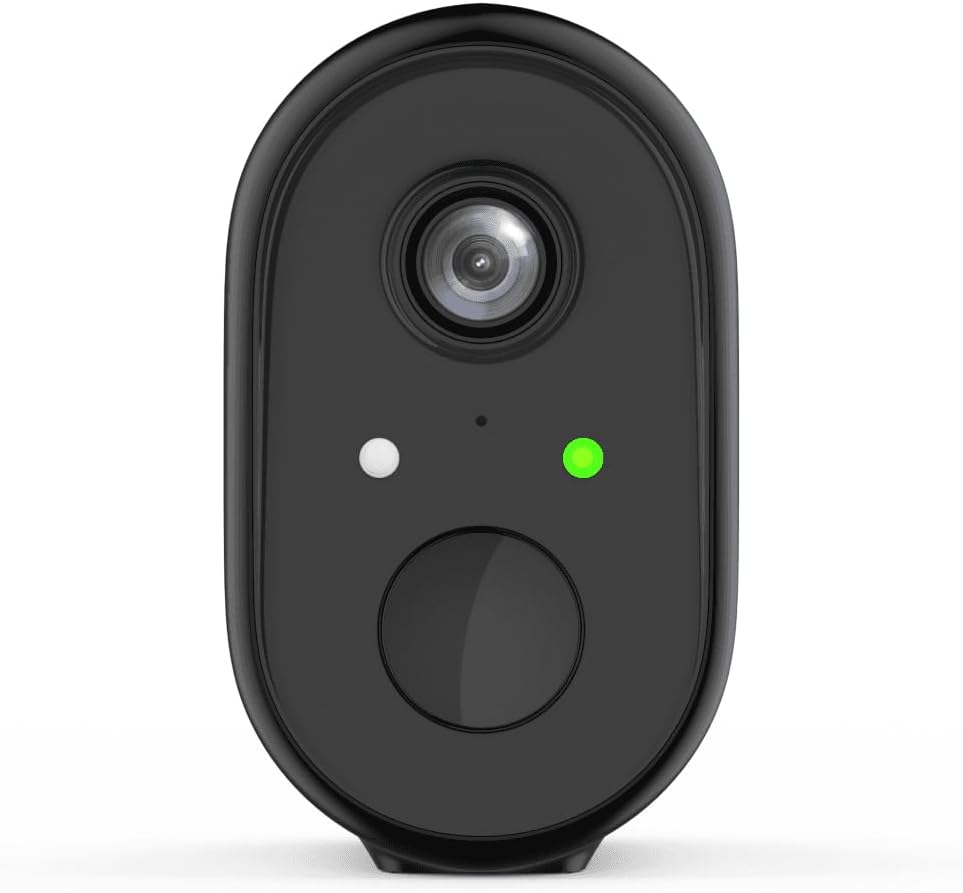
Gambar 1: Hareupeun view of the WOOX R4260 camera, highlighting the camera lens, status indicator LED, and the main button/microphone area.

Gambar 2: The WOOX R4260 camera attached to its adjustable wall mounting bracket, showing the overall design and mounting mechanism.
- Lensa kaméra: Nangkep video footage.
- Status LED: Indicates camera status (e.g., pairing mode, connected, charging).
- Mikropon/Speaker: Pikeun komunikasi audio dua arah.
- Titik Pasang: Connects to the mounting bracket.
- Palabuhan Ngecas USB: For battery charging (usually located on the back or bottom, covered by a rubber flap).
- Tombol Reset: Used to reset the camera to factory settings (often near the charging port or under a cover).
3. Setup jeung Instalasi
3.1 Ngecas Batré
Before initial use, fully charge the camera's built-in lithium-ion battery. Connect the provided USB charging cable to the camera's charging port and a standard 5V USB power adapter (not included). The status LED will indicate charging status (e.g., red for charging, green for fully charged).
3.2 Unduh Aplikasi sareng Nyiptakeun Akun
Download the "WOOX Home" app from the Apple App Store or Google Play Store. Register for a new account or log in with an existing one.
3.3 Ngapasangkeun Kaméra sareng Aplikasi
- Ensure your smartphone is connected to a 2.4GHz Wi-Fi network. The WOOX R4260 camera supports 2.4GHz Wi-Fi only.
- Open the WOOX Home app and tap the "+" icon to add a new device.
- Select "Security Camera" or the specific camera model (R4260) from the device list.
- Follow the on-screen instructions in the app. This typically involves powering on the camera, pressing the reset button until the status LED blinks rapidly (indicating pairing mode), and scanning a QR code generated by the app with the camera's lens.
- Once connected, the status LED will turn solid green, and the camera will appear in your app.
Note: If pairing fails, ensure your Wi-Fi password is correct and does not exceed 20 characters, as some users have reported issues with longer passwords. Ensure the camera is within range of your Wi-Fi router.
3.4 Instalasi fisik
The WOOX R4260 can be mounted on a wall, ceiling, or tree. Choose a location that provides the desired viewsudut sareng aya dina jangkauan Wi-Fi.
- Tandaan titik-titik pangeboran pikeun braket pemasangan.
- Bor liang jeung selapkeun colokan témbok lamun dipasang dina masonry.
- Ngamankeun bracket ningkatna kana beungeut cai ngagunakeun screws disadiakeun.
- Pasangkeun kaméra kana braket pemasangan teras atur sudutna sakumaha diperyogikeun.
- Ensure the camera is securely fastened and has a clear line of sight.
4. Ngoperasikeun kaméra
4.1 Hirup View
Open the WOOX Home app and tap on your R4260 camera to access the live video feed. From here, you can monitor your property in real-time.
4.2 Audio Dua Arah
The camera features two-way audio. In the live view, tap the microphone icon to speak through the camera's speaker, and listen to audio from the camera's microphone.
4.3 Deteksi Gerak sareng Siaga
Configure motion detection settings within the WOOX Home app. You can adjust sensitivity, set detection zones, and schedule alert times. When motion is detected, the camera will record a clip and send a notification to your smartphone.
4.4 Ngarékam sareng Nyimpen Pidéo
The camera supports local storage via a microSD card (not included) and cloud storage (subscription may be required). You can review dirékam footage ngaliwatan fitur puter balik aplikasi.
5. Pangropéa
5.1 Manajemén batré
The R4260 is powered by a rechargeable Lithium-ion battery. Monitor the battery level in the WOOX Home app and recharge the camera when the battery is low. Battery life can vary based on usage, temperature, and Wi-Fi signal strength.
5.2 beberesih
Periodically clean the camera lens with a soft, dry cloth to ensure clear image quality. Do not use harsh chemicals or abrasive materials.
5.3 Apdet firmware
The WOOX Home app will notify you of available firmware updates. It is recommended to keep your camera's firmware updated to ensure optimal performance and security.
6. Cara ngungkulan
| Masalah | Solusi anu mungkin |
|---|---|
| Kaméra gagal nyambung ka Wi-Fi. |
|
| Kualitas pidéo goréng. |
|
| Batré gancang boros. |
|
| Taya panggeuing deteksi gerak. |
|
7. Spésifikasi
- model: R4260
- Resolusi Rekaman Video: 1080 p
- Résolusi Pidéo anu Éféktif: 1080
- Resolusi Tetep Éféktif: 2 megapiksel
- Téknologi konektipitas: IEEE 802.11b/g/n, 2.4GHz Wi-Fi / WLAN
- Téknologi Komunikasi Nirkabel: WLAN
- Fitur husus: Two-way audio, Motion detector
- Pamakéan: Luar
- Sumber Daya: Battery powered (2 Lithium-ion batteries included)
- Voltage: 5 volt
- kakuatan: 5 Watt
- Viewdina Angle: 110 darajat
- Bahan: palastik
- warna: Hideung
- Ukuran (L x W x H): 11.5 x 6 x 9.5 séntiméter
- Tipe Pamasangan: Wall mount, Ceiling mount, Tree mount
- Jenis pamasangan: Screw-in
- Alat anu cocog: Smartphone
- Jenis Controller: Amazon Alexa (via WOOX Home app integration)
8. Garansi jeung Rojongan
WOOX products are designed and manufactured to the highest quality standards. For detailed warranty information and technical support, please refer to the official WOOX websitus atanapi ngahubungan layanan palanggan maranéhanana langsung. Simpen resi pameseran anjeun salaku bukti pameseran.
Pabrikan: WOOX


