Bubuka
Thank you for choosing the Viper ProScore Electronic Scoreboard. This device is designed to enhance your dart game experience by providing automatic scoring for up to 8 players across 40 different games and 655 game options. This manual will guide you through the installation, operation, and maintenance of your new scoreboard.
Fitur produk
- Compatible with steel-tip dartboards, bringing electronic dart game features to traditional play.
- Large, backlit LCD screen for clear visibility from the throw line.
- Supports up to 8 players with 40 distinct games and 655 game variations, including customizable handicaps.
- Features an automatic shut-off and sleep mode to conserve battery power.
- Soft-touch keypad for intuitive and easy operation.
- Compact dimensions: 12.7 cm (L) x 3.8 cm (W) x 26 cm (H).
- Battery operated: Requires 3 AA batteries (not included).
Eusi pakét
Punten pastikeun sadaya barang aya sateuacan neraskeun pamasangan:
- Viper ProScore Electronic Scoreboard
- Mounting hardware (screws and wall anchors or wood screws)
Parentah Setup
1. Pamasangan batré
- Locate the battery compartment on the back of the scoreboard.
- Buka panutup kompartemen batré.
- Pasangkeun 3 batré AA (teu kaasup), pastikeun polaritasna bener (+/-).
- Tutup panutup kompartemen batré aman.
2. Mounting the Scoreboard
The Viper ProScore Electronic Scoreboard can be mounted on a wall next to your dartboard for optimal viewing.

Gambar: Deukeut view of the black mounting bracket with three screw holes, designed to secure the scoreboard to a wall.
- Choose a suitable location on the wall, typically to the side of your dartboard, at a comfortable viewjangkungna.
- Use the provided mounting hardware (screws and anchors or wood screws) to securely attach the scoreboard to the wall. Ensure the scoreboard is level.

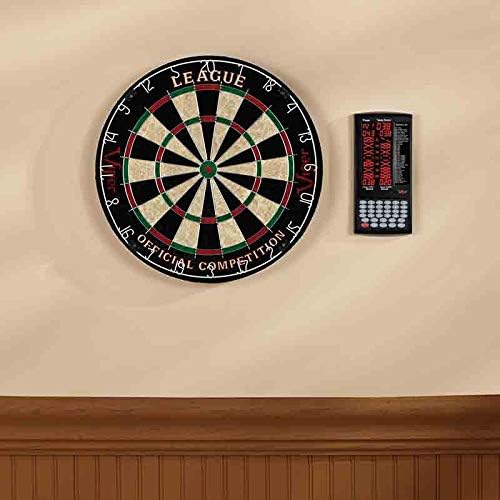
Image: The Viper ProScore Electronic Scoreboard is shown mounted on a wall to the right of a traditional dartboard, illustrating a typical installation setup.
Parentah Operasi

Image: The Viper ProScore Electronic Scoreboard displaying scores for two players and a list of available games. The keypad with number buttons and function keys is visible at the bottom.
1. Daya Hurung / Pareum
- To turn on the scoreboard, press the Hurung/Pareuman kancing.
- To turn off the scoreboard, press and hold the Hurung/Pareuman tombol nepi ka tampilan pareum.
- The scoreboard features an automatic shut-off and sleep mode to conserve battery life when not in use.
2. Pilihan Kaulinan
- After powering on, use the Up jeung Turun buttons to scroll through the list of 40 available games displayed on the screen.
- Once your desired game is highlighted, press the Lebetkeun tombol pikeun milih éta.
3. Player Setup
- The scoreboard supports up to 8 players. Follow the on-screen prompts to select the number of players for your game.
- Some games allow for custom handicaps. Refer to the specific game rules for details.
4. Scoring
After each player's turn, manually enter the score using the numeric keypad (buttons 1-20, 25, 50). Special buttons are available for common dart scores:
- X2: Multiplies the last entered score by 2 (Double).
- X3: Multiplies the last entered score by 3 (Triple).
- 25: For scoring a single bullseye.
- 50: For scoring a double bullseye.
- Cik: To register a missed throw.
- Next Player: Advances to the next player's turn after scores are entered.
5. Correcting Scores
- If an incorrect score is entered, press the Leres button to adjust the last entry.
6. Volume Control
- Ngagunakeun éta Jilid button to adjust the sound level of the scoreboard's voice announcements and effects.
Daptar kaulinan
The Viper ProScore Electronic Scoreboard includes the following 40 games:
Gambar: A lengkep view of the game list section on the scoreboard's display, showing game codes and names.
- G01 Jangkrik
- G02 No Score Cricket
- G03 Cut Cricket Tenggorokan
- G04 Killer Cricket
- G05 Low Ball Cricket
- G06 Low Pitch Cricket
- G07 English Cricket
- G08 Doubles Only Cricket
- G09 Double only Cricket
- G10 Single only Cricket
- G11 Football
- G12 Bowling
- G13 Golf
- G14 Rally
- G15 301
- G16 401
- G17 501
- G18 601
- G19 701
- G20 301 Liga
- G21 401 Liga
- G22 501 Liga
- G23 601 Liga
- G24 801 Liga
- G25 Round the Clock
- G26 Cacah
- G27 Shoot-Out
- G28 Shanghai
- G29 Half-It
- G30 Killer
- G31 Shoot-Out
- G32 9 Lives
- G33 Leuwih
- G34 Unders
- G35 High Score
- G36 Big-6
- G37 Forty-One
- G38 Bingo
- G39 Ganda Turun
- G40 21 Points
Pangropéa
- beberesih: Wipe the scoreboard surface with a soft, dry cloth. Do not use abrasive cleaners or solvents.
- Ngagantian batré: Replace batteries when the display dims or the scoreboard functions erratically. Always replace all batteries at the same time with new ones of the same type.
- Panyimpenan: Upami disimpen kanggo waktos anu lami, cabut batréna pikeun nyegah bocor.
Pamérésan masalah
- Scoreboard does not turn on:
- Pariksa naha batréna dipasang kalayan leres sareng polaritas anu leres.
- Ganti batré heubeul ku nu anyar.
- Tampilanna taram atawa kedip-kedip:
- Batré bisa jadi low. Gantina.
- Incorrect scores are registered:
- Ensure you are pressing the correct numeric buttons for the score.
- Ngagunakeun éta Leres button to rectify recent entries.
- Tombol henteu ngaréspon:
- Try turning the scoreboard off and on again.
- Ensure the buttons are clean and free from debris.
spésifikasi
- Jumlah modél: 37-0116
- Ukuran (L x W x H): 12.07 x 12.07 x 25.4 cm (4.75 x 4.75 x 10 inci)
- beurat: 318 gram (0.7 lbs)
- Sumber Daya: 3 Batré AA (teu kalebet)
- Bahan: Sisal (Note: This specification seems to refer to a dartboard material, not the scoreboard itself. The scoreboard is typically plastic/electronic components.)
- warna: Hideung
- Player Capacity: Nepi ka 8 pamaén
- Kaulinan: 40 games, 655 options
Garansi sareng Rojongan
For specific warranty information and customer support, please refer to the documentation included with your product or visit the official Viper websitus. Simpen resi pameseran anjeun pikeun klaim jaminan.