Bubuka
The Alula Slimline Touchpad PRO provides modern and intuitive control for your smart security system. Featuring a 7-inch full-color touchscreen, this device can be wall-mounted or placed on a tabletop, offering complete control of your security system from anywhere within your premises. It allows you to arm and disarm the system, view cameras, control smart devices, and initiate scenes. Its interface mirrors the Alula Smart Security app, ensuring ease of use and a familiar experience.

Figure 1: Alula Slimline Touchpad Pro main interface.
Eusi pakét
- Alula Slimline Touchpad PRO
- Tembok Gunung Bracket
- Nangtung Tabletop
- 110V Plug-in Transformer
- Charger
Setup sareng Instalasi
The Slimline Touchpad PRO offers flexible installation options, including wall mounting or tabletop placement. Ensure the device is placed within Wi-Fi range for optimal performance.
Pamasangan Wall Mount
- Choose a suitable location on a wall, preferably near a power outlet.
- Secure the wall mount bracket to the wall using appropriate screws (not included).
- Connect the 12V direct wire or use the 110V plug-in transformer to power the device.
- Carefully attach the touchpad to the mounted bracket, ensuring it clicks securely into place.
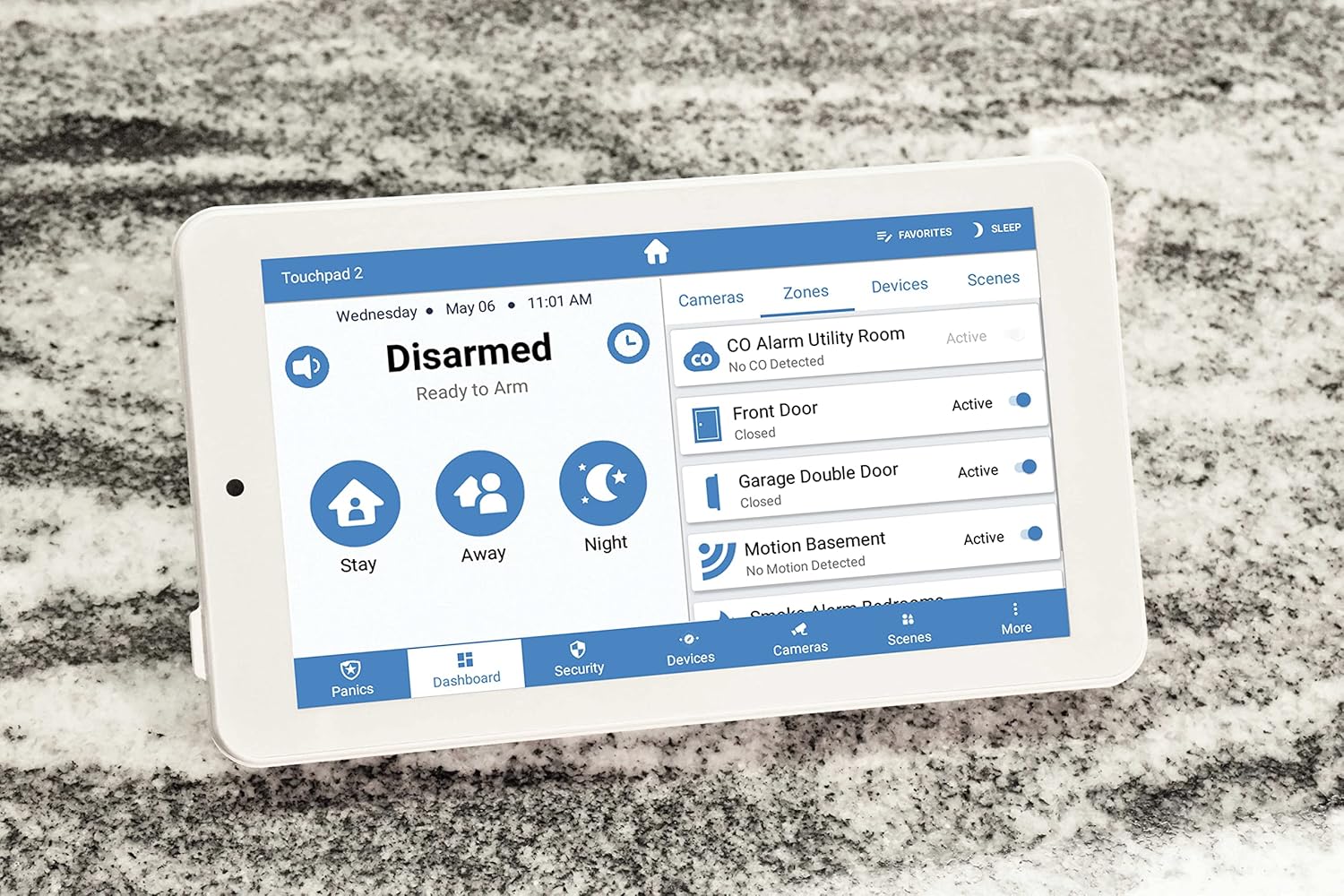
Figure 2: Touchpad in tabletop configuration, showing device and zone management.
Pamasangan Tabletop Stand
- Attach the tabletop stand to the back of the touchpad.
- Place the touchpad on a flat, stable surface.
- Connect the 110V plug-in transformer to the touchpad and plug it into a power outlet.
Initial Power-Up and Wi-Fi Connection
- Once powered, the touchpad will boot up.
- Follow the on-screen prompts to connect to your home Wi-Fi network.
- Lebetkeun kecap akses Wi-Fi anjeun nalika dipenta.
- The touchpad will then attempt to connect to your Alula smart security system.
Parentah Operasi
The Slimline Touchpad PRO provides comprehensive control over your Alula smart security system.
Arming jeung Disarming
- Panangan tetep: Tap the "Stay" icon to arm the system with interior motion sensors bypassed. Ideal for when you are home.
- Panangan Jauh: Tap the "Away" icon to arm all sensors. Ideal for when you leave the premises.
- Arm Night: Tap the "Night" icon for a customized arming mode, typically similar to "Stay" but with specific zones armed.
- Ngarampas pakarang: Tap the "Disarmed" area and enter your user code to disarm the system.
Controlling Smart Devices and Scenes
- Navigate to the "Devices" or "Scenes" tab on the bottom menu.
- From the "Devices" tab, you can control connected smart home devices such as lights, locks, and thermostats.
- From the "Scenes" tab, you can activate pre-configured scenes that control multiple devices simultaneously (e.g., "Good Morning" scene).

Figure 3: Touchpad displaying a scenic background in disarmed state.
Komunikasi Audio Dua Arah
The touchpad supports two-way audio, allowing communication with monitoring stations or other connected devices if configured within your system.
Pangropéa
To ensure the longevity and optimal performance of your Alula Slimline Touchpad PRO, follow these maintenance guidelines:
- beberesih: Use a soft, dry, lint-free cloth to clean the touchscreen. For stubborn smudges, slightly dampen the cloth with water. Avoid abrasive cleaners, solvents, or aerosol sprays.
- Apdet parangkat lunak: Ensure your touchpad's software is kept up-to-date. Updates are typically pushed automatically via your Wi-Fi connection.
- Sasayogian tanaga: Always use the original Alula power adapter. Do not use third-party adapters.
- panempatan: Avoid placing the touchpad in direct sunlight, near heat sources, or in areas with extreme humidity.
Pamérésan masalah
| Masalah | Mungkin Cukang lantaranana | Solusi |
|---|---|---|
| Touchpad not powering on. | No power, faulty adapter, or loose connection. |
|
| Teu bisa nyambung ka Wi-Fi. | Sandi salah, di luar jangkauan, atanapi masalah router. |
|
| Layar rampa teu ngaréspon. | Gangguan parangkat lunak samentawis atanapi karusakan fisik. |
|
| System not arming/disarming. | Incorrect user code, system fault, or communication issue. |
|
spésifikasi
| Fitur | Rincian |
|---|---|
| Nomer modél | RE667W-R-Pro |
| Ukuran layar | 7 inci |
| Resolusi | 1024 x 600 piksel |
| Warna | Bodas |
| Sumber Daya | 110V (with included transformer) or 12V direct wire |
| Konektipitas | Nirkabel (Wi-Fi) |
| Métode kontrol | Toél |
| Audio | Audio dua arah |
| Ukuran (L x W x H) | 9 x 6 x 4 inci |
| Tipe Pamasangan | Tembok Gunung, Tabletop |
| Alat nu cocog | Smartphone (via Alula Smart Security app) |
| UPC | 810044990607 |
Garansi sareng Rojongan
For warranty information and technical support, please refer to the official Alula website or contact your authorized Alula dealer. Keep your purchase receipt as proof of purchase.
Alula Support: alula.com/support


