Produk Leuwihview
The Zendure SuperBase Pro 1500 is a portable power station designed to provide reliable power for various applications, from outdoor adventures to emergency home backup. It features a 1440 Wh capacity and a 1500W output, capable of powering a wide range of electronic devices and appliances.

Gambar 1: Hareupeun view of the Zendure SuperBase Pro 1500, showing the main display and control buttons.
Guide Setup
1. Unboxing sareng Inspeksi Awal
Carefully remove the SuperBase Pro 1500 from its packaging. Inspect the unit for any signs of damage during transit. Ensure all accessories listed in the packing list are present.
2. Ngecas Awal
Before first use, it is recommended to fully charge the SuperBase Pro 1500. Connect the provided AC charging cable to the AC input port on the unit and then to a standard wall outlet. The display will indicate the charging status and battery percentage.
- Charging time may vary based on the input power source.
- Pikeun umur batre optimal, ulah ngecas batré sateuacan ngecas.

Gambar 2: Sisi view of the SuperBase Pro 1500, highlighting the AC output ports and DC output port.
Parentah Operasi
1. Powering on / Pareum
To power on the unit, press and hold the main power button for approximately 3 seconds. The display will illuminate. To power off, press and hold the main power button again until the display turns off.
2. Ngartos Tampilan
Layar LCD nyayogikeun inpormasi sacara real-time ngeunaan status pembangkit listrik:
- Tingkat batré: Nembongkeun persen batré ayeunatage.
- Daya Input: Indicates the power (in Watts) being drawn into the unit during charging.
- Daya kaluaran: Shows the power (in Watts) being consumed by connected devices.
- Remaining Runtime/Recharge Time: Ngira-ngira sabaraha lila unit tiasa ngadayakeun alat atanapi sabaraha lami dugi ka dicas pinuh.
- Indikator Status Port: Icons for AC, DC, USB, and other ports indicate if they are active.
3. Alat Sambungkeun
The SuperBase Pro 1500 offers various output ports:
- Kaluaran AC: Press the AC power button to enable the AC outlets. Connect your AC-powered devices (e.g., laptops, small appliances) to these ports. Ensure the total power consumption does not exceed 1500W.
- Kaluaran DC: Press the DC power button to enable the DC output ports. These are suitable for devices requiring 12V DC power.
- Kaluaran USB: Connect USB-powered devices (e.g., smartphones, tablets) to the USB-A or USB-C (PD 100W, PD 20W) ports. These ports are typically always active when the unit is on.
4. Charging the SuperBase Pro 1500
Unit ieu tiasa dicas nganggo sababaraha metode:
- Outlet Tembok AC: Connect the AC charging cable to a standard wall outlet.
- Panel Surya (Opsional): Connect compatible solar panels to the solar input port. Ensure the solar panel voltage sareng arus aya dina wates anu ditangtukeun.
- Car Charger (Optional): Use a car charger adapter to charge the unit from your vehicle's 12V cigarette lighter port.
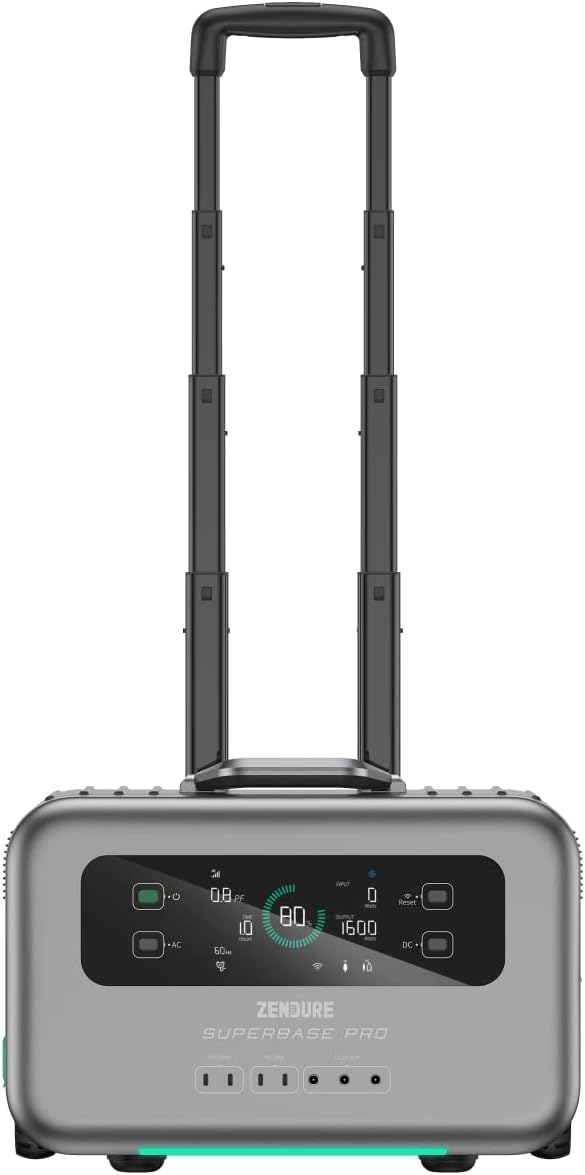
Figure 3: The SuperBase Pro 1500 with its retractable handle extended for easy transport.
Pangropéa
1. beberesih
Regularly clean the exterior of the unit with a soft, dry cloth. Do not use abrasive cleaners or solvents. Ensure all ports are free of dust and debris.
2. Panyimpenan
When storing the SuperBase Pro 1500 for extended periods, ensure it is charged to approximately 50-80% capacity. Store it in a cool, dry place, away from direct sunlight and extreme temperatures. Recharge the unit every 3-6 months to maintain battery health.
3. Kaperawatan batré
The SuperBase Pro 1500 uses a lithium-ion battery. To maximize its lifespan:
- Avoid frequent full discharges.
- Do not expose the unit to temperatures below -10°C (14°F) or above 45°C (113°F) for prolonged periods.
- If the unit will not be used for a long time, charge it to 80% every 3 months.
Pamérésan masalah
| Masalah | Mungkin Cukang lantaranana | Solusi |
|---|---|---|
| Unit teu hurung. | Batréna béak pisan. | Connect to an AC outlet and charge for at least 10 minutes before attempting to power on. |
| Henteu aya kaluaran AC. | Kaluaran AC teu diaktipkeun; Protéksi kaleuwihan beban diaktipkeun. | Press the AC power button to enable. Reduce the load on AC outlets; restart the unit. |
| Taya kaluaran DC. | DC output not enabled; Overload protection activated. | Press the DC power button to enable. Reduce the load on DC outlets; restart the unit. |
| Unitna teu ngecas. | Charging cable not properly connected; Input source issue. | Ensure all charging cables are securely connected. Verify the wall outlet or solar panel is functioning correctly. |
| Pintonan nunjukkeun kode kasalahan. | Kasalahan sistem internal. | Note the error code and refer to the Zendure support websitus atanapi ngahubungan layanan palanggan pikeun pitulung. |
spésifikasi
| Fitur | Rincian |
|---|---|
| Modél | SUPERBASE PRO |
| Kapasitas | 1440 wh |
| Kakuatan Kaluaran AC | 1500 Watts (Rated) |
| Jenis Batré | Litium-ion |
| Ukuran (L x W x H) | 50 x 50 x 28 cm |
| Beurat | 10.89 kg |
| Voltage | 1.5E+3 Volt (DC) |
| Warna | Hideung |
| UPC | 850020422692 |
Émbaran jaminan
Zendure products typically come with a limited warranty. For detailed information regarding the warranty period, coverage, and terms and conditions for your SuperBase Pro 1500, please refer to the warranty card included with your product or visit the official Zendure websitus.
Simpen bukti pameseran anjeun pikeun klaim garansi.
Rojongan Palanggan
For technical assistance, troubleshooting not covered in this manual, or service inquiries, please contact Zendure customer support.
Contact information and support resources can typically be found on the official Zendure websitus:
- Zendure Official Support Page (Kelample link, actual URL bisa rupa-rupa)
- Refer to the product packaging or included documentation for specific regional contact details.


