1. Bubuka
This manual provides essential information for setting up, operating, and maintaining your Bose Smart Soundbar 300. Please read these instructions carefully before use to ensure optimal performance and longevity of your device.

Gambar 1.1: Hareupeun view of the Bose Smart Soundbar 300 with its remote control.
2. Naon dina Box
Pastikeun yén sadaya komponén aya sateuacan neraskeun setelan:
- Bose Smart Soundbar 300
- Kabel listrik
- kabel optik
- Kadali jauh sareng batré
3. Setélan
3.1 Nempatkeun
Place the soundbar in front of your TV, ensuring it does not block the TV's remote sensor. For optimal audio, avoid placing objects directly in front of the soundbar's grille.

Image 3.1: The soundbar positioned on a TV stand below a television.
3.2 Sambungan
The Bose Smart Soundbar 300 offers multiple connectivity options for your television. Choose one of the following methods:
- Optical Audio Cable (Included): Connect one end of the optical cable to the OPTICAL IN port on the soundbar and the other end to the optical output port on your TV.
- HDMI Cable (Sold Separately): Connect one end of an HDMI cable to the HDMI (ARC) port on the soundbar and the other end to the HDMI ARC port on your TV. This connection allows for TV voice control and simplifies audio routing.
After connecting the audio cable, connect the power cord to the soundbar and then to a power outlet.
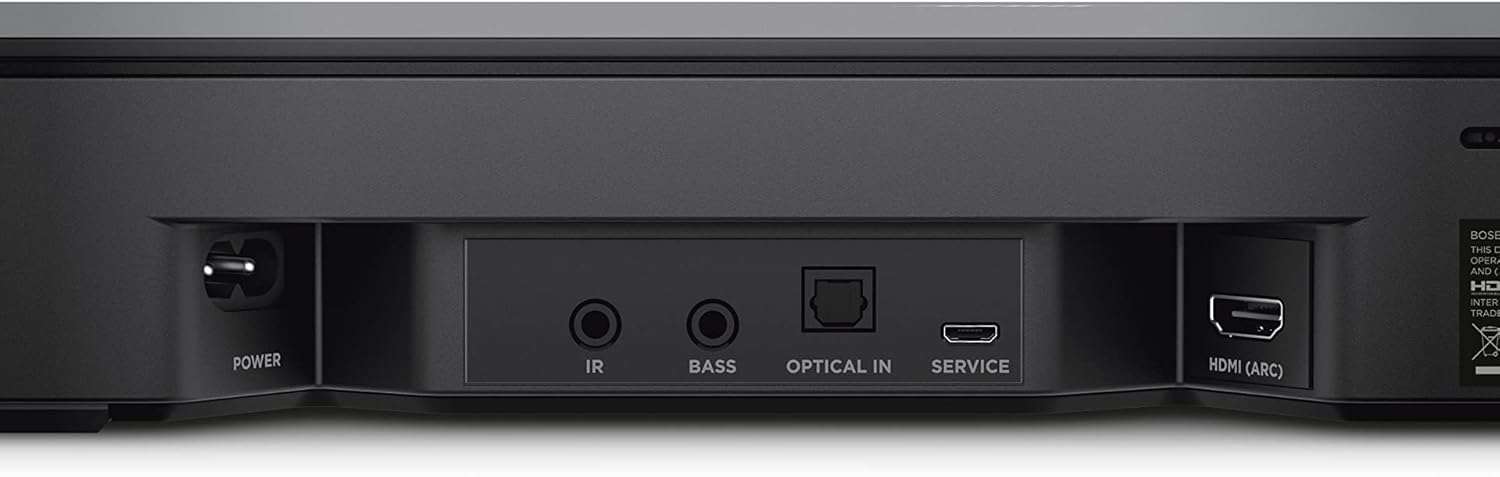
Image 3.2: Rear panel connections including Power, IR, Bass, Optical In, Service, and HDMI (ARC).
3.3 Konfigurasi Awal
Download the Bose Music app to your smartphone or tablet for step-by-step setup instructions, Wi-Fi network connection, and voice assistant integration (Alexa or Google Assistant).
4. Nyuping
4.1 Daya Hurung/Pareuman
The soundbar will typically power on automatically when your TV is turned on, especially when connected via HDMI ARC. You can also use the power button on the remote control.
4.2 Volume Control
Adjust the volume using the remote control provided with the soundbar or your TV remote if HDMI ARC is enabled.
4.3 Pamilihan Sumber
The soundbar automatically detects the audio source from your TV. For Bluetooth streaming, select the Bluetooth input via the Bose Music app or the remote control.
4.4 Kontrol sora
The soundbar features built-in Amazon Alexa and Google Assistant. Once configured through the Bose Music app, you can use voice commands for hands-free control of the soundbar, your TV, and other compatible devices. The noise-rejecting microphone system is designed to pick up your voice commands effectively.
4.5 Konéktipitas Wireless
The soundbar supports various wireless options:
- Bluetooth: Pasangkeun alat sélulér anjeun pikeun ngalirkeun audio sacara nirkabel.
- Wifi: Connect to your home Wi-Fi network for access to streaming services, Apple AirPlay 2, and Spotify Connect.
- Audio Multi-Rohang: The soundbar is compatible with other Bose smart products for a multi-room listening experience.
5. Pangropéa
To ensure the longevity and optimal performance of your Bose Smart Soundbar 300, follow these maintenance guidelines:
- beberesih: Use a soft, dry cloth to clean the exterior surfaces of the soundbar. Avoid using liquid cleaners or solvents.
- Ventilasi: Ensure that the soundbar's ventilation openings are not blocked to prevent overheating.
- Panyimpenan: Upami nyimpen soundbar kanggo waktos anu panjang, pegatkeun sambungan listrik sareng simpen di tempat anu tiis sareng garing.
6. Cara ngungkulan
If you encounter issues with your Bose Smart Soundbar 300, refer to the following common problems and solutions:
- Henteu aya sora:
- Check all cable connections (power, optical, HDMI ARC).
- Ensure the correct audio input is selected on your TV and soundbar.
- Verify TV audio output settings are configured for external speakers (e.g., PCM for optical, or HDMI ARC enabled).
- Ningkatkeun polumeu dina bar sora sareng TV anjeun.
- Sound Drops Out (HDMI ARC):
- Try a different high-speed HDMI cable.
- Power cycle both the TV and the soundbar (unplug from power for 30 seconds).
- Check for firmware updates for both your TV and soundbar via the Bose Music app.
- Voice Assistant Issues (Alexa/Google Assistant):
- Ensure the soundbar is connected to your Wi-Fi network.
- Verify voice assistant setup is complete in the Bose Music app.
- Check for microphone mute status on the soundbar.
- If Alexa is hijacking conversations from other devices, review Alexa settings in the Amazon Alexa app to manage device priorities.
- Bose Music App Activation Failed:
- Ensure your mobile device is connected to the same Wi-Fi network as the soundbar during setup.
- Restart the soundbar and your mobile device.
- Reinstall the Bose Music app.
- Masalah Nyapasangkeun Bluetooth:
- Pastikeun bar sora dina mode papasangan Bluetooth.
- Delete the soundbar from your device's Bluetooth list and attempt to pair again.
- Pindahkeun alat anjeun ngadeukeutan bar sora.
For further assistance, refer to the Bose support websitus atanapi ngahubungan layanan palanggan.
7. Spésifikasi
| Fitur | Rincian |
|---|---|
| Ngaran modél | Soundbar 300 |
| Nomer modél | SSSB300-SOUND |
| merek | Bose |
| Warna | Bose Black |
| Ukuran produk (D x W x H) | 4.02" x 26.58" x 2.21" |
| Item Beurat | 8.09 pon |
| Tipe Speaker | Soundbar |
| Konfigurasi Saluran Sakuliling Sora | 2.1 |
| Téhnologi konektipitas | Bluetooth, HDMI (ARC), Optical, Wi-Fi |
| Téknologi Komunikasi Nirkabel | Bluetooth, WiFi |
| Métode kontrol | Voice, Remote Control, Bose Music App |
| Asisten sora Diwangun-di | Amazon Alexa, Asisten Google |
| Sumber Daya | Kabel Listrik |
| Komponén Kaasup | Soundbar, Power Cord, Optical Cable, Remote Control with Batteries |
| UPC | 657768222986 |

Image 7.1: Dimensions of the Bose Smart Soundbar 300 (2.21" H x 26.58" W x 4.02" D).
8. Émbaran jaminan
The Bose Smart Soundbar 300 comes with a Limited Warranty. For specific terms and conditions, please refer to the warranty documentation included with your product or visit the official Bose websitus.
9. Rojongan
For additional support, product registration, or to access frequently asked questions, please visit the official Bose support websitus:
You may also contact Bose customer service directly for personalized assistance.


