1. Bubuka
This manual provides comprehensive instructions for the installation, operation, and maintenance of your LEDVANCE WiFi Smart Outdoor Camera (Model 75830 Cam v3). This device is designed to enhance your home security by providing high-definition video surveillance with smart features.
The camera integrates with the SYLVANIA App and is compatible with Amazon Alexa and Google Home, allowing for convenient remote management and alerts.
2. Eusi Paket
Pastikeun yén sadaya item aya dina pakét anjeun:
- LEDVANCE WiFi Smart Outdoor Camera (Modél 75830 Cam v3)
- Adaptor Daya (DC 12V/1A)
- Alat obeng
- Pemasangan Hardware (screws, jangkar)
- Pituduh Mimiti Gancang (henteu kalebet dina manual ieu)
3. Produk Langkungview

Figure 3.1: LEDVANCE WiFi Smart Outdoor Camera (Model 75830 Cam v3)
The LEDVANCE WiFi Smart Outdoor Camera is designed for outdoor use, featuring a weatherproof IP65 rating. It provides 1080p HD video resolution and is equipped with a 1/2.9" 2 Megapixel CMOS image sensor, capable of up to 25 frames per second. The lens is 3.0mm@F2.0 with a 130-degree viewing angle, offering a wide field of view.
fitur konci ngawengku:
- Pidéo HD 1080p: Clear day and night video surveillance.
- Deteksi gerak: Customizable zone selection to minimize false alerts.
- Deteksi Sora: Alerts for unusual sounds.
- Visi Peuting: Effective up to 32.8 feet (10 meters) in low light conditions.
- Audio Dua Arah: Communicate through the camera.
- Panyimpenan Lokal: MicroSD slot supports up to 128GB (MicroSD card not included).
- Optional Cloud Storage: Subscription-based cloud storage available.
- Modeu Privasi: Temporarily disable recording and live view pikeun privasi.
- Tahan cuaca (IP65): Dirancang pikeun tahan elemen outdoor.
- Integrasi Smart Home: Cocog sareng Amazon Alexa sareng Google Home.
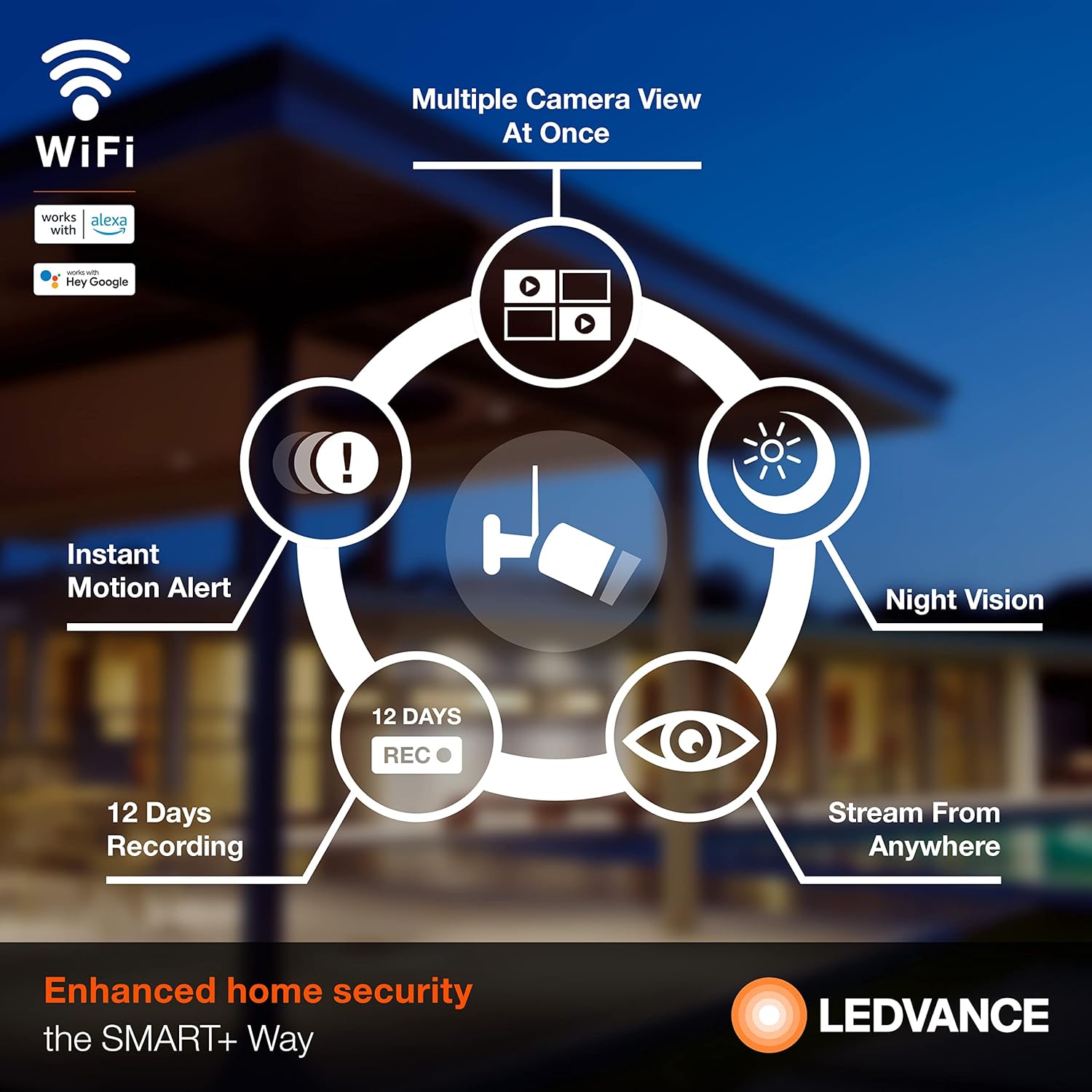
Gambar 3.2: Leuwihview of Camera Features
4. Setélan
4.1 Pamasangan Aplikasi
To operate your camera, download the SYLVANIA App from your smartphone's app store (available for iOS and Android devices). Milarian pikeun "SYLVANIA App" and follow the on-screen instructions to install.
4.2 Account Creation and Device Pairing
- Open the SYLVANIA App and create a new account or log in if you already have one.
- Follow the in-app instructions to add a new device. Select your LEDVANCE WiFi Smart Outdoor Camera from the list of available devices.
- Pastikeun smartphone Anjeun disambungkeun ka a 2.4 GHz jaringan WiFi. The camera requires a 2.4GHz network for connectivity.
- Hurungkeun kaméra nganggo adaptor kakuatan anu disayogikeun.
- Follow the app's prompts to connect the camera to your WiFi network. This typically involves scanning a QR code displayed on your phone with the camera or entering WiFi credentials.
- Once connected, the camera's status indicator will change, and you will receive a confirmation in the app.
4.3 Instalasi fisik
The camera is designed for wall mounting. Use the included screwdriver tool and mounting hardware for secure installation.
- Choose a suitable outdoor location that provides the desired viewsudut sareng aya dina jangkauan jaringan WiFi 2.4GHz anjeun.
- Mark the drilling points using the camera's mounting base as a template.
- Drill pilot holes and insert the wall anchors if necessary.
- Secure the camera's mounting base to the wall using the provided screws.
- Adjust the camera angle as needed to cover the desired area.
- Connect the power adapter to the camera and plug it into a suitable outdoor power outlet. Ensure the power connection is protected from weather elements.
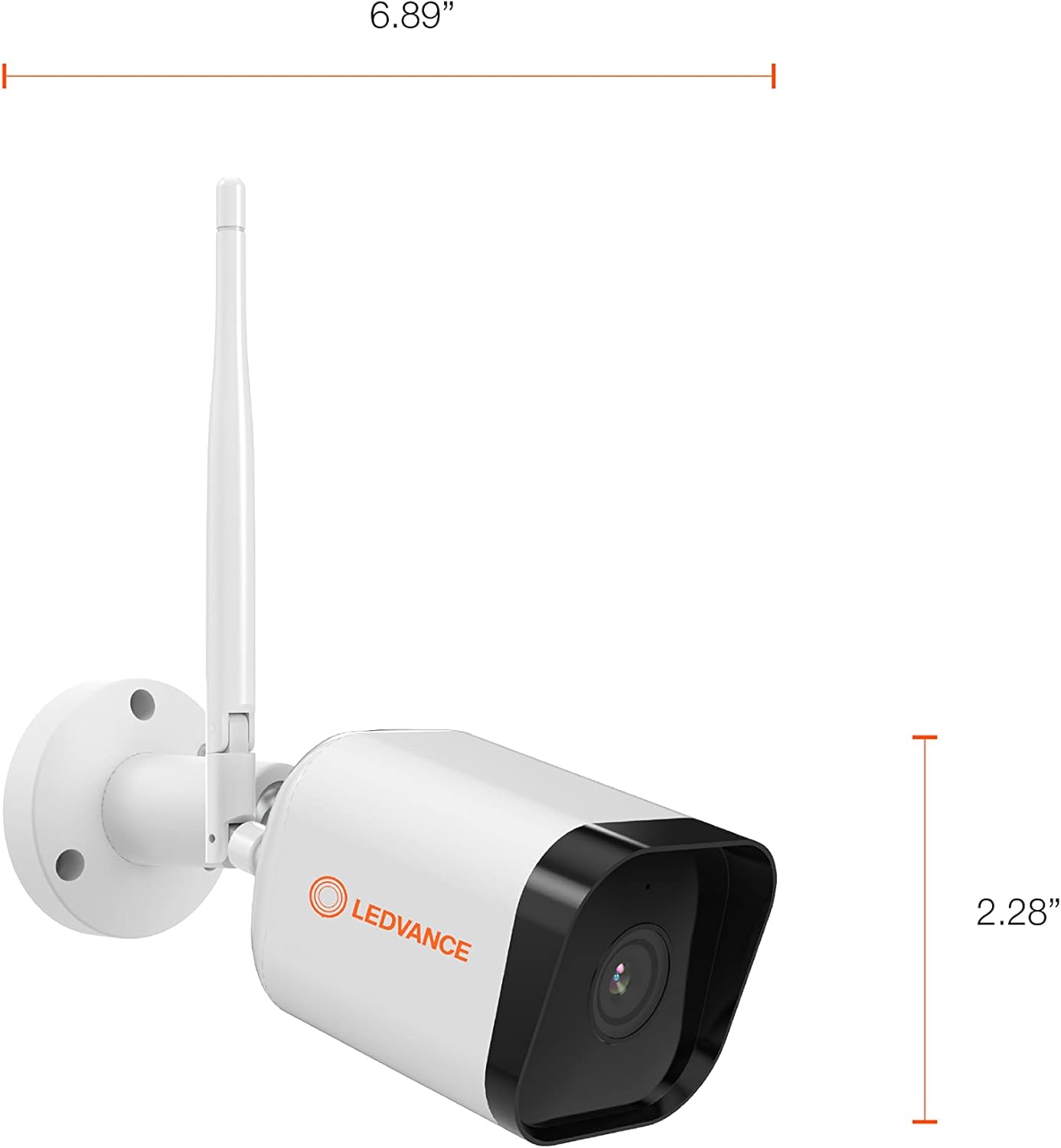
Gambar 4.1: Diménsi Kaméra
5. Parentah Operasi
5.1 Hirup View jeung Rékam
Once the camera is set up and connected, open the SYLVANIA App to access the live video feed. You can view real-time footage from anywhere with internet access.
- Ngarekam Manual: Within the app, you can manually initiate video recording or capture still images directly to your phone or tablet.
- Panyimpenan Lokal: If a MicroSD card (up to 128GB) is inserted, the camera will record events directly to the card.
- Panyimpenan awan: For continuous recording or extended storage, subscribe to the optional cloud storage service through the SYLVANIA App.

Figure 5.1: Managing Camera via SYLVANIA App
5.2 Deteksi Gerakan sareng Sora
The camera is equipped with advanced motion and sound detection capabilities:
- Tanda Gerak: Nampi bewara instan dina smartphone anjeun nalika aya gerakan anu dideteksi.
- Pilihan Zona: Customize specific areas within the camera's view for motion detection to reduce unwanted alerts.
- Tanda sora: Get notified when the camera detects significant sounds.

Figure 5.2: Motion Detection in Action
5.3 Audio Dua Arah
Utilize the built-in microphone and speaker to communicate with visitors or deter intruders directly through the SYLVANIA App.
5.4 Modeu Privasi
Activate Privacy Mode through the SYLVANIA App to temporarily disable video recording and live streaming, ensuring your privacy when needed.
5.5 Pamaduan Smart Home
Connect your LEDVANCE camera with Amazon Alexa or Google Home for voice control and integrated smart home routines. Refer to the respective app's instructions for linking your SYLVANIA account.
6. Pangropéa
- beberesih: Ngusap lénsa kaméra sareng awak kalayan lembut, damp lawon. Hindarkeun pembersih abrasive atanapi pangleyur.
- Pembaruan firmware: Regularly check the SYLVANIA App for available firmware updates to ensure optimal performance and security.
- Kartu MicroSD: If using a MicroSD card, periodically check its status in the app and consider formatting it every few months to maintain performance. Back up important recordings before formatting.
- Sambungan Daya: Ensure the power adapter and cable remain securely connected and free from damage.
7. Cara ngungkulan
If you encounter issues with your LEDVANCE WiFi Smart Outdoor Camera, refer to the following common solutions:
- Kaméra Teu Nyambung ka WiFi:
- Pastikeun jaringan WiFi anjeun 2.4GHz. Kaméra henteu ngadukung jaringan 5GHz.
- Pariksa sandi WiFi bener.
- Pindahkeun kaméra langkung caket kana router WiFi anjeun pikeun ningkatkeun kakuatan sinyal.
- Balikan deui router anjeun sareng kaméra.
- Taya Live View or Recording:
- Pariksa sambungan internét anjeun.
- Ensure the camera is powered on and connected to WiFi.
- If using a MicroSD card, ensure it is properly inserted and not full. Format the card if necessary (back up data first).
- Check if Privacy Mode is accidentally activated in the SYLVANIA App.
- Motion/Sound Alerts Not Received:
- Verify that motion/sound detection is enabled in the SYLVANIA App settings.
- Check your phone's notification settings for the SYLVANIA App.
- Adjust motion detection sensitivity and zone settings.
- Kualitas pidéo goréng:
- Ngabersihan lénsa kaméra.
- Ensure sufficient WiFi signal strength.
- Check your internet upload speed.
- Kaméra Teu Ngabales:
- Perform a hard reset by unplugging the power adapter for 10 seconds and then plugging it back in.
- If issues persist, consult the SYLVANIA App's help section or contact customer support.
8. Spésifikasi
| Fitur | Spésifikasi |
|---|---|
| Nomer modél | 75830 Cam v3 |
| Pamakéan jero rohangan / outdoor | Luar |
| Protokol konektipitas | Wi-Fi (2.4GHz wungkul) |
| Sumber Daya | Listrik Kabel (DC 12V/1A) |
| Resolusi Capture Video | 1080p HD |
| Laju pigura | 25 fps |
| Sénsor Gambar | 1/2.9" 2 Megapiksel CMOS |
| Lensa | 3.0mm@F2.0 |
| Viewdina Angle | 130 derajat |
| Wengi Sawangan Sawangan | Nepi ka 32.8 ft (10m) |
| Panyimpenan Lokal | MicroSD card (max. 128GB) |
| Peunteun Protection Internasional | IP65 (Tahan Cuaca) |
| Alat nu cocog | Smartphone (via SYLVANIA App), Amazon Alexa, Google Home |
| Tipe Pamasangan | Tembok Gunung |
| Ukuran produk (L x W x H) | 6.89 x 2.91 x 2.28 inci |
| Item Beurat | 1.16 pon |
| Warna | Bodas |
| Fitur husus | 2-Way Audio, Motion Sensor, Night Vision |
9. Garansi jeung Rojongan
LEDVANCE WiFi Smart Outdoor Camera (Model 75830 Cam v3) katutupan ku a jaminan hiji taun ti tanggal beuli. Garansi ieu nyertakeun cacad manufaktur sareng ngajamin fungsi produk sakumaha anu dimaksud dina panggunaan normal.
For warranty claims, technical support, or further assistance, please refer to the support section within the SYLVANIA App or visit the official LEDVANCE websitus pikeun inpo kontak.

Figure 9.1: LEDVANCE Quality Assurance


