1. Bubuka
This manual provides essential information for the installation, operation, and maintenance of your Montech Titan Gold 850W ATX 3.0 Power Supply. This high-end power supply is designed for gaming systems, featuring 80 Plus Gold and Cybenetics Gold certifications, fully modular cabling, and readiness for PCIe 5.0 with a new 12VHPWR connector. Please read this manual thoroughly before installation and use to ensure proper functionality and safety.

Figure 1: Montech Titan Gold 850W Power Supply and its retail packaging.
2. Émbaran Kasalametan
Always observe the following safety precautions to prevent injury or damage to your power supply and system components:
- Pastikeun catu daya dipegatkeun tina stop kontak listrik AC sateuacan dipasang atanapi nanganan.
- Ulah muka catu daya casing. Tinggi voltagBarang-barangna aya di jero, sareng teu aya bagian anu tiasa diservis ku pangguna.
- Pasang catu daya di daérah anu berventilasi saé, jauh tina sumber panas, sinar panonpoé langsung, sareng Uap.
- Anggo ngan ukur kabel modular anu disayogikeun sareng catu daya ieu. Nganggo kabel anu teu cocog tiasa nyababkeun karusakan.
- Pastikeun sadaya panyambungna dipasang sacara aman sateuacan diaktipkeun sistem.
3. Eusi Paket
Pastikeun yén sadaya item aya dina bungkusan:
- Montech Titan Gold 850W Power Supply Unit
- Set Kabel Modular (kalebet kabel 12VHPWR)
- Kabel Daya AC
- Pamasangan screws
- Tali Kabel/Tali Velcro
- Manual pangguna (dokumén ieu)

Figure 2: Included modular cables and accessories for the power supply.
4. Setup jeung Instalasi
Turutan léngkah-léngkah ieu pikeun masang catu daya anjeun:
- Nyiapkeun Kasus PC anjeun: Ensure your PC case is compatible with ATX power supplies.
- Pasang PSU: Secure the power supply into the designated PSU bay in your PC case using the provided mounting screws. Ensure the fan is oriented correctly for optimal airflow (typically facing downwards if your case has a bottom vent).
- Sambungkeun kabel modular: Identify the necessary cables for your motherboard, CPU, graphics card(s), and storage devices. Connect these cables to the corresponding ports on the power supply. The fully modular design allows you to connect only the cables you need, reducing clutter.
- Sambungkeun ka komponén: Route the connected cables through your case's cable management channels and connect them to your motherboard (24-pin ATX, 8-pin EPS/CPU), graphics card(s) (PCIe, including the 12VHPWR for compatible GPUs), and storage drives (SATA, Molex).
- Sambungan Aman: Double-check all connections to ensure they are firm and properly seated.

Gambar 3: Leuwihview of the modular cable connection ports on the power supply.
5. Parentah Operasi
Saatos dipasang, turutan léngkah-léngkah ieu pikeun ngoperasikeun catu daya anjeun:
- Nyambungkeun Daya AC: Plug the AC power cord into the power supply's AC inlet and then into a wall outlet or surge protector.
- Saklar kakuatan: Locate the main power switch on the rear of the power supply and flip it to the 'ON' (I) position.
- System Power On: Press the power button on your PC case to start your computer.
- Smart Zero Fan Feature: This power supply includes a 'Smart Zero Fan' switch. When enabled (ON), the fan will remain off under low load conditions for silent operation. The fan will automatically activate when the load increases to maintain optimal temperatures. If disabled (OFF), the fan will operate continuously.

Figure 4: Rear panel with main power switch and Smart Zero Fan control.
6. Pangropéa
To ensure the longevity and optimal performance of your power supply, periodic maintenance is recommended:
- beberesih lebu: Regularly clean dust from the power supply's fan intake and exhaust vents using compressed air. Ensure the power supply is turned off and unplugged before cleaning.
- Pamariksaan kabel: Periodically check all modular cable connections for looseness or damage. Re-seat any loose cables.
- Kaayaan Lingkungan: Maintain a clean, dry, and cool environment for your PC to prevent excessive heat and dust buildup.

Gambar 5: Top view of the power supply, highlighting the fan grill for cleaning.
7. Cara ngungkulan
Upami anjeun ngalaman masalah sareng catu daya anjeun, tingali masalah sareng solusi umum ieu:
- Henteu aya kakuatan:
- Pastikeun kabel daya AC dipasang pageuh kana catu daya sareng stop kontak témbok.
- Verify the main power switch on the PSU is in the 'ON' (I) position.
- Check all modular cable connections, especially the 24-pin ATX and 8-pin EPS/CPU cables, for secure seating.
- Nguji stop kontak témbok jeung alat sejen pikeun mastikeun eta boga kakuatan.
- Sistem Pareum Teu Disangka-sangka:
- This could indicate an overload or overheating. Ensure your system's power consumption does not exceed the PSU's 850W capacity.
- Check for proper ventilation around the PSU and inside the PC case. Clean any dust buildup.
- Ensure the 'Smart Zero Fan' is functioning correctly or try disabling it to force continuous fan operation.
- Fan Not Spinning (under low load):
- If the 'Smart Zero Fan' feature is enabled, the fan will not spin under low loads. This is normal operation. The fan will activate when the system load increases.
- If the fan never spins even under high load with 'Smart Zero Fan' disabled, contact customer support.
8. Spésifikasi
Detailed technical specifications for the Montech Titan Gold 850W Power Supply:
| Fitur | Spésifikasi |
|---|---|
| merek | Montech |
| Ngaran modél | Titan Gold 850W (TIS0124) |
| Wattage | 850 Watt |
| Kaluaran Wattage | 750 Watts (Note: Product title states 850W, specifications list 750W. Please verify with manufacturer if discrepancy is critical.) |
| Sertifikasi efisiensi | 80 Plus Gold, Cybenetics Gold |
| Faktor Bentuk | ATX |
| Desain suplai kakuatan | Modular pinuh |
| Tipe Panyambung | ATX, PCIe 5.0 (12VHPWR) |
| Métode Cooling | Air (1 Fan) |
| Item Beurat | 7.52 pon |
| Tanggal Kahiji Sadia | 13 Désémber 2022 |
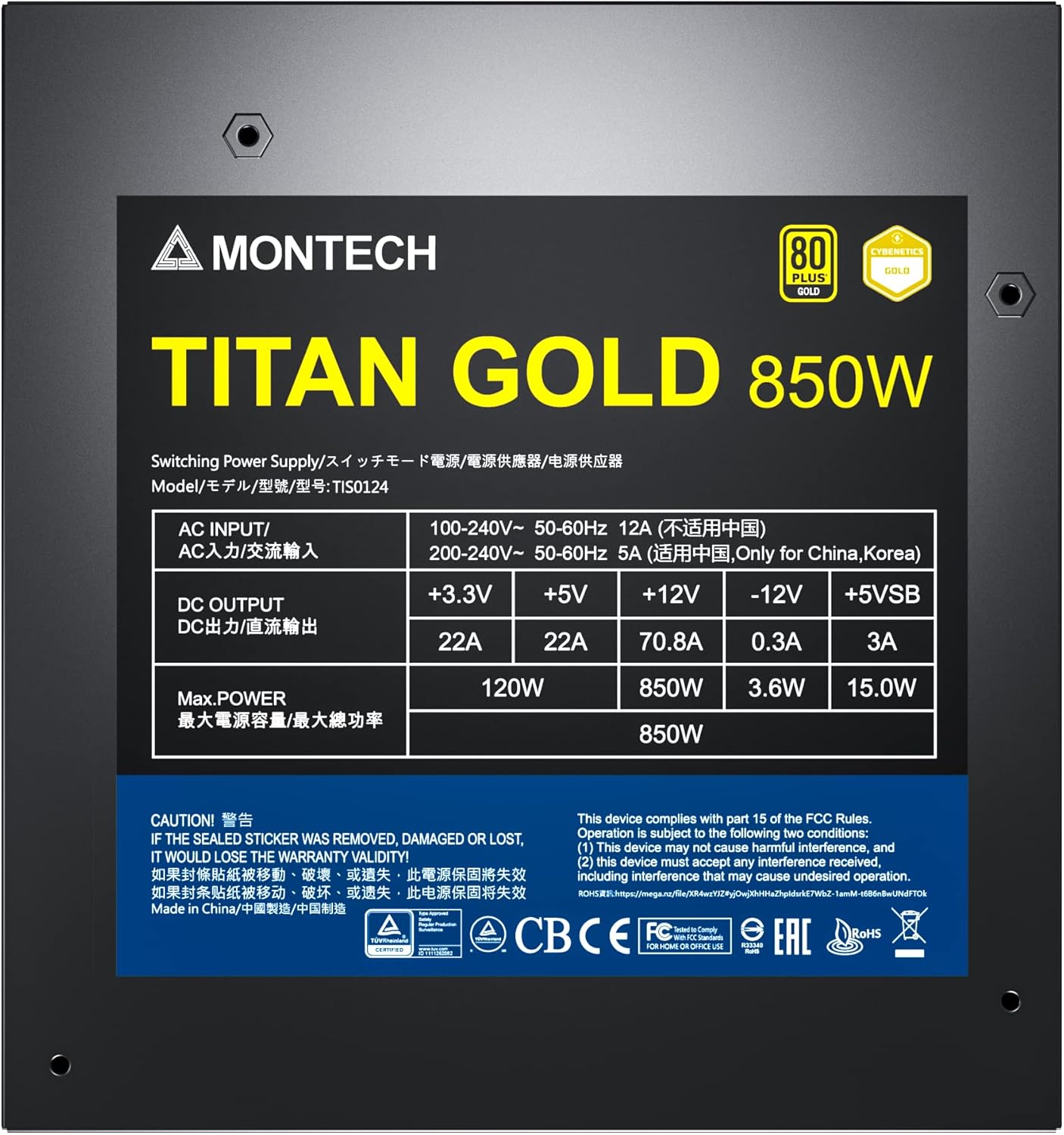
Figure 6: Product label displaying electrical specifications and certifications.
9. Jaminan & Dukungan
The Montech Titan Gold 850W Power Supply comes with a garansi 10 taun, ensuring long-term reliability and peace of mind. For technical support, warranty claims, or further assistance, please visit the official Montech websitus atanapi ngahubungan departemén layanan palanggan maranéhna.
Punten nahan bukti pameseran anjeun pikeun validasi garansi.


