Bubuka
This manual provides comprehensive instructions for the safe and efficient operation of your Max Power Portable Speaker, model MPD661. Please read this manual thoroughly before using the device and retain it for future reference.
The Max Power MPD661 is a versatile portable sound system designed for various indoor and outdoor activities, featuring Bluetooth connectivity, USB and SD card playback, FM radio, and integrated LED lights. It is also suitable for karaoke use.
Eusi pakét
Pastikeun yén sadaya item aya dina bungkusan:
- Max Power Portable Speaker (MPD661)
- Kabel Ngecas Tipe-C
- Manual pangguna (dokumén ieu)
Catetan: Additional accessories such as microphones or auxiliary cables may be sold separately.
Produk Leuwihview
Familiarize yourself with the main components and controls of your MPD661 speaker.

Gambar 1: Hareupeun view of the Max Power MPD661 Portable Speaker, showcasing the main speaker grille and the illuminated green LED ring. Control buttons are visible at the top.
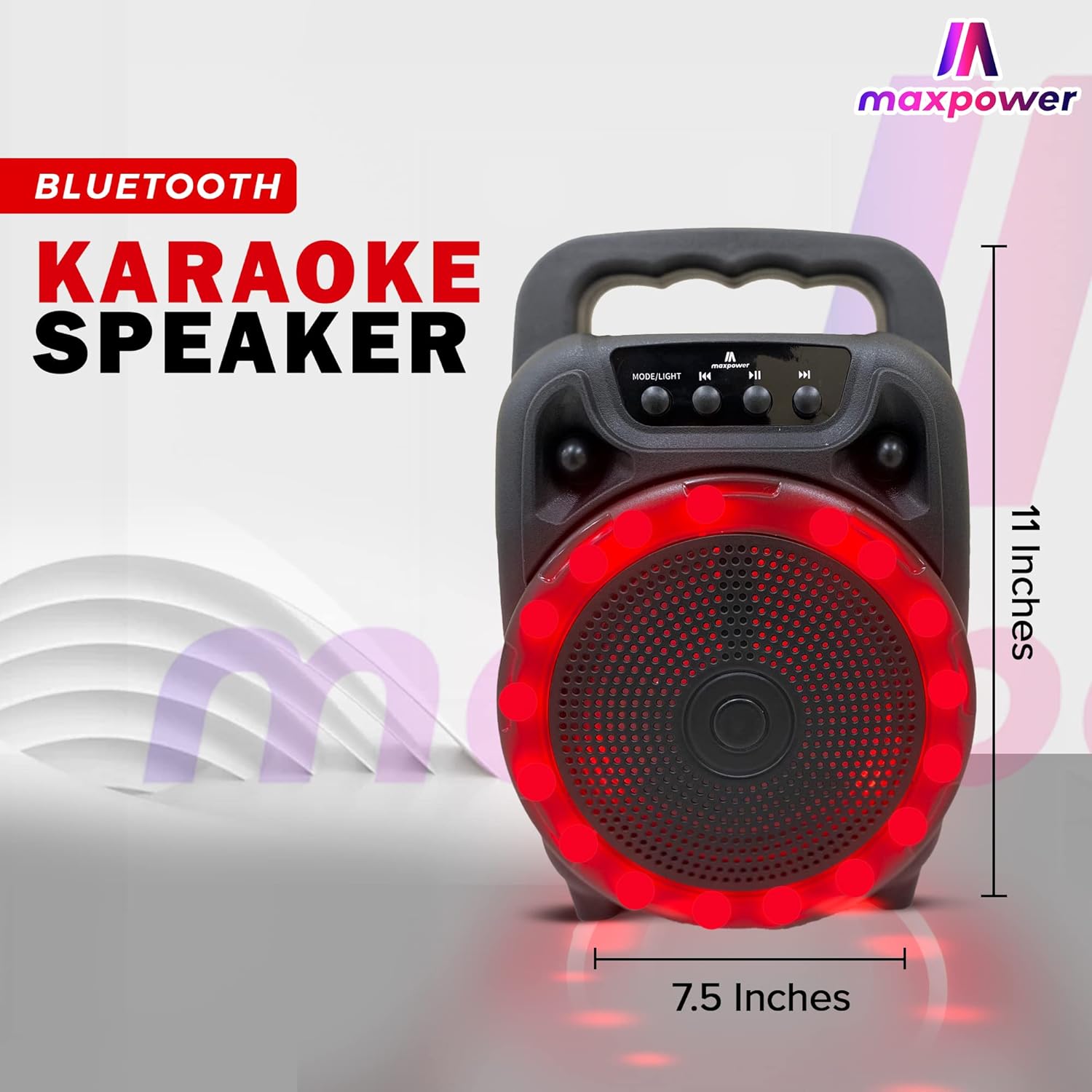
Gambar 2: Samping view of the Max Power MPD661 Portable Speaker, illustrating its compact dimensions of approximately 11 inches in height and 7.5 inches in width. The integrated carry handle is visible.
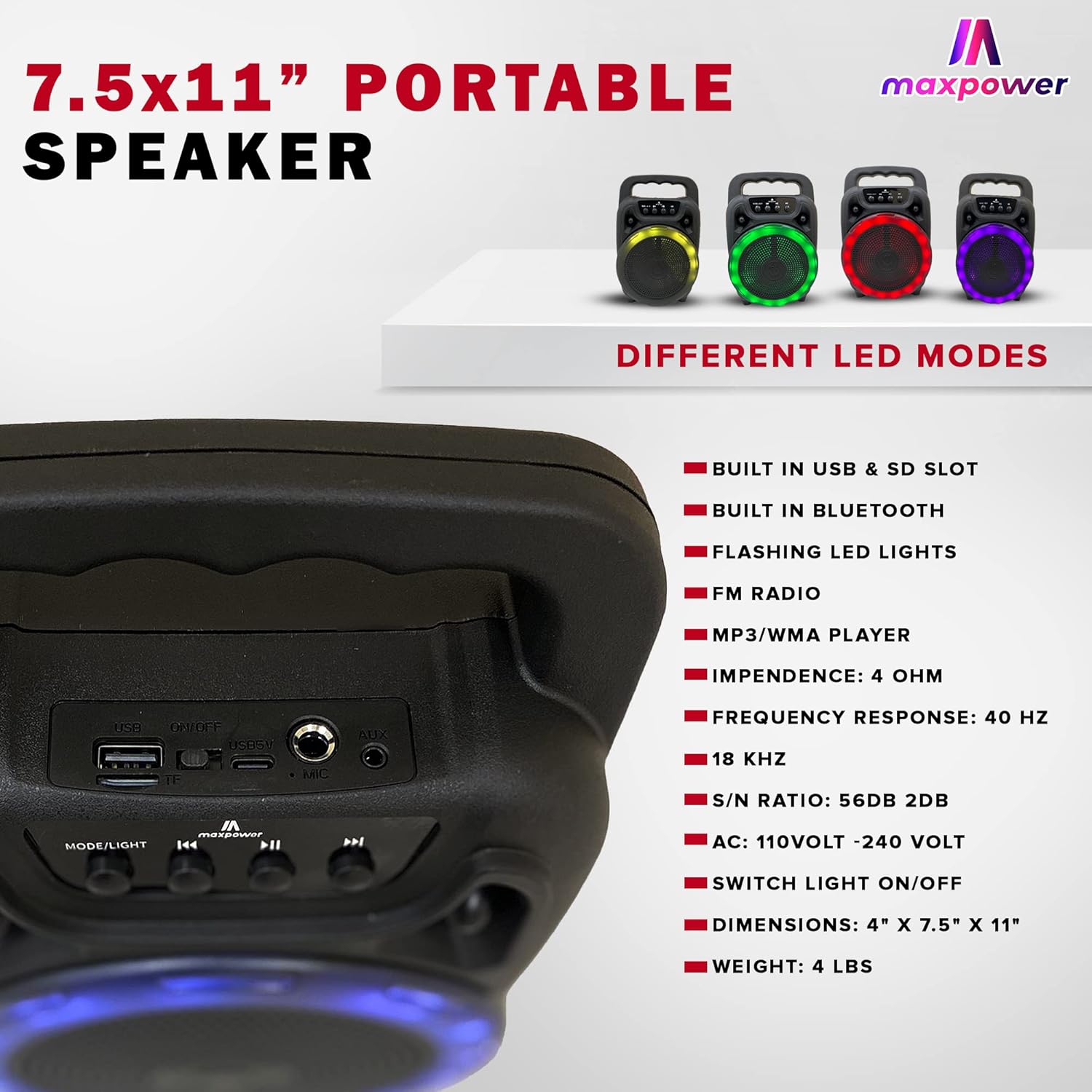
Gambar 3: Rear panel of the Max Power MPD661 Portable Speaker, detailing the USB port, SD card slot, and microphone input. Key technical specifications are also listed next to the image.
Panel Kontrol sareng Port:
- MODE/LIGHT Button: Press to switch between Bluetooth, FM Radio, USB, and SD card modes. Long press to toggle LED lights on/off.
- Tombol Lacak Sateuacanna: Press to go to the previous track. Long press to decrease volume.
- Tombol Puter/Reureuh: Press to play or pause audio. In FM mode, long press to auto-scan and save stations.
- Tombol Lacak salajengna: Press to go to the next track. Long press to increase volume.
- Port USB: Pikeun playback USB flash drive.
- Slot Kartu SD: Pikeun playback kartu SD.
- Input MIC: Jack 6.35mm pikeun nyambungkeun mikropon.
- Input AUX: Jack 3.5mm pikeun nyambungkeun alat audio éksternal.
- Input DC 5V: Port Tipe-C pikeun ngecas spiker.
Setup sareng Ngecas
Ngecas awal:
Before first use, fully charge the speaker. Connect the supplied Type-C charging cable to the DC 5V input port on the speaker and the other end to a standard USB power adapter (not included) or a computer USB port. The charging indicator light will illuminate during charging and turn off when fully charged.
The speaker features a built-in Type-C charger that enables faster charging.
Hurungkeun/Pareuman:
Locate the power switch, usually on the rear or side panel. Flip the switch to the "ON" position to power on the speaker. Flip to "OFF" to power off.
Parentah Operasi
Mode Bluetooth:
- Power on the speaker. It will automatically enter Bluetooth pairing mode, indicated by a flashing LED light or an audible prompt.
- Dina alat sélulér anjeun (smartphone, tablet, jsb.), aktipkeun Bluetooth sareng milarian alat anu sayogi.
- Select "MPD661" from the list of devices. Once connected, you will hear a confirmation sound.
- You can now play audio from your device through the speaker. Use the speaker's control buttons or your device to adjust volume, play/pause, and skip tracks.
Playback USB/SD Card:
- Insert a USB flash drive or SD card (pre-loaded with MP3/WMA audio files) kana palabuhan masing-masing.
- The speaker will automatically switch to USB or SD card mode and begin playing audio. If not, press the "MODE/LIGHT" button to select the correct mode.
- Use the Previous/Next Track buttons to navigate through songs and the Play/Pause button for playback control.
Modeu Radio FM:
- Press the "MODE/LIGHT" button until you hear the FM radio prompt.
- Long press the Play/Pause button to initiate an automatic scan for available FM stations. The speaker will save all found stations.
- Use the Previous/Next Track buttons to switch between saved FM stations.
Fungsi Karaoke:
- Sambungkeun mikropon kabel (teu kaasup) kana port input MIC.
- Play music via Bluetooth, USB, or SD card mode.
- Adjust the microphone volume and echo (if available on your microphone) for optimal sound.
Kontrol Lampu LED:
The speaker features flashing LED lights. Long press the "MODE/LIGHT" button to toggle the LED lights on or off. The speaker supports different LED display modes.

Gambar 4: Illustration of the Max Power MPD661 Portable Speaker displaying various LED light color options, including green, red, blue, and purple, which can be cycled through.
Pangropéa sareng Perawatan
- beberesih: Anggo kaén anu garing sareng lemes pikeun ngabersihan bagian luar spéker. Ulah make cleaners abrasive atawa pangleyur.
- Panyimpenan: Simpen spéker dina tempat anu tiis sareng garing jauh tina sinar panonpoé langsung sareng suhu anu ekstrim.
- Perawatan batré: Pikeun manjangkeun umur batre, ulah miceun batre pinuh. Ngeusi batre spéker rutin, sanajan teu dipaké pikeun période nambahan.
- Tahan cai: spiker ieu teu waterproof. Hindarkeun paparan ka cai atanapi kalembaban anu kaleuleuwihan.
- Penanganan: Ulah ngalungkeun atawa ngagebugan speaker kalawan tarik.
Pamérésan masalah
| Masalah | Mungkin Cukang lantaranana | Solusi |
|---|---|---|
| Speaker teu hurung. | Batré béak. Saklar daya pareum. | Charge the speaker fully. Ensure the power switch is in the "ON" position. |
| Taya sora tina speaker. | Volume is too low. Incorrect mode selected. Device not connected via Bluetooth. | Increase volume on both speaker and connected device. Press "MODE/LIGHT" to select correct input. Re-pair Bluetooth device. |
| Sambungan Bluetooth teu stabil. | Device is too far from speaker. Interference from other devices. | Move device closer to the speaker (within 33 feet/10 meters). Avoid obstacles between devices. Turn off other Bluetooth devices. |
| USB / kartu SD teu maén. | Lepat file format. Kartu/drive teu dipasang kalawan bener. | Mastikeun files are MP3/WMA format. Re-insert the USB drive or SD card firmly. |
spésifikasi
| Fitur | Rincian |
|---|---|
| Nomer modél | MPD661 (647625056175) |
| Diménsi | 4" x 7.5" x 11" (kira-kira 10.16 cm x 19.05 cm x 27.94 cm) |
| Beurat | 2.18 pon (kira-kira 0.99 kg) |
| Konektipitas | Bluetooth, USB, SD Card, AUX |
| Input Audio | Bluetooth, USB |
| Réspon Frékuénsi | 40 Hz - 18 KHz |
| Babandingan S/N | 56dB ± 2dB |
| Impedansi | 4 OHM |
| Sumber Daya | Didukung ku batré (1 batré Lithium Ion, kalebet) |
| Port ngecas | Type-C (DC 5V) |
| Format Audio Dirojong | MP3/WMA |
| Fitur | Flashing LED Lights, FM Radio, Karaoke Function |
Émbaran Kasalametan jeung Warnings
PERHATOSAN: Kangker sareng Karusakan Réproduktif - www.P65Warnings.ca.gov
- Ulah ngalaan speaker ka suhu ekstrim, sinar panonpoé langsung, atawa kalembaban luhur.
- Do not disassemble, repair, or modify the speaker yourself. This will void the warranty and may cause damage or injury.
- Jauhkeun speaker ti barudak jeung piaraan.
- Paké ngan kabel ngecas husus.
- Hindarkeun dengekeun dina volume anu luhur pikeun période anu panjang pikeun nyegah karusakan dédéngéan.
Garansi sareng Rojongan
For warranty information or technical support, please contact Max Power customer service. Refer to the product packaging or the official Max Power websitus pikeun detil kontak.
Please have your model number (MPD661) and UPC (647625056175) ready when contacting support.


