1. Bubuka
This manual provides essential instructions for the installation, operation, and maintenance of your PNI Greenhouse SC1800C PRO 3KW Hybrid Solar Inverter. This multi-functional inverter/charger combines the functions of an inverter, solar charger, and battery charger to offer uninterrupted power support in a portable design. Please read this manual thoroughly before installation and use to ensure optimal performance and safety.
2. Parentah Kasalametan
WARNING: This section contains critical safety information. Failure to follow these instructions may result in serious injury or damage to the equipment.
- Instalasi jeung wiring kudu dipigawé ku tanaga mumpuni wungkul.
- Do not attempt to disassemble or repair the unit yourself. Refer all servicing to authorized service personnel.
- Tetep barudak jauh ti inverter nu.
- Mastikeun ventilasi ditangtoskeun sabudeureun inverter pikeun nyegah overheating.
- Do not expose the inverter to rain, snow, spray, or any type of liquid.
- Before connecting or disconnecting any wiring, ensure all power sources (AC, solar, battery) are disconnected.
- Use appropriate circuit breakers and fuses as required by local electrical codes.

Gambar 1: Hareupeun view of the inverter showing the caution label.
3. Produk Langkungview
3.1 Fitur konci
- Multi-functional inverter/charger with integrated MPPT solar charge controller.
- Output gelombang sinus murni pikeun éléktronika sénsitip.
- Input Configurable voltage rentang pikeun parabot imah jeung komputer pribadi.
- Configurable batré ngecas ayeuna dumasar kana aplikasi.
- Configurable AC/Solar Charger priority via LCD setting.
- Cocog jeung mains voltage atawa kakuatan generator.
- Automatic restart while AC is recovering.
- Overload, leuwih suhu, sareng panyalindungan sirkuit pondok.
- Desain carjer batré pinter pikeun kinerja batré dioptimalkeun.
- Fungsi mimiti tiis.
- Monitoring with PC software (USB cable included) and optional WiFi dongle for remote monitoring.
3.2 Eusi pakét
pakét ngawengku:
- PNI Greenhouse SC1800C PRO Hybrid Solar Inverter
- Kabel Komunikasi USB
- Manual pamaké
3.3 Katerangan Fisik
Gambar 2: Hareupeun view tina inverter.
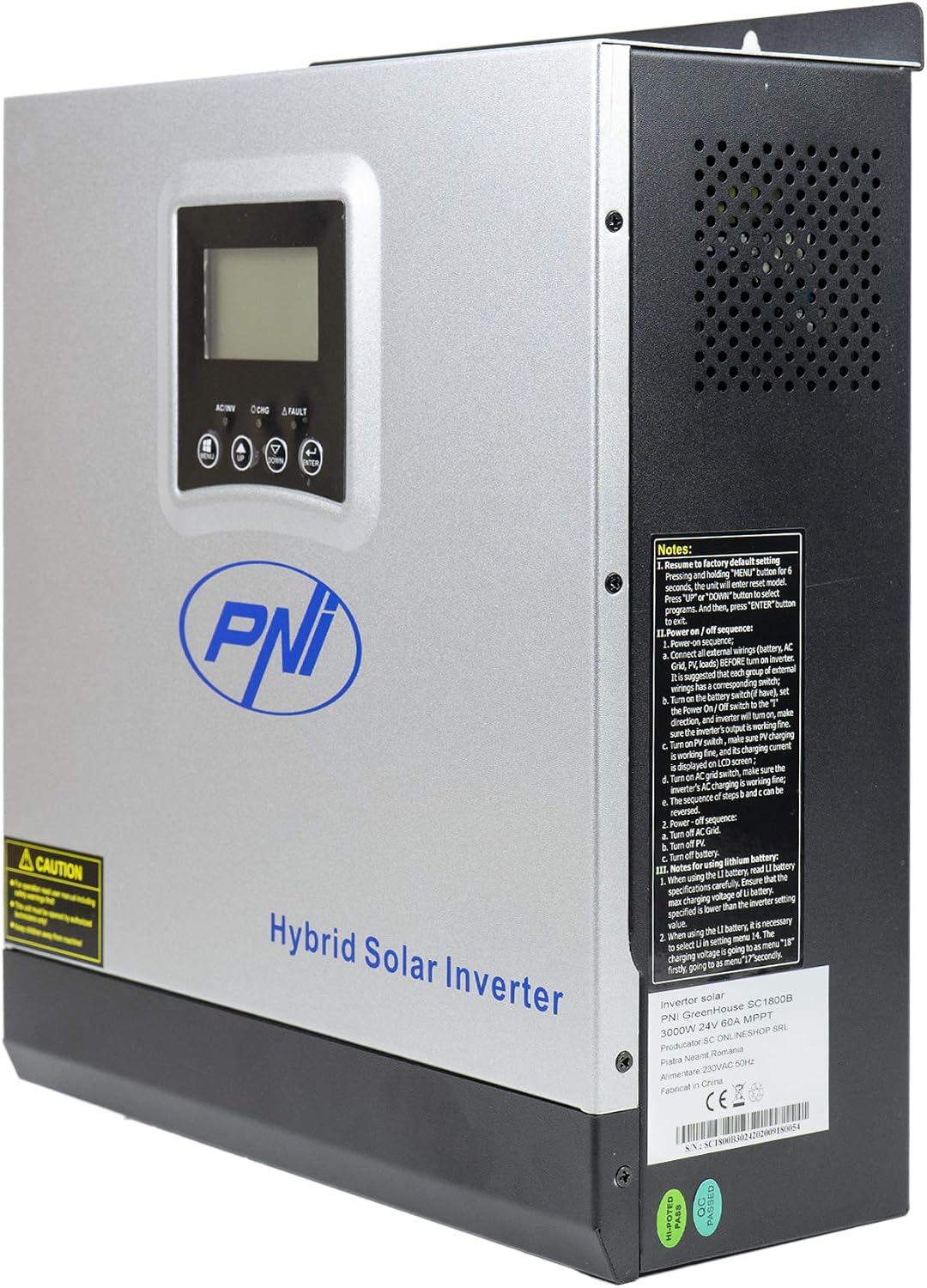
Gambar 3: Sisi view of the inverter, highlighting ventilation and general notes.

Figure 4: Rear panel connections. 1: AC Input, 2: AC Output, 3: ON/OFF Switch, 4: Input Breaker, 5: Battery Terminals (DC+ DC-), 6: PV Input Terminals (PV+ PV-).

Figure 5: Side panel communication ports: COM, USB, and optional WiFi port.
3.4 Diagram Aplikasi

Figure 6: Basic application diagram. 1: Solar panels, 2: Utility grid, 3: Generator, 4: Off-Grid solar inverter, 5: Battery, 6: Home loads. Note: Generator, PV modules, WiFi module, and battery are not included.
4. Setup & Instalasi
4.1 Pasang Inverter
The inverter is designed for wall mounting. Choose a suitable location that is:
- Indoors and protected from direct sunlight, rain, and dust.
- Dilengkepan ventilasi anu saé pikeun ngamungkinkeun panas kaluar.
- Bisa diakses pikeun masang kabel sareng perawatan.
- Strong enough to support the inverter's weight (approximately 7.75 kg).
4.2 Sambungan Wiring
All wiring must comply with local electrical codes and regulations. Ensure all power sources are disconnected before making any connections.
- Sambungan batré: Connect the 24V battery bank to the DC+ and DC- terminals (5 in Figure 4). Ensure correct polarity. The inverter supports AGM, lead-acid, GEL, and user-defined lithium-ion batteries.
- Sambungan Input AC: Connect the utility grid or generator AC input to the AC INPUT terminals (1 in Figure 4).
- Sambungan Kaluaran AC: Connect your home loads to the AC OUTPUT terminals (2 in Figure 4).
- Sambungan Input PV: Connect your solar panels to the PV+ and PV- terminals (6 in Figure 4). Ensure the PV input voltage (30-120 VDC) and current (max 30A) are within the inverter's specifications.
IMPORTANT: Double-check all connections for correct polarity and secure fastening before powering on the unit.
5. Operasi
5.1 Panel kontrol

Figure 7: Control Panel. 1: Function Buttons (MENU, UP, DOWN, ENTER), 2: LCD Display, 3: AC/INV Indicator, 4: CHG Indicator, 5: FAULT Indicator.
The LCD display shows system information such as input/output voltage, status batré, persen bebantage, and operating mode. The function buttons allow you to navigate menus and configure settings.
5.2 Powering on / Pareum
- Pikeun Ngahurungkeun:
a. Ensure all wiring connections are secure.
b. Turn on the battery breaker (if installed).
c. Turn on the PV input breaker (if installed).
d. Turn on the AC input breaker (if connected to utility/generator).
e. Press the ON/OFF switch (3 in Figure 4) on the inverter to the 'ON' position. The inverter will perform a self-test and the LCD will light up. - Pikeun mareuman:
a. Disconnect all AC loads from the inverter.
b. Press the ON/OFF switch to the 'OFF' position.
c. Turn off the AC input breaker.
d. Turn off the PV input breaker.
e. Turn off the battery breaker.
5.3 Modeu operasi
The inverter supports various operating modes, configurable via the LCD menu:
- SBU (Solar-Battery-Utility) Priority: Solar power is the primary source, followed by battery, then utility grid.
- UTI (Utility) Priority: Utility grid is the primary source, followed by solar, then battery.
- SOL (Solar) Priority: Solar power is the primary source, followed by utility grid, then battery.

Figure 8: Illustration of various operating and charging modes.
5.4 Pemantauan sareng Komunikasi
- Komunikasi USB: Connect the inverter to a PC using the provided USB cable (Figure 5) to monitor system status and configure advanced settings via dedicated software.
- Optional WiFi Dongle: For remote monitoring via mobile app or PC, an optional WiFi dongle can be connected to the designated port (Figure 5).
6. Pangropéa
Pangropéa rutin ngajamin umur panjang sareng kinerja optimal inverter anjeun.
- beberesih: Periodically clean the exterior of the inverter and ensure ventilation openings are free from dust and debris. Use a dry cloth.
- Sambungan: Pariksa sadaya sambungan listrik unggal taun pikeun ayana pageuh sareng tanda-tanda korosi.
- Kaséhatan batré: Monitor batré voltage and health, especially for lead-acid batteries, to ensure they are functioning correctly.
- Lingkungan: Ensure the operating environment remains within the specified temperature range (-26°C to +80°C) and humidity levels.
CAUTION: Disconnect all power sources before performing any maintenance.
7. Cara ngungkulan
Bagian ieu nyadiakeun léngkah ngungkulan dasar pikeun masalah umum. Pikeun masalah nu leuwih kompleks, kontak rojongan teknis.
| Masalah | Mungkin Cukang lantaranana | Solusi |
|---|---|---|
| Inverter henteu hurung | Teu aya sambungan batré; Volum batrétage too low; ON/OFF switch is off | Check battery connections; Charge battery; Turn ON/OFF switch to 'ON' |
| Taya kaluaran AC | Overload; Short circuit; Inverter fault | Reduce load; Check for short circuits; Restart inverter; Contact support if fault persists |
| Batré teu ngecas | PV input too low/disconnected; AC input disconnected; Charger fault | Check PV connections and sunlight; Check AC input; Verify charger settings; Contact support |
| Alarm disada | Low battery; Overload; Over-voltage; Disconnected battery | Check battery level; Reduce load; Check input voltage; Reconnect battery |
8. Spésifikasi
| Fitur | Spésifikasi |
|---|---|
| Ngaran modél | SC1800C PRO |
| Dipeunteun Power | 3000 W / 3000 VA |
| Daya Puncak | 6000 VA (0.5 seconds) |
| Batré Voltage | 24 V |
| Batre cocog | AGM, Lead-acid, GEL, Lithium-ion (user-defined) |
| Minimum Start-up Voltage | 23 V (cold start) |
| Gelombang | Galura murni |
| Frékuénsi Kaluaran | 50, 60 Hz |
| AC Masukan Voltage | 230 V |
| Daya input Max PV | 2000 W |
| Max PV Input Voltage (Vmp) | 30 - 120 VDC |
| Max Solar Charge Current | 60 A |
| Tipe carjer surya | MPPT |
| Max AC Charge Current | 30 A |
| Efisiensi Inverter | 90% ~ 93% |
| Waktu Mindahkeun | 10 ms (UPS), 20 ms (APL) |
| Suhu Operasi | -26°C ~ +80°C |
| Ukuran (L x W x H) | 350 x 290 x 120 mm (Product description) / 330 x 290 x 100 mm (Specifications) |
| Beurat | 6.9 kg (Product description) / 7.75 kg (Specifications) |
| Konsumsi sayaga | ~25 W (~12.5 W in energy saving mode) |
| Komunikasi | USB, optional WiFi module |
9. Jaminan & Dukungan
9.1 Émbaran jaminan
The PNI Greenhouse SC1800C PRO Hybrid Solar Inverter comes with a manufacturer's warranty. Please refer to the warranty card included with your product or contact your retailer for specific warranty terms and conditions. Keep your purchase receipt as proof of purchase.
9.2 Rojongan Téknis
For technical assistance, troubleshooting beyond this manual, or service inquiries, please contact PNI customer support or your authorized dealer. Have your product model number and serial number ready when contacting support.