1. Produk Langkungview
The Zoom G2X Four is a versatile guitar multi-effects processor designed to deliver superior sound quality and extensive creative control. It features advanced amp modeling, a wide array of built-in effects, an integrated expression pedal, and robust connectivity options for both live performance and studio use.

Gambar 1: Hareupeun view of the Zoom G2X Four Multi-Effects Processor, showcasing the display, control knobs, footswitches, and expression pedal.

Gambar 2: Angled view of the Zoom G2X Four, highlighting the compact design and the integrated expression pedal.
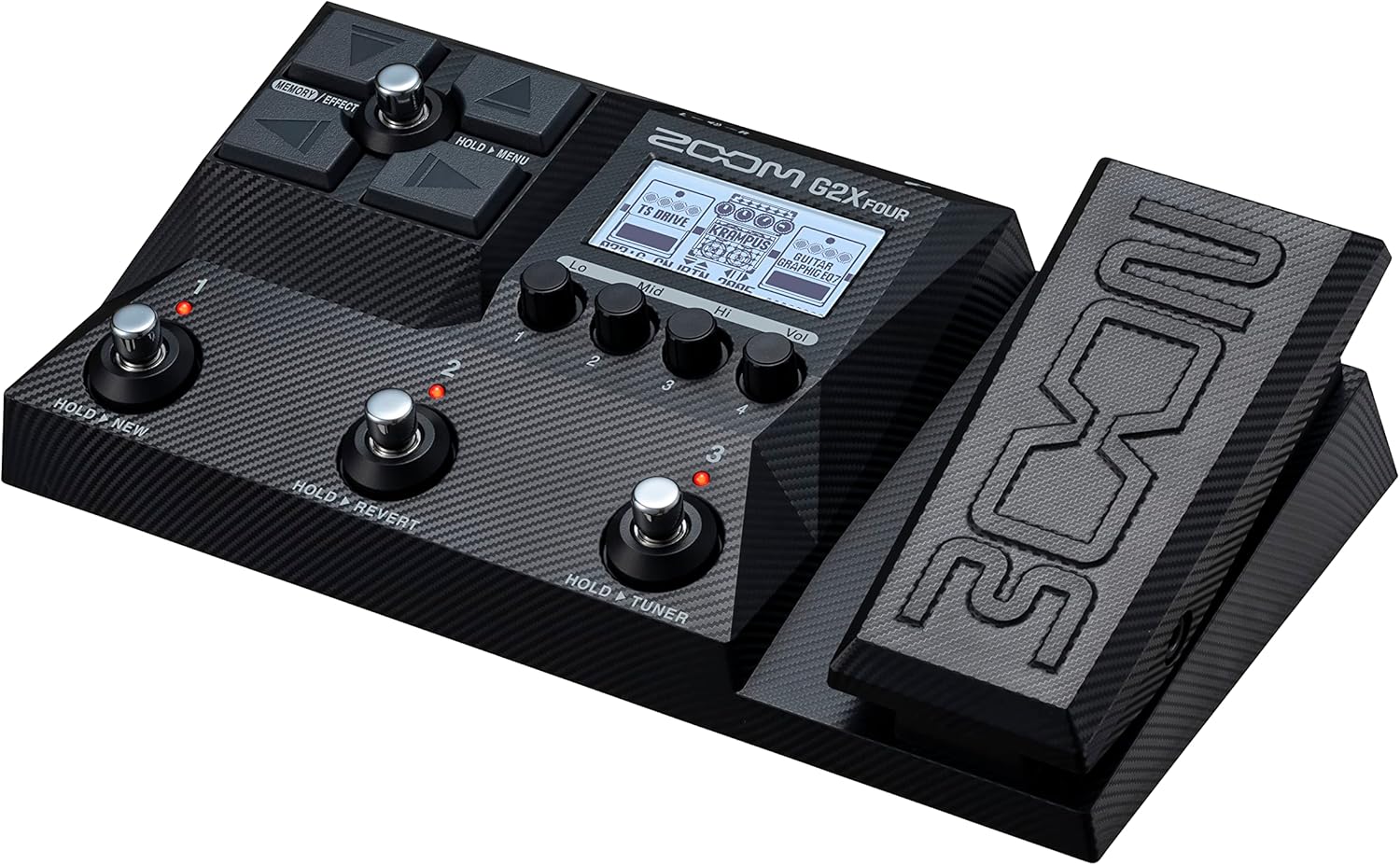
Gambar 3: Anu miring deui view from the top, providing a clear perspective of the unit's layout and controls.
2. Fitur konci
- Kualitas Sora Unggul: Features 24-bit A/D/A conversion and 32-bit signal processing for exceptional audio clarity.
- Versatility unmatched: Offers 6 simultaneous effects plus a dedicated pedal effect, providing a vast sonic landscape.
- Ultimate Control: Integrated expression pedal allows real-time manipulation of effects like wah and volume swells.
- Expansive Patch Memory: Store and recall up to 300 custom user patches for quick access during performances.
- Seamless USB Integration: USB port enables audio interface functionality (2-in/2-out at 44.1kHz/32-bit) and access to Handy Guitar Lab software.
3. Setup Guide
3.1 Powering On
- Connect the supplied 9V AC adapter to the DC IN jack on the rear panel of the G2X Four.
- Colokkeun adaptor AC kana stop kontak standar.
- Unit bakal hurung sacara otomatis.
3.2 Connecting Your Guitar and Amppangagung
- Sambungkeun gitar anjeun ka INPUT jack on the G2X Four using a standard 1/4-inch instrument cable.
- Nyambungkeun OUTPUT (L/MONO) jack of the G2X Four to your amplifier's input using a 1/4-inch instrument cable. For stereo output, connect the R output to a second amplifier atanapi mixer.
- Alternatively, for silent practice, connect headphones to the dedicated 1/8-inch headphone jack.
3.3 USB Audio Interface Setup
- Connect the G2X Four to your computer using a USB-C cable.
- The unit will function as a 2-in/2-out audio interface (44.1kHz/32-bit).
- Install the necessary drivers and Handy Guitar Lab software from the Zoom website for full functionality and patch management.
Video 1: An official introduction to the Zoom G2 Four and G2X Four, demonstrating basic features and connectivity. This video is provided by Zoom North America.
4. Parentah Operasi
4.1 Basic Navigation and Patch Selection
- Use the footswitches to scroll through and select different patches.
- The display screen shows the current patch name and active effects.
- Rotate the control knobs (1-4) to adjust parameters of the selected effects.
4.2 Editing Effects
- Select a patch you wish to edit.
- Press the 'MEMORY/EFFECT' button to enter effect editing mode.
- Navigate through the effect chain using the directional buttons.
- Select an effect and use the control knobs to modify its parameters.
- Press the 'SAVE' button to store your changes to a user patch location.
4.3 Ngagunakeun Pedal Éksprési
- The integrated expression pedal can be assigned to control various effect parameters, such as wah, volume, pitch shift, or modulation speed.
- Refer to the on-screen menu to assign and calibrate the expression pedal for specific effects within a patch.
4.4 Bagian Looper jeung Wirahma
- Activate the looper function to record and overdub guitar phrases.
- Utilize the built-in rhythm section to practice with various drum patterns and tempos.
4.5 Tuner Function
- Engage the tuner mode by holding down the designated footswitch.
- Tune your instrument accurately using the visual feedback on the display.
5. Pangropéa
- Jaga kabersihan unit ku cara ngusap nganggo lawon anu lemes sareng garing. Hindarkeun pembersih atanapi pelarut anu abrasif.
- Store the G2X Four in a cool, dry place away from direct sunlight and extreme temperatures.
- Avoid exposing the unit to moisture or liquids.
- Regularly check cable connections for wear and tear to ensure optimal performance.
6. Cara ngungkulan
- Henteu aya sora: Ensure all cables are securely connected, the volume levels on the G2X Four and your amplifier are adequate, and the correct input/output settings are selected.
- Distorted/Unwanted Sound: Check gain staging throughout your signal chain. Ensure no effects are clipping and adjust input/output levels accordingly. Verify that the correct amp model and cabinet IR settings are active for your setup.
- Unit teu ngabales: Disconnect and reconnect the power adapter. If the issue persists, perform a factory reset (refer to the full manual for instructions).
- Difficulty with USB Connection: Ensure the correct USB drivers are installed on your computer. Try a different USB port or cable.
7. Spésifikasi
| Fitur | Spésifikasi |
|---|---|
| Item Beurat | 1.4 pon (635 gram) |
| Dimensi produk | 13.25 x 6.25 x 3.3 inci |
| Nomer Modél Item | G2X OPAT |
| Panganteur Hardware | Multipronged Audio |
| Format Sinyal | Analog |
| Voltage | 9 volt |
| Warna | Hideung |
8. Garansi jeung Rojongan
For warranty information, technical support, and additional resources, please visit the official Zoom website or contact Zoom customer service. Keep your proof of purchase for warranty claims.
Sumberdaya online sareng FAQ ogé tiasa sayogi dina Toko Zoom.


